
You built the workflow, dragged in the trigger, stacked three emails and a tag action below it, and hit save. Then nothing happens. A form gets submitted, an appointment gets booked, a tag gets added by hand, and the enrollment count under the trigger stays at zero. Or contacts do enter, but they stall three steps in and never receive the SMS you can see sitting right there in the builder.
If your GoHighLevel workflow not triggering is the thing standing between a lead and a follow-up, the frustrating part is that HighLevel rarely breaks on its own. It is doing exactly what a setting, a filter, or a contact record told it to do, and that setting is usually one click away from where you are already looking.
I build and repair marketing automation for course creators and service businesses, across GoHighLevel, ActiveCampaign, HubSpot, Kartra, Mailchimp and Ontraport. The specific settings differ on every platform, but the failure shape repeats: an unpublished change, a filter that used to match and quietly stopped, or a contact whose record disqualifies them in a way the builder never flags as an error. Below are the ten causes I check on a GoHighLevel workflow, in the order I check them, each with the exact fix, checked against HighLevel’s own support portal as of October 2026.
Quick Answer
A GoHighLevel workflow usually fails to trigger for one of three reasons: the workflow is still in Draft and was never Published, the trigger’s filters or re-entry settings are quietly excluding the exact contacts you expect to enter, or the contact entered fine but stalled on a Wait step, an If/Else branch, or an action with a broken merge field or a disconnected integration. Open the workflow’s Enrollment History and Execution Logs first. They show you which contacts entered, which branch they took, and the exact error on any action that failed, instead of making you guess.
What’s Covered
02Cause 1: Is the Workflow Actually Published, Not Just Saved?
03Cause 2: Are Trigger Filters Silently Blocking Everyone?
04Cause 3: Did You Import Contacts Instead of Letting Them Trigger It Live?
05Cause 4: Is Re-Entry Turned Off for a Contact Who Has Been Through Before?
06Cause 5: Is the Trigger Listening for the Wrong Event?
07Cause 6: Is an If/Else Step Sending Everyone Down the Wrong Branch?
08Cause 7: Is a Wait Step Just Waiting?
09Cause 8: Did a Connected Integration Quietly Disconnect?
10Cause 9: Is a Broken Merge Field Blocking the Send Email or Send SMS Step?
11Cause 10: Did the Sub-Account Run Out of Premium Action Credits?
12GoHighLevel Workflow Not Triggering: What Order Should You Check Things In?
13Why Does HighLevel Make Workflows Behave This Way?
14How Do You Stop GoHighLevel Workflows From Breaking in the First Place?
15Frequently Asked Questions
How Does a GoHighLevel Workflow Actually Decide Who Gets In?
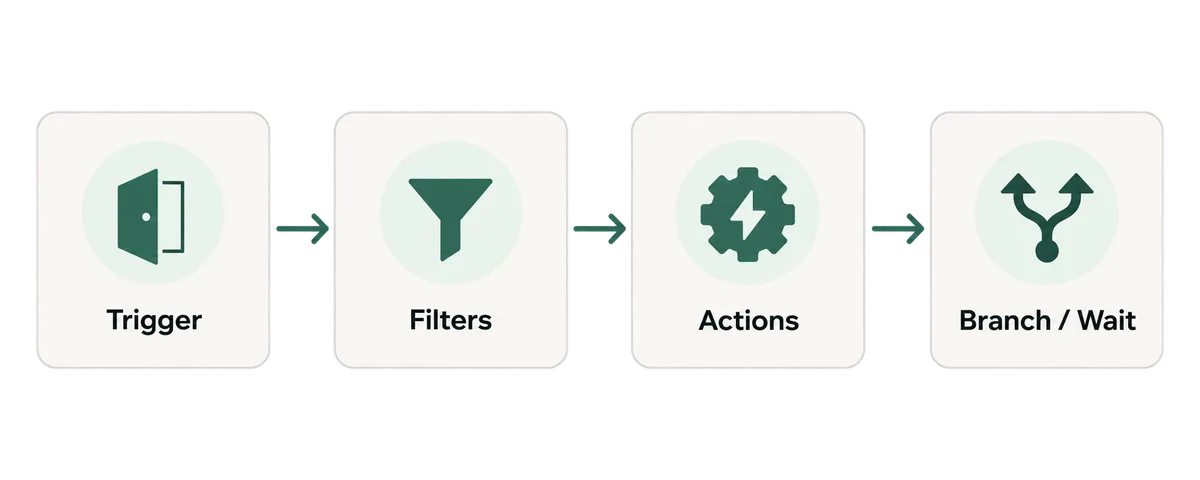
A workflow is built from four kinds of step, and a contact moves through them strictly in order, never by assumption.
- Triggers sit at the top and open the door. HighLevel’s own documentation describes a trigger as the specific event that starts the automation, whether that is a form submission, a tag being added, or an appointment being booked.
- Filters are conditions attached to a trigger or sitting as their own step. Every filter has to evaluate true for the contact to pass. One filter checking a tag, a pipeline stage, or a custom field against a value that no longer matches is enough to stop everyone.
- Actions do the work: send an email, send an SMS, add a tag, update a field, call a webhook, enroll in another workflow.
- If/Else branches and Wait steps route and hold contacts. A branch sends a contact down one of two paths based on a condition checked at that exact moment. A Wait holds them for a set time, until a date, or until an event happens.
That model gives you the diagnosis before you open a single setting. If the enrollment count under the trigger never moves, the problem is the trigger or its filters. If contacts enter but stop partway, look at the specific Wait, branch, or action where they stopped. If contacts reach the end of the workflow but the message never arrives, the workflow is fine and the action itself, or the contact’s own record, is the problem. The ten causes below follow that same order.
Cause 1: Is the Workflow Actually Published, Not Just Saved?
This is the single most common cause, and it catches experienced users as often as beginners, because the builder looks identical either way. HighLevel’s own guide to getting started with workflows is explicit: a workflow sits in Draft mode by default, and nothing inside it runs until you toggle it to Published using the switch in the top right of the builder.
The trap is the edit, not just the first build. Someone opens a live, already-published workflow, adds a new SMS step halfway down, and clicks away. The change is visibly there the next time they open the builder, so they assume it is live. It is not, until Publish is clicked again after that specific edit. On a brand new workflow, the same gap means the trigger is wired correctly and nothing ever happens, because the whole thing is still Draft.
Fix: Open the workflow and check the toggle in the top right corner. It should read Published, not Draft. Click Publish again after every single edit, however small, including a one-word change to an email. Make this the last click of every editing session, not an afterthought.
Cause 2: Are Trigger Filters Silently Blocking Everyone?
A trigger can carry filters that narrow who it accepts: has this tag, does not have this tag, pipeline stage is, custom field equals, opportunity status is, and more. Filters are evaluated as AND conditions against the real event data the moment the trigger fires. Every one of them has to be true, and each one is a place a small mismatch quietly excludes everybody.
The mismatches I see most:
- A tag filter expecting a tag that is spelled or capitalized differently than the one the form, the Zapier connection, or a teammate actually applies.
- A pipeline stage filter pointing at a stage that was later renamed or deleted in the pipeline builder. The filter keeps the old internal reference and never matches anything again.
- A custom field filter checking a value that arrives formatted differently than configured, such as a phone number with or without a country code, or a dropdown value that was edited after the filter was built.
Because every one of these filters saves without complaint, the workflow looks correctly configured for weeks while quietly rejecting every contact that hits it.
Fix: Remove every filter from the trigger, publish, and run one fresh test contact through. If it enters, add the filters back one at a time, republishing and testing after each, until the one that blocks shows itself. For a tag or pipeline-stage filter, open the actual tag list or pipeline settings and confirm the exact spelling and stage still exists, rather than trusting what the filter dropdown shows.
Cause 3: Did You Import Contacts Instead of Letting Them Trigger It Live?
This one is specific to GoHighLevel and trips up anyone migrating a list in from another platform. HighLevel’s own article on the Contact Created trigger states plainly that it fires when a contact is manually added, submitted through a form, created through the API, or added through an integration. Bulk CSV imports do not fire it.
The symptom is identical to a broken trigger: five hundred contacts land in the system, the welcome workflow attached to Contact Created sits at zero enrollments, and nothing in the builder flags an error, because nothing is actually wrong with the workflow. The import itself never generated the event the trigger listens for.
Fix: Do not rely on Contact Created for an imported list. Either add the imported contacts to a static or smart list and use the bulk “Add to Workflow” action on that list, or apply a tag during the import and build a separate Tag Added trigger specifically for onboarding imported contacts. Keep Contact Created for genuinely new, individually-created contacts.
Cause 4: Is Re-Entry Turned Off for a Contact Who Has Been Through Before?
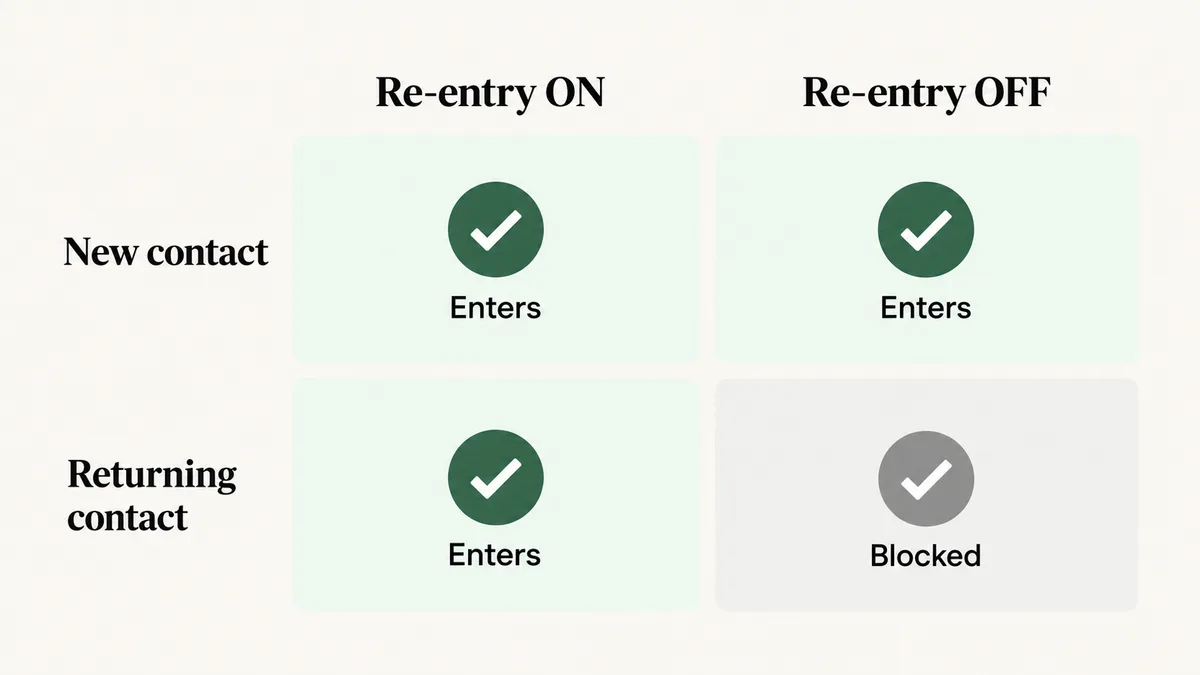
Every workflow has an “Allow Re-entry” setting in its Settings tab, deciding whether a contact who has already completed the workflow, or who is currently still active in it, can enter again. Left off, a contact can only ever go through the workflow once in its lifetime.
This produces the most common false alarm I see. Someone tests a workflow with their own contact record, which already ran through it last month during a previous test. They trigger it again, nothing happens, and they conclude the trigger is broken. The trigger did its job. Re-entry was off, so a contact who already finished was correctly refused a second pass.
There is one documented exception worth knowing: workflows built on an appointment or invoice-based trigger will always allow a contact back in once per new appointment or invoice, regardless of what the Allow Re-entry toggle says, so that each new booking or bill still gets its own run.
Fix: Never retest a workflow with a contact that has already been through it. Create a dedicated test contact, or use an email alias such as yourname+test7@gmail.com, for every single test run. Then open the workflow’s Settings tab and confirm Allow Re-entry matches what you actually want for returning contacts.
Cause 5: Is the Trigger Listening for the Wrong Event?
HighLevel ships a long list of native triggers that look similar but listen for genuinely different events, and picking the near-miss is an easy, invisible mistake.
- Appointment-related triggers split by who performed the action: a customer booking their own slot, a team member booking on their behalf, and a booking being cancelled or rescheduled are three separate triggers, not one.
- Pipeline Stage Changed versus Opportunity Status Changed are two different fields entirely. Stage tracks where a deal sits in your pipeline. Status tracks the separate Open, Won, Lost, or Abandoned flag. A workflow built to fire on a deal being marked Won will never fire from a stage move alone.
- Form Submitted versus a third-party form embedded on the same page only fires for HighLevel’s own form or survey builder. An external form embedded through an iframe or a plugin never generates the event, even though a visitor clearly submitted something.
The event the platform actually saw almost never matches the event the trigger is subscribed to in these cases, and the workflow saves cleanly either way.
Fix: Open the trigger and read its exact description, not just its name, since several native triggers share almost identical names. For appointments and pipelines specifically, confirm which field or role actually changes in the real workflow you run day to day, then match the trigger to that field, not to the nearest-sounding option.
Cause 6: Is an If/Else Step Sending Everyone Down the Wrong Branch?
An If/Else step checks a condition at the exact moment a contact reaches it and sends them left or right based on the result. The workflow itself keeps running either way, which is exactly why a wrong branch is so easy to miss. Nothing stops. Contacts just quietly end up getting the wrong message, or no message at all, on a branch nobody is watching.
Two real patterns cause most of these:
- A stale reference inside the condition itself, the same problem as Cause 2: a renamed form, a deleted tag, or a pipeline stage that moved, so the condition can never evaluate true even though it looks correctly built.
- A race condition against the workflow’s own earlier steps. Branching on a field or tag that an action just above it set, with no pause in between, can read the old value, because the write has not finished propagating yet when the condition checks it.
Fix: Open the workflow’s Execution Logs, find a contact who went down the unexpected branch, and read the actual field or tag value their record held at that moment, not the value you assume they should have had. If the condition reads something the same workflow just set, insert a short one to five minute Wait step between the write and the read, longer if the value comes from an external integration rather than an internal action.
Cause 7: Is a Wait Step Just Waiting?
Contacts enter the workflow, the first email goes out, and then everything appears to stop. This is frequently not a bug at all. A Wait step can be configured several different ways, and more than one of them looks identical to a stall from the outside.
- Wait until a specific date holds a contact until that exact date arrives, however long that takes. Built from an old campaign template, the date can be months away or already in the past, in which case the contact is stuck for good unless moved manually.
- Business hours or quiet hours windows hold a contact until the next valid send window in their own time zone, so a form submitted at 11pm can sit until 8 or 9am the next morning entirely on purpose.
- Appointment-relative waits, such as “3 hours before the appointment,” hold the contact until that calculated moment, which only arrives once the appointment itself is actually booked at a real date and time.
Fix: Click directly into the Wait step where contacts are sitting and read its exact configuration before assuming anything is broken. Replace a fixed calendar date with a relative wait on any workflow meant to run indefinitely. If several Wait steps in one sequence each apply their own business hours window, apply that restriction only to the steps that actually send a message, since stacking it on every structural wait compounds and silently stretches a short sequence into a much longer one.
Cause 8: Did a Connected Integration Quietly Disconnect?
Everything up to this point assumes the workflow lives entirely inside HighLevel. Plenty of real workflows do not. A webhook step posting to Zapier or Make, a Stripe payment action, or a step writing a row into Google Sheets all depend on a connection that can expire or get revoked without anything inside the workflow builder visibly changing.
An expired API key, a revoked OAuth token after a password change on the other platform, or an app the connected account quietly removed access to will usually fail that one step only. Earlier steps, like an internal tag or an internal email, keep working exactly as before, which makes the failure look partial and confusing rather than total.
Fix: Open the Execution Logs for the specific action that depends on an outside service and read the actual error message HighLevel recorded, rather than guessing. Reconnect the integration from scratch, generate a fresh API key or token if the original one is more than a few months old, and run one real test through that exact step before trusting the rest of the workflow again.
Cause 9: Is a Broken Merge Field Blocking the Send Email or Send SMS Step?
Everything upstream of the message itself is fine. Contacts entered correctly, passed every filter, and reached the Send Email or Send SMS action right on schedule, and the message still never goes out. The action itself is where it breaks.
A single invalid or malformed custom value or merge field referenced inside that message, such as a field renamed since the email was built, or a custom value left blank for a specific contact, can block the entire send, not just the line that references it. The step fails quietly rather than sending a message with a visible gap in it.
Fix: Open the Send Email or Send SMS action and check every merge field and custom value referenced inside it, one at a time, against the current, real field and custom value lists, not against what you remember building. Send a real test to a contact record that is missing one of those fields on purpose, confirm whether it fails the same way, and either backfill the field or rebuild the message without depending on it.
Cause 10: Did the Sub-Account Run Out of Premium Action Credits?
This cause is specific to HighLevel and genuinely non-obvious, which is exactly why it goes unnoticed. Certain triggers and actions, mostly the ones built by third-party Marketplace apps rather than HighLevel itself, are classed as LC Premium Triggers and Actions, billed on a metered, pay-per-execution basis against a wallet attached to the sub-account.
A newly enabled sub-account gets a batch of free executions to start. Once those run out and rebilling has not been turned on for that specific sub-account, the premium step simply stops executing. Every ordinary, HighLevel-native step above and below it in the same workflow keeps running normally, so the symptom looks exactly like Cause 8’s disconnected integration: one specific step goes quiet while everything around it works.
Fix: If the broken step is a Marketplace-provided trigger or action rather than a native HighLevel one, check the Execution Logs for a credit or billing-related error first. From the agency level, confirm LC Premium Triggers and Actions are enabled and that rebilling is switched on for the specific sub-account the workflow belongs to, not just enabled agency-wide.
GoHighLevel Workflow Not Triggering: What Order Should You Check Things In?
Ten causes is too many to check by guessing. This order puts the fastest checks first, and each step rules out a whole group of causes at once.
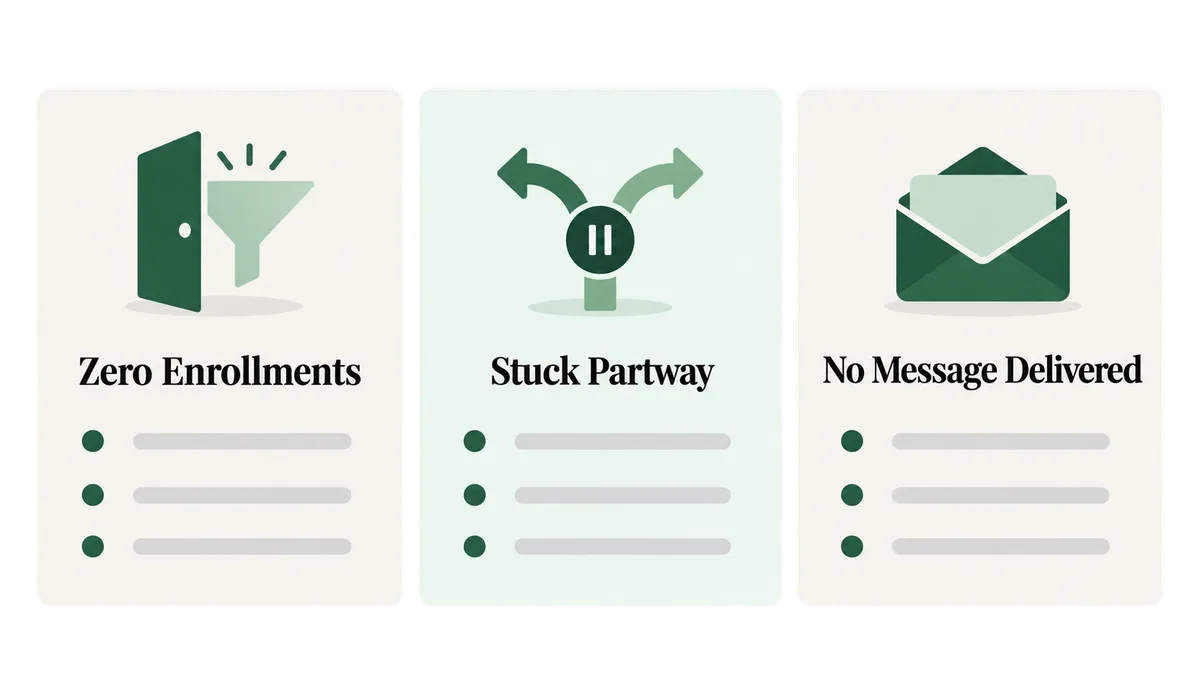
- Open the workflow’s Enrollment History. Zero enrollments points to Causes 1, 2, 3 or 5. Contacts enrolled but stuck partway points to Causes 4, 6 or 7. Contacts completing the workflow with no message delivered points to Causes 8, 9 or 10.
- Check the Published toggle. If it reads Draft, that is Cause 1, and nothing else matters until it is fixed.
- Strip every trigger filter and run one brand new test contact through. If it now enters, that is Cause 2. If the real contacts in question came from a CSV import, that is Cause 3 regardless of what the filters show.
- Confirm the test contact has never been through this workflow before. Re-entry settings, Cause 4, invalidate almost every test run on a reused contact record.
- Re-read the trigger’s exact description against the real event you expect. A near-miss trigger, Cause 5, saves cleanly and looks correct at a glance.
- Open the Execution Logs for the exact step where contacts stall. This single tab answers Causes 6, 7, 8, 9 and 10 directly, since it shows the branch taken, the wait condition, and any real error message on a failed action.
Why Does HighLevel Make Workflows Behave This Way?
Look back across the ten causes and a theme shows up. HighLevel almost never moves or blocks a contact silently without a specific setting telling it to. An edit does not go live until you publish it on purpose. A contact who already finished does not restart unless re-entry is explicitly on. A premium action does not run for free forever once the starting credits are used, because somebody has to pay for the execution on the other end.
This is the right call for a system sending real email and SMS to real customers, but it means almost every one of these ten causes is a deliberate rule rather than a bug, and the fix is usually reading that one rule correctly rather than rebuilding anything.
The same mental model carries across platforms, even though the specific settings differ. On ActiveCampaign, the equivalent decision sits in the start trigger’s “runs once” versus “runs multiple times” choice, covered in my guide to ActiveCampaign automations not triggering. Ontraport handles the same idea through its trigger’s “if contact is already on map” setting, in this breakdown of Ontraport campaigns, and Kartra’s sequence-status rules work differently again, as in my notes on Kartra automations.
How Do You Stop GoHighLevel Workflows From Breaking in the First Place?
Most of these ten causes are preventable with a handful of habits, and none of them take long once they are routine.
- Publish after every edit, however small. Treat the Draft state as unfinished, always, with no exceptions for a one-line change.
- Test with a fresh contact every time. Keep a consistent email-alias pattern for test records so none of them carry history into a re-entry setting.
- Read the trigger’s full description, not just its name, before building on it. Several native triggers sound nearly identical and listen for genuinely different events.
- Check the Execution Logs after every meaningful change, not only when something is visibly broken, since a branch quietly routing the wrong way produces no error at all.
- Confirm rebilling is enabled for a sub-account the moment it starts relying on any Marketplace-provided premium trigger or action, rather than discovering the free execution allowance ran out mid-campaign.
Deliverability sits alongside all of this as a separate layer. A workflow can be built flawlessly and still land in spam if the sending domain is not properly authenticated, which has nothing to do with the workflow itself. I cover that domain-side setup, SPF, DKIM, DMARC and the warm-up period, step by step in my GoHighLevel email deliverability guide. And if a workflow problem is turning into “I just need someone to rebuild this correctly,” my notes on what a GoHighLevel developer actually costs break down real rate ranges before you hire one.
Frequently Asked Questions
Why does my workflow show the right trigger but still enroll zero contacts?
Check the Published toggle first, since a correctly built but unpublished workflow enrolls nobody. If it is already published, the next most likely cause is a trigger filter referencing a tag, pipeline stage, or custom field value that no longer matches reality, even though the filter itself still saves without an error.
Why didn’t my imported contacts get the welcome workflow?
The Contact Created trigger does not fire for bulk CSV imports, only for contacts added manually, through a form, the API, or an integration. Use a list-based bulk enrollment action or a dedicated tag trigger for imported contacts instead.
How do I see exactly where a stuck contact stopped?
Open the workflow and find the contact’s Enrollment History, then look at the Execution Logs for the specific step they are sitting on. It shows the branch taken on any If/Else step, the exact wait condition on a Wait step, and the real error message on a failed action.
Why would one SMS step inside a working workflow stop sending?
A single malformed custom value or merge field referenced inside that one message can block the entire send, even though every other step keeps running normally. Check every merge field in that specific action against the current field list before assuming the whole workflow is broken.
Can a contact I already removed from a workflow come back in automatically?
Only if Allow Re-entry is enabled for that workflow, and only after they have fully completed it or been manually removed. A contact who is still actively inside the workflow cannot re-enter a second time regardless of that setting.
Is it normal for a Marketplace trigger or action to just stop working?
Yes, if the sub-account’s free LC Premium execution allowance has run out and rebilling was never turned on for that specific sub-account. The step fails silently while every native, non-Marketplace step in the same workflow keeps running as expected.
A GoHighLevel workflow not triggering is almost always HighLevel following an instruction exactly as written: an unpublished edit, a filter that quietly stopped matching, a re-entry rule doing its job, or a sub-account out of execution credits on a premium step. Start with Enrollment History and the Execution Logs, see exactly where the numbers stop or the error sits, and the cause is usually one click away from there. If your automation spans more than one platform, my guide to HubSpot workflows not enrolling contacts and my notes on Mailchimp automations not sending use the same diagnostic approach for those two.
Workflow still stuck at zero?
Tell me what the Enrollment History shows, which trigger starts the workflow, and what the Execution Logs say about the step where contacts stall. I will tell you which of these ten causes it is and exactly what to change, whether or not you need anyone to build it.