
Someone buys your course, gets tagged, and should drop straight into the onboarding sequence. Nothing happens. No email, no tag change, no record in their profile. You open the automation, read it three times, and it looks exactly the way you built it. If you have been searching “Kartra automation not working“, you already know the worst part: Kartra rarely tells you which piece failed.
I build and repair funnel and email automation for course creators and small teams, and Kartra problems almost always sit in one of four places. The rule never fired, the rule fired but nothing subscribed the contact, the contact was subscribed but the sequence could not move them, or everything worked and the email was blocked before it left. Below are the ten causes I check, in the order that finds the problem fastest.
Quick Answer
Most Kartra automation failures come down to four things. Sequence steps are inactive or disconnected, so they get skipped along with their emails. Nothing is actually subscribing the contact, because starting rules are not retroactive and only fire on new events. The sequence is paused, so contacts join it and sit there. Or the contact’s status restricts mailing, which stops email even when the automation ran perfectly. Open the contact’s own profile first and read the Sequences and Log tabs. If the contact never entered the sequence, fix the trigger. If they entered and stopped, fix the step or the status.
📋 What’s Covered
02Cause 1: Are the Sequence Steps Active and Connected?
03Cause 2: Is Anything Actually Subscribing the Contact?
04Cause 3: Are You Expecting a Starting Rule to Work Retroactively?
05Cause 4: Is the Sequence Paused?
06Cause 5: Is the Contact’s Status Restricting Mailing?
07Cause 6: Are You Testing With an Email Already in the Sequence?
08Cause 7: Has the Contact Been Through This Sequence Too Often?
09Cause 8: Are the Delay and the Time Window Working Against Each Other?
10Cause 9: Did You Build the Rule Where You Think You Did?
11Cause 10: Is the Automation Firing but the Email Never Arriving?
12Kartra Automation Not Working? What Should You Check First?
13Why Do Kartra Automations Fail So Quietly?
14How Do You Stop Kartra Automations Breaking Again?
15Frequently Asked Questions
How Does a Kartra Automation Actually Fire?
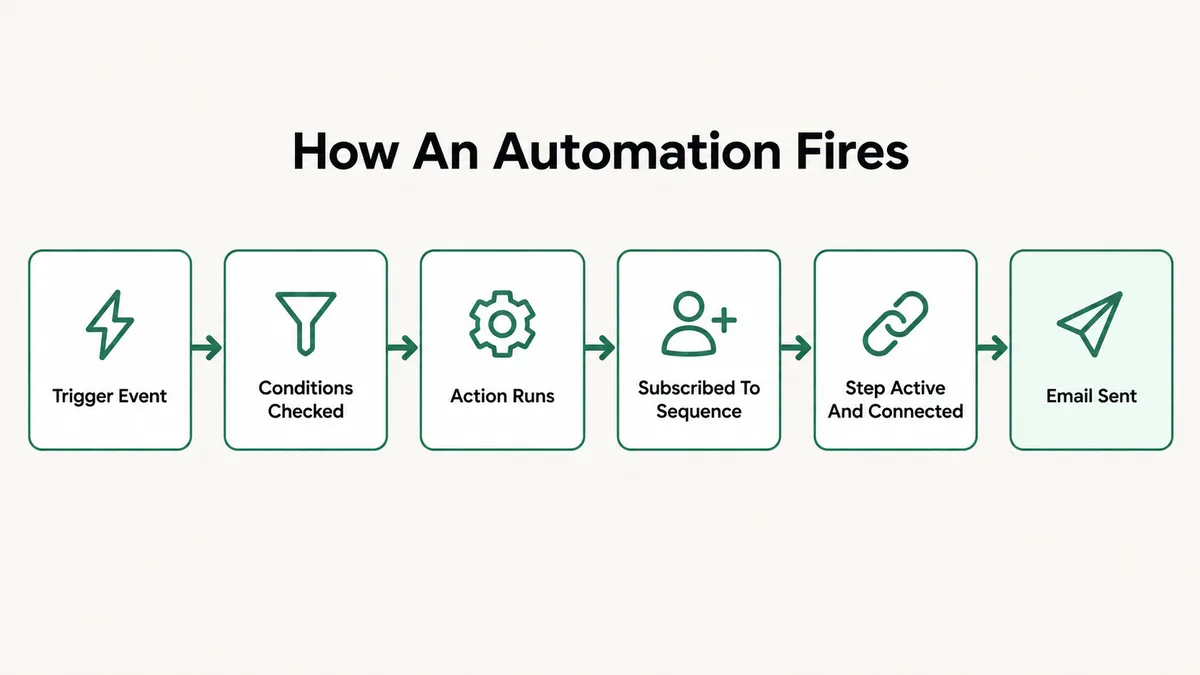
Kartra splits the work across two systems that people talk about as if they were one. Automations are IF and THEN rules: something happens, then something else runs. Sequences are the timed paths contacts walk through after a rule puts them there. When people say an automation broke, they usually mean an email did not arrive, and that email sits several steps downstream of the rule itself.
The path looks like this:
- The trigger: a tag lands, a form is filled, a product is bought, a page is visited. Kartra calls this the IF.
- The conditions: optional AND parameters narrow the rule down, so a contact who does not match them is filtered out before anything runs.
- The action: the THEN. Assign a tag, grant membership access, subscribe the contact to a sequence.
- The sequence: the contact joins it, lands on the first step, waits out that step’s delay, and moves on.
- The send: Kartra hands the email to a mail server, and the receiving side decides whether to accept it.
Five links, and a break in any of them produces the same silence. This is why the contact record is the only honest place to start. Open the contact, look at the Sequences tab, and you know immediately whether the first three links worked. The Log tab tells you what the account did to that person and when.
Cause 1: Are the Sequence Steps Active and Connected?
This is the single most common one, and it catches experienced users too. In Kartra, a new sequence step is inactive by default. You build the step, write the email, save it, and it sits there doing nothing until you open the three dots menu in its top right corner and choose Activate. Kartra’s guide to activating and connecting sequence steps states it plainly: disconnected or inactive steps, and their emails or actions, are skipped.
Connections are the other half. Steps are joined by dragging from the node beneath one step to the node above the next, and an arrow appears when the link is made. The detail people miss is the first connection of all: the first step has to be joined to the Starting rules module, not left floating above it. A sequence with five beautifully written emails and no line from the starting rules module sends nothing at all.
Fix: Open the sequence builder and read it like a diagram rather than a list. Every step needs an arrow in and an arrow out, and the first one needs its arrow coming from the Starting rules module. Then check each step’s own state and activate any that are still inactive. Do this before changing anything else, because a skipped step looks identical to a rule that never fired.
Cause 2: Is Anything Actually Subscribing the Contact?
Kartra’s own wording here is worth reading twice: automated sequences are on by default, but they only run when a contact is subscribed to them. A sequence is not a rule. It does not go looking for people. Something has to put each contact on it.
There are three ways that happens. A starting rule inside the sequence itself, an automation whose THEN action is to subscribe the contact to that sequence, or a manual subscription you do by hand from the contact record. Plenty of accounts have a sequence with an empty Starting rules module and an automation that assigns a tag but never subscribes anyone, because the person building it assumed the tag would be enough.
The tag assumption is worth calling out on its own. A tag is a label. It does nothing by itself. It only matters if a starting rule or an automation is watching for it, and watching specifically for the assignment event.
Fix: Open the sequence and look at the Starting rules module. If it is empty, go to Marketing and then Automations and search for a rule whose action subscribes contacts to this sequence. If neither exists, that is your answer. Add one, not both, so you have a single place to look next time something goes wrong.
Cause 3: Are You Expecting a Starting Rule to Work Retroactively?
Starting rules fire on events, not on states. Kartra’s documentation on automatically adding a contact to a sequence says starting rules are not retroactive, and gives the exact case that bites people: if the rule is based on a tag, contacts who already carry that tag when you create the rule are not added. Only new assignments count.
This is why a brand new sequence looks broken on day one. You have 400 customers tagged bought-course, you build a rule that starts the sequence on that tag, and the report stays at zero until the next sale. Nothing is wrong. The rule is waiting for an event that already happened for everyone you were thinking of.
The available starting conditions are worth knowing for the same reason, because each is an event: an opt-in form completed, a tag assigned, a list subscribed to, an order placed, a tracked page visited, another sequence subscribed to, or a basic automation triggered.
Fix: To bring existing contacts in, filter your contact list by the tag or condition, select them, and subscribe them to the sequence manually as a one time backfill. Keep the starting rule for everyone who arrives from now on. If you want to re trigger a tag rule for one person, remove the tag and add it again, because assigning a tag someone already has is not a new event.
Cause 4: Is the Sequence Paused?
A paused sequence is the quietest failure in Kartra, because it does not stop people joining. Per Kartra’s article on turning a sequence on or off, contacts who meet the subscription conditions are still added while it is paused, they just do not progress. Your subscriber count climbs. Your send count stays at zero.
Pausing has a second effect that surprises people: it resets timing. If contacts are sitting inside a delay on a step when you pause, all of those timing delays are reset. Pause a sequence for ten minutes to make an edit, and everyone mid delay starts their wait again.
This is also why editing a live sequence is a bad habit. If you want the sequence genuinely stopped, Kartra’s guidance is to delete its starting rules and pause or delete the automation rules that subscribe people to it, so contacts stop piling up at the entrance.
Fix: Check the sequence list for a pause icon instead of a play icon and restart it. For edits, build a copy, test the copy, and switch the automation over to it rather than pausing a sequence with people inside. If you already paused a live sequence, expect the next batch of emails to arrive later than your original schedule, and tell your team so nobody reports it as a second fault.
Cause 5: Is the Contact’s Status Restricting Mailing?
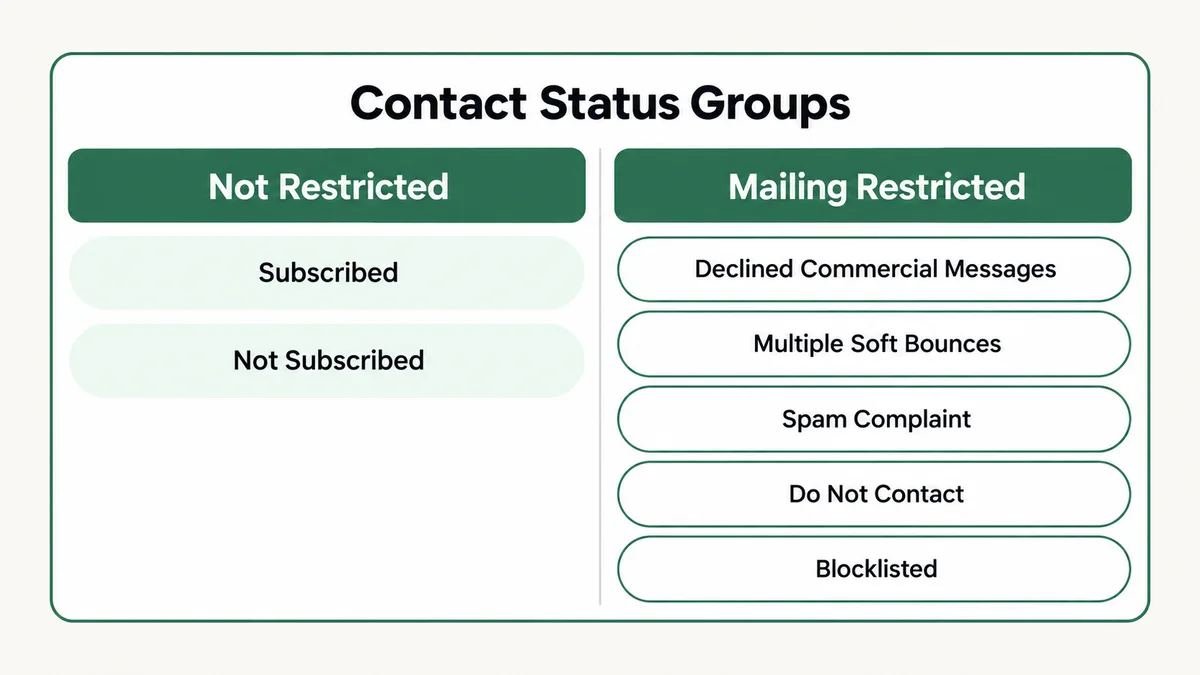
Sometimes the automation is fine and the person is the problem. Kartra’s reference on contact status and filtering lists several statuses that restrict mailing: blocklisted, spam complaint, declined commercial messages under GDPR, do not contact, and multiple soft bounces. A contact in any of those states can sit inside a sequence and still receive nothing.
Each one has a different cause. Blocklisting comes from invalid addresses, hard bounces, risky or suspicious addresses and mail server problems. Multiple soft bounces come from full mailboxes or a server that was temporarily unavailable. Declined commercial messages comes from the contact withholding marketing consent at opt in, which is easy to do accidentally with a GDPR checkbox on a form.
The GDPR one is the case I see most in real accounts, and it is almost always the account owner’s own address or a team member’s, opted in through a form where they clicked past the consent box while testing.
Fix: Open the contact record and read the status before touching the automation. A restricted status explains everything and no amount of rebuilding will change it. For a genuine consent problem, send that person a fresh opt in through a form that captures consent properly. For a bounce or blocklist, correct the address. Never bulk clear these, because the statuses exist to protect your sending reputation.
Cause 6: Are You Testing With an Email Already in the Sequence?
Half the reports I get of a broken Kartra automation are really a broken test. A contact who is already in a sequence does not enter it a second time, so the tenth test with your own address behaves nothing like a real customer’s first visit. Kartra’s guidance on testing automated sequences is direct about it: use a unique email address for each test.
Gmail and Google Workspace make this painless. Adding a suffix such as +test1 before the at sign creates an address that Kartra treats as a new contact while the mail still lands in your normal inbox. Increment the number each time and you get a clean run whenever you want one.
Browser state causes the same confusion on the opt in side. An old Kartra cookie identifies you as an existing lead, prefills a form and skips the behaviour a stranger would get. Test in a private window and that disappears.
Fix: Run every test with a fresh address and a private browser window, then follow it through the contact’s own Emails, Sequences and Log tabs rather than watching your inbox. If the test is built on a tag rule and you want to reuse a contact, remove the tag first and reassign it, since a tag that is already there cannot be assigned again.
Cause 7: Has the Contact Been Through This Sequence Too Often?
Kartra has a safeguard that almost nobody knows about until it removes someone. Contacts are automatically removed from a sequence if they pass through the same sequence more than three times within a thirty day period. It exists to stop redundant rules cycling the same people through the same emails forever.
For real customers this is a good thing. For whoever is testing, it is a trap, because heavy testing on one contact hits that ceiling fast and then the sequence stops working for that person specifically while working fine for everyone else. It also catches accounts where two or three rules all subscribe to the same welcome sequence from different triggers.
Fix: If one contact is the only one affected, stop testing on them and switch to a fresh address. Then audit how many rules point at that sequence. One entry point per sequence is the standard to hold yourself to, and where several triggers genuinely need to lead to the same emails, send them through one rule that carries the conditions instead of three rules that duplicate each other.
Cause 8: Are the Delay and the Time Window Working Against Each Other?
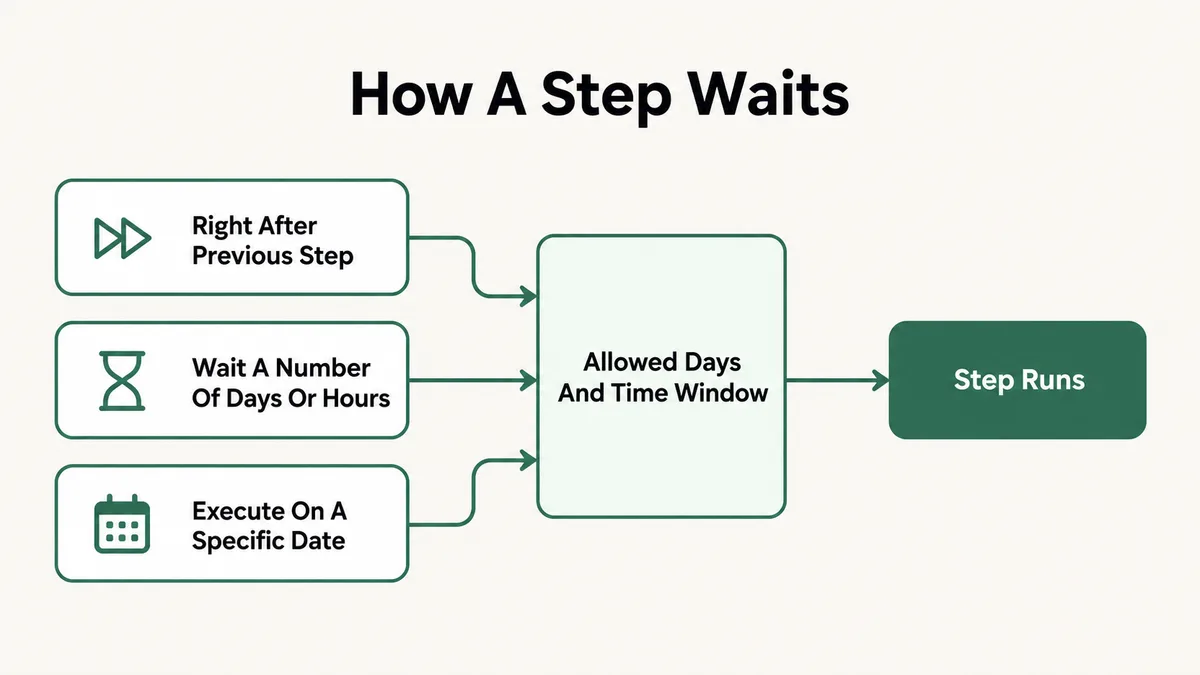
Every sequence step has two separate timing controls, and people set one while forgetting the other. Kartra’s article on setting timing in a sequence describes them as the delay and the day and time. The delay is either right after the previous step, a number of days or hours, or a specific date. One day means twenty four hours starting the moment the contact arrives on the step, not midnight to midnight.
The day and time settings then gate the result. You pick allowed weekdays and either any hour or a window such as eight in the morning to noon. Kartra checks those conditions only after the delay has finished, so the two stack. A step set to fire right after the previous one, restricted to weekdays between eight and noon, does nothing at all for a contact who signs up at one in the afternoon on a Friday until Monday morning.
Fix: Open each step and read the delay and the window together, then work out the worst case for a contact who joins at the least convenient moment. Widen the allowed hours on anything a buyer expects instantly, such as a receipt or a login email, and keep narrow windows for marketing steps where arrival time genuinely matters. If a send looks late by minutes rather than hours during a launch, that is normal processing time while a large batch moves through, not a fault.
Cause 9: Did You Build the Rule Where You Think You Did?
Kartra has two places to build automation and they behave differently. Its explanation of basic versus advanced automation puts basic automations inside an individual asset’s setup wizard, on a form, a product, a webinar, while advanced automations live in Marketing and then Automations and work across the whole account.
Two real problems come from that split. The first is invisibility. A basic automation built into a form two years ago does not appear in the Automations list, so somebody debugging today reads the account rules, finds nothing relevant, and rebuilds a rule that now runs alongside the forgotten one. The second is access: advanced automations require a Growth plan or higher, while basic automations come with all plans. On a lower tier, the rule you were told to build simply is not available.
AND conditions add a quieter version of the same problem. They narrow a trigger, and they are evaluated at the moment the trigger fires. A condition such as “has tag” fails if your other automation assigns that tag a second later, and the ordering is invisible in the rule itself.
Fix: Check both places before concluding a rule is missing. Open the asset itself, the form or the product, and read its own automations tab, then check the account level list. Where a rule depends on a tag another rule assigns, put both the tag and the follow on action in the same rule, or separate them with a short delay step so the order is explicit.
Cause 10: Is the Automation Firing but the Email Never Arriving?
If the contact record shows the sequence subscription, the step and the send, your automation worked. What is left is delivery, and that is a different problem with a different fix. Kartra’s guide to email authentication explains the mechanics: DKIM keys prove you own the domain you send from, Kartra sets them up automatically for supported domain providers, and shows the exact DNS values to add by hand when it cannot. Sending domains that have not been authenticated prompt a warning inside the account.
One useful detail: if you use KartraMail, SPF authentication comes with the DKIM records generated in your account, so there is no separate SPF record to add. DMARC is its own record and tells receiving servers what to do with mail that fails those checks.
The giveaway for a delivery problem rather than an automation problem is the pattern. Automation faults hit specific people or a specific step. Delivery faults hit everything you send, land in spam folders across several providers at once, and often start right after you change a sending address or a domain.
Fix: Open your sending domain settings and confirm it is authenticated with no warning against it. Add the DKIM records Kartra gives you at your DNS host, add a DMARC record, and send a test to addresses at two or three different providers. The same authentication work applies on every platform, and my walkthrough of email deliverability setup covers the reasoning behind each record in more depth.
Kartra Automation Not Working? What Should You Check First?
Rebuilding rules at random wastes an afternoon. Work through this order instead and stop as soon as a step fails, because that step is the fault:
- Open the affected contact, not the automation. The Sequences, Emails and Log tabs on their profile tell you how far they actually got.
- Read their status first. Blocklisted, spam complaint, do not contact, declined commercial messages or multiple soft bounces explains an empty inbox on its own.
- Check whether they are on the sequence at all. Not subscribed means the trigger or the subscribing action is the problem, so go to causes 2 and 3.
- Subscribed but on step one forever: look at the pause state and the step timing, causes 4 and 8.
- Subscribed and moving, but a step sent nothing: that step is inactive or disconnected, cause 1.
- Works for new contacts, fails for you: you are already in the sequence or over the three passes in thirty days limit, causes 6 and 7.
- Everything logged as sent, nothing received: this is delivery, cause 10.
- Nothing anywhere, on any contact: the rule is in the other place, on an asset rather than the account list, or your plan does not include advanced automations, cause 9.
The same order works on other platforms with the same shape. My notes on ActiveCampaign automations that never trigger and on working around the Systeme.io automation rule limit follow the same contact first logic.
Why Do Kartra Automations Fail So Quietly?
An all in one platform is really a set of tools sharing a login. Forms, products, sequences, automations, memberships and the mail server each do their own job and each assume the ones before them behaved. None of them is responsible for telling you that a contact never arrived, because from every individual tool’s point of view nothing went wrong.
That is why a missing arrow between two steps produces no warning. The sequence is valid. It has a path, the path just does not include that step. The same is true of a starting rule watching for an event that will not happen again, or a contact whose status quietly took them out of the mailable pool months ago. Every one of those states is legitimate on its own terms.
Time makes it worse. Automations built during a launch get edited by whoever is around, an asset gets duplicated with its basic automation attached, a tag gets renamed, and the account slowly fills with rules nobody has read in a year. The failure shows up as a customer complaint, which is the most expensive possible place to find it.
The single habit that changes this is treating the contact record as the source of truth. It is the one screen in Kartra where the whole chain leaves evidence, and it answers in seconds what an hour of staring at the builder will not.
How Do You Stop Kartra Automations Breaking Again?
Give every sequence exactly one entry point and write down what it is. When a sequence has one starting rule and no competing automations, a fault has one place to hide instead of four, and the three passes in thirty days safeguard stops being something you trip over.
Name things for the person who inherits them. A tag called bought-course is fine until you sell three courses. Dates, product names and a consistent prefix cost nothing to type and save a stranger an hour of guessing. Do the same for sequences and rules.
Keep a testing routine rather than testing by feel. A fresh plus addressed email, a private window, and a walk through the contact’s own tabs after every meaningful change. Run it after any edit to a form, a product or a sequence, not only when something is reported broken.
Finally, review the account once a quarter. Open the automations list, open the assets with basic automations on them, and delete the rules nothing points at any more. Most of the accounts I am called into have no single broken thing, just four years of half finished ideas competing with each other. If that sounds familiar, my business automation work usually starts with exactly that cleanup before anything new gets built.
Frequently Asked Questions
Why is my Kartra sequence not sending any emails?
Check three things in order. Whether the sequence is paused, whether its steps are active and connected including the connection to the Starting rules module, and whether anything actually subscribes contacts to it. Sequences are on by default but only run for contacts who have been subscribed, and inactive or disconnected steps are skipped along with their emails.
Do Kartra starting rules apply to contacts I already have?
No. Kartra’s documentation states that starting rules are not retroactive. If the rule watches for a tag, contacts who already carry that tag are not added, and only new assignments trigger it. To bring existing contacts in, filter your list and subscribe them to the sequence manually as a one time backfill.
Why does my Kartra automation work for other people but not for my own email?
Usually because your address is already in the sequence, or has been through it more than three times in the last thirty days, which removes a contact automatically. Kartra also recommends a unique email address for every test. Use a plus suffix such as yourname+test4 to create a clean contact that still delivers to your normal inbox.
What happens to contacts already in a sequence when I pause it?
They stop where they are and do not progress, and any timing delays they were sitting in are reset when you pause. New contacts who meet the conditions are still added while it is paused, they just do not move either. If you want them to stop joining, remove the starting rules and pause the automations that subscribe them.
Which Kartra contact statuses stop emails from being sent?
Blocklisted, spam complaint, declined commercial messages under GDPR, do not contact, and multiple soft bounces all restrict mailing. A contact in any of those states can be subscribed to a sequence and still receive nothing, so read the status on the contact record before you start rebuilding an automation.
Do I need a paid upgrade to use Kartra automations?
Basic automations, the ones configured inside an individual asset such as a form or a product, come with all plans. Advanced automations, built in Marketing and then Automations and able to connect assets across the whole account, require a Growth plan or higher. If an account level rule is not available to you, that is the reason.
In my experience, Kartra automation not working is rarely a platform fault. It is a step nobody activated, a rule waiting for an event that already happened, a sequence left paused after an edit, or a contact status that quietly took someone out of the mailable pool. Open the contact record, find the link that failed, fix that one thing, and test it with an address Kartra has never seen.
If the funnel side is misbehaving too, the same contact first approach applies to order forms that will not submit and to most checkout problems.
Automations still not firing?
Tell me which trigger you built, what the contact record shows, and where the chain stops. I will tell you which link is broken and what to change.