
You set up a welcome series in Mailchimp, turned it on, and waited. A week later the report shows almost nobody received the first email, or nobody at all. New people are joining your audience every day. The flow says it is on. If you have been searching “Mailchimp automation not sending“, you have probably already sent yourself a test email, watched it arrive fine, and come away more confused than before.
I build and fix email and automation setups for course creators, coaches and small teams, and a Mailchimp automation that stops sending is almost never an outage on Mailchimp’s side. It is a gate. Every contact has to pass several checks before a flow email goes out, and when one of those checks fails, Mailchimp does not raise an alarm. The contact just waits, or skips the step. Below are the ten causes I check, in the order that finds the problem fastest.
Quick Answer
When a Mailchimp automation is not sending, the flow is usually paused or still a draft, the trigger happened before the flow was turned on, or a filter or subscription status is keeping contacts out. Mailchimp’s own help docs state that flow triggers only apply to events that happen after activation, so contacts already on your list never enter a new flow on their own. Check the flow status first, then the trigger settings, then the contact’s status and activity, and only then look at deliverability.
📋 What’s Covered
02Cause 1: Is the Flow Still a Draft or Paused?
03Cause 2: Did the Trigger Happen Before You Turned the Flow On?
04Cause 3: Are Imported Contacts Left Out of the Signup Trigger?
05Cause 4: Is a Trigger Filter Keeping Contacts Out?
06Cause 5: Has the Contact Already Been Through the Flow Once?
07Cause 6: Is the Contact Not Actually Subscribed?
08Cause 7: Is One Email Step Paused While the Flow Runs?
09Cause 8: Did a Plan Change Break the Flow?
10Cause 9: Is the Store or Integration Behind the Trigger Disconnected?
11Cause 10: Is the Email Sending but Not Arriving?
12Mailchimp Automation Not Sending? What Should You Check First?
13Why Do Mailchimp Automations Fail Quietly?
14How Do You Keep Mailchimp Automations Sending Going Forward?
15Frequently Asked Questions
How Do Mailchimp Automation Flows Decide Who Gets an Email?
A little history first, because it explains a lot of the confusion. Mailchimp used to have two automation builders. The older classic automations were retired for new builds in 2025, and Mailchimp now says classic automations are only available to paid accounts that had already created one. Everything else runs on what Mailchimp used to call Customer Journeys and now calls Marketing Automation Flows. Plenty of tutorials still describe the old builder, so if a guide mentions “Resume All Emails” or a list of workflow types, it is describing a tool most accounts no longer have.
In the current builder, a flow has three parts that matter for troubleshooting:
- Triggers: the event that lets a contact in, such as “Signs up for email”, “Tag added”, a date, a purchase or an email click. Standard and higher plans allow up to three triggers per flow, and each trigger takes up to five filters.
- Steps: the actions and rules a contact moves through, such as a time delay, a conditional split, a “Send email” action or a tag update.
- Flow settings: including “Contacts can re-enter flow”, which decides whether someone can go through the flow more than once.
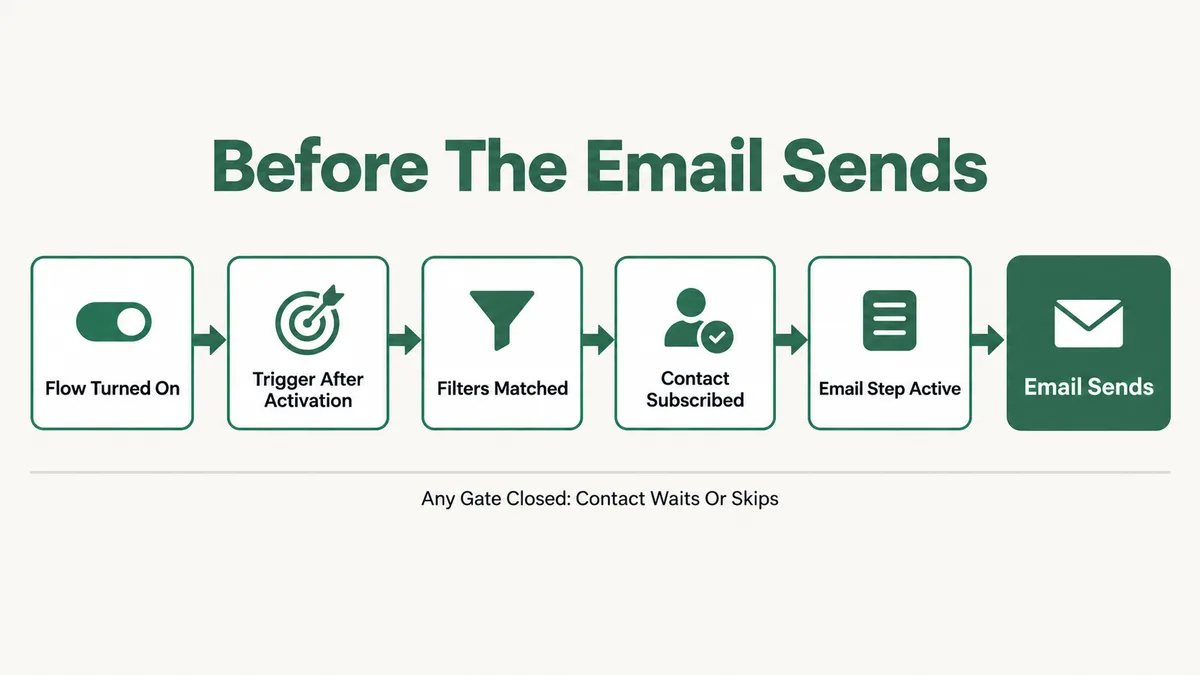
An email only goes out when a contact passes every gate in that chain. The flow has to be on. The trigger event has to happen after it was turned on. The contact has to match the filters, have a subscribed status, and reach an email step that is not paused. Miss any one and the result looks identical from the outside: no email.
Cause 1: Is the Flow Still a Draft or Paused?
It sounds too simple to be the answer, and it is the answer more often than anything else on this list. A flow you built and saved is not running until you click “Turn flow on”. And a flow somebody paused to make a quick edit stays paused until somebody turns it back on.
The pause behavior matters. According to Mailchimp’s article About Marketing Automation Flows, while a flow is paused, contacts are not added to it and those already inside do not move forward. People who signed up during the pause did not queue up waiting for you. Their trigger event happened while the flow was closed, so they never entered.
There is also a timing quirk worth knowing. If contacts are sitting on a time delay step when you pause, and the pause lasts longer than the delay, they move on to the next step once you resume. So a long pause followed by a restart can send a burst of emails at once, which looks like a different bug.
Fix: Open Automations, find the flow, and read its status. If it is a draft, review it and click “Turn flow on”. If it is paused, check who paused it and why before resuming. Then note the date it went live, because anyone who triggered it before that date is covered by Cause 2, not this one.
Cause 2: Did the Trigger Happen Before You Turned the Flow On?
This is the one that catches people who build a flow for contacts they already have. You create a welcome series, turn it on, and expect your existing 3,000 subscribers to start receiving it. They do not, and nothing in the interface tells you why.
Mailchimp states it plainly: flow triggers only apply to actions or events that happen after the flow is activated. A “Signs up for email” trigger watches for new signups from that moment. Someone who signed up last month already had their signup event, and the flow was not there to see it.
The same rule applies to tags. If you tag 400 contacts “workshop” and then build a flow triggered by that tag, none of those 400 enter. The tag was added before the flow existed. This is by far the most common reason I see for a brand new flow reporting zero contacts started.
Fix: Build the flow on a tag trigger, turn the flow on, and only then add the tag to the contacts who should receive it. For a clean test, remove the tag from one test contact, confirm the flow is on, and add the tag back. If that contact enters the flow, the flow works and the problem was timing.
Cause 3: Are Imported Contacts Left Out of the Signup Trigger?
Here is a close cousin of Cause 2. You import a CSV of new leads from an event, the flow is on, and still nobody gets the welcome email. Imports are treated differently from people who sign up through a form.
When you choose the “Signs up for email” trigger, Mailchimp gives you a choice about whether to include new, imported contacts. If that option is off, anyone who arrives through an import never counts as a signup for this flow, even if the import happened after the flow went live. The trigger list in Mailchimp’s guide to all the flow triggers also notes that tags applied through an import come with their own limits.
Before you switch it on, think about who you are importing. Imported contacts need real permission to receive marketing email. Adding them to an automated sequence does not change that, and sending a welcome series to a cold list is a quick way to earn spam complaints.
Fix: Pause the flow, open the “Signs up for email” trigger, and turn on the option to include imported contacts if those contacts gave you permission. Save, turn the flow back on, and remember it only applies to imports from that point on. For contacts imported earlier, use the tag method from Cause 2.
Cause 4: Is a Trigger Filter Keeping Contacts Out?
Every trigger has a “Filter who can enter this flow” option, and you can stack up to five filters on one trigger. Filters are useful. They are also invisible once you close the trigger panel, which is how a filter added in March quietly blocks every signup in September.
The ones I find most often are a filter on a signup form or source that was later replaced, a filter on a tag that got renamed, a location or language filter from an old campaign, and a group or interest filter where the signup form stopped asking that question. The contact enters your audience, fails the filter, and the flow never sees them.
Conditional splits later in the flow cause a similar effect. A contact enters, reaches a split that checks a condition, and goes down the branch that has no email on it. From the report, that looks like “started the flow, never received anything.”
Fix: Pause the flow and open each trigger. Write down every filter and compare it against one real contact who should have entered. Check their tags, groups, signup source and location on their profile. Remove or correct any filter that no longer matches how people join. Then walk that same contact through each conditional split and confirm which branch they land on.
Cause 5: Has the Contact Already Been Through the Flow Once?
A contact who completed a flow does not go through it again by default. That is the right behavior for a welcome series. It is the wrong behavior for anything meant to repeat, like a re-engagement sequence, a monthly reminder, or a flow triggered each time someone registers for an event.
The control is a flow setting called “Contacts can re-enter flow”. Mailchimp describes it as letting contacts repeat a flow multiple times, with a minimum amount of time they have to wait before re-entering. With it off, the second trigger event for the same person is simply ignored.
This one shows up constantly during testing. You test with your own address, it works, you tweak the email and test again, and the second test never arrives. The flow is fine. You already went through it.
Fix: For repeating flows, pause the flow, open its settings, turn on “Contacts can re-enter flow”, and set a minimum wait that fits the use case. For testing, use a fresh test address each round, or a plus address such as yourname+test4@yourdomain.com if your mail provider supports it.
Cause 6: Is the Contact Not Actually Subscribed?
Mailchimp tracks a marketing status on every contact: subscribed, unsubscribed, non-subscribed or cleaned. Flow emails are marketing emails, so they only go to subscribed contacts. The other three either never enter or skip the email step.
Each status has a common cause. Non-subscribed contacts often come from a store integration, where a customer bought something but never opted in to marketing. Cleaned contacts had an address that bounced hard. Unsubscribed contacts opted out, sometimes from a different list or campaign than the one you were thinking about.
Double opt-in adds a fourth trap. If your signup form requires confirmation, the person is not subscribed until they click the confirmation link. Anyone who never confirms never counts as a signup, so a welcome flow never starts for them. If a large share of form signups never receive anything, check how many are stuck unconfirmed.
Fix: Open the profile of one contact who should have received the email and read the status next to their address. Then check their activity feed for how they joined, whether they confirmed, and whether they bounced. If you have many non-subscribed store customers, the fix is an opt-in at checkout, not a flow change.
Cause 7: Is One Email Step Paused While the Flow Runs?
In the current builder you can pause a single step without pausing the whole flow. It is handy for editing one email. It is also easy to forget. Mailchimp’s article on how to edit a marketing automation flow says contacts continue to queue at a paused step while you edit. The flow shows as on, contacts show as in progress, and nobody receives email two.
The same article adds a rule people trip over: to change triggers, rules and actions, you have to pause the entire flow first. So a common sequence is pause flow, edit, resume flow, while one step you paused earlier for a different edit stays paused.
If a lot of contacts are sitting “in progress” at the same step for longer than its delay, that step is the first place to look. A normal flow has contacts spread across steps. A stuck one has a pile-up.
Fix: Open the flow and look at the contact counts on each step. Find any step with a pile of contacts waiting and check whether it is paused. Finish the edit, save the email, and resume that step. Expect the queued contacts to receive it shortly after, so check the content is final before you resume.
Cause 8: Did a Plan Change Break the Flow?
Automation depth depends on your plan, and a downgrade or a lapsed payment can leave a flow built for more than your plan now supports. According to Mailchimp’s plan comparison page as checked on 18 September 2026, the Free plan gets a free preview of flows, Essentials allows up to four flow steps, and Standard or Premium add branching points and multiple starting points. The help article adds that Standard and higher allow up to 200 steps, and that webhook actions and extra triggers start at Standard.
Sending limits are the other half. The Free plan caps sends at 500 a month and 250 a day, with a limit of 250 contacts. Paid plans set the monthly send limit as a multiple of your contact count: 10 times on Essentials, 12 times on Standard and 15 times on Premium. Hit the cap and automated emails stop along with everything else.
None of this is a problem while you are within your limits. It becomes one when someone downgrades to save money without checking what the automations were built on.
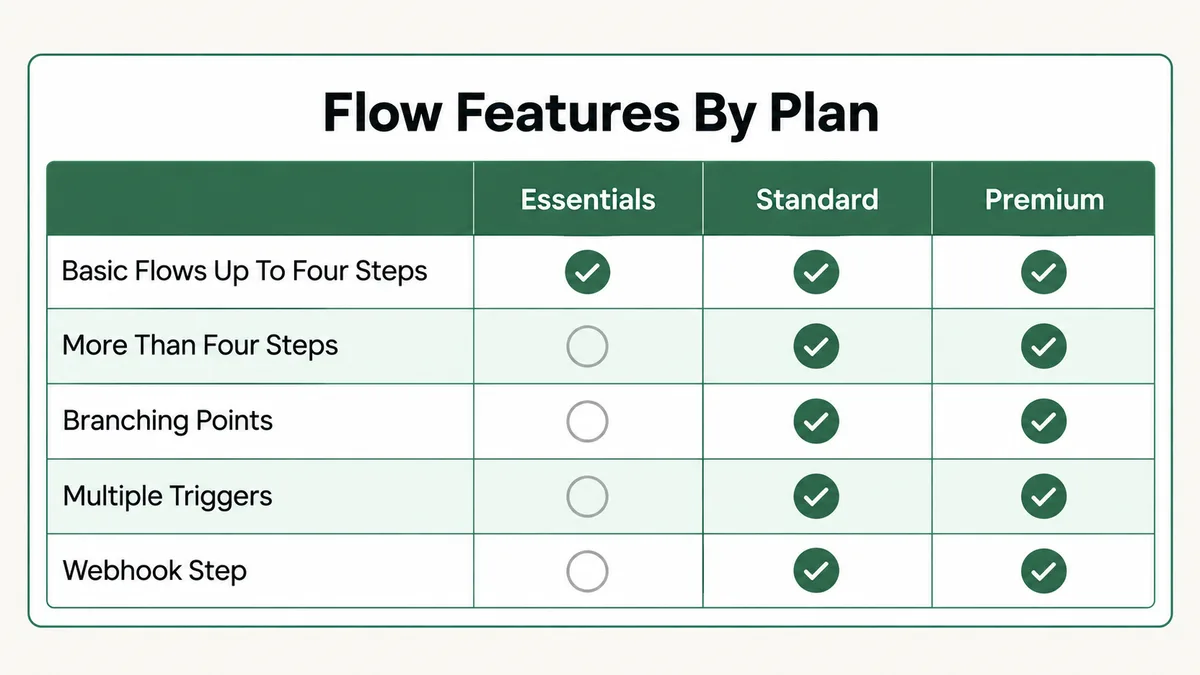
Fix: Check your current plan under Account and billing, then compare it against what the flow uses: step count, splits, multiple triggers, webhooks. Check your send usage for the month as well. Either move to the plan the flow needs, or rebuild the flow within your current limits, for example by splitting one long flow into two shorter ones joined by a tag.
Cause 9: Is the Store or Integration Behind the Trigger Disconnected?
Shopping triggers, such as abandoned cart, order confirmation, first purchase or product purchased, depend on data flowing in from a connected store. If the connection breaks, the events stop arriving, and a flow that worked for a year goes quiet without any change inside Mailchimp.
Mailchimp’s trigger guide notes that Shopify triggers need the latest version of the Shopify integration, so an old connection that was never updated is a real candidate. Cart triggers also have a restriction: abandoned cart triggers cannot be combined with other triggers in the same flow. The same thinking applies to API and integration triggers. If a form tool, Zapier or a custom script sends the event, and that sender fails, Mailchimp never hears about it. My guide to a Zapier Zap not triggering covers that side of the chain.
Fix: Open Integrations and confirm the store connection is active and on the current version. Place a test order or abandon a test cart with a subscribed test contact, then check that contact’s activity feed for the event. If the event is missing, the problem is the connection, not the flow. Reconnect it and repeat the test.
Cause 10: Is the Email Sending but Not Arriving?
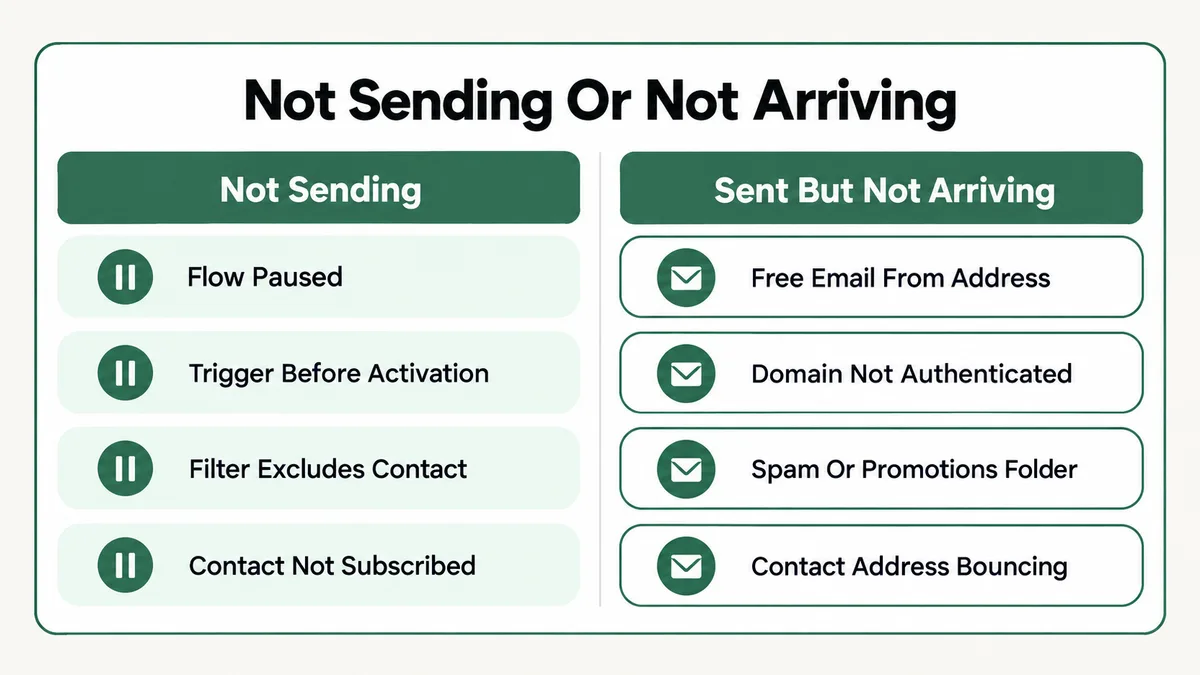
Sometimes the flow is working perfectly. The report shows the email as sent, and the recipient still says they never got it. That is a deliverability problem, and it needs a different set of checks from everything above.
The biggest one is the From address. If you send from a Gmail, Yahoo or other free address, Mailchimp cannot authenticate it, because you do not own that domain. Its help page on the limits of free email addresses explains that Mailchimp rewrites the From domain to one of its own to pass DMARC, and strongly recommends a private domain instead. Since Gmail and Yahoo tightened their rules for bulk senders, an unauthenticated domain is a fast route to the spam folder.
The other checks are simpler. Ask the recipient to search spam and promotions tabs. Check whether their address bounced, which changes their status to cleaned. And look at the email report for opens, because a sent email with a normal open rate is arriving for most people.
Fix: Use an address on a domain you own as the From address, then authenticate that domain in Mailchimp under the domains settings. Send a test to a Gmail address and check where it lands. My email deliverability setup guide walks through the DNS side in more detail, and the same records apply to any sender.
Mailchimp Automation Not Sending? What Should You Check First?
When a client tells me a Mailchimp automation is not sending, I run the same order every time. It moves from the checks that take seconds to the ones that take a test.
- Read the flow status. On, paused or draft. Note the date it went live.
- Pick one real contact who should have received the email. Everything after this step uses that one person, not the whole list.
- Compare their trigger date with the go-live date. Triggered before activation means they never entered.
- Check how they joined. Imported contacts need the import option on the signup trigger.
- Check their status. Subscribed, unsubscribed, non-subscribed, cleaned or unconfirmed.
- Check them against every trigger filter and split.
- Check whether they went through the flow before and whether re-entry is on.
- Look for a pile-up at one step and check whether that step is paused.
- Check plan and send limits against what the flow uses.
- If the report says sent, switch to deliverability: From domain, authentication, spam folder, bounces.
In most of the accounts I have fixed, the answer shows up by step five. Working from one specific contact is the part that makes this fast. “Nobody is getting the email” is hard to debug. “Sarah joined on the 12th through an import and the flow only counts form signups” is a one-click fix.
Why Do Mailchimp Automations Fail Quietly?
Most of these causes share one trait: Mailchimp treats them as correct behavior, not errors. A contact who does not match a filter is supposed to stay out. A contact who triggered an event before the flow existed is supposed to be ignored. So there is no error message to find, only a number that stays at zero.
That design makes sense for a tool used by millions of accounts. Sending email to people who were not meant to get it is a far worse failure than not sending it. But it means you have to troubleshoot by following one contact through each gate yourself, rather than waiting for a red warning.
The other reason is that flows outlive the people who set them up. A filter makes sense to whoever built it. Two years later a new form replaces the old one, a tag gets renamed during a clean-up, or someone downgrades the plan, and nobody connects that change to the flow. I see the same pattern in ActiveCampaign automations that stop triggering and ConvertKit automations that stall, which tells you it is about how automations get maintained, not about Mailchimp in particular.
How Do You Keep Mailchimp Automations Sending Going Forward?
A few habits prevent almost everything above.
- Keep a test contact inside every flow. A real, subscribed address you control, re-entered on a schedule. If it stops receiving, you know within days, not months.
- Write down each flow’s triggers and filters in a short note, including why each filter exists. It takes five minutes and saves an hour later.
- Use tags as the handoff between systems. When a form tool, store or Zap needs to start a flow, have it apply a tag and trigger on that tag. Tags are easy to test and easy to re-apply.
- Check the flow report weekly. Contacts started versus completed, and any pile-up at one step.
- Review automations before any plan change or form replacement, not after.
- Send from an authenticated domain you own, never a free address.
None of this needs special tools. It is a checklist and a test address, and it turns a silent failure into one you catch the same week.
Frequently Asked Questions
Why is my Mailchimp automation not sending to existing subscribers?
Because flow triggers only apply to events that happen after the flow is turned on. Existing subscribers already had their signup event. Use a tag trigger instead, turn the flow on, then tag the existing contacts you want in the flow.
Can I use automation flows on the Mailchimp Free plan?
Only in a limited form. Mailchimp’s compare plans page lists flows on Free as a free preview, with 250 contacts and 500 sends a month. Essentials allows flows up to four steps, and branching and multiple triggers start on Standard.
Why did my test email arrive but the automation did not?
A test email skips every gate a real contact goes through: the trigger, filters, status and re-entry. It only proves the email design works. To test the flow, add a real subscribed test contact the same way a real contact would join.
How do I make a contact go through a Mailchimp flow again?
Turn on the “Contacts can re-enter flow” setting and set a minimum wait time. Then trigger the flow again, for example by removing and re-adding the tag the flow starts on.
Do imported contacts get Mailchimp automation emails?
Only if the flow’s “Signs up for email” trigger is set to include imported contacts, and only for imports after that setting is on. Make sure those contacts gave permission to receive marketing email first.
Why are contacts stuck in progress in my flow?
Usually a paused step, a long time delay, or a wait rule waiting for an event that never happens. Look at which step holds the contacts, then check whether it is paused or what condition it waits for.
In my experience, a Mailchimp automation not sending is rarely a Mailchimp bug. It is a paused flow, a trigger that fired before the flow existed, or a contact who never passed one of the gates. Pick one real contact, work the checklist in order, and most fixes take a few minutes.
If Mailchimp is only one piece of your setup, the same habit of following one contact through each step works everywhere. It is how I approach a FluentCRM automation not running too, and the deliverability side carries over to any sender.
Mailchimp automation still not sending?
Tell me which flow is stuck, how contacts join your audience, and what the flow report shows. I will tell you which of these causes it is and what to change, whether or not you need anyone to build it.