
You built the welcome automation, connected the form, wrote five emails, and sent a test signup. The subscriber shows up in your list. The first email never arrives. Search “ConvertKit automation not working” and you will find plenty of people in the same spot, because Kit rarely tells you why. There is no error banner, just a count that says a few subscribers are “waiting here” and a sequence with nobody in it.
ConvertKit renamed itself Kit in late 2024, and most of the menus kept working the same way, so everything below applies whichever name you know it by. I set up and repair email automation for course creators and membership sites, and the ten causes below are the ones that come up again and again. Most of them are a single setting.
Quick Answer
A Kit (ConvertKit) automation usually stops working for one of five reasons: the visual automation is Inactive or Paused, the subscriber is unconfirmed or otherwise not a confirmed subscriber, they joined before the automation was switched on (Kit automations are not retroactive), they are waiting at an event step whose condition they have not met, or the email sequence is holding them because of a draft email, a send day setting or an exclusion. Check the automation status first, then the subscriber’s profile, then the sequence settings. If you are on the Free plan, note that visual automations and email sequences are not included at all.
📋 What’s Covered
02Cause 1: Is the Visual Automation Still Inactive?
03Cause 2: Is the Automation Active but Paused?
04Cause 3: Did the Subscriber Join Before You Turned It On?
05Cause 4: Is the Subscriber Unconfirmed or Unsubscribed?
06Cause 5: Has the Subscriber Already Been Through It?
07Cause 6: Are Subscribers Waiting at an Event Step?
08Cause 7: Is the Email Sequence Holding Them?
09Cause 8: Why Is the Sequence Itself Not Sending?
10Cause 9: Does Your Plan Include Automations at All?
11Cause 10: Are Imports and Zapier Skipping the Trigger?
12ConvertKit Automation Not Working? What Should You Check First?
13Why Do Kit Automations Fail Without an Error?
14How Do You Stop Kit Automations Breaking Again?
15Frequently Asked Questions
How Does a Kit Automation Move a Subscriber?
Kit has two automation tools, and knowing which one you built saves time. A Rule is the simple “if this happens, then do that” tool under Automate, then Rules. A Visual Automation is the drag and drop builder where a subscriber enters at the top and moves down a path of steps. Kit’s own help page on what Rules are in Kit recommends Visual Automations for almost everything, and keeps Rules for link triggers and for unsubscribing people from forms.
A Visual Automation is made of entry points plus three kinds of steps:
- Entry points: joins a form or landing page, is added to a tag, has a custom field change, or makes a purchase. One automation takes up to five.
- Actions (green): add to an email sequence, delay, move subscriber, add or remove a tag, set a custom field, or unsubscribe.
- Events (orange) and conditions: events pull a subscriber forward when something happens, such as a tag being added or a date arriving. Conditions split subscribers onto different paths.
The part that explains most failures is this: a subscriber only moves to the next step once the current one is finished. A sequence step is finished when they receive the last published email. An event step is finished when its condition is met. If any step never finishes, everyone behind it waits, and nothing on screen calls that an error.
Cause 1: Is the Visual Automation Still Inactive?
This is the most common cause, and it is easy to miss. New Visual Automations start as Inactive. Kit’s article on Active, Inactive and Paused statuses explains that an Inactive automation lets nobody enter and nobody progress. You can build the whole thing, save every step, and walk away thinking it is live.
It also happens after editing. People set an automation to Inactive to rebuild a branch, finish the edit on a Friday, and forget to switch it back.
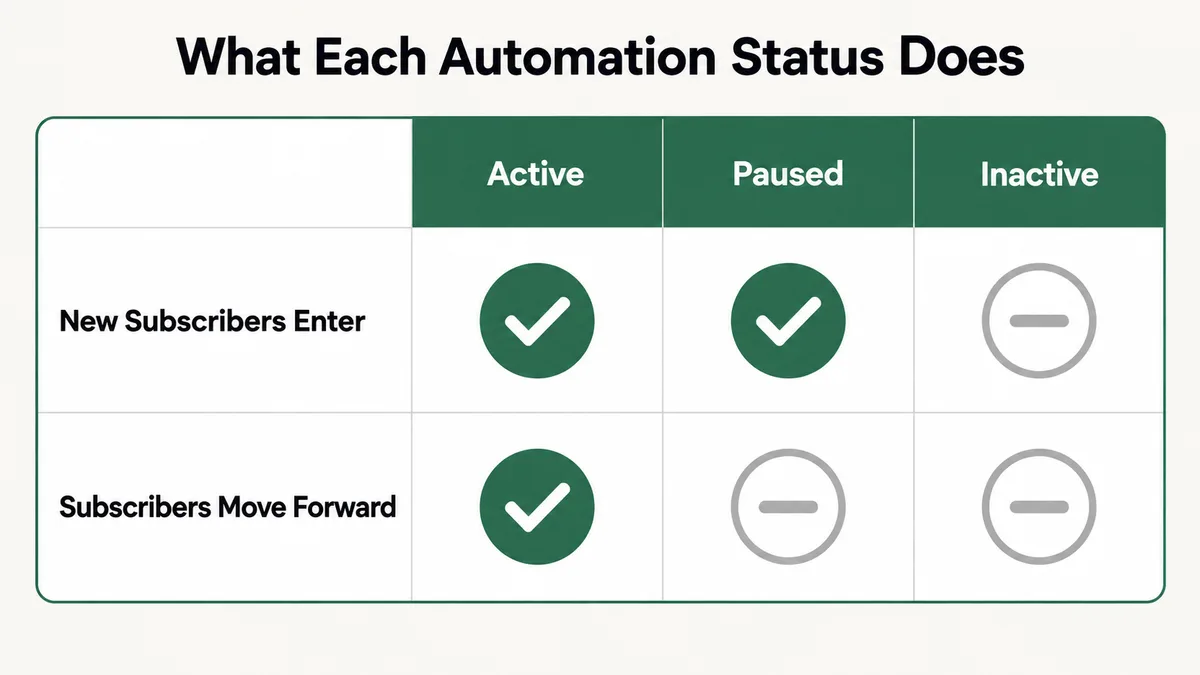
Fix: Open the automation and look at the toggle at the top right of the builder. If it is off, switch it on and click Activate to confirm. From the automations list, the same thing sits behind the three dots next to the name, as Set to Active. Give it a few minutes, then check whether the waiting counts start to drop.
Cause 2: Is the Automation Active but Paused?
Paused is a separate state, and it looks deceptively healthy. The toggle still shows Active. New subscribers still enter, so the entry point count goes up. But nobody moves past their current step. Kit describes new entrants waiting right after the entry point and everyone else waiting before their next step.
Pausing is useful on purpose: you can rewrite later steps while signups collect, then release everyone at once. The trouble starts when it was paused during a launch and nobody remembers doing it. From the outside, it looks exactly like an email deliverability problem.
Fix: Look for a Resume button next to the Active toggle. If it is there, the automation is paused. Click Resume and confirm with “Turn it on!”. Before you do, check what the waiting subscribers will receive, since they all move at once and a large backlog will send a burst of emails in a short window.
Cause 3: Did the Subscriber Join Before You Turned It On?
Kit automations are not retroactive. If a form is the entry point, only people who subscribe through that form after the automation is active will enter. Everyone who joined last month stays exactly where they are.
This catches two groups. The first is anyone who builds a new welcome sequence and expects the existing list to get it. The second is anyone who tests with their own email address after already signing up to that form weeks ago. The test “fails”, but the automation is fine. The subscriber just was not new.
Kit’s help page on manually adding subscribers to an automation gives the standard workaround, and it works well.
Fix: Add a second entry point to the automation using a new, temporary tag. Save it first. Then go to Subscribers, filter for the people you want, and use Bulk Actions to add that tag. Watch the Completed count under the new entry point climb. Once they are in, delete the temporary entry point and the tag. Removing the tag does not pull anyone back out of the automation.
Cause 4: Is the Subscriber Unconfirmed or Unsubscribed?
Kit uses double opt-in on forms by default. Someone who fills in the form but never clicks the confirmation button stays Unconfirmed, and Kit’s help page on unconfirmed subscribers is clear that you cannot confirm them on their behalf. Unconfirmed subscribers do not count toward billing, and you cannot email them through Kit. So a welcome sequence has nobody to send to.
The confirmation email itself lands in spam more often than people expect, especially on school and corporate addresses. Bots are the other source. They fill in forms and never confirm.
The other statuses matter too. The subscriber profile page shows whether someone is Confirmed, Unsubscribed, Complained (they marked an email as spam), Bounced (a hard bounce), Blocked, or Cold (no opens or clicks for 90 days). Cold subscribers still receive email. The others do not.
Fix: Open the subscriber’s profile and read the status before touching the automation. If you see a lot of Unconfirmed people, look at the form’s Settings, then Incentive, and decide whether double opt-in is right for that form. If you keep it, rewrite the confirmation email so the button is obvious and the subject line says what it is. Add reCAPTCHA if bots are the problem.
Cause 5: Has the Subscriber Already Been Through It?
Visual Automations are built for one pass. Kit’s article on looping subscribers through a Visual Automation says that once someone reaches the end, they exit and usually will not go through it again unless they are re-added.
That trips up two setups. One is the recurring program, like a monthly challenge or an annual renewal reminder, where people should go round again. The other is a tag entry point on someone who already carries that tag. Kit’s own loop method removes the tag and then adds it back, which tells you that re-applying a tag someone already has is not the way to restart the automation.
Fix: For a single person, remove the trigger tag from their profile, wait a minute, then add it again. For a repeating program, follow Kit’s loop pattern: enter on a tag, run your steps, remove the tag near the end, add a delay, then re-add the same tag. Pair it with an email sequence that is not set to repeat, so people only receive emails they have not had yet.
Cause 6: Are Subscribers Waiting at an Event Step?
Event steps are the orange steps, and they are gates. Kit’s reference on Visual Automation events lists five: a tag is added, a tag is removed, a date occurs, a product is purchased, or a custom field changes. A subscriber sits in front of the event until it happens to them. If the event is “tag Webinar Attended is added” and nothing ever adds that tag, they wait forever.
The same article notes that events only pull subscribers forward, never backwards or sideways. It also flags a real trap with dates. If both branches of a condition lead to date events, everyone waiting at that condition moves to whichever date event triggers first, whichever branch they qualified for. Kit’s suggested fix is a delay step before each date event.
Past dates work the other way. If a date event’s calendar date has already passed, anyone arriving at it moves straight through.
Fix: Click the “subscribers waiting here” box above each orange step to see who is stuck. For each one, ask what is supposed to make that event happen, then check that thing directly: is the tag being applied by a form, a link trigger or an integration, and is the date in the future on purpose? Add a delay before any date event that sits at the end of a condition branch.
Cause 7: Is the Email Sequence Holding Them?
An email sequence step in a Visual Automation is finished only when the subscriber receives the last published email in it. Two sequence settings stop that from ever happening.
The first is the evergreen setting on the sequence’s Settings tab. If it reads “Yes, subscribers added via Visual Automations should stay in the sequence”, people stay in the sequence so they receive any email you add later. That is handy for a newsletter style sequence and fatal for a welcome flow that is supposed to hand people to a sales sequence afterwards. Kit’s article on subscribers waiting in a Visual Automation calls this out directly.
The second is a long final delay. If the last email is set to send 14 days after the one before, the automation step does not finish for two more weeks. People are not stuck. They are on schedule, which is less obvious when you are staring at a waiting count.
Fix: Open the sequence, go to Settings, and switch the Visual Automation option to “No, subscribers added via Visual Automations should exit the sequence after receiving the last published email” if people need to move on. Then read the delay on each email in order and add them up, so you know how long the step takes by design.
Cause 8: Why Is the Sequence Itself Not Sending?
Sometimes the automation is working and the sequence is the part that is broken. Kit’s guide to why an email sequence is not sending lists the usual suspects, and these are the ones I find most often:
- Emails left in draft. Each sequence email has a Published toggle. Draft emails are skipped. Publishing needs a physical mailing address in your account settings.
- Send days switched off. The Sequence Schedule on the Settings tab has day checkboxes, and each email has its own “On days” setting. Uncheck everything in either place and sending pauses.
- A first email that is not immediate. If the first email is not set to “As soon as possible”, nothing arrives on signup.
- Exclusions. A sequence wide exclusion stops matching subscribers from receiving future emails, even if they are halfway through.
- Mid-sequence edits. Deleting, reordering or inserting emails in the middle affects people already in the sequence. Kit’s advice is to add new emails at the end only.
- A free email address as the sender. Sending “as” a Gmail or Yahoo address causes delivery failures. Use an address on your own domain.
Fix: Check the Active subscribers count on the sequence’s Analytics tab first. If it is above zero, work down the list above in order: Published toggles, send days in both places, first email timing, exclusions, then the sending address. Kit says changes to exclusions and send days usually take effect within the hour.
Cause 9: Does Your Plan Include Automations at All?
This one surprises people who started on a trial. The Kit pricing page, which I checked on 14 September 2026, lists the Free plan at $0 for up to 10,000 subscribers with unlimited forms, landing pages and broadcasts, plus tagging and segmentation. Visual Automations, email sequences and apps and integrations are not part of it.
Those three features start on the Creator plan, listed at $33 a month (or $390 billed yearly) for 1,000 subscribers, with unlimited Visual Automations and sequences. Pro is listed at $66 a month (or $790 yearly) at the same subscriber level. Link triggers, which are Rules, are also paid plan features. Kit’s help articles still call the top tier “Creator Pro” in places, while the pricing page calls it Pro.
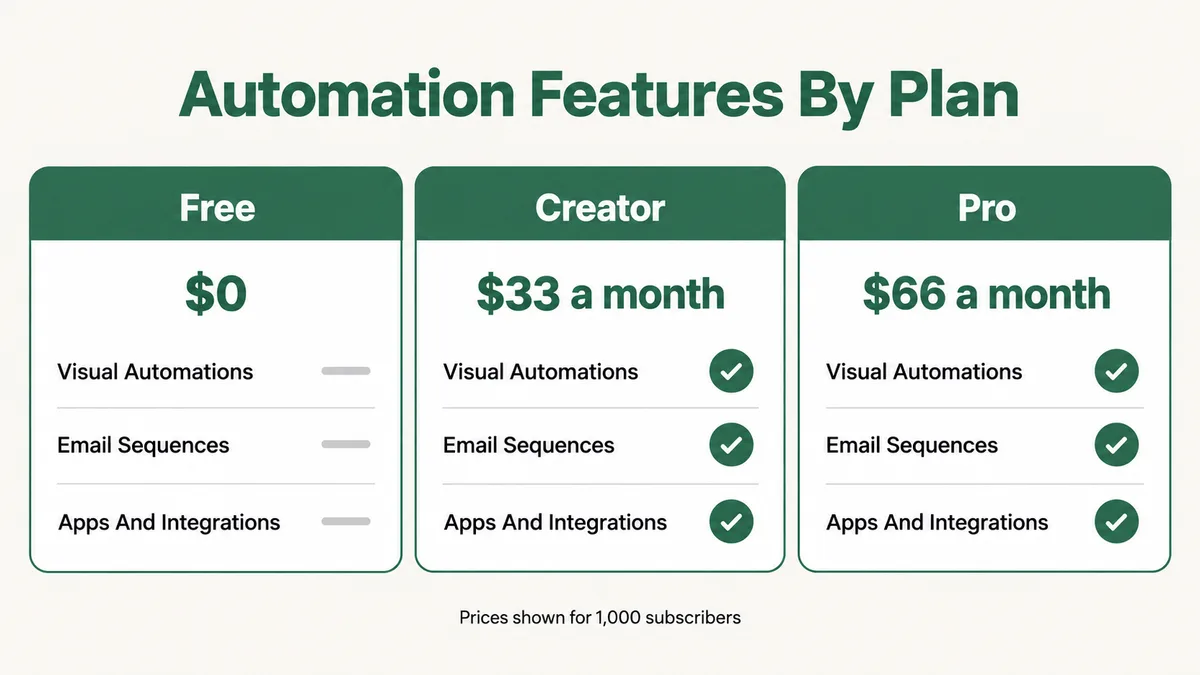
If an account was downgraded, or a trial ended, the automations you built on it will not behave the way they did during the trial. Prices and plan contents change, so check the live page before deciding anything based on these figures.
Fix: Open your account’s billing page and confirm the current plan. If you are on Free and need a welcome flow, either upgrade to Creator, or run the flow as scheduled broadcasts to a tag segment until the list justifies the cost.
Cause 10: Are Imports and Zapier Skipping the Trigger?
How a subscriber gets into Kit decides which automations notice them. Zapier’s own help page on common problems with Kit on Zapier names two. Subscribers added with the Import Subscribers button do not set off Zaps. And a subscriber sent into a form by a Zap still has to confirm if that form uses double opt-in, so the Zap shows success while the person never appears on the list.
The same logic applies inside Kit. An import is not a form signup, so a “joins a form” entry point will not fire for imported contacts. If you migrated from another platform and expected the welcome automation to pick everyone up, this is why it did not.
When Zapier is part of the chain, it is worth checking that side as well. My guide to a Zapier Zap not triggering covers the Zapier half of the problem.
Fix: Use a tag as the entry point for anything that arrives from outside Kit, and have the import or the Zap apply that tag. For Zaps that add people to a double opt-in form, either switch that form to auto-confirm in its Incentive settings or accept that the automation starts only when they confirm.
ConvertKit Automation Not Working? What Should You Check First?
Work through this in order. The early checks take seconds and catch most cases. The later ones take longer, so only reach them when the quick ones come back clean.
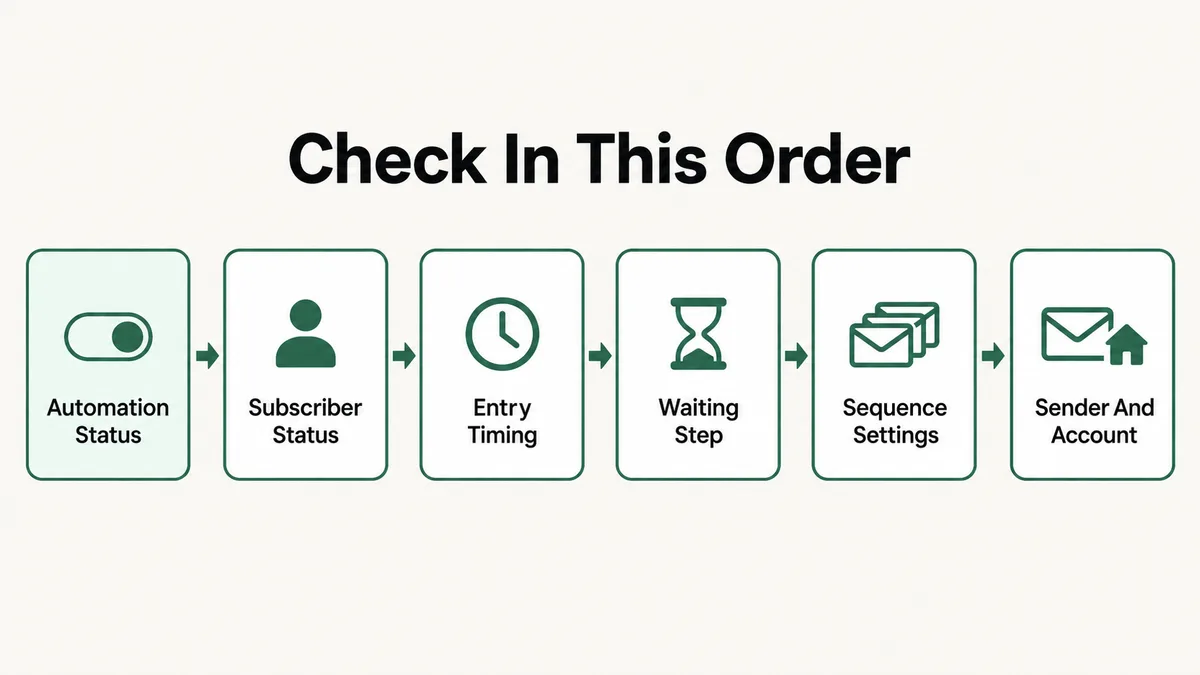
- Automation status. Is the toggle on, and is there a Resume button showing?
- Subscriber status. Open one affected profile. Confirmed, Unconfirmed, Unsubscribed, Bounced or Complained?
- Entry timing. Did they join, get tagged or buy after the automation went Active? Did they arrive by import?
- Waiting step. Which step shows them waiting? If it is orange, what is meant to trigger that event?
- Sequence settings. Published toggles, send days, first email timing, exclusions, and the evergreen option.
- Sender and account. A domain sending address, a mailing address on file, and a plan that includes automations.
- Wait out the cache. Waiting counts on the builder can lag by several minutes, and Kit says occasionally up to an hour, before you conclude nothing is moving.
Test with a brand new email address each time. An address you have used before carries old tags, old form signups and old sequence history, and it gives you misleading results.
Why Do Kit Automations Fail Without an Error?
Because in Kit’s model, waiting is normal. A subscriber held before a date event three weeks away looks exactly like one held before a tag event that will never happen. The builder has no way to know which wait you intended, so it shows both as a waiting count and moves on.
The design favors creators who build carefully and punishes the quick edit. Kit deliberately keeps people safe from double sends and accidental re-entry, which is why automations are one pass, not retroactive, and cautious about repeated tags. Each of those protections is sensible alone. Together they mean the most common failure is a silent one.
It is the same pattern I see across email platforms. The ActiveCampaign automation troubleshooting guide and the FluentCRM automation guide both come back to entry conditions and contact status too. The menus differ. The logic that breaks is the same.
How Do You Stop Kit Automations Breaking Again?
Enter on tags, not forms, wherever you can. Kit’s own guide to combining entry points into a tag shows the pattern: every form applies one tag, and the automation enters on that tag. You can then add people from imports, Zaps or bulk actions the same way, and you stay well under the five entry point limit.
Name tags after what they trigger. “Start welcome flow” tells you what adding it does. “Lead magnet 2” does not, and it is how someone tags a group months later and accidentally drops them into a sequence.
Add new sequence emails only at the end. If a flow needs restructuring, build a new sequence and swap it in, rather than reordering one with people in it.
Keep a short note of every automation and what feeds it, including Zaps and any other integration. Then run a monthly check with a fresh address through each live flow. It takes ten minutes and catches a paused automation before your list notices. If you would rather have someone design the flows so they hold up, that is part of my business automation work.
Frequently Asked Questions
Why are subscribers stuck “waiting here” in my Kit automation?
Usually because the step in front of them is not finished. The automation is Inactive or Paused, they are waiting for an event such as a tag or a date that has not happened, or an email sequence is holding them because it is set to keep automation subscribers in it. The count can also lag by several minutes, occasionally up to an hour.
Do Kit automations apply to existing subscribers?
No. Kit automations are not retroactive, so only people who meet the entry point after the automation is active will enter. To add existing subscribers, create a temporary tag, add it as an extra entry point, apply it to the right people with Bulk Actions, then remove the entry point and tag once they are in.
Is ConvertKit the same as Kit?
Yes. ConvertKit rebranded as Kit in late 2024. The help center moved from help.convertkit.com to help.kit.com, and old article links redirect. Visual Automations, Rules, sequences and tags work the same way, so older ConvertKit tutorials are still mostly accurate, apart from menu names and plan names.
Can I use Visual Automations on the Kit Free plan?
Not according to the pricing page as checked on 14 September 2026. The Free plan covers forms, landing pages, broadcasts and tagging for up to 10,000 subscribers. Visual Automations, email sequences and apps and integrations start on the Creator plan, listed at $33 a month for 1,000 subscribers.
Why didn’t my Zap add the subscriber to my Kit automation?
If the Zap adds people to a form that uses double opt-in, they still need to confirm before they appear on your list, even though Zapier shows the task as successful. Switch that form to auto-confirm, or have the Zap apply a tag that the automation enters on. Subscribers brought in with the Import Subscribers button do not set off Zaps at all.
How do I make a subscriber go through a Kit automation again?
Once someone reaches the end, they exit and do not repeat it unless re-added. Use a tag entry point, remove the tag from the subscriber, then add it back. For a recurring program, build that into the automation: remove the tag near the end, add a delay, and re-add the tag so the automation starts over.
In my experience, a ConvertKit automation not working is rarely a bug on Kit’s side. It is a status left off, a subscriber who never confirmed, or a step waiting for something nobody set up. Work the checklist in order and most fixes take a few minutes.
If Kit is only one part of your stack, the same habit of checking status, entry and waiting steps carries over. It works for a Make scenario not running just as well, and for getting email to land in the first place, the GoHighLevel email deliverability guide covers domain setup that applies well beyond GoHighLevel.
Kit automation still not moving?
Tell me which automation is stuck, where subscribers are waiting, and how people get into your list. I will tell you which of these causes it is and what to change, whether or not you need anyone to build it.