
I got a message last week from a store owner who opened her Shopify invoice and found her Grow plan had jumped from $95 to $105 a month. Nothing on her storefront had changed. No new feature, no extra storage, no new app bundled in. Just a higher number on a bill she had budgeted around for two years.
She is not alone. Shopify raised prices on two of its core plans on October 15, 2026, and the timing, right before Black Friday and Cyber Monday, has a lot of merchants asking the same question: is this the moment to finally look at shopify price increase alternatives, and specifically, is WooCommerce actually cheaper, or does it just move the same costs somewhere less visible?
I build and repair WordPress commerce sites for a living, including WooCommerce stores, so I have a direct financial incentive to tell you WooCommerce is always the answer. I am not going to do that. Below is the real math on both sides, what actually breaks if you move, and an honest answer on whether this specific price hike is actually the reason to switch.
Quick Answer
Shopify’s October 2026 price increase is real: Grow went from $95 to $105 a month and Advanced went from $339 to $399, with no new features attached. That alone is not a strong enough reason to migrate. WooCommerce is not free either, once you add real hosting, a theme, and the plugins most stores actually need, the gap narrows a lot. The honest trigger to switch is high transaction volume on a third party payment gateway, not the plan price by itself.
📋 What’s Covered
02Is This Shopify Price Increase Actually a Big Deal?
03Does WooCommerce Really Cost Less, or Does It Just Move the Cost Around?
04What Do the New Transaction Fee Tiers Cost You at Real Volume?
05What Do You Actually Control on WooCommerce That You Don’t on Shopify?
06What Actually Breaks When You Migrate From Shopify to WooCommerce?
07Is a Full Migration Worth It, or Is There a Middle Path?
08How Do You Decide If Switching Is Right for Your Store Right Now?
09Why Do Platforms Like Shopify Keep Raising Prices Without Adding Features?
10How Do You Avoid Getting Blindsided by the Next Price Increase?
11Frequently Asked Questions
What Exactly Changed in Shopify’s October 2026 Pricing?
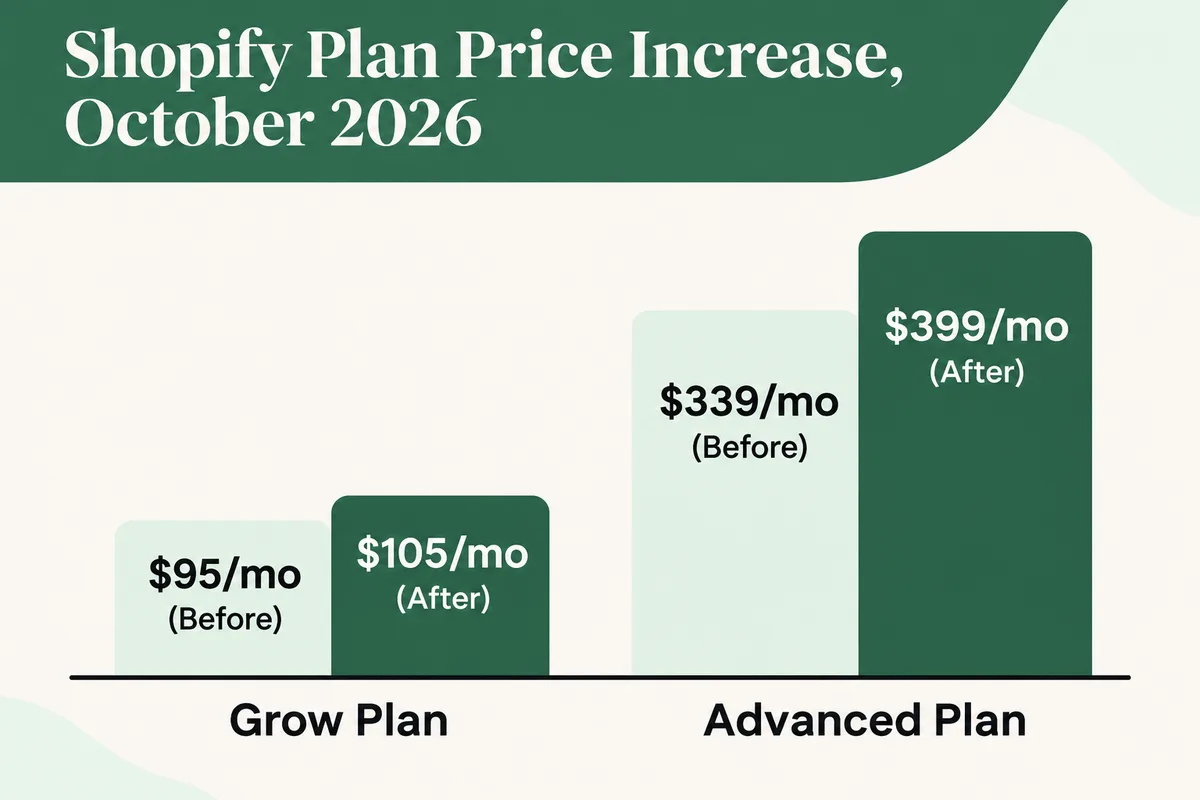
Shopify runs four core plans: Basic, Grow, Advanced, and Plus. Basic stayed at $39 a month. The increase hit the two plans most growing stores actually sit on. Grow went from $95 to $105 a month on monthly billing, a 10.5 percent increase, and Advanced went from $339 to $399, a 17.7 percent increase. Both took effect on October 15, 2026, for new merchants immediately, with existing merchants rolled onto the new price at their next billing cycle. Plus, Shopify’s enterprise tier starting around $2,300 a month on a custom contract, was not touched.
I checked this directly against Shopify’s own live pricing page rather than taking the number secondhand, and it matches what CommonThreadCo reported the same week it happened. Annual billing softens the hit a little: Grow drops to $79 a month paid yearly, and Advanced to $299, roughly a 25 percent discount for committing upfront. No feature, no storage increase, no new app access came bundled with either change. It is a straight price increase.
Is This Shopify Price Increase Actually a Big Deal?
On its own, no. Ten extra dollars a month on Grow is $120 a year, which most stores doing enough volume to justify Grow over Basic will not notice in their margins. Sixty extra dollars a month on Advanced is $720 a year, which is a more real number but still small next to the revenue a store on Advanced is usually processing.
What makes it feel bigger than the raw dollars is the pattern. This is not Shopify’s first increase, and the timing, ten days before the start of the holiday shopping season, reads as a company confident enough in its lock-in to raise prices at the exact moment merchants are least able to absorb disruption by switching platforms. That confidence is not misplaced. Switching ecommerce platforms mid holiday season is close to the worst possible time to do it, and Shopify knows it.
So the honest framing is this: the price increase itself is a minor annual cost. What it actually does is start a conversation that was probably overdue anyway, about whether the platform still fits the store a year or two after the decision was first made.
Does WooCommerce Really Cost Less, or Does It Just Move the Cost Around?
This is the part most “switch to WooCommerce” articles skip, because WooCommerce itself being free is only half the real cost. You still need hosting, and WooCommerce specific managed hosting from a provider like Kinsta or SiteGround realistically runs $30 to $150 a month once you are past intro pricing, scaling higher with traffic. A premium WooCommerce theme is typically a one time $59 to $99, not recurring, so it is cheap over a few years but not nothing up front.
Then come the plugins that most stores actually need, not the ones you could technically skip. WooCommerce Subscriptions runs $279 a year if you sell anything recurring. A real SEO plugin, Yoast Premium or Rank Math Pro, runs roughly $108 to $119 a year. A proper backup plugin adds another $150 to $240 a year depending on the provider. Add those up and a typical store is paying somewhere around $300 to $450 a year in essential plugin licenses, on top of hosting.
Run the full comparison honestly and a mid size store on WooCommerce with managed hosting, a theme, subscriptions, SEO, and backups lands somewhere in the same neighborhood as Shopify’s new Grow price, sometimes a little under it, sometimes close to even, depending on hosting choice. The real financial case for WooCommerce is rarely “it’s free.” It’s that you own every piece of that stack and can swap any single part of it without losing the whole store.
What Do the New Transaction Fee Tiers Cost You at Real Volume?
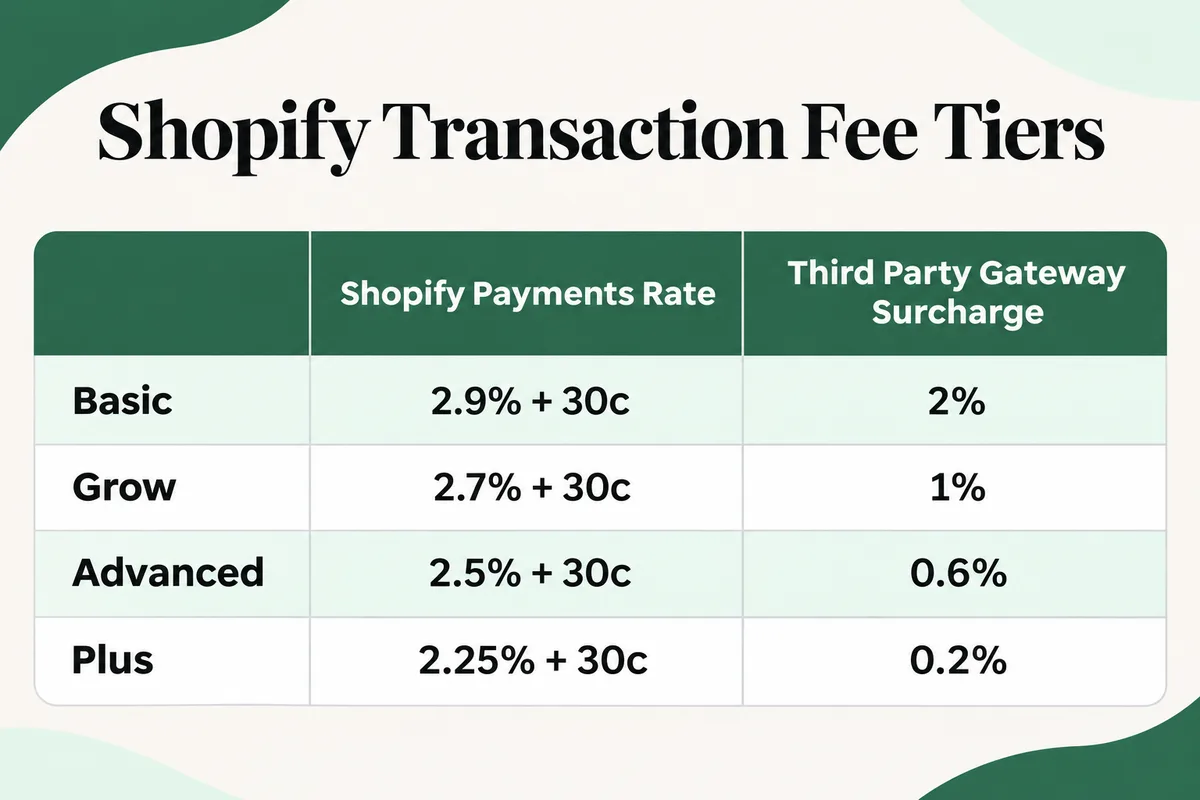
This is the number most merchants never calculate, and it matters more than the plan price for anyone processing real volume. If you use Shopify Payments directly, the card rate drops as you move up plans: 2.9 percent plus 30 cents on Basic, 2.7 percent on Grow, 2.5 percent on Advanced, down to 2.25 percent on Plus. If you use a third party gateway instead of Shopify Payments, Shopify charges an additional surcharge on top of that gateway’s own fee: 2 percent on Basic, 1 percent on Grow, 0.6 percent on Advanced, and 0.2 percent on Plus.
On $50,000 a month in sales through a third party gateway on Grow, that 1 percent surcharge alone is $500 a month, $6,000 a year, well past the $120 annual increase everyone is talking about. The plan price increase gets the attention because it shows up as a single line on an invoice. The transaction fee structure is the number that actually determines whether Shopify is expensive for your specific store, and it rewards staying on Shopify Payments and moving up plans as volume grows, which is exactly the lock-in effect worth noticing before you decide the plan price is the real issue.
What Do You Actually Control on WooCommerce That You Don’t on Shopify?
Checkout customization is the clearest example. Unless you are on Shopify Plus, you can no longer deeply customize the checkout through checkout.liquid. Shopify deprecated it for the information, shipping, and payment steps back in August 2024, and the remaining thank you and order status page customizations sunset for good in August 2026. If your business logic depends on custom checkout fields, conditional upsells at checkout, or non standard validation, Shopify Plus or a WooCommerce migration are your only two real paths, and Plus starts around $2,300 a month.
Product variants tell a smaller version of the same story. Shopify raised its variant cap to 2,048 in October 2025, but the limit of three option types per product, color, size, material, whatever you pick, is unchanged. A product that genuinely needs a fourth option, say color, size, material, and a custom engraving choice, structurally cannot represent that on Shopify without a workaround. WooCommerce has no such cap on option types, because variations are just WordPress posts, not a fixed internal schema.
The underlying difference is ownership, not features. Shopify gives you a fast, reliable platform in exchange for building inside its rules. WooCommerce gives you the rules themselves, at the cost of being responsible for hosting, security, and updates yourself.
What Actually Breaks When You Migrate From Shopify to WooCommerce?
This is the section most comparison articles leave out, and it is the one that determines whether switching is actually worth it. The theme does not transfer. Shopify themes are built in Liquid on a JSON section and template structure, while WooCommerce themes run on PHP templates and WordPress hooks. There is no conversion tool between the two, which means a full visual rebuild, not a reskin.
Apps do not transfer either, and some of them simply stop existing on the other side. Judge.me’s WooCommerce review plugin was permanently shut down in August 2025 and is now Shopify only, which means a store relying on it for reviews loses that specific tool outright, not just its settings. Loyalty programs, upsell funnel apps, and subscription billing schedules all need to be manually rebuilt, and payment gateway tokens are not portable between platforms, so subscribers typically have to re enter their card details after the move.
I built the WooCommerce checkout for Certified Boater, a NASBLA approved boater safety certification platform running on LearnDash, and the checkout configuration itself was never the hard part. The hard part is always what sits around it: tax rules, shipping classes if you are shipping anything physical, and the handful of apps you are not replacing one for one.
Customer accounts mostly survive the move through migration tools, order history, products, and addresses transfer, but product reviews explicitly do not, and passwords never survive because Shopify and current WordPress use different password hashing. Every customer resets their password after a migration, full stop.
URLs are the quiet risk. Shopify’s path structure, /products/ and /collections/, does not match WooCommerce’s default structure. WooCommerce’s own migration documentation warns directly that mismatched URLs “can break links, cause 404 errors, and harm your search engine rankings,” and recommends mapping every redirect by hand. Skip that step and you are trading a price increase for a ranking drop, which is a much worse trade.
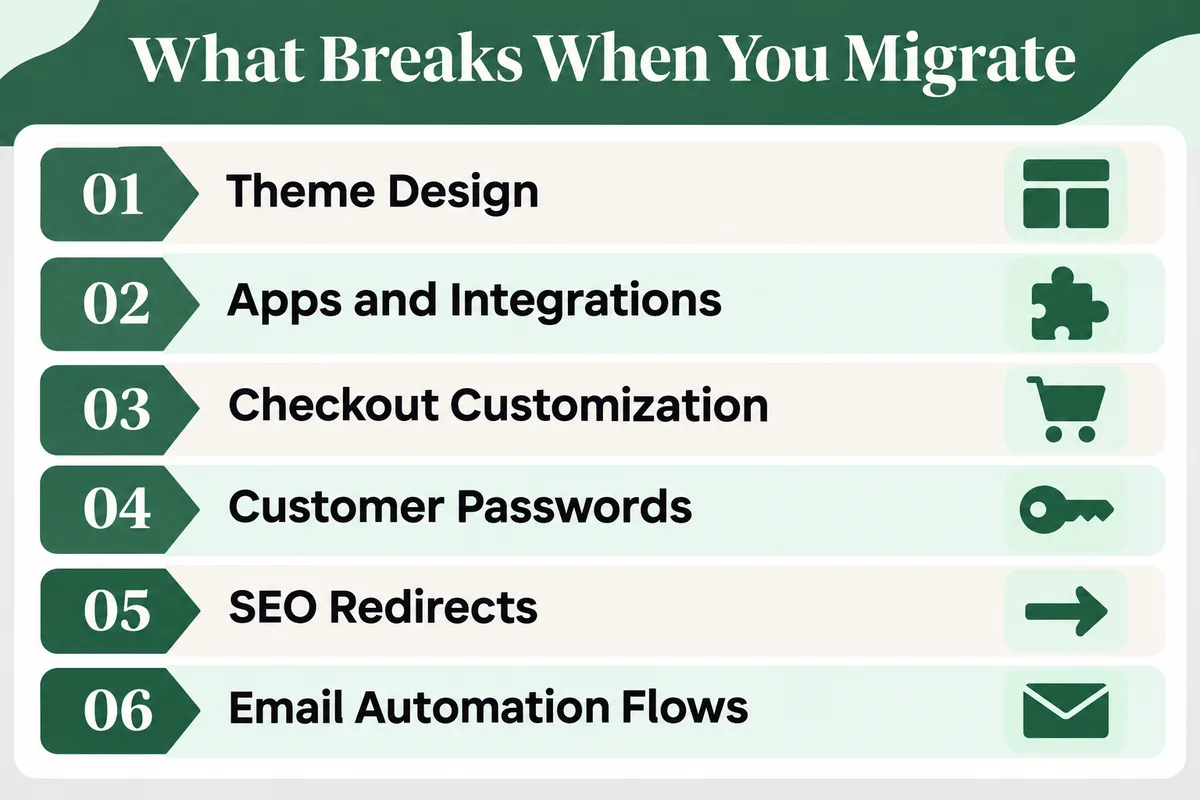
Email automation rounds it out. Klaviyo has a free official WooCommerce plugin used by thousands of brands, and AutomateWoo is a solid paid alternative at $159 a year, but no automation logic imports automatically from Shopify Flow. Every welcome sequence, abandoned cart flow, and win back campaign gets rebuilt by hand, the same way I had to rebuild automation logic migrating a client off Teachable onto WordPress and LearnDash last month. The platform changes, but the actual labor of rebuilding what used to run itself does not go away.
Is a Full Migration Worth It, or Is There a Middle Path?
Full migrations are real projects, not weekend tasks. Published cost ranges and timelines vary a lot and I could not trace a single authoritative figure, but the range that keeps showing up across agencies and migration tool vendors sits roughly between $2,000 and $30,000 depending on catalog size and customization, over two to eight weeks. Treat that as a rough planning range, not a quote, since your real number depends entirely on how many apps and how much custom checkout logic you are carrying over.
There is a middle path worth considering before committing to either extreme. If your pain point is specifically the transaction fee surcharge at high volume, moving to Shopify Payments directly, if you are not already on it, can sometimes solve the actual cost problem without touching the platform at all. If your pain point is checkout customization, Shopify Plus is expensive but it is a smaller change than a full platform migration. Reserve the full WooCommerce move for when the reason is structural, ownership, data portability, or a feature cap you have genuinely hit, not just this one invoice.
How Do You Decide If Switching Is Right for Your Store Right Now?
- Calculate your real new annual Shopify cost, plan price plus twelve months of actual transaction fees at your real volume, not an estimate.
- Build the honest WooCommerce comparison: hosting, theme, every plugin you would actually need, and your real payment processing rate on that side too.
- List every app your store depends on today and check, one by one, whether a real WooCommerce equivalent exists or whether it needs to be rebuilt from scratch.
- Count how many custom checkout rules or product option types you are currently working around on Shopify, since that is the clearest sign of a structural fit problem rather than a pricing one.
- Check your internal technical capacity. WooCommerce trades a monthly fee for ongoing responsibility, security updates, backups, and plugin maintenance someone has to own.
- If the honest math still favors switching after all five steps, plan the move for a slow season, never the eight weeks before your biggest sales period of the year.
Why Do Platforms Like Shopify Keep Raising Prices Without Adding Features?
Because the cost of leaving is high enough that most merchants absorb the increase instead. That is not a criticism unique to Shopify. Every hosted SaaS platform, LearnDash’s parent StellarWP, ConvertKit, Teachable, has raised prices in the past year, and every one of them is betting that the pain of switching outweighs the pain of paying more. The migration costs and broken apps covered above are exactly the mechanism that makes that bet usually correct.
This is also simply what a mature subscription business does. Shopify went from a scrappy startup charging almost nothing to a public company with shareholders expecting growth, and raising prices on an already large, mostly locked in customer base is one of the most reliable ways to deliver that growth without the risk of building something genuinely new. It is a rational business decision from Shopify’s side. Whether it is a good deal for you depends entirely on your own numbers, not on Shopify’s.
How Do You Avoid Getting Blindsided by the Next Price Increase?
Whichever platform you end up on, budget for a 10 to 15 percent price increase roughly every year or two. That is the real pattern across hosted ecommerce and course platforms right now, and treating it as a surprise every time it happens is the actual mistake, not the increase itself.
Keep a current export of your product catalog, customer list, and order history regardless of which platform you are on, so that a future migration, if you ever need one, starts from your own backup instead of a scramble. And be deliberate about how deep your custom checkout logic and app dependencies go. The deeper they go on any single platform, the more expensive it becomes to ever leave, and that is exactly the advantage every price increase counts on.
Frequently Asked Questions
Did Shopify really raise its prices in October 2026?
Yes. Grow went from $95 to $105 a month and Advanced went from $339 to $399 a month, effective October 15, 2026, confirmed directly on Shopify’s own pricing page. Basic and Plus were not changed.
Is WooCommerce actually cheaper than Shopify?
Sometimes, but not automatically. Once you add realistic WooCommerce hosting, a theme, and the plugins most stores need, the total often lands close to Shopify’s Grow plan rather than dramatically under it. The real savings usually come from avoiding Shopify’s transaction fee surcharge at high volume, not from the base platform cost.
How long does a Shopify to WooCommerce migration take?
Published ranges vary widely, but two to eight weeks is a reasonable planning window depending on catalog size, app dependencies, and how much custom checkout logic needs rebuilding. Larger, more customized stores sit at the longer end.
Will my customers need to reset their passwords after migrating?
Yes. Shopify and current WordPress use different password hashing methods, so customer passwords never transfer during a migration. Every customer resets their password the first time they log in on the new platform.
Do my Shopify apps work on WooCommerce after I switch?
No. Shopify apps do not transfer, and some have no direct WooCommerce equivalent at all, Judge.me’s WooCommerce review plugin, for example, was discontinued in 2025 and is now Shopify only. Every app dependency needs to be checked individually before you commit to switching.
Should I switch platforms right before the holiday shopping season?
No. A platform migration carries real risk of broken redirects, missed SEO rankings, and checkout issues, and your highest sales period is the worst time to absorb that risk. If a switch makes sense for your store, plan it for a slow season instead.
The honest version of this decision has nothing to do with loyalty to either platform. Shopify’s October price increase is real, but ten or sixty dollars a month is rarely the actual reason to rebuild a working store. The real reasons are structural: a checkout you cannot customize without Plus, a transaction fee surcharge that scales against you at volume, or an option cap you have genuinely hit. If one of those applies to you, the migration is worth planning properly, not rushing. If none of them do, the cheaper move this month is simply recalculating your real annual cost on both platforms before you decide anything.
Not sure which side of this math your store lands on?
Send me your current Shopify plan, your real transaction volume, and the apps you depend on. I will tell you honestly what switching would actually cost and whether it is worth doing before you touch anything.
Or have the migration handled end to end
Catalog moves, redirect mapping, app replacement, and checkout rebuilds, scoped and priced in writing before anything on your live store is touched.