
Most people decide to migrate from Teachable to WordPress right after they open an invoice that is bigger than last month’s, not after a careful platform audit. The decision takes ten minutes. The migration takes considerably longer, and the part that trips people up is almost never the part they were worried about. Everyone braces for the videos. Almost nobody braces for the fact that Teachable has no button that exports a finished course.
I have built and rebuilt course businesses on both sides of this move. Teachable has real strengths, and plenty of creators are right to stay. But if you are reading this, you have probably already hit the ceiling: the Starter plan’s 7.5% transaction fee, the product cap, or the jump to Builder that more than doubled what you were paying a year ago. Here is the honest version of what migrating actually involves: what comes with you, what you rebuild from scratch, and the order that keeps a paying student from getting locked out on launch day.
Quick Answer
To migrate from Teachable to WordPress, you download your course videos, PDFs, and images one file at a time, since Teachable has no single-click course export, export your student and transaction data as CSV files, then rebuild the course structure, quizzes, and drip schedule inside LearnDash on your own WordPress hosting. There is no automated Teachable-to-LearnDash importer. Budget two to five weeks depending on course size, expect every quiz and automation to be rebuilt by hand, and plan the payment handover carefully, since existing Teachable subscriptions do not follow you to a new processor automatically.
📋 What’s Covered
02Why Are Creators Leaving Teachable in 2026?
03How Do You Get Your Course Content Out of Teachable?
04How Do You Rebuild Your Courses in WordPress and LearnDash?
05How Do You Move Your Students Without Locking Them Out?
06What Happens to Your Teachable Payments and Subscriptions?
07How Do You Keep Your Google Rankings When You Migrate From Teachable?
08How Do You Launch Without Stranding a Paying Student?
09What Does WordPress and LearnDash Actually Cost Compared to Teachable?
10Why Do Most Teachable to WordPress Migrations Go Wrong?
11How Do You Avoid This on Your Next Platform Move?
12Frequently Asked Questions
What Actually Happens When You Migrate From Teachable to WordPress?
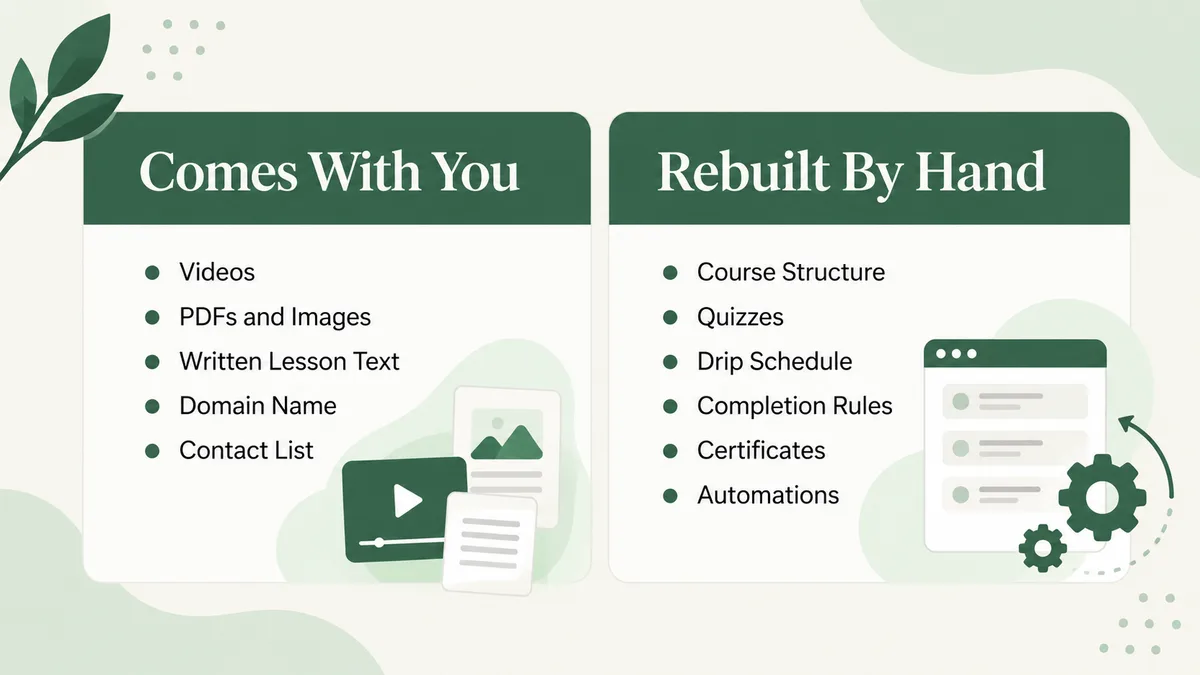
Nobody moves a course business for fun. The move happens because the hosted platform stopped fitting, usually around pricing, and the mental model that keeps the process sane is simple: your raw assets come with you, and everything that describes how those assets behave gets rebuilt by hand.
Your raw assets are the video files, PDFs, slide decks, lesson text, your domain, and your contact list. Everything else, the course structure, the lesson order, the quiz logic, the drip schedule, the completion rules, and any automation you wired up through Teachable’s integrations, has to be recreated inside WordPress and LearnDash. Teachable was never built to hand that structure to a competitor, and there is no reason it would be.
Why Are Creators Leaving Teachable in 2026?
Teachable’s own published pricing page shows the real shift. Starter runs $39 a month, or $29 billed annually, and still carries a 7.5% transaction fee on every sale on top of standard card processing. Builder jumped to $89 a month, or $69 annually, though it drops the transaction fee if you use Teachable Payments. Growth sits at $189 a month, or $139 annually. The free plan that used to let brand-new creators test the water is gone.
The complaint that shows up most often in reviews is not the price alone. It is the combination of a transaction fee on the cheapest plan with hard limits on products and admin users that force a creator onto a more expensive tier before they are ready for one. A creator selling three courses under Starter is paying a percentage of every sale and is one new product away from an upgrade they did not plan for.
None of this makes Teachable a bad product. It makes it a product whose cost structure scales against you exactly when your course business starts working. That is the trigger for most of the migration conversations I have, and it is worth naming directly before you start moving anything.
How Do You Get Your Course Content Out of Teachable?
This is the step most migration guides gloss over, and it is the one that sets your real timeline. Teachable’s own help center article on exporting school content says it plainly: there is no native feature that exports a course as a single unit, support cannot run a full export on your behalf, and bulk downloading of all course files at once is not supported.
So the real process is manual, file by file. Videos, banner images, PDFs, and audio files come out one at a time through the three-dot menu in the curriculum editor. Text blocks get copied into a document you control. Images inside lesson text get saved individually. User data and transaction history export cleanly as CSV files, emailed to you from the Users and Transactions sections, but that only covers your contacts and sales records, not your course structure.
Before you touch anything, duplicate every course inside Teachable first. The duplicate can stay unpublished, and it gives you a safety copy of the original structure to check your rebuild against later, which matters more than it sounds like it should once you are three courses into a rebuild and cannot remember the original lesson order.
How Do You Rebuild Your Courses in WordPress and LearnDash?
LearnDash maps cleanly onto Teachable’s structure, which is one real reason it is the usual destination. A Teachable school becomes a WordPress site, a Teachable course becomes a LearnDash course, and Teachable’s sections and lectures become LearnDash’s lessons and topics. The quiz builder, the certificate settings, and the drip-content scheduling all have direct LearnDash equivalents, so nothing about the rebuild requires inventing a new course structure, only re-entering the one you already have.
I built a NASBLA-approved boater safety course on exactly this stack for Certified Boater, using LearnDash for the course and quiz logic with WooCommerce handling checkout, and it is the same pattern that fits a Teachable rebuild: LearnDash for the course mechanics, WooCommerce or MemberPress for billing, and a page builder for the parts that actually need to look good rather than just function.
Upload every video to your own host or a dedicated video platform rather than the WordPress media library, since self-hosted video on shared server resources is the single most common cause of a slow course site. Rebuild quizzes one question at a time, checking each against the duplicate you kept in Teachable. Set your completion rules and certificate triggers last, after the lesson structure is confirmed, since LearnDash calculates completion from the structure itself.
How Do You Move Your Students Without Locking Them Out?
Your exported user CSV gives you names and emails, not working logins on the new site, so students need new accounts on WordPress regardless. Import the CSV through a plugin that creates WordPress user accounts and enrolls them into the matching LearnDash course in one pass, rather than creating accounts and enrollments as two separate manual steps.
Course progress and quiz scores do not transfer. There is no field in Teachable’s export that records which lessons a student completed in a format LearnDash can read, so every student restarts progress tracking from zero on the new platform even if they finished the whole course on Teachable. Say this plainly in your migration announcement rather than letting students discover it themselves, because a student who already passed every quiz and gets flagged as zero percent complete will assume something is broken.
Send the new login details directly rather than relying on students to find a WordPress password-reset email that might land in spam. A short video walkthrough of the new course player cuts support tickets more than any written instructions will.
What Happens to Your Teachable Payments and Subscriptions?
This is the part everyone underestimates. If you are on Teachable Payments, your processing relationship lives inside Teachable, not with you directly, so an active payment plan or subscription on Teachable does not simply continue billing once you launch on WordPress. You need your own payment processor, usually Stripe, connected to WooCommerce or MemberPress before launch, and every recurring student needs to either be migrated to a new subscription on your processor or re-subscribe after the move.
If a student is mid-payment-plan, decide upfront whether you will honor the remaining installments manually, offer a discounted one-time payoff, or ask them to re-enter card details on the new checkout. Whichever you choose, put it in writing before launch, because a surprised recurring-billing customer is the fastest way to generate a chargeback.
How Do You Keep Your Google Rankings When You Migrate From Teachable?
If your Teachable school sits on a custom domain and that domain carries any organic traffic, map every old URL to its new WordPress equivalent with a 301 redirect before you switch DNS, not after. A Teachable school’s URL structure rarely matches WordPress’s, so this is usually a manual mapping exercise rather than something a plugin does automatically.
Submit your new sitemap in Google Search Console the same day you go live, and keep the old Teachable site reachable with redirects active for at least a few months rather than deleting it immediately. Search engines re-crawl on their own schedule, and a dead link where a ranking page used to be costs you more than a slow re-index would.
How Do You Launch Without Stranding a Paying Student?
Run through the entire flow as a student before you tell anyone the move is happening. Buy a course on the new checkout with a real card, receive the confirmation email, log in, watch a video, take a quiz, and hit a drip gate if your course uses one. Then repeat the whole sequence on a phone, since a layout issue that never shows up on a desktop browser is often the first thing a student notices.
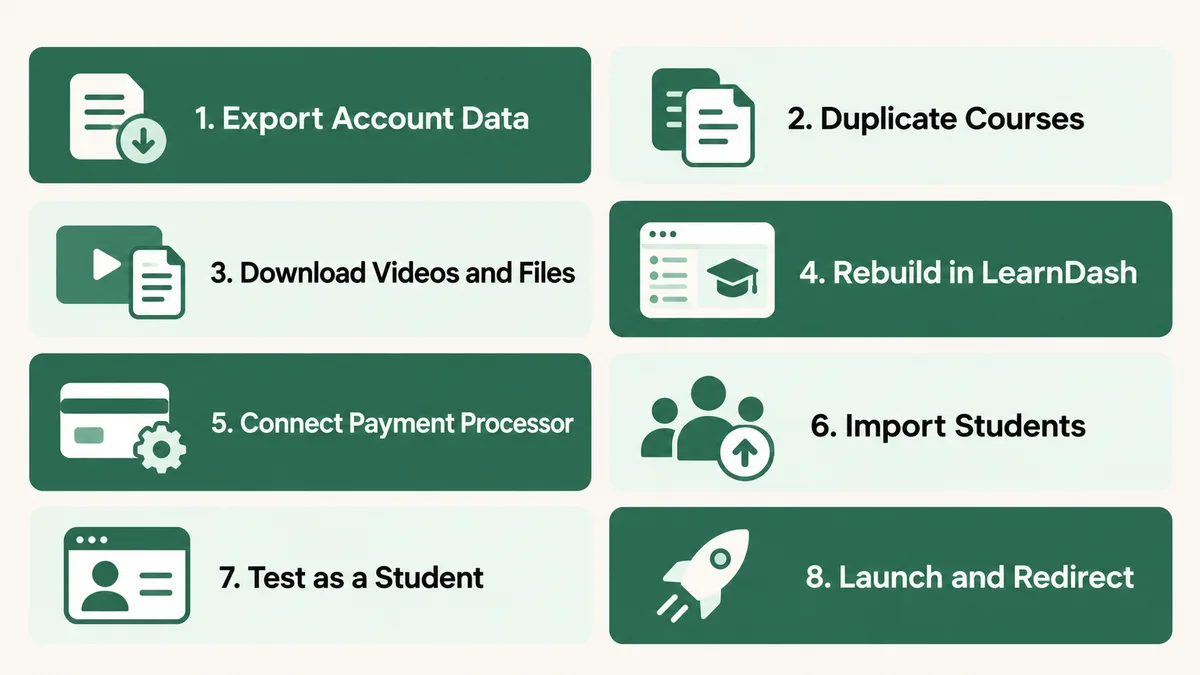
Tell students what is changing before it changes, not after. One email a week ahead of the switch, explaining the new login process, the progress reset, and who to contact if something looks wrong, prevents most of the support load. The migrations that generate refund requests are rarely the technically messy ones. They are the quiet ones nobody warned anyone about.
What Does WordPress and LearnDash Actually Cost Compared to Teachable?
Cost is usually why people start looking, so it deserves real numbers instead of a vague promise of savings.
On Teachable, Builder at $69 a month annually removes the transaction fee, putting a mid-size creator at roughly $828 a year before any payment processing. Growth at $139 a month annually runs about $1,668 a year. Starter looks cheaper on paper at $29 a month, but the 7.5% transaction fee means a creator doing $3,000 a month in sales is actually paying around $225 a month in fees on top of the plan, which erases the apparent savings fast.
On the WordPress side, LearnDash’s standard annual licensing runs $259 for Essentials, $399 for Pro, and $599 for Elite, all with zero transaction fees of its own since you connect your own payment processor directly. Managed WordPress hosting suited to a course site starts around $35 a month, or $30 billed annually, at a provider like Kinsta’s entry tier, which is billed on bandwidth rather than a hard visitor cap.
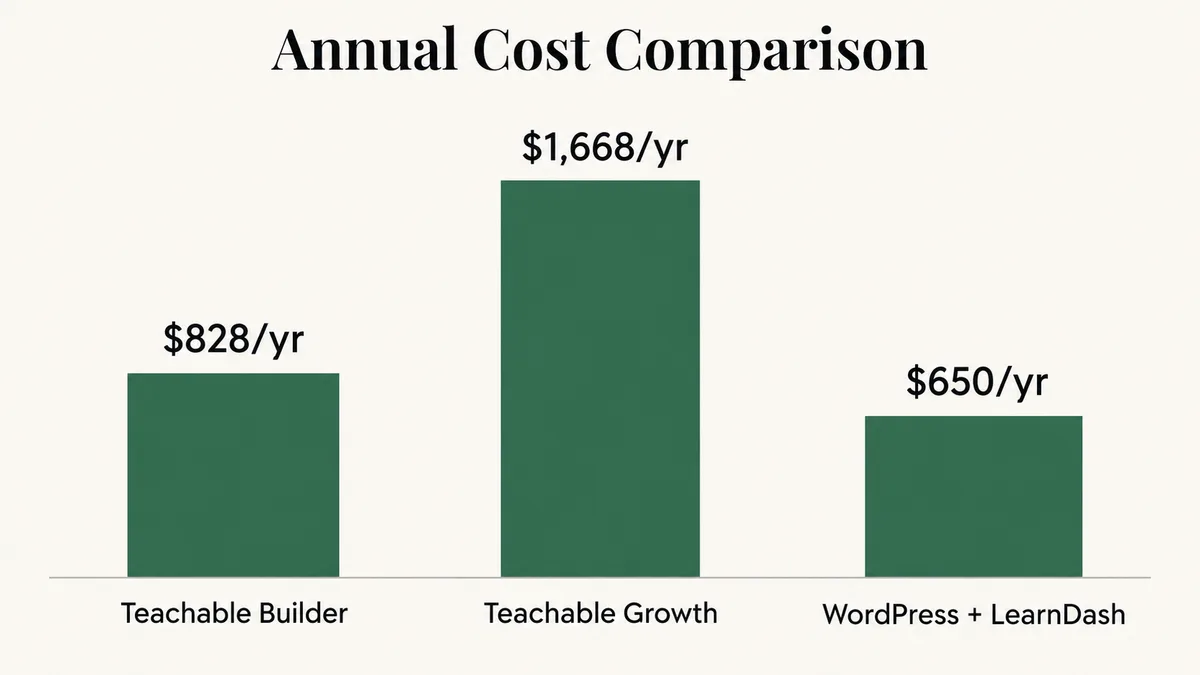
So a baseline WordPress and LearnDash stack lands around $619 a year on annual hosting billing ($259 for LearnDash Essentials plus $360 for Kinsta’s entry tier), or around $679 on monthly hosting billing, against $828 to $1,668 a year on Teachable before any transaction fees, with the gap widening further as sales volume grows and Teachable’s percentage cut grows with it. Read that honestly too. The WordPress baseline does not include a video host, an email platform, or a checkout plugin the way Teachable’s bundle does, so a fully loaded WordPress stack usually lands closer to $900 to $1,300 a year, plus the one-time cost of the rebuild itself.
Why Do Most Teachable to WordPress Migrations Go Wrong?
The failure pattern is almost always the same, and it is rarely a technical bug. Someone treats the migration as a weekend project, exports the CSVs, rebuilds the easy courses, and only discovers the payment-handover problem after launch, when the first renewal date for a Teachable subscriber arrives and nothing happens on either platform.
The second most common failure is underestimating video. A course with forty lecture videos means forty individual downloads and forty individual re-uploads, and skipping the duplicate-course safety copy in Teachable means there is no reliable way to confirm every file made the trip. Both failures share the same root cause: treating a manual, multi-system process as if it were a single export-import button, because that is what the move feels like it should be.
How Do You Avoid This on Your Next Platform Move?
Keep master copies of every video, PDF, and worksheet in your own storage, uploaded to whichever platform you use rather than created inside it. Keep the written source of every lesson in a document you control, not only inside a hosted editor. Export your contact list on a regular schedule rather than waiting for the day you need it in an emergency. Use your own domain from day one, and your own payment processor wherever a platform allows it, because whoever holds the billing relationship effectively holds your recurring revenue.
Frequently Asked Questions
Is there a plugin that imports Teachable courses into LearnDash automatically?
No. Teachable has no native course-export feature and does not support bulk downloading of course files, confirmed directly in its own help center documentation. Since there is no complete, structured data set describing your course, no importer plugin can read something that does not exist, so the rebuild is manual regardless of which tool claims to automate it.
How long does it take to migrate from Teachable to WordPress?
A single small course with ten to fifteen lessons can move in under a week. A full school with multiple courses, quizzes, and an active subscriber base usually takes two to five weeks, most of it spent on manual video downloads, quiz rebuilding, and testing the new checkout before announcing anything to students.
Will my students lose their course progress?
Yes, for progress tracking and quiz history specifically. Teachable’s data exports cover user accounts and transactions, not a lesson-by-lesson completion record that LearnDash can import, so every student’s progress bar starts over on the new platform even if they already finished the course. Communicate this before launch rather than letting students discover it on their own.
Can I keep my domain and my email list?
The domain, yes, as long as you own it through a registrar rather than exclusively through Teachable, then point its DNS at your new WordPress host once redirects are tested. Your contact list exports as a CSV and comes across fine, but any tags, sequences, or automation logic attached to it in Teachable’s own email tools do not, so those get rebuilt inside whichever email platform you connect to WordPress.
Should I use LearnDash or a different WordPress LMS plugin?
LearnDash is the most direct match for Teachable’s own structure, with a one-to-one relationship between courses, lessons, and quizzes, plus mature certificate and drip-content features. It is worth comparing against alternatives like LifterLMS or Sensei if your course relies heavily on a feature Teachable does not have, such as cohort-based scheduling, but for a straightforward course rebuild, LearnDash is the safer default.
When does it make sense to stay on Teachable instead of migrating?
If you are early, selling one course under a few thousand dollars a month, and value having everything bundled into one monthly bill with no server to manage, the transaction fee on Starter may still cost less in time and stress than running your own WordPress stack. The math tips toward migrating once your sales volume makes the percentage fee bigger than a LearnDash license, or once you outgrow Builder’s product and admin-user limits.
If you are weighing this move, the honest answer is almost never “migrate immediately” or “never migrate.” It is a real cost-and-time tradeoff that changes as your course business grows, and it is worth running the numbers on your own account rather than someone else’s. For more on what a LearnDash-based course site actually looks like once it is live, see how a similar move played out for a Kajabi-to-WordPress migration, or read through the common access issues covered in Teachable student access troubleshooting if you are still deciding whether the platform itself is the problem.
Thinking about making the move?
Send me what your Teachable account actually contains: courses, active subscriptions, automations, and list size. I will tell you honestly how long the migration takes, what it costs, and whether staying put is the better call.
Or have the rebuild handled end to end
Course rebuilds, student imports, payment handovers, and redirect mapping across both platforms, scoped in writing before anything is touched.