

Your course used to feel instant. Now the profile page takes a visible beat to load, the quiz list drags, and on launch day the whole site seems to lean against a wall every time someone submits an answer. If you are searching for LearnDash site slow because your student count finally crossed into the thousands, the good news is that this is not a vague “LearnDash is heavy” problem you just have to live with. It is almost always one specific query, loop, or setting, and the real cases below name exactly which ones.
I build and maintain WordPress course sites for a living, LearnDash among them, and the pattern repeats across every site that grows past a few hundred active students: the slowdown rarely tracks with total enrollment. It tracks with how many of those students are doing something, taking a quiz, loading a profile page, hitting a report, at the same moment. Below are nine real, documented causes, each with the fix that actually applies.
Quick Answer
LearnDash slows down with more students because most of its pages read and write live from the database instead of serving cached HTML, and a handful of specific features, ProPanel’s background reports, course progress loops on profile pages, and quiz listings, scale by multiplying database rows rather than by a flat cost per student. The fix is rarely more RAM alone. It is finding the specific query or loop that is exploding, adding real object caching instead of relying on page caching, and sizing hosting to concurrent users during your busiest moments, not your total student count.
📋 What’s Covered
02Cause 1: Is LearnDash ProPanel Running an Expensive Query in the Background?
03Cause 2: Are Profile and Progress Pages Looping Through Every Enrollment on Every Load?
04Cause 3: Is Your Quiz Listing Page Scanning Every Quiz Link at Once?
05Cause 4: Are Simultaneous Quiz Attempts Hitting the Database at the Same Moment?
06Cause 5: Is an Essay Question Checking Every Existing Post Before It Saves?
07Cause 6: Are You Trying to Cache Pages That Were Never Cacheable?
08Cause 7: Is Your Hosting Sized for Total Students Instead of Concurrent Ones?
09Cause 8: Are Other Plugins Competing for the Same Database Writes?
10Cause 9: Have You Hit a Real Ceiling, or Just One Unscoped Query?
11LearnDash Site Slow: Which Symptom Points to Which Cause?
12Why Does LearnDash Strain Under Scale More Than a Simple WordPress Site?
13How Do You Keep a Growing LearnDash Site From Slowing Down Again?
14Frequently Asked Questions
What Actually Slows a LearnDash Site Down as It Grows?
A course page, a lesson, a quiz, a profile screen, and a ProPanel report are not like a blog post. Every one of them has to check who you are, what you have completed, and what you are allowed to see, on every single load. A WordPress caching plugin can serve the same HTML to a thousand anonymous visitors on a blog. It cannot do that for a page whose entire content depends on which specific student is looking at it.
That difference is the root of nearly everything in this post. Almost every action a student takes, starting a lesson, submitting a quiz, viewing a certificate, writes to the database, and a page that cannot be served from cache means at least one real PHP process and a fresh set of database queries on every load. A handful of specific LearnDash features multiply that cost further by querying across every combination of users and courses, rather than just the one student currently looking at the screen, which is exactly where the nine causes below start.
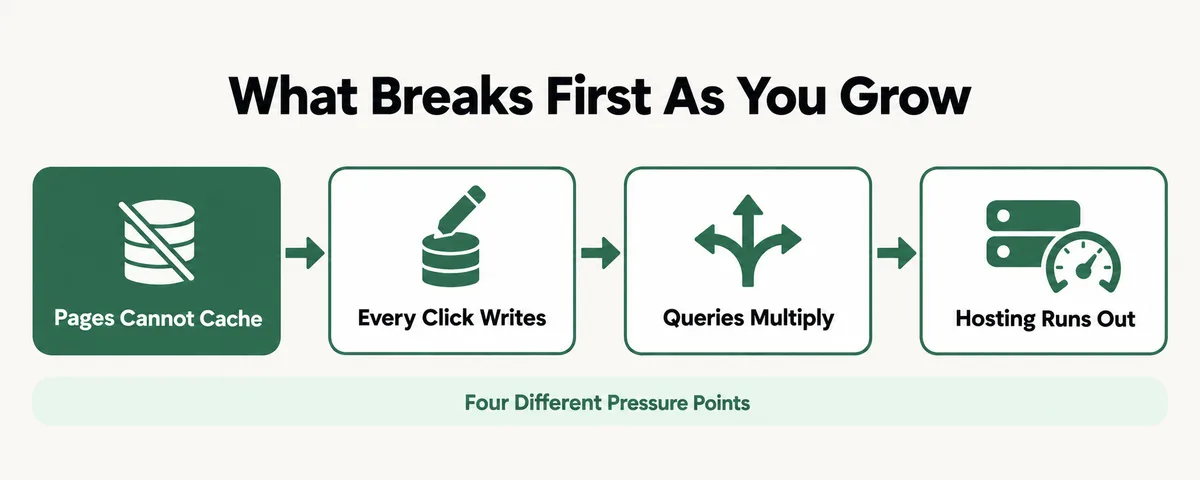
LearnDash’s own documentation does not pretend otherwise. The plugin’s technical requirements list a PHP memory limit of 128MB as a LearnDash-only requirement, on top of whatever WordPress itself and your other plugins already need, which is a quiet admission that the plugin is genuinely heavier than a typical WordPress install. The nine causes below are the specific, named reasons that weight shows up as real seconds of waiting once your student count climbs.
Cause 1: Is LearnDash ProPanel Running an Expensive Query in the Background?
ProPanel is LearnDash’s built-in reporting layer, and one of its real, documented failure modes is a query that scales by multiplying users by courses rather than by either number alone. A real case logged on a site with 21,000 users found a single query against the wp_learndash_user_activity table, joining users, posts, and activity records to find who had not started a course yet, taking 10.8 seconds and scanning more than 4.3 million rows, triggered through admin-ajax.php by a ProPanel screen.
The plugin’s own code comment, quoted in that writeup, is refreshingly direct about why: “for every combination of users and posts (courses) we will fill out row. This can be expensive when you have thousands of users and courses.” That is not a bug hiding in the dark. It is a documented tradeoff that only becomes painful once your numbers get large enough.
Fix: Open ProPanel and audit which reports you actually check on a regular basis. Disable the modules you rarely open, especially any screen that cross-references every user against every course, since that is exactly the query shape that gets expensive. If you genuinely need that report at scale, this is a case for a developer to add a proper index or scope the query, covered in detail in the original write-up on LearnDash’s database design, rather than running it unscoped against a growing student list.
Cause 2: Are Profile and Progress Pages Looping Through Every Enrollment on Every Load?
The LearnDash developers at Uncanny Owl published real before-and-after numbers from their own optimization work, and the profile page was the worst offender they found. On large sites, loading a student’s profile page could require database operations exceeding 150 seconds and tens of thousands of individual SQL queries, against a typical WordPress page’s roughly 200. The cause: the Course Progress Details section looped through every course a student was enrolled in and pulled full records for each one, every time the page loaded, whether or not anyone needed to see that detail.
A student enrolled in three courses barely notices this. A student enrolled in forty, on a site with thousands of students loading their profile throughout the day, turns a minor inefficiency into a real bottleneck.
Fix: The real fix Uncanny Owl shipped was a developer-level rewrite: load summary data only, then pull full course detail only when a student actually drills into one specific course, combined with a transient cache so the same data is not recalculated on every visit. That change took their profile pages from 150 seconds to 2. If a custom rewrite is not on the table yet, reducing how many courses are visible by default on the profile screen is a smaller, interim step worth asking a developer about.
Cause 3: Is Your Quiz Listing Page Scanning Every Quiz Link at Once?
The same Uncanny Owl optimization work found quiz listing pages taking 120 seconds to load on sites with more than 1,000 quizzes. The cause sits in how LearnDash builds its quiz filters: to populate the dropdowns connecting quizzes to courses, lessons, and topics, it looks up every association between all of them at once, rather than loading them only as a student narrows down what they are looking for.
This one tends to catch certification-heavy or exam-bank style courses off guard, since quiz count can climb into the thousands long before student count does, which means a smaller site with a large question bank can hit this before a much bigger site with fewer quizzes ever does.
Fix: The documented fix traded some filtering convenience for speed: load the list of courses first, and only surface the lessons and topics inside a course after it is selected, instead of building every association up front. That change brought the same page from 120 seconds down to 2. If your quiz count is already deep into four digits, treat this as a sign the default listing screen needs the same kind of staged loading, not a caching plugin.
Cause 4: Are Simultaneous Quiz Attempts Hitting the Database at the Same Moment?
Quizzes are, by a wide margin, the most database-intensive thing LearnDash does, and the slowdown is specifically tied to how many students are attempting one at the exact same time, not how many are enrolled overall. Since nearly every action in LearnDash writes to the database, a cohort of students all opening the same timed quiz at once creates a real spike in simultaneous writes, and under enough load that spike can produce table locks or write conflicts rather than just a slower page.
This cause shows up almost exclusively around scheduled events: a single shared deadline, a live cohort session, or a graded exam window, which is exactly when a site owner is least able to absorb a slowdown without student complaints.
Fix: Stagger quiz open and close windows across a cohort instead of setting one identical deadline for every student, which spreads the write load out instead of concentrating it into a single spike. Pair that with the object caching covered in Cause 6, since taking repeat reads off MySQL frees up real capacity for the writes a quiz window actually needs. For a recurring graded launch, it is worth having a developer watch Query Monitor during a live quiz window at least once to confirm there is no lock contention specific to your setup.
Cause 5: Is an Essay Question Checking Every Existing Post Before It Saves?
This is the most specific, and most surprising, cause on this list. Uncanny Owl’s writeup documents a site with 120,000 rows already in the wp_posts table where saving a single essay-type quiz answer took 35 seconds. The reason: LearnDash checked the submission’s title and name against every existing post on the site to avoid creating a duplicate, before it would save the new entry, and that check gets more expensive as the table grows, regardless of how many students are submitting at once.
A site with heavy use of essay or open-ended quiz questions accumulates exactly the kind of row growth that triggers this, since every submission is itself a new row the next check has to scan past.
Fix: The actual fix is a developer change: skip the duplicate-title check entirely and force a guaranteed-unique post name at creation instead, which cut the same save from 35 seconds to 3 in the documented case. If you are leaning heavily on essay-style questions at real scale and have not had this specific check looked at, it is worth raising directly with whoever maintains your site rather than assuming general slowness has one single cause.
Cause 6: Are You Trying to Cache Pages That Were Never Cacheable?
A real, documented limitation of LearnDash is stated plainly in one teardown of the plugin’s performance: “Caching the plugin pages is not possible. The dynamic content interacts with the database.” That is not a configuration mistake. A course page, a quiz, or a profile screen has to check your specific progress on every load, so a standard page cache, the same kind that works beautifully on the rest of a WordPress site, simply has nothing to serve for these pages. Every uncached load spawns at least one real backend PHP process, and that cost climbs directly with how many students are active at once.
The mistake I see most often is a site owner assuming a page caching plugin alone should have fixed this, when page caching was never the right tool for this particular job in the first place.
Fix: Add real object caching, Redis or Memcached, at the PHP and MySQL layer rather than relying on a page-cache plugin to help here. Object caching stores the results of repeated database queries, so a student’s progress data does not get recalculated from scratch on every single load. This sits alongside, not instead of, whatever page cache you already run for the parts of your site that are not student-specific.
Cause 7: Is Your Hosting Sized for Total Students Instead of Concurrent Ones?
LearnDash’s own technical requirements set a floor, not a scaling plan: WordPress 6.6 or newer, PHP 7.4 or newer with 8.3 recommended, MySQL 5.6 or MariaDB 10.1 or newer, and a PHP memory limit of 128MB specifically for LearnDash, on top of everything else running. One widely cited hosting rule of thumb goes further, suggesting at least 2GB of RAM to start, rising to 4GB of RAM with a 512MB PHP memory limit once more than roughly 20 students are active in courses at the same time. A separate teardown of common LearnDash performance complaints notes plainly that ordinary shared hosting plans handle “only a few dozen” LearnDash users well before problems start.
The number that matters in every one of those figures is concurrent users, students actively doing something right now, not your total enrollment. A site with 10,000 enrolled students where 40 are ever logged in at once has a very different real load than one with 2,000 enrolled students where 400 hit the site during a single live cohort session.
Fix: Check your real concurrent-user count during your actual busiest windows, a launch day, a cohort kickoff, a deadline night, through your host’s own metrics or a monitoring plugin, rather than going by total enrollment. Size your hosting plan and PHP memory limit to that peak with real headroom, and revisit it every time a cohort or launch is meaningfully larger than your last one, the same way you would plan capacity for any other traffic spike.
Cause 8: Are Other Plugins Competing for the Same Database Writes?
LearnDash rarely runs alone. WooCommerce handles the purchase, a membership plugin might gate access, and an automation tool like Zapier or Make could be listening for enrollment events to sync elsewhere. Every one of those is making its own calls through admin-ajax.php or the REST API on the same pages where LearnDash is already writing progress data, and they compete for the same database connections and the same PHP workers during your busiest moments.
This stacking effect is the same pattern I cover in more depth in my guide to a slow WooCommerce membership site, and a course business selling through WooCommerce on top of LearnDash is genuinely carrying two separate sets of bottlenecks that can mask each other.
Fix: Use the same isolate-and-test approach that works for any plugin conflict: temporarily deactivate anything not strictly essential during a controlled, low-traffic test window, note whether the specific slow action improves, then reactivate plugins one at a time, testing after each, until the bottleneck returns. Whichever plugin brings it back is the one competing hardest for the same resources LearnDash needs.
Cause 9: Have You Hit a Real Ceiling, or Just One Unscoped Query?
Every real case in this post, the 10.8 second ProPanel query, the 150 second profile page, the 120 second quiz list, the 35 second essay save, had one specific, identifiable cause, and one specific fix that addressed exactly that cause. None of them were solved by a blanket “LearnDash is too heavy, replace it” conclusion, because the underlying plugin was not broken. One unscoped query or loop was.
If you have genuinely ruled out Causes 1 through 8 and the site is still broadly sluggish across the board, not on one specific page type, that is a real signal you may be approaching the edge of your current hosting tier or architecture, which is a bigger, legitimate conversation. Most sites searching for this phrase, though, are not there yet.
Fix: Before paying for a bigger server or planning a rebuild, install Query Monitor and watch it during an actual slow moment, not a quiet one. In every documented case above, one specific query or loop, not the plugin as a whole, was the real cause, and the fix was exactly as specific. Find that query first.
LearnDash Site Slow: Which Symptom Points to Which Cause?
Nine causes is a lot to check one at a time. Match your actual symptom first, the way the real cases above split out by exactly which page type was slow.
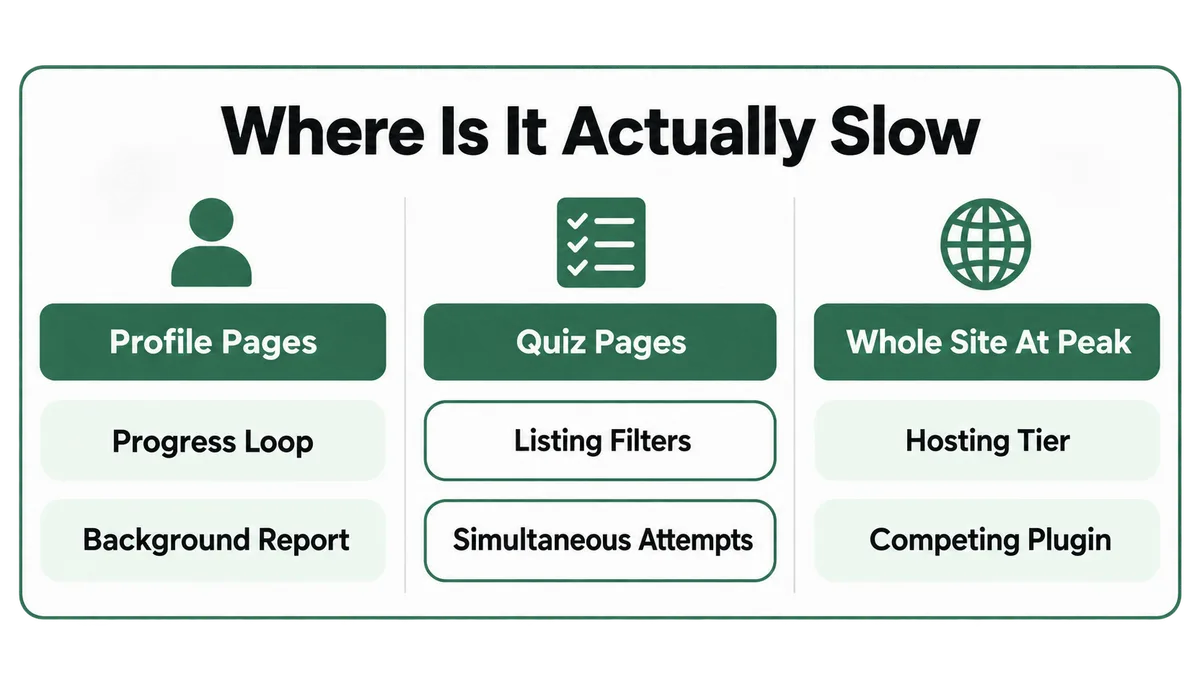
- Only the profile or progress pages are slow points first to Cause 2, the course progress loop, then Cause 1, a ProPanel report running in the background.
- Only quiz-related pages are slow points to Cause 3 if it is the listing or filter screen, and Cause 4 if it is specifically simultaneous attempts during a shared quiz window.
- Saving a specific answer type is slow, especially essay or open-ended questions, points directly to Cause 5.
- The whole site feels sluggish during specific peak windows points to Cause 7, hosting sized for total rather than concurrent students, and Cause 6, missing object caching.
- Slowness only started after adding a new plugin points to Cause 8, a competing database write source.
- You have ruled out the above and it is still broadly slow all the time lands on Cause 9, which means it is time to profile a real slow moment directly rather than keep guessing.
Why Does LearnDash Strain Under Scale More Than a Simple WordPress Site?
A basic WordPress page mostly has to render the same content for everyone and hand it back fast, which is exactly what a page cache is built for. LearnDash’s entire job is the opposite: track precise, individual state, who completed what, when, with what score, for every single student, which means correctness per learner matters more than raw throughput by default. That tradeoff is deliberate, and it is the direct cause of every one of the nine causes above.
The real ceiling on this tradeoff is higher than most site owners assume. A documented case study of a non-profit’s LearnDash site describes scaling to 225,673 real users, far beyond what any default WordPress hosting plan was ever built for. Getting there took a cluster-based hosting setup with load balancers, a custom Redis object-cache cluster, database clustering to reroute the most expensive queries to isolated databases, replacing page builders with an in-house templating tool, and, after it caused multi-minute load times past 100,000 users, replacing WordPress’s own native user-roles engine entirely.
Almost no course business needs anything close to that. The reason it is worth knowing about is that the underlying bottlenecks at 225,000 students, uncacheable dynamic pages, expensive cross-user queries, and a database straining under concurrent writes, are the exact same categories as Causes 1 through 8 above at any smaller scale. The difference between a sluggish site with a few thousand students and a smooth one with a few hundred thousand is almost never “pay for more hosting” alone. It is finding and rewriting the specific thing that is expensive, at whatever scale you are actually at.
How Do You Keep a Growing LearnDash Site From Slowing Down Again?
Most of the nine causes above are preventable with a short list of habits, checked as your course grows rather than only after something breaks on a launch day.
- Track concurrent users during real peak windows, not total enrollment, as the number that actually predicts strain on your site.
- Add real object caching before a launch forces the issue, rather than discovering mid-event that page caching alone was never going to help.
- Audit ProPanel modules and your quiz count as they climb into the thousands, since that is a separate growth curve from your student count and gets missed easily.
- Stagger quiz deadlines and cohort launches instead of pointing every student at one shared moment in time.
- Test any new membership, automation, or reporting plugin under a simulated peak load before turning it on for real students, rather than finding out it competes with LearnDash the hard way.
- Revisit your hosting tier against LearnDash’s own requirements every time enrollment jumps meaningfully, not only once something has already slowed down.
If quizzes themselves are the part of your course that keeps causing trouble, a lot of the same diagnostic habits apply to quiz retakes that will not work and to certificates that will not generate, since both trace back to the same completion and progress data this post has been working through.
Frequently Asked Questions
How many students can LearnDash actually handle before it slows down?
There is no single fixed number, because the real limit tracks concurrent active users, not total enrollment. One teardown of common complaints notes that ordinary shared hosting handles only a few dozen LearnDash users well, while a documented case study scaled a single LearnDash site to over 225,000 real users with the right hosting architecture. Your actual ceiling depends far more on your hosting tier and which heavy features you use than on a hard student cap.
Will a caching plugin fix a slow LearnDash site?
Not by itself. Standard page caching cannot cache LearnDash’s dynamic, per-student pages, since the plugin’s own dynamic content interacts directly with the database on every load. What actually helps is object caching, which caches database query results, combined with fixing the specific queries or loops that are expensive in the first place.
Is it safe to disable LearnDash ProPanel?
Generally yes, if you are not actively relying on its reports day to day. ProPanel is an added reporting layer, not the core enrollment or progress tracking that lets students access and complete courses, so disabling it stops its background queries without affecting whether students can use their courses.
Does LearnDash support multisite for agencies running several client sites?
No. LearnDash’s own documentation states plainly that it does not support multisite configurations, so each client course site needs its own standalone WordPress install rather than sharing one network, which is worth planning around before a migration or a new client build rather than after.
What is the actual minimum hosting LearnDash needs?
LearnDash’s documented minimums are WordPress 6.6 or newer, PHP 7.4 or newer with 8.3 recommended, MySQL 5.6 or MariaDB 10.1 or newer, and a 128MB PHP memory limit specifically for LearnDash. That is a bare floor, not a scaling plan. A commonly cited real-world rule of thumb is to plan for 4GB of RAM and a 512MB PHP memory limit once you are regularly running more than about 20 students active in courses at the same time.
Do I need a developer to fix this, or can I do it myself?
Some of it you can do yourself: checking your real PHP memory limit, disabling ProPanel modules you do not use, staggering quiz deadlines, and moving to a hosting tier sized for your real concurrent load. The deepest fixes, rewriting the profile page query or skipping the essay duplicate-title check, are custom PHP changes, since LearnDash ships no setting to toggle them yourself.
A slow LearnDash site at scale almost never means the plugin is bad. It means one specific query, loop, or setting that was perfectly fine at fifty students stopped being fine at five thousand, and every real case in this post had an equally specific fix once someone actually looked. Start with whichever symptom matches what you are seeing, work through its cause, and measure concurrent load rather than total enrollment from here on. If you are weighing whether to keep pushing your current setup or bring in help for the deeper fixes, my LearnDash development page covers the kind of performance work I take on.
Site slowing down as you grow?
Tell me your real student count, where exactly it feels slow, and what your hosting plan looks like. I will tell you which of these nine causes it is and what actually needs to change.
Related reading: How to Migrate From Teachable to WordPress and LearnDash Without Losing Your Students