
You set up a lead magnet funnel on the free plan, wire an opt-in to a welcome email, and it works. Then you build a second funnel for a paid offer, go to add a rule that tags buyers and starts a follow-up sequence, and Systeme.io tells you to upgrade. The Systeme.io automation rule limit is the wall most free plan users hit first, usually well before they come anywhere near the 2,000 contact ceiling.
The limit is real, and it is tight. But one rule goes a lot further than most people get out of it, and several jobs people build rules for do not need a rule at all. I build automation stacks for course creators and membership businesses, and when I audit a Systeme.io account that “needs” an upgrade, a good share of the rules in it are doing work that a product setting, a workflow or a webhook would handle without touching the quota.
Quick Answer
Systeme.io’s free plan allows 1 automation rule and 1 workflow, the Startup plan ($17 a month) allows 10 rules and 5 workflows, Webinar ($47) allows 100 rules and 20 workflows, and Unlimited ($97) removes the cap. To stretch the free plan, stack several actions inside your one rule, deliver courses, tags and communities through an offer’s Resources section instead of a purchase rule, use your separate workflow allowance for anything with delays or branches, and send extra events out through Settings, Webhooks to Zapier or Make. If you need more than two automated entry points that all run inside Systeme.io, Startup is the honest fix.
📋 What’s Covered
02Why Does One Rule Run Out So Fast?
03Workaround 1: Can One Rule Carry Several Actions?
04Workaround 2: Can Offer Resources Replace a Purchase Rule?
05Workaround 3: Which Trigger Should Your One Rule Use?
06Workaround 4: Can Your Workflow Do the Work of Several Rules?
07Workaround 5: Can Webhooks Hand the Logic to Another Tool?
08Workaround 6: Should Zapier or Make Run the Actions Instead?
09Workaround 7: Does This Job Need Automating at All?
10Workaround 8: When Is Upgrading to Startup the Real Fix?
11Systeme.io Automation Rule Limit: Which Workaround Comes First?
12Why Is the Free Plan Capped on Rules Rather Than Features?
13How Do You Plan Automations So You Stop Hitting the Cap?
14Frequently Asked Questions
What Does the Systeme.io Automation Rule Limit Actually Cap?
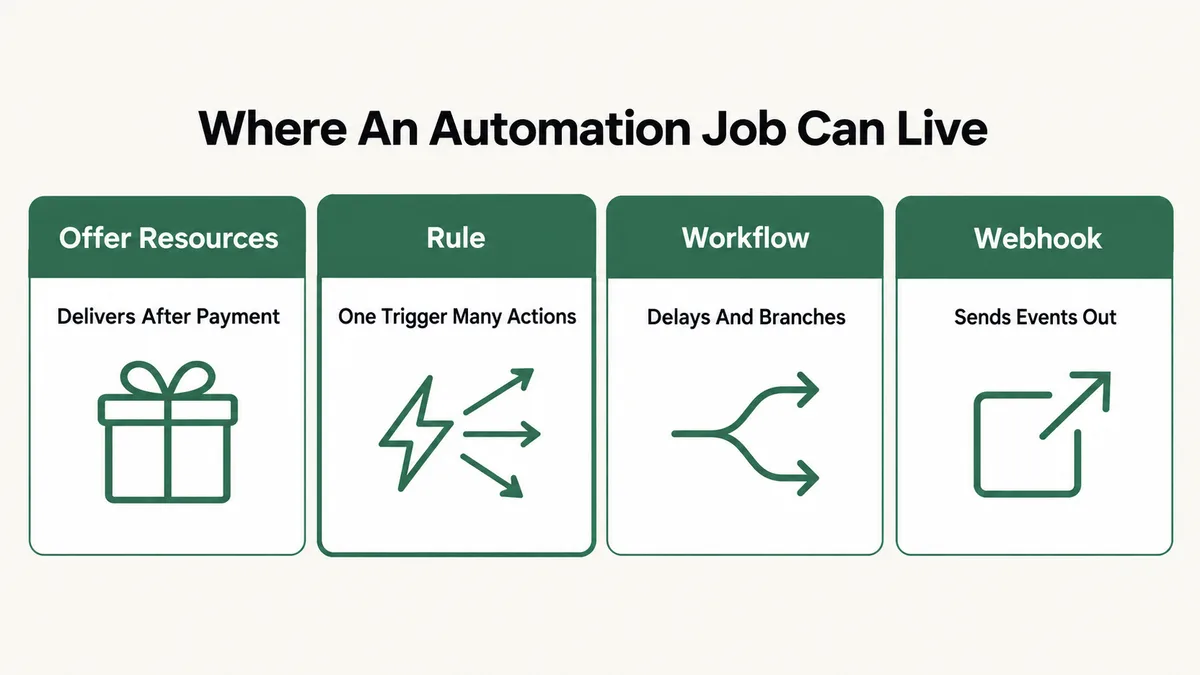
Systeme.io has two separate automation tools, and each has its own allowance. An automation rule is the simple one: a trigger on the left, one or more actions on the right. You build it under Automations, then Rules, or straight from the funnel editor. A workflow is the visual builder under Automations, then Workflows, where you can add delays, Yes and No decision branches, and actions in a sequence.
The comparison table on the Systeme.io pricing page, which I checked on 14 September 2026, lists these caps:
- Free ($0): 1 automation rule, 1 workflow, 1 email campaign, 1 tag, 3 sales funnels, 2,000 contacts.
- Startup ($17 a month): 10 rules, 5 workflows, 10 campaigns, 10 tags, 10 funnels, 5,000 contacts.
- Webinar ($47 a month): 100 rules, 20 workflows, 100 campaigns, 100 tags, 50 funnels, 10,000 contacts.
- Unlimited ($97 a month): no cap on rules, workflows, campaigns, tags or funnels, and no contact ceiling.
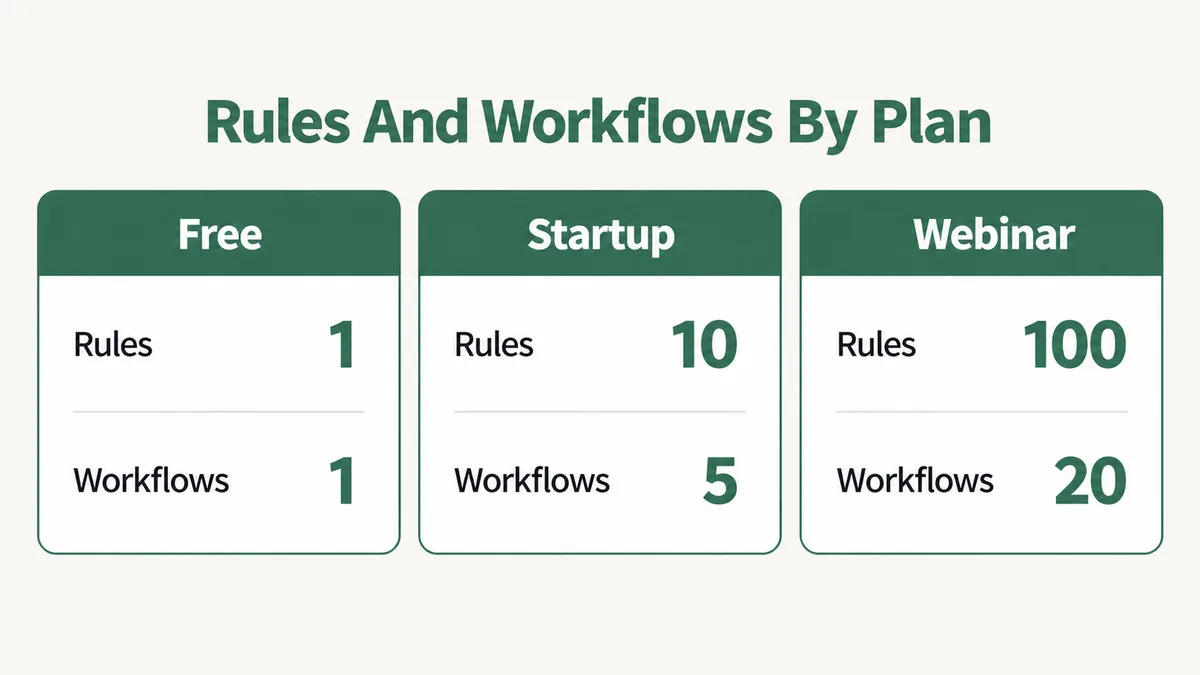
Two things in that table matter more than the rule count itself. First, rules and workflows are counted separately, so a free account has two automations to work with, not one. Second, the tag and campaign caps sit at the same level as the rule cap. Several of the usual free plan tricks lean on extra tags or extra sequences, and those run into their own walls.
One caution: pages about Systeme.io disagree on these numbers. Some third party reviews say the free plan has no rule cap at all, and one pricing breakdown lists 50 rules on Webinar rather than 100. Plans change. Check the live pricing table before you make a decision based on any number here, including mine.
Why Does One Rule Run Out So Fast?
Because a rule is built around a trigger, and a funnel business has many trigger points. Someone opts in on the lead magnet page. Someone else buys the main offer. A third person adds the order bump. A fourth clicks a link in email three. Each of those events is a different trigger, and the natural way to automate them is one rule each. On the free plan, the first one uses up the quota.
The triggers themselves are narrow, too. The Systeme.io help page on automation rules shows Funnel step form subscribed set to one specific page, and Tag added set to one specific tag. A rule for the opt-in on funnel one does nothing for the opt-in on funnel two.
Two more details from that page catch people later. A trigger can fire at most 20 times for the same contact, after which rules and workflows are switched off for that contact. And a Tag added rule only reacts to tags added after the rule exists, so saving a rule does not sweep up contacts who already carry the tag.
Workaround 1: Can One Rule Carry Several Actions?
Yes, and this is the cheapest fix on the list. The rule editor has a Trigger column and an Action column, and the Action column takes more than one action. Systeme.io’s own help page on tags describes a tag-triggered rule setting off “one or more actions”, with campaign subscription and sending an email as the examples.
So the question to ask is not “which automation do I build first” but “which single moment in my funnel deserves every action I can hang on it.” For most free plan accounts, that is the lead magnet opt-in. One rule on that trigger can send the delivery email, add the contact to your one email campaign, and enroll them in your free course, all at once.
What people get wrong is splitting those actions across rules because the tutorials they followed showed one action per rule. Tutorials do that for clarity. Nothing in the editor requires it.
Fix: Open Automations, then Rules, and list what each rule does. If two rules share a trigger, merge their actions into one and delete the other. If they have different triggers, decide which trigger reaches the most contacts and move the valuable actions there. Then test with a brand new email address, since a contact who has already fired the trigger counts toward that 20 time ceiling.
Workaround 2: Can Offer Resources Replace a Purchase Rule?
For most of what happens after a sale, yes. A digital product in Systeme.io has a Resources section on the order form, and whatever you attach there is delivered when the payment goes through. No rule is involved. The help page on order bumps lists four resource types for digital products: courses, course bundles, tags and communities.
That covers the job people most often spend their only rule on: “when someone buys, give them the course.” Systeme.io’s help page on course access lists purchase-based enrollment through the order form’s Resources section as its own method, separate from the rule-based ones. The order bump gets its own Resources too, so a bump that unlocks a bonus course needs no rule either.
The attached tag is the useful part. It lands on the buyer at the moment of payment, which gives you a clean marker for segmenting newsletters later, or a trigger to pick up in a workflow or an outside tool. On the free plan you only get one tag, so spend it on the purchase that matters most.
Fix: Open the sales funnel, go to the order form step, and check the Resources section for each offer. Attach the course, bundle or community there. If you currently have a New sale rule whose only job is enrollment, test a purchase with the resource attached, confirm access arrives, and then free up that rule for something only a rule can do.
Workaround 3: Which Trigger Should Your One Rule Use?
Pick the trigger that no other tool in the account can replace. With purchases covered by resources, the gaps that remain are usually opt-ins and email link clicks.
Opt-ins are the strongest candidate on a free account. An opt-in form has no Resources section, so the only native way to react to it is a rule or a workflow. Email link clicks are the other. The help page on link click automations says a rule can target a specific link in a specific email, while a workflow cannot select a specific link and reacts to clicks on any link instead. If your funnel depends on “clicked the webinar link, so tag them as interested,” that needs a rule.
Tag added is the flexible choice when you already feed tags in from elsewhere: an offer resource, a manual bulk action, or Zapier. You apply the tag from several places, and the one rule reacts to all of them. The catch on the free plan is the single tag allowance. If that tag is already used as a purchase marker, your Tag added rule and your purchase segment become the same thing, which works only if you want buyers and tag-driven contacts treated identically.
Fix: Write down every event you want to automate and, next to each, whether resources, a workflow or an outside tool can cover it. The event with no alternative gets the rule. If more than one event has no alternative, that is your first sign the free plan does not fit, and workaround eight applies.
Workaround 4: Can Your Workflow Do the Work of Several Rules?
Often, yes, because a workflow can branch. The Systeme.io workflow guide describes three step types: an action, a delay, and a decision that splits contacts into Yes and No paths based on contact fields, tags, email activity, registration dates, contact state or activity. Multiple conditions can be combined in one decision.
That turns one workflow into something several rules would otherwise do. Say the workflow fires on New sale. A decision checks whether the buyer already carries your lead magnet tag. On the Yes path, they get a short “thanks for coming back” email. On the No path, they get a longer welcome sequence with delays between messages. Two different experiences, one automation slot.
Workflows also carry actions rules do not have. The workflow guide lists Send webhook, and Systeme.io’s Google Sheets help page says adding a row to a sheet is only available in workflows, not in simple automation rules. Delays between actions are a workflow feature too.
The main catch: workflows only react to events after they are switched on. The guide says they do not apply to contacts who met the trigger in the past, so turning one on will not backfill anyone.
Fix: Give your rule the job that needs a specific link or a simple instant response, and give your workflow the job with timing or branching. Build the workflow on the event that splits into the most paths, add one decision step, and test both branches with two fresh contacts before relying on it.
Workaround 5: Can Webhooks Hand the Logic to Another Tool?
Yes, and this one is easy to miss because it lives in account settings rather than under Automations. The Systeme.io webhook service guide puts it under your profile picture, then Settings, then Webhooks. You pick the events to send, give it a destination URL and a secret key, and Systeme.io posts the data out when the event happens.
The supported events are Contact created, Contact tag added, Contact tag removed, Opt-In, New sale and Sale canceled. That list covers most of the triggers people want extra rules for. Each webhook also has a delivery log, reached through the three dot menu, which shows whether the receiving server accepted the message. That log is more useful for debugging than most people expect.
The pricing table does not list webhooks as a capped item, which is why this sits on the list. What a webhook cannot do alone is act on Systeme.io. It only sends data out. Something on the other end has to receive it and, if needed, call back into Systeme.io through its public API to tag a contact, enroll them in a course or start a campaign.
Fix: Create one webhook per destination rather than one per event, and select every event that destination needs. Send a real test opt-in, open the delivery log, and confirm a successful delivery before you build anything on the receiving side.
Workaround 6: Should Zapier or Make Run the Actions Instead?
If you already pay for one of them, it is a reasonable way past the limit. If you would be signing up just to avoid a $17 plan, run the numbers first.
The systeme.io app on Zapier offers five triggers: New Completed Campaign, New Optin, New Sale, New Webinar Registration and New Tag Added to Contact. Its actions cover creating or updating a contact with tags, creating or updating a contact and granting course access, removing a tag, revoking course access, and subscribing to or unsubscribing from a campaign. That is enough to rebuild most rule logic outside Systeme.io: new opt-in on funnel two, subscribe to campaign, done.
On the Systeme IO app for Make, the documented modules focus on actions: contacts, tags, contact fields, course enrollments, community memberships, and a general API call module. For triggers, you pair it with the webhook service from workaround five. Both tools connect with a key created under Settings, then MCP and API keys, and the pricing table lists 30 API requests a minute on the free plan.
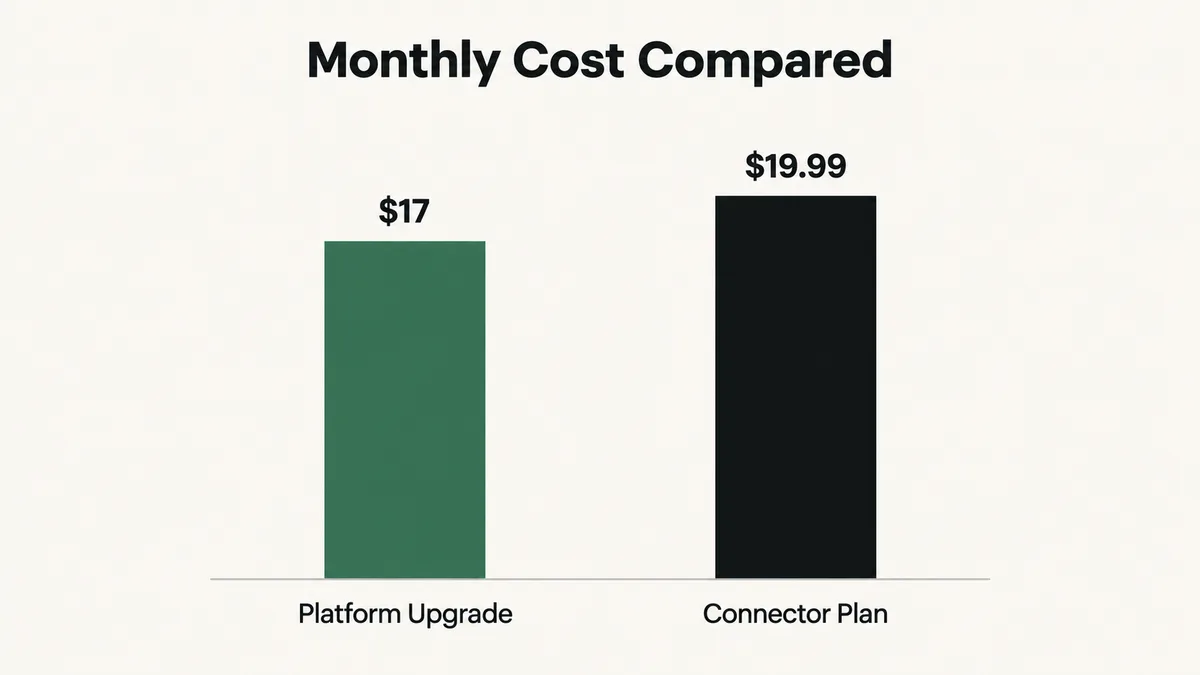
Here is the comparison. Zapier’s pricing page lists a free plan of 100 tasks a month, two step Zaps only, and a 15 minute polling interval. The cheapest paid plan, Professional, is $19.99 a month billed annually for 750 tasks. Systeme.io Startup is $17 a month for 10 rules and 5 workflows, running instantly, with no task meter. For a funnel doing a few hundred opt-ins a month, Zapier free runs out and Zapier paid costs more than the upgrade it was meant to avoid. When a Zap does misbehave, my guide to a Zapier Zap not triggering covers the usual causes.
Fix: Use an outside tool when it is already in your stack or when the action happens outside Systeme.io anyway, such as adding a buyer to a CRM or a Slack channel. For logic that starts and ends inside Systeme.io, compare your monthly event volume against the Zapier task allowance before building, and treat the Startup plan as the baseline cost.
Workaround 7: Does This Job Need Automating at All?
Some of it does not, at least not yet. Early funnels produce a handful of events a week, and a manual step done on Friday afternoon costs less than a plan upgrade or a Zapier bill.
Systeme.io gives you the manual tools. On the contacts list, you select contacts, click More actions, and add a tag in bulk. You can enroll a single student in a course by hand. And while the free plan allows only one email campaign, the pricing table lists newsletters as unlimited on every plan, so a weekly broadcast to a filtered segment replaces a lot of what a second sequence would have done.
The test is volume and timing. A welcome email that arrives two days late loses the lead. A “tag everyone who attended the live call” step that happens the next morning loses nothing. Automate the first. Batch the second until the volume says otherwise.
Fix: For each automation you wanted to build, write down how many contacts it would touch per week and how much a one day delay hurts. Anything low volume and delay tolerant becomes a weekly manual task. Revisit the list once a month, since a manual task that grows past ten minutes a week is a sign it has earned a real automation slot.
Workaround 8: When Is Upgrading to Startup the Real Fix?
When the workarounds start costing more than $17 a month in time, tools or lost leads. Every trick above has a cost. Merged actions make one rule harder to read. Webhooks need something to receive them. Zapier bills per task. Manual steps get forgotten.
The signs I look for are simple. You have two or more opt-in points that each need their own instant response. You need more than one email sequence running at the same time. You need a second tag to tell buyers apart from leads. Or you are building a fourth funnel, which the free plan does not allow regardless of automation. Any one of these means the free plan has stopped being free in any practical sense.
The upgrade also moves several caps at once. Startup lifts rules to 10, workflows to 5, tags to 10, campaigns to 10 and funnels to 10, and the pricing page offers two months free on annual billing. That is a different account, not just a bigger rule count.
Fix: Before upgrading, apply workarounds one and two, because they cost nothing and make the paid account cleaner too. Then list the automations you still need. If the list is longer than one rule and one workflow can hold, upgrade to Startup and rebuild each automation as its own clearly named rule rather than keeping the merged versions.
Systeme.io Automation Rule Limit: Which Workaround Comes First?
Work through these in order. The early steps cost nothing and free up slots. The later ones cost money or time, so only reach them once the free options are used up.
- List every rule and workflow you have or want. Next to each, write its trigger and its actions.
- Move purchase deliveries to offer Resources. Courses, bundles, tags and communities all attach there.
- Merge rules that share a trigger. One rule, several actions.
- Give the rule the event with no alternative. Usually an opt-in or a specific email link click.
- Give the workflow anything with delays or branches. Use a decision step to cover more than one path.
- Batch low volume jobs by hand. Bulk tagging and newsletters cover more than you expect.
- Send remaining events out by webhook, if a tool you already pay for can act on them.
- Compare the leftover cost against $17 a month. If the workarounds cost more, upgrade.
Most free accounts I look at clear steps two and three and find they were one rule short, not ten.
Why Is the Free Plan Capped on Rules Rather Than Features?
Because Systeme.io sells usage, not access. The pricing page describes the free plan as access to all core features with limited usage, and the comparison table bears that out: the free account has funnels, courses, communities, workflows and email, just one or a few of each. Compare that with platforms that lock whole features behind paid tiers.
A rule cap is an effective upgrade prompt because it bites exactly when a business starts working. One funnel with one automation is a test. Two funnels with different follow-ups is a business, and that is the moment the account asks for $17.
It also explains why the workarounds exist. The platform delivers purchases through resources because checkout has to work on every plan. Webhooks and the public API exist because Systeme.io wants to plug into other tools. None of those were built as loopholes, which is why using them is fine. It is the same pattern I see on other all in one platforms, where the gap between “can do” and “can do at scale” sits in quotas. The ClickFunnels order form troubleshooting guide shows a different side of the same category.
How Do You Plan Automations So You Stop Hitting the Cap?
Map the funnel before you build anything. Draw each entry point, each purchase and each email click that should cause something to happen, and mark where each response will live: resource, rule, workflow, outside tool or manual. Ten minutes on paper saves rebuilding rules later.
Name rules after their trigger, not their action. “Opt-in, lead magnet page” tells you in one glance whether a new job belongs in it. “Send welcome email” does not, and it hides the fact that the rule also enrolls and tags.
Keep a one page note of every automation, including the ones outside Systeme.io. Webhooks and Zaps are invisible from the Automations screen, and a funnel that behaves oddly six months later is usually one where somebody forgot a Zap was also tagging contacts.
Test with fresh email addresses every time, because of the 20 trigger ceiling per contact. And review the plan limits each quarter, since pricing tables change. If you want someone to look over how your funnels, email and outside tools fit together, that is part of my business automation work.
Frequently Asked Questions
How many automation rules does the Systeme.io free plan allow?
One. The comparison table on the Systeme.io pricing page lists 1 automation rule and, separately, 1 workflow on the free plan, as checked on 14 September 2026. Startup raises that to 10 rules and 5 workflows, Webinar to 100 rules and 20 workflows, and Unlimited removes the cap. Some third party reviews give different figures, so check the live table before deciding.
Do workflows count against the Systeme.io automation rule limit?
No. The pricing table lists automation rules and workflows as two separate lines with separate limits. On the free plan, that means one rule and one workflow, so you have two automations to use. Workflows add delays, decision branches and a few actions rules do not have, such as adding a row to a Google Sheet.
Can I give course access after purchase without an automation rule?
Yes. Attach the course in the Resources section of the order form for that offer. After payment is validated, the buyer gets access automatically. The same section takes course bundles, tags and communities, and order bumps have their own Resources, so none of these purchase deliveries need a rule.
Why did my Systeme.io automation stop working for one contact?
Check how many times that contact has fired the trigger. Systeme.io’s help page says a trigger can be activated at most 20 times by the same contact, after which rules and workflows are disabled for that contact. This catches people who test repeatedly with their own address. Use a fresh email for each test.
Is Zapier cheaper than upgrading Systeme.io?
Usually not, once volume picks up. Zapier’s free plan gives 100 tasks a month with two step Zaps and 15 minute polling, and its Professional plan is $19.99 a month billed annually for 750 tasks. Systeme.io Startup is $17 a month with 10 rules and 5 workflows and no task meter. Zapier makes sense when it is already in your stack or when the action happens outside Systeme.io.
Can one Systeme.io automation rule have more than one action?
Yes. The rule editor has a Trigger column and an Action column, and you can add several actions to the same rule. Systeme.io’s help page on tags describes a tag-triggered rule setting off one or more actions. Stacking a delivery email, a campaign subscription and a course enrollment on a single opt-in trigger is the simplest way to stretch the free plan’s one rule.
If you have applied the first four workarounds and still need more automations inside Systeme.io, the account has outgrown the free plan. That is not a failure of setup. It is the plan working as designed, and $17 a month for ten rules is cheap next to the time spent keeping a patchwork of webhooks and manual tasks in line.
The pattern underneath all of this carries over to other tools. A Systeme.io automation rule limit problem is rarely a shortage of rules. It is usually a rule doing a job that belongs somewhere else. The same habit of asking where a job should live helps with a Make scenario not running or an ActiveCampaign automation not triggering.
Stuck on one rule and not sure whether to upgrade?
Tell me what your funnels do, which events need an automated response, and which plan you are on. I will tell you which jobs can move out of the rule quota and whether the upgrade is worth it, whether or not you need anyone to build it.