

For months the site ran fine. Lessons loaded fast, quizzes graded instantly, certificates landed in inboxes within seconds. Then a cohort launched, or an enrollment deadline hit, and the same site that handled a hundred students without complaint started timing out on profile pages, dropping quiz submissions, and throwing 503 errors at the exact moment the most people were trying to use it.
If you are trying to figure out how to scale a WordPress LMS before that happens to you, or you are already living it, the frustrating part is that nothing about your site actually broke. It is doing precisely what an unconfigured cache, an undersized hosting plan, or a database table built for a hundred students does under the load of a thousand.
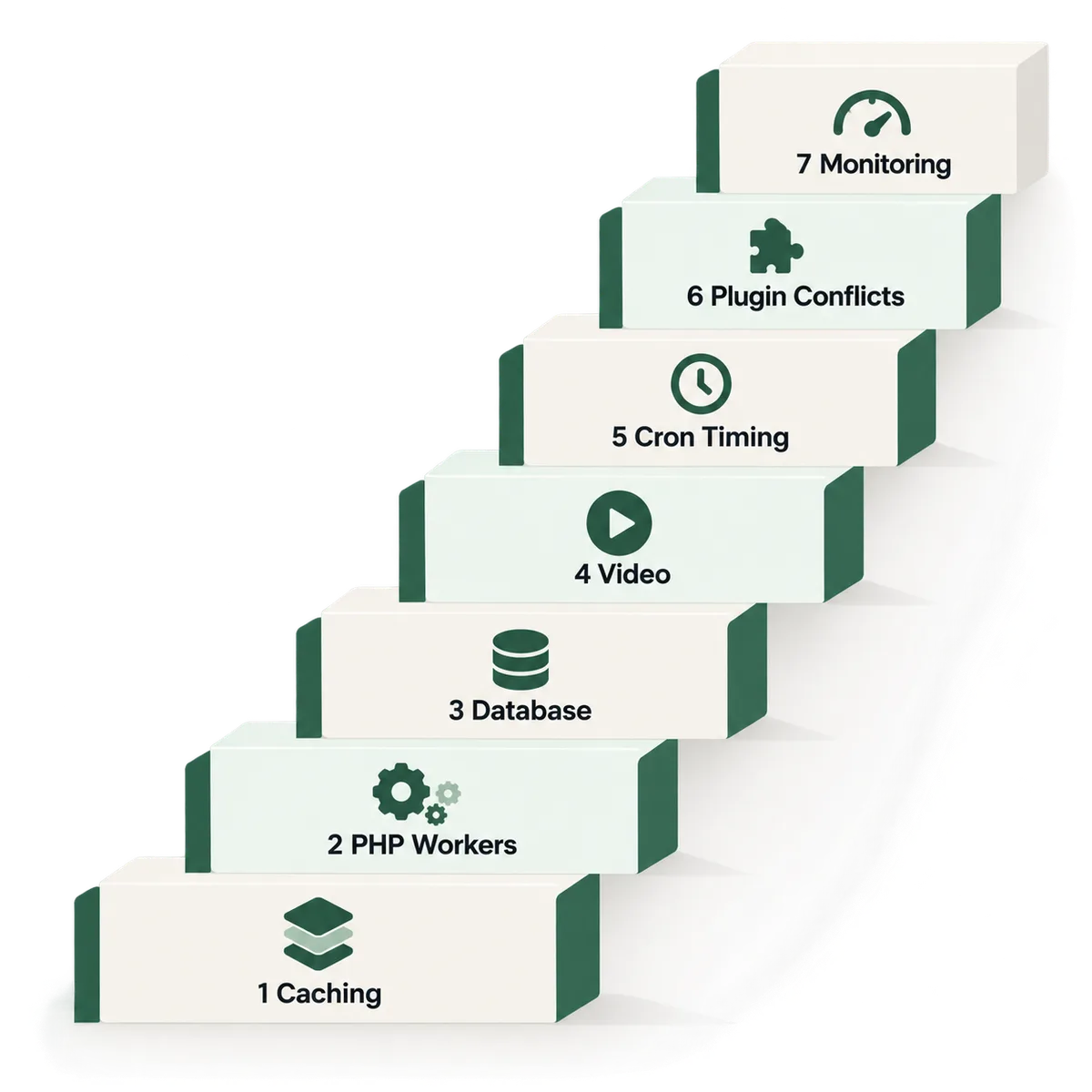
I build and repair WordPress course and membership sites, mostly on LearnDash and WooCommerce Memberships, and I have debugged this exact failure shape twice already on real client sites, not as a hypothetical. Below are the seven places a WordPress LMS actually breaks as it grows, in the order they tend to show up, each with the real fix, verified against primary sources and against my own debugging work as of October 2026.
Quick Answer
A WordPress LMS scales by fixing the one thing that makes it different from an ordinary WordPress site: every student is logged in, so normal full-page caching never touches lesson, quiz, or dashboard pages. Scaling means adding object caching for those logged-in requests, hosting with enough PHP workers to handle concurrent quiz and lesson traffic, keeping the database tables LearnDash and WooCommerce write to from bloating unchecked, moving video off the server entirely, and replacing WP-Cron with a real scheduled task before certificates, drip content, and notification emails start backing up.
What’s Covered
02Bottleneck 1: Is Full-Page Caching Even Protecting Your Lesson and Quiz Pages?
03Bottleneck 2: Are You Running Out of PHP Workers Before You Run Out of Students?
04Bottleneck 3: Is LearnDash’s Own Data Quietly Choking Your Database?
05Bottleneck 4: Is Self-Hosted Video Quietly Capping Your Growth?
06Bottleneck 5: Is WP-Cron Falling Behind on Certificates and Drip Content?
07Bottleneck 6: Is a Caching Plugin Quietly Breaking a Feature Instead of Speeding It Up?
08Bottleneck 7: Are You Finding Out About a Problem From Students Instead of From Monitoring?
09How Do You Know Your WordPress LMS Is Approaching Its Scaling Limit?
10Why Do These Bottlenecks Show Up in This Specific Order?
11How to Scale a WordPress LMS Without Hitting These Walls Again
12Frequently Asked Questions
Why Does a WordPress LMS Slow Down As It Grows When the Marketing Site Stays Fast?
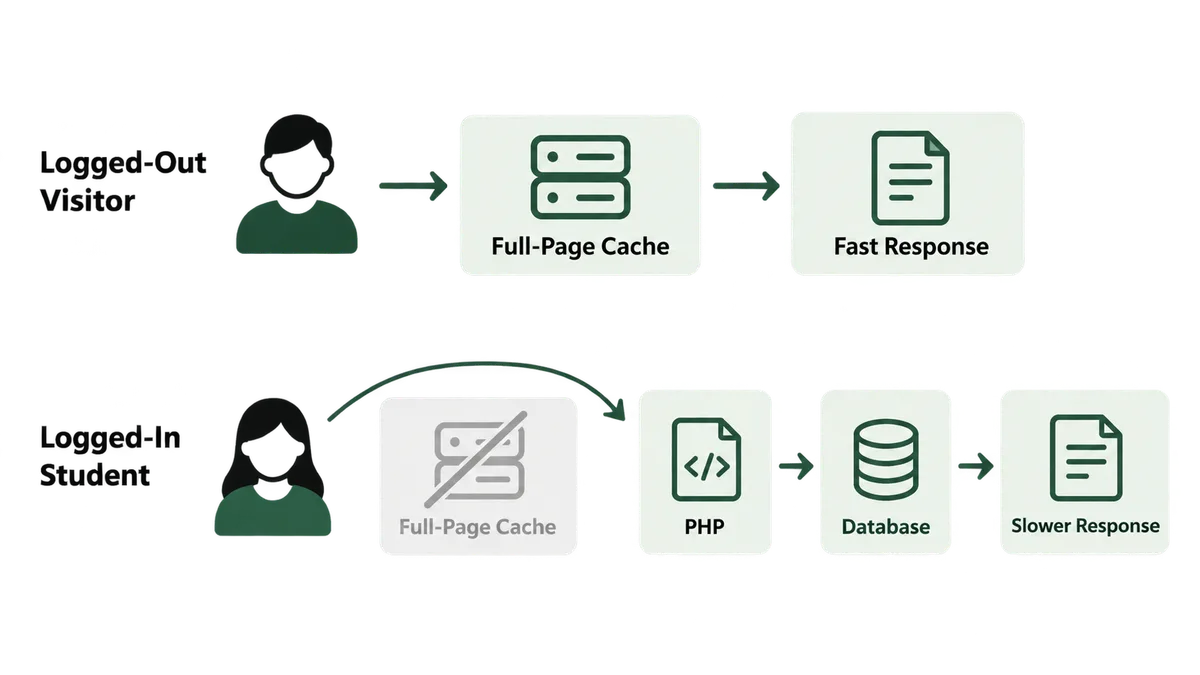
An ordinary WordPress site gets fast almost for free. A caching plugin saves a finished HTML copy of each page the first time it loads, and every visitor after that gets served the saved copy straight from disk, never touching PHP or the database at all. That trick is why a well-cached marketing page stays quick even under heavy traffic.
It does not work for a single page inside your course area, and that is the entire reason an LMS scales differently. Every student is logged in, and a logged-in request carries a personal state: their own progress, their own quiz attempts, their own list of which lessons are available to them. Full-page caching cannot serve one saved copy to a thousand different students who each need to see something different, so it skips logged-in pages entirely by default. That means every lesson view, every quiz submission, and every dashboard load hits PHP and the database fresh, every single time, for every single student, regardless of how fast your home page is.
Kinsta’s own guidance for LMS hosting makes this exact distinction explicit: course sites need “plenty of PHP threads” and site-level caching built around handling the demand of logged-in users specifically, not the general-purpose caching that makes a blog fast. That is the gap this entire post is about closing.
Bottleneck 1: Is Full-Page Caching Even Protecting Your Lesson and Quiz Pages?
Because full-page caching skips logged-in traffic by design, the pages your students spend the most time on, lessons, quizzes, course dashboards, get zero benefit from the caching plugin already installed on the site, the one everyone assumes is handling performance. On a small site this goes unnoticed because PHP and the database can absorb a handful of uncached requests without strain. It stops going unnoticed the moment a cohort of a few hundred students logs in during the same hour.
The fix is not a different caching plugin. It is a different layer of caching entirely, one that works underneath PHP rather than in front of it.
Fix: Add object caching, Redis or Memcached, in front of your database. Object caching cannot serve a whole page the way full-page caching does, but it caches the repeated, expensive database queries LearnDash and WooCommerce run on every logged-in page load, such as checking a student’s course access or progress, so PHP stops re-querying the same data on every single request. Most managed WordPress hosts that market themselves for LMS or membership sites, Kinsta among them, offer Redis as an add-on specifically because of this gap. Confirm it is actually turned on, since it is rarely enabled by default.
Bottleneck 2: Are You Running Out of PHP Workers Before You Run Out of Students?
Every uncached request your LMS handles needs a free PHP worker, sometimes still called a PHP thread, to process it. Shared and entry-level hosting plans intentionally cap how many of these a single account gets, because the server is shared across many customers. That cap is invisible on a quiet day. It becomes the entire story the moment a cohort opens their first lesson at the same time, or a graded quiz deadline lands at midnight and two hundred students submit within the same ten minutes.
When every available worker is busy, new requests do not fail outright. They queue, and the student experience is a spinning loader that eventually times out, which looks exactly like a broken site rather than a full one.
Fix: Ask your host directly how many PHP workers your specific plan includes, not just how much storage or bandwidth it offers, since worker count is the number that actually governs concurrent logged-in traffic. If your plan caps out at a handful of workers, a VPS or a managed WordPress plan built around PHP thread count, with object caching included, is the real upgrade path. Buying more storage or a faster CPU without more workers leaves the actual bottleneck untouched.
Bottleneck 3: Is LearnDash’s Own Data Quietly Choking Your Database?
This bottleneck is specific to LearnDash itself, and it is real enough that LearnDash add-on developer Uncanny Owl published a detailed account of it after debugging a large enterprise LearnDash install. Once that site’s quiz count passed 1,000 and it regularly had more than 100 students online at the same time, performance collapsed in three specific places: user profile pages inside wp-admin, the quiz listing page, and quiz submissions themselves. Some users and admins saw outright 503 errors.
The actual numbers behind that collapse are worth sitting with. In user profiles, the “Course Progress Details” section alone could push database processing past 150 seconds and require tens of thousands of SQL queries to render a single page, against roughly 200 queries for a typical WordPress page. Separately, simply listing a quiz library with well over 1,000 quizzes became a 120 second operation on its own. Neither of those is a server resource problem that more hosting money fixes. It is LearnDash’s own progress-tracking queries scaling linearly, or worse, with every quiz and every student, until a single page load means tens of thousands of round trips to the database.
Fix: If your course library is approaching a similar size, several hundred quizzes or more, don’t wait for a 503 to find out. Profile a real admin profile page and your quiz listing page with the Query Monitor plugin on a staging copy of your site, and look specifically at query count and total query time, not just overall page load. If either number is unusually high, this is a known, documented LearnDash scaling issue rather than a misconfiguration on your end, and the fix lives in optimizing or caching those specific progress-tracking queries, not in generic page caching, which never touches this problem since it’s entirely inside wp-admin and logged-in requests.
Bottleneck 4: Is Self-Hosted Video Quietly Capping Your Growth?
Course content is video-heavy almost by definition, and uploading that video straight into the WordPress media library feels like the simplest path when you only have a handful of students. It stops being simple the moment real numbers of students start streaming it concurrently. Every one of those streams is a long-lived connection your web server has to hold open and feed data to, competing directly with the same PHP workers your lesson and quiz pages depend on for everything else.
Unlike the other bottlenecks on this list, this one does not announce itself as a database problem or a worker shortage first. It shows up as a server that mysteriously struggles during exactly the hours students are actively watching lessons, then recovers fine overnight.
Fix: Move video hosting off your WordPress server entirely, to a dedicated video platform such as Vimeo, Bunny Stream, or Cloudflare Stream, and embed the player on the lesson page instead of self-hosting the file. This is almost never optional once a course has real enrollment, since it removes the single heaviest, longest-running load your web server would otherwise carry on top of everything LearnDash and WooCommerce already ask of it.
Bottleneck 5: Is WP-Cron Falling Behind on Certificates and Drip Content?
Certificate generation, scheduled drip-content releases, and queued notification emails all depend on WordPress’s built-in task scheduler, WP-Cron. Most site owners assume this works like a real system-level cron job, running reliably on its own clock. It does not. By default, WP-Cron only checks whether a scheduled task is due when an actual visitor loads a page on your site, piggybacking the check onto normal traffic instead of running independently.
On a low-traffic site this quirk barely matters, since pages load constantly enough to trigger the check close to on time. On a growing LMS it becomes a real liability in the opposite direction: a traffic spike can trigger the same scheduled task dozens of times in parallel, or heavy PHP worker contention from the other bottlenecks on this list can delay the triggering page load itself, so certificate generation and drip releases queue up and fall behind exactly when the most students are active and waiting on them.
Fix: Disable WordPress’s default page-load-triggered cron by adding define('DISABLE_WP_CRON', true); to wp-config.php, then set up a real server-level cron job or your host’s scheduled-task feature to hit wp-cron.php on a fixed interval, typically every one to five minutes, independent of whether a visitor happens to load a page. This single change makes certificate delivery, drip content, and queued notifications run on a predictable clock instead of a traffic-dependent one.
Bottleneck 6: Is a Caching Plugin Quietly Breaking a Feature Instead of Speeding It Up?
This is the bottleneck I have hit first-hand, twice, on real client sites, and both times the caching plugin was the thing actually causing the problem it was installed to prevent. On one LearnDash site, an image-optimization plugin conflicted with certificate generation closely enough to silently break it, a cause I cover in full in my guide to LearnDash sites slowing down with more students. On a separate WooCommerce membership site, LiteSpeed Cache served stale images and content to logged-in members after updates, which I debugged and documented in my piece on why a WooCommerce membership site slows down.
The pattern behind both incidents is the same: a caching or optimization plugin applied a blanket rule across the whole site without an explicit exception for LMS-specific dynamic content, and nobody tested that exception until students reported the symptom.
Fix: Never install a caching or image-optimization plugin on an LMS and trust its defaults. Explicitly test cache-exclusion rules for every LMS-dependent URL pattern, course pages, quiz pages, the certificate endpoint, the student dashboard, on a staging copy before it reaches production, and re-test after every plugin update, since an update can silently reset an exclusion rule you configured manually.
Bottleneck 7: Are You Finding Out About a Problem From Students Instead of From Monitoring?
Every bottleneck above has a real, catchable warning sign before it becomes an outage: a slow query, a worker queue filling up, a cron job running late. None of those signs are visible from the front end of your site, which is exactly why the first the typical course owner hears about any of this is a support email from a frustrated student.
Waiting for that email means the problem is already live and affecting paying students during whatever moment was important enough to create a traffic spike in the first place, a launch, a deadline, a live cohort event.
Fix: Install the free Query Monitor plugin on a staging copy of your site and get a baseline for query count and page generation time on your busiest page types, lesson, quiz, and profile, before you need one. Pair that with real uptime monitoring and, if your host offers it, an APM dashboard showing live PHP worker usage. Then deliberately load-test before any known spike, a launch date, a cohort start, an enrollment deadline, rather than discovering the ceiling live.
How Do You Know Your WordPress LMS Is Approaching Its Scaling Limit?
You do not need to wait for an outage to get a real answer. These checks, run in roughly this order, point straight at whichever bottleneck above is closest to becoming a real problem.
- Compare load time on a logged-out page against a logged-in lesson page. A large gap confirms full-page caching is doing nothing for your actual students, pointing at Bottleneck 1.
- Ask your host for real PHP worker or concurrency metrics during your busiest known hour. Workers sitting consistently near their cap during a quiz deadline or cohort launch is Bottleneck 2.
- Run Query Monitor on a staging copy against your admin profile pages and quiz listing page. Query counts in the thousands or page times over a few seconds on these specific pages match the documented LearnDash pattern in Bottleneck 3.
- Check where your course video actually streams from. If it is a file in your own WordPress media library rather than an embedded third-party player, that is Bottleneck 4 waiting for enough concurrent viewers to matter.
- Check whether DISABLE_WP_CRON is set and a real server cron is configured. If neither is true, certificates and drip content are running on traffic-dependent timing, Bottleneck 5, whether or not you have noticed yet.
- Review your caching plugin’s exclusion rules against every LMS-specific URL by hand. An assumption that “it’s probably fine” here is exactly how Bottleneck 6 reaches production undetected.
Why Do These Bottlenecks Show Up in This Specific Order?
Look at the order and a pattern shows up. The first two bottlenecks, caching and PHP workers, are structural. They exist the moment a second student logs in, and a small site simply never generates enough concurrent load to expose them. The third, LearnDash’s own data layer, is a function of content volume and student count both growing together, which is why Uncanny Owl’s documented case only became catastrophic once quiz count and simultaneous users crossed real thresholds, not because anything changed in how LearnDash was configured.
The last three, video, cron timing, and a misbehaving caching plugin, are different in kind. They are not inevitable at any size. They are mistakes that only become visible under load, which is exactly why I found both of mine, the certificate conflict and the stale LiteSpeed Cache issue, while debugging real client sites that had already grown past the point where a small site hides these problems by never generating enough traffic to trigger them.
That is also why a WordPress LMS migration is sometimes the real fix rather than a patch. If the underlying hosting or plugin stack was never built with this traffic pattern in mind, my guide to migrating from Kajabi to WordPress and LearnDash covers the opposite direction of this exact tradeoff: trading a managed platform’s built-in scaling for the control a self-hosted LMS gives you to fix every bottleneck on this list yourself.
How to Scale a WordPress LMS Without Hitting These Walls Again
Every fix above is cheaper before launch than after a cohort is already depending on the site. If you are still building, bake these in from day one instead of waiting to retrofit them.
- Choose hosting with object caching and a real PHP worker count included, not just advertised storage or bandwidth, and confirm Redis or Memcached is actually enabled rather than merely available as an add-on.
- Plan for video hosting on a dedicated platform from the first course you build, rather than uploading to the WordPress media library and migrating later once it already hurts.
- Set up a real server-level cron and disable the default WP-Cron behavior before launch, so certificates and drip content never depend on traffic timing in the first place.
- Test every caching plugin’s exclusion rules against your specific LMS URLs on staging before it ever touches production, and repeat that test after every plugin update going forward.
- Install Query Monitor and set a performance baseline before your first real cohort, not after, so you have a number to compare against when something later feels slower than it used to.
Frequently Asked Questions
How many students can a WordPress LMS actually handle?
There is no single number, since it depends entirely on hosting resources, PHP worker count, and whether object caching is configured, not on WordPress or LearnDash as software. A well-configured site with Redis caching and enough PHP workers can comfortably handle far more concurrent students than an identical site on undersized shared hosting with no object cache at all.
Why doesn’t my caching plugin speed up my course pages?
Full-page caching plugins skip logged-in traffic by design, since they cannot serve one saved page to students who each need to see their own progress and access status. Lesson, quiz, and dashboard pages need object caching, Redis or Memcached, which caches the underlying database queries instead of the whole page.
Is shared hosting ever enough for a WordPress LMS?
It can be for a small course with modest concurrent traffic, but the PHP worker caps that make shared hosting affordable are the same caps that cause timeouts the moment a real cohort logs in together. A VPS or a managed WordPress plan built around PHP thread count and object caching is the real upgrade path once enrollment becomes meaningful.
Should I ever self-host course videos on WordPress?
Not once a course has real enrollment. Self-hosted video competes directly with your PHP workers for server resources during every concurrent view. Embedding a dedicated video platform such as Vimeo, Bunny Stream, or Cloudflare Stream removes that load from your web server entirely.
Why are my certificates or drip content emails arriving late?
WordPress’s default scheduler, WP-Cron, only checks for due tasks when a visitor loads a page, rather than running independently like a real system cron job. Under traffic spikes or PHP worker contention, that check gets delayed or skipped, backing up certificate generation and scheduled content. Disabling the default behavior and pointing a real server cron at wp-cron.php on a fixed interval fixes this.
At what point does LearnDash itself start slowing down?
Uncanny Owl documented a real case where performance in user profile pages, the quiz listing page, and quiz submissions significantly deteriorated once a site passed roughly 1,000 quizzes with more than 100 simultaneous users, with some profile page loads requiring tens of thousands of database queries. This is a known data-layer scaling issue inside LearnDash itself, not a hosting problem, and needs query-level optimization rather than more server resources.
A WordPress LMS that slows down under growth is almost never actually broken. It is running into one of seven specific, well-documented limits, most of which are invisible until enough real students hit them at once. Fix the caching gap first, since it affects every other bottleneck on this list, then work down the order above before your next real spike finds the limit for you. If your site already spans course content, membership gating, and automation tied together, the same architecture thinking applies across the stack, not just inside LearnDash, which is why I keep my WooCommerce membership site performance notes and my LearnDash scaling troubleshooting guide both close at hand.
Growing faster than your site can handle?
Tell me your student count, your current hosting plan, and where it’s actually slowing down, a specific page, a specific moment, a specific error. I’ll tell you which of these seven bottlenecks it is and what order to fix them in, whether or not you need anyone to build it.