
A client’s course designer spends three weeks building a polished module in Articulate Storyline 360, or lays out a clean set of lessons in Rise 360, exports the zip file Articulate hands back, and uploads it to their WordPress LMS exactly the way the course platform’s upload button suggests. The lesson opens. The slides play. A student clicks through to the end. Nothing marks the lesson complete. No certificate triggers. No progress bar moves. On a LearnDash, LifterLMS, or Tutor LMS site, articulate to wordpress lms integration does not work out of the box, and the zip file itself is rarely the actual problem.
I build and maintain WordPress course sites for a living, and this exact support ticket shows up in a predictable shape: a real, well-built Articulate course, a real WordPress LMS, and a silent gap between the two that neither vendor’s documentation owns. This is the real breakdown of why that gap exists and the five actual causes behind a stalled integration, in the order I check them on a real site.
Quick Answer
Articulate to WordPress LMS integration breaks because WordPress has no native SCORM or xAPI support at all, and neither does LearnDash, LifterLMS, Tutor LMS, or WP Courseware. Every one of those plugins needs a separate bridge plugin, such as GrassBlade xAPI Companion or Tin Canny Reporting, to even read the package Storyline or Rise 360 exports, and that bridge plugin then needs a correctly matched export format and, for most of them, a connected Learning Record Store before completion tracking works at all.
The five real causes below cover a wrong export format, a missing bridge plugin, a missing Learning Record Store, a SCORM version mismatch, and a genuine Rise 360 embedding limitation, each with the actual fix.
📋 What’s Covered
02Cause 1: Did You Export Without Selecting an LMS Format at All?
03Cause 2: Does Your WordPress LMS Plugin Have No Native SCORM Support?
04Cause 3: Is a Bridge Plugin Installed With No Learning Record Store Connected?
05Cause 4: Does Your SCORM Version Not Match What the Bridge Plugin Expects?
06Cause 5: Are You Embedding Someone Else’s SCORM Content Inside a Rise 360 Course?
07What Order Should You Actually Diagnose This Integration In?
08Why Don’t Articulate and WordPress Talk to Each Other Natively?
09How Do You Avoid This Breaking Again on Your Next Course Upload?
10Frequently Asked Questions
What Does Real Articulate to WordPress LMS Integration Actually Require?
Storyline 360 and Rise 360 are authoring tools, not learning management systems. Neither one hosts a course, tracks a student, or issues a certificate on its own. What each one actually does at publish time is package a course into a standards-based format, SCORM, AICC, cmi5, or xAPI, that some other system is supposed to receive, host, and read. That packaging step is real and well documented on Articulate’s own side.
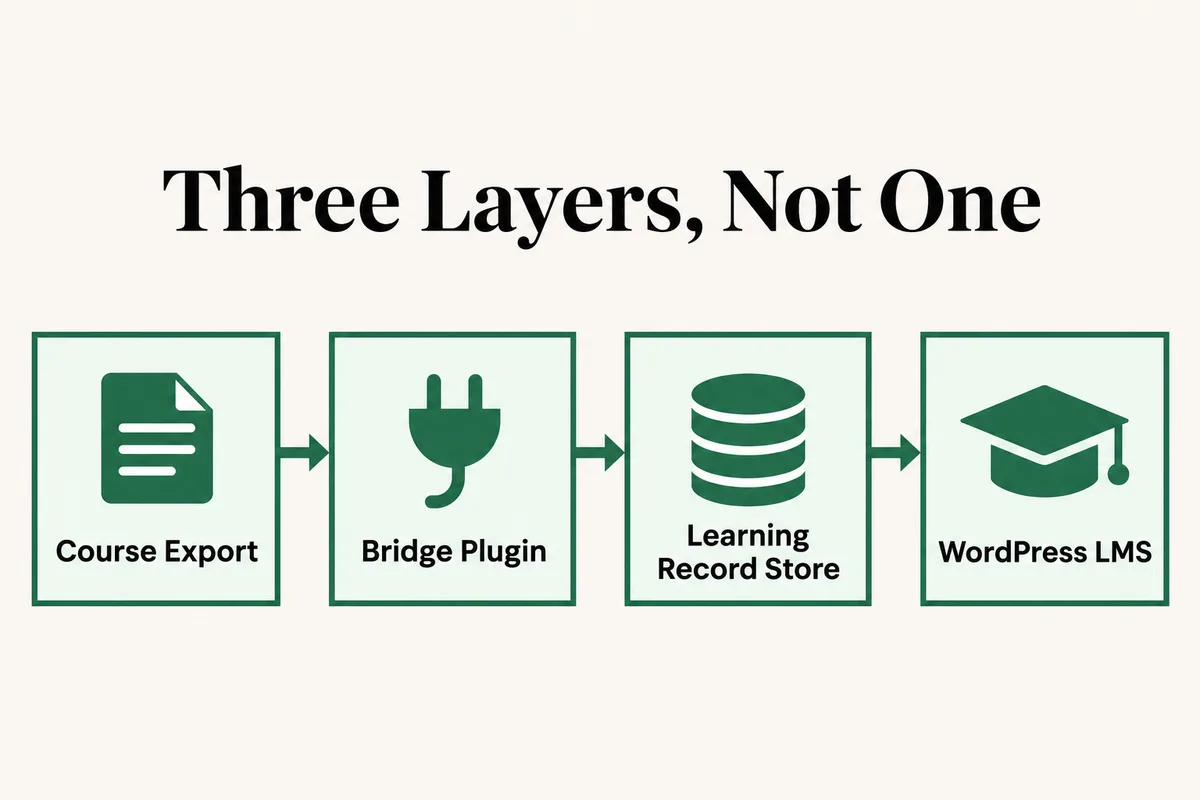
WordPress, on the other hand, was never built to be that other system. A plain WordPress install has no concept of SCORM, no concept of xAPI, and no built-in way to parse the manifest file inside either package. Everything WordPress knows about “a course” comes from whichever LMS plugin you installed, LearnDash, LifterLMS, Tutor LMS, or WP Courseware among others, and none of those four plugins reads a SCORM or xAPI package natively either. Each one needs a separate, paid bridge plugin just to open the file, and most of those bridge plugins need a further piece, a Learning Record Store, before completion tracking actually works.
That is three layers that all have to line up correctly: the export format Articulate produces, the bridge plugin that reads it, and the tracking backend that records what a student actually did. A broken integration is almost always one specific layer, not a vague “WordPress and Articulate don’t get along.”
Both authoring tools support the same real export menu. According to Articulate’s own flexible publishing page, Storyline 360 and Rise 360 courses can both be exported in SCORM, AICC, cmi5, or xAPI format so they work with “virtually any LMS.” That part of the chain is solid on Articulate’s side. The gap sits entirely on the receiving end, inside WordPress.
Cause 1: Did You Export Without Selecting an LMS Format at All?
This is the most common cause I see on a first course upload, and it has nothing to do with WordPress yet. Both Storyline 360 and Rise 360 default their publish screen toward the web, not toward an LMS. In Storyline, that means clicking Publish from the Home tab and landing on a destination list that includes Web, Document, Video, and LMS as separate tabs, each producing a different kind of output. In Rise, the Publish button opens a similar fork: export for the web, export for review, or export for an LMS.
A web export produces a working, playable course with no imsmanifest.xml file, no tincan.xml file, and no completion-tracking hooks at all, because a plain web export was never meant to report anything back to an LMS. Upload that zip to a bridge plugin expecting a SCORM or xAPI package, and at best it displays as a static embed with zero tracking. At worst, the bridge plugin rejects the upload outright because the manifest file it’s looking for simply isn’t in the zip.
Fix: Open the course again in Storyline or Rise, click Publish, and confirm you’re on the LMS export tab, not Web or Review. Pick SCORM 1.2, SCORM 2004, or xAPI, whichever your bridge plugin expects (see Cause 4 below), and generate a fresh zip. Unzip it locally first and confirm you can see either an imsmanifest.xml file (SCORM) or a tincan.xml file (xAPI) at the top level before you upload anything to WordPress.
Cause 2: Does Your WordPress LMS Plugin Have No Native SCORM Support?
Even with a correctly exported package in hand, LearnDash, LifterLMS, Tutor LMS, and WP Courseware all share the same real limitation: none of them reads SCORM or xAPI content on their own. LearnDash does not natively support xAPI or SCORM at all, and the same gap applies to LifterLMS and Tutor LMS. Each one needs a dedicated third-party add-on installed and activated before a lesson can even accept a SCORM zip as its content type.
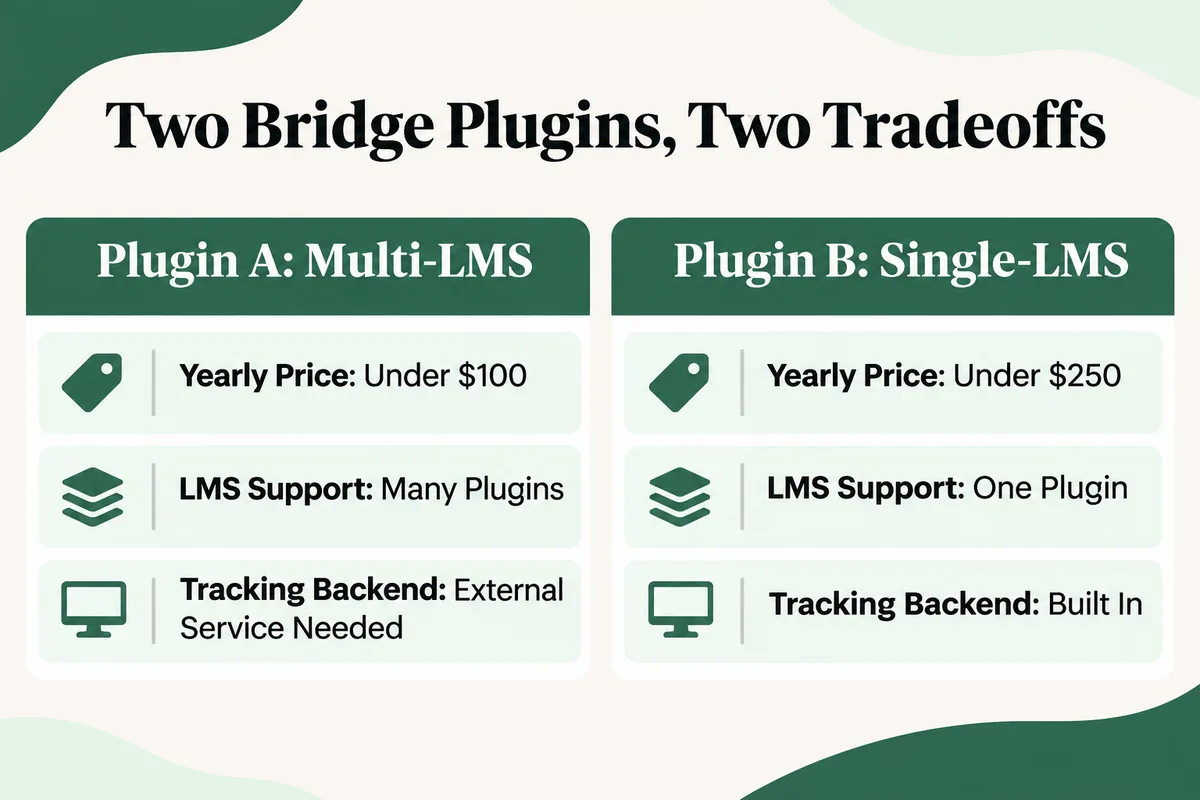
The two real options for LearnDash, LifterLMS, and several other WordPress LMS plugins are GrassBlade xAPI Companion and, for LearnDash specifically, Tin Canny Reporting. GrassBlade currently runs $99 a year for one production and one staging install, supports SCORM 1.2 and SCORM 2004, 2nd through 4th edition, plus xAPI, with cmi5 still in beta, and works across LearnDash, LifterLMS, Tutor LMS, WP Courseware, LearnPress, MasterStudy LMS, Sensei LMS, and Moodle. Tin Canny Reporting is LearnDash only, priced from $199 a year for a single site, and explicitly lists Articulate Storyline as one of the authoring tools its reporting supports.
If your site has no bridge plugin installed at all, the lesson content can still display, usually because the LMS plugin is treating the zip as a generic embedded file rather than a tracked SCORM package, but nothing about student progress, quiz scores, or completion status is actually being recorded anywhere.
Fix: Check your Plugins screen in wp-admin for GrassBlade xAPI Companion, Tin Canny Reporting, or an equivalent SCORM bridge. If none is installed, that is almost certainly why tracking is silent. Install one that matches your LMS plugin, LearnDash supports either option, LifterLMS and Tutor LMS need GrassBlade specifically, and re-upload the course content through that plugin’s own upload interface rather than a plain WordPress media upload.
Cause 3: Is a Bridge Plugin Installed With No Learning Record Store Connected?
This is the cause that looks the most like a mystery, because the plugin is genuinely installed and activated, the course plays correctly, and tracking still never fires. GrassBlade xAPI Companion draws a hard line between hosting content and tracking it: basic content hosting works without any further setup, but completion tracking, quiz reporting, and automatic lesson completion inside your LMS all require a connected Learning Record Store, an LRS, which is a separate data repository that actually receives and stores the xAPI statements your course generates as a student clicks through it.
Without an LRS connected, GrassBlade has nowhere to send that tracking data, so it simply doesn’t send it. The course itself keeps working, because playback and tracking are two separate jobs, and only one of them was ever configured. This is the single most common reason I find a course that “plays fine but never completes” on a GrassBlade install specifically.
Tin Canny Reporting avoids this exact failure mode by design. It markets itself as the only all-in-one WordPress plugin with built-in LRS functionality, meaning there’s no separate service to connect, at the cost of being LearnDash-only rather than working across multiple LMS plugins the way GrassBlade does.
Fix: If you’re running GrassBlade, open its settings and confirm an LRS is actually connected, either GrassBlade’s own Cloud LRS or a compatible third-party one. If that setting is blank or shows a connection error, completion tracking has never been live on your site, regardless of how long the course has been uploaded. If you’re running Tin Canny Reporting on LearnDash, this specific cause doesn’t apply, since its built-in LRS ships connected by default; look at Cause 4 next instead.
Cause 4: Does Your SCORM Version Not Match What the Bridge Plugin Expects?
Storyline 360 publishes standards compliant content for SCORM 1.2, SCORM 2004 2nd, 3rd, and 4th edition, AICC, xAPI, or cmi5, selected from a single dropdown on the LMS publish tab. Rise 360 offers the same real spread of options. That flexibility is useful, and it’s also exactly where a second, quieter mismatch happens: picking SCORM 2004 4th edition when your bridge plugin or LRS was tested and configured against SCORM 1.2, or the reverse.
Both GrassBlade and Tin Canny Reporting list support for SCORM 1.2 and SCORM 2004 on paper, so this usually isn’t a hard rejection. It shows up instead as partial tracking, a course that marks itself started but never completed, or quiz scores that don’t record correctly, because a specific edition’s completion-status values or scoring rules don’t map the way the bridge plugin’s older configuration expects.
Fix: Standardize on one SCORM version across your whole site rather than letting each export use whatever the publish dialog happened to default to. SCORM 1.2 remains the safest, most widely tested choice for a bridge-plugin setup specifically because it’s the oldest and most universally supported edition. If you’re already using SCORM 2004, pick one edition, 3rd is the most common, and republish every course against that same edition rather than mixing versions across your course library.
Cause 5: Are You Embedding Someone Else’s SCORM Content Inside a Rise 360 Course?
This cause runs in the opposite direction from the first four, and it’s a genuinely different question that gets asked constantly in Articulate’s own community forum, in threads with titles like “Uploading SCORMs or HTML5 from other builders for use in Rise 360 Course?” and “Upload a Rise course to our LMS.” The real confusion is this: Rise 360 is built to export a finished course out to an LMS, not to import a SCORM package authored somewhere else back into itself.
If you’re trying to drop an existing SCORM or HTML5 package, built in a different tool entirely, inside a Rise 360 lesson, the practical option is Rise’s Web Object block, which embeds a zipped HTML5 bundle as a static piece of content inside the course. That gets the content visually inside Rise, but it does not inherit Rise’s own completion logic, and it does not pass that embedded content’s own internal tracking data back out through Rise’s eventual SCORM or xAPI export. The embedded piece plays. It does not report.
Fix: If the goal is simply to show existing HTML5 or SCORM content inside a Rise course visually, the Web Object block is the right tool and you shouldn’t expect it to track completion on its own, build that tracking into the surrounding Rise lesson structure instead. If the goal is actually a full, trackable integration of that other content, skip the Rise import step entirely and upload the original package straight to your WordPress bridge plugin as its own separate lesson, which is the path that was built to track in the first place.
What Order Should You Actually Diagnose This Integration In?
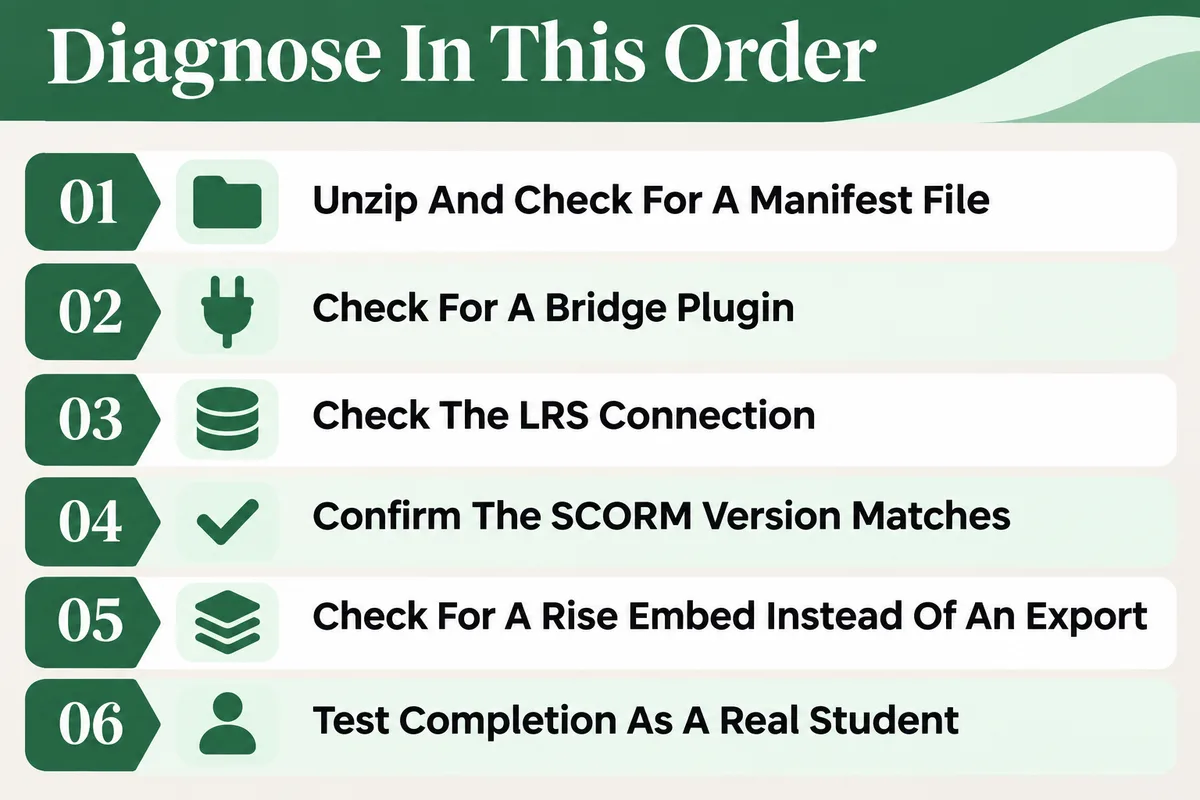
Run through these steps in this order. Each one either clears a whole cause above or points you straight at which one actually applies, rather than guessing at five possibilities at once.
- Unzip the export locally and look for a manifest file. An imsmanifest.xml file means SCORM, a tincan.xml file means xAPI. No manifest file at all means you exported for the web, not for an LMS, and that’s Cause 1.
- Check your Plugins screen for a bridge plugin. No GrassBlade, Tin Canny, or equivalent installed and active means the content has nowhere to report to, regardless of how correctly it was exported, which is Cause 2.
- If you’re on GrassBlade, open its settings and confirm a Learning Record Store is actually connected. A blank or errored LRS connection is Cause 3, and it’s invisible from the course page itself.
- Confirm the SCORM version in your export matches what your bridge plugin is configured for. A mismatch here shows up as partial tracking rather than a hard failure, which is Cause 4.
- If the content in question was authored somewhere other than Rise or Storyline and you’re trying to bring it into Rise itself, recognize that as a different question entirely. That’s Cause 5, and the Web Object embed answer is different from the first four fixes.
- Place one real test completion as a student, not as an admin. Log in as a test student account, finish the lesson completely, and confirm the LMS actually marks it complete, rather than trusting that the upload succeeding means tracking works.
Why Don’t Articulate and WordPress Talk to Each Other Natively?
SCORM itself is an older standard, built in the early 2000s for a world of dedicated, enterprise LMS platforms where every vendor agreed to speak the same packaging language so training content could move between systems. xAPI came later specifically to fix SCORM’s biggest real limitation, that it could only report a handful of fixed values like completion status and a single score, by letting any activity emit a flexible “actor verb object” statement to an LRS instead. Both standards assume the receiving system is built around that exact data model from the ground up.
WordPress was never built around that model, because WordPress is a general-purpose publishing platform, not an LMS. Every WordPress LMS plugin, LearnDash, LifterLMS, Tutor LMS, and the rest, was built with its own internal course, lesson, and progress data structure, designed for content authored directly inside WordPress itself, not for an externally packaged SCORM or xAPI bundle. Reading that external package correctly, and mapping its tracking data onto WordPress’s own user and post structure, is genuinely separate work from running a course plugin, which is exactly the job a bridge plugin exists to do.
That split explains why the fix is never “update WordPress” or “update LearnDash.” The gap sits in the translation layer between two systems that were each built correctly for a different job, and closing it means adding the specific piece, a bridge plugin plus, for most of them, an LRS, that was built to do that translation on purpose.
How Do You Avoid This Breaking Again on Your Next Course Upload?
A working integration today doesn’t guarantee the next course upload goes the same way, especially once a different team member is doing the exporting. These habits keep it from quietly breaking again.
- Document the exact export settings that work on your site. Write down the specific SCORM version or xAPI setting your bridge plugin is configured for, so the next person exporting a course from Storyline or Rise doesn’t have to rediscover it by trial and error.
- Test every new course as a real student account before launch. An admin account often has elevated permissions that mask a tracking failure a real student would hit immediately.
- Keep your bridge plugin and LRS connection on the renewal calendar, not just WordPress core and theme updates. Both GrassBlade and Tin Canny Reporting are annual subscriptions, and a lapsed license can quietly stop tracking without taking the course page down.
- Standardize your SCORM version across your entire course library, not per upload. Picking the version fresh each time is exactly how Cause 4 creeps back in six months later.
- If you’re scaling past a handful of Articulate courses, weigh LearnDash plus Tin Canny’s built-in LRS against GrassBlade’s broader LMS compatibility deliberately, rather than defaulting to whichever one you installed first. The two plugins solve the same problem with a genuinely different tradeoff, and the right one depends on whether you’re staying on one LMS plugin or planning to switch.
Frequently Asked Questions
Does LearnDash support Articulate Storyline content natively?
No. LearnDash does not natively support SCORM or xAPI content, including Articulate Storyline exports. You need a third-party bridge plugin, either GrassBlade xAPI Companion or Tin Canny Reporting, installed and configured before a Storyline package can be uploaded as trackable lesson content.
What is the difference between GrassBlade and Tin Canny Reporting?
GrassBlade xAPI Companion costs $99 a year and works across LearnDash, LifterLMS, Tutor LMS, and several other WordPress LMS plugins, but needs a separately connected Learning Record Store for tracking to work. Tin Canny Reporting starts at $199 a year, works with LearnDash only, and includes its own built-in LRS, so there’s no separate tracking backend to configure.
Should I export my Articulate course as SCORM or xAPI for WordPress?
SCORM 1.2 remains the safest default for a WordPress bridge plugin setup, since it’s the oldest, most universally tested format across GrassBlade, Tin Canny Reporting, and most LMS plugins. xAPI offers richer tracking data if your bridge plugin and LRS are both specifically configured for it, but it introduces more places for a mismatch to occur if you’re not standardizing the version across your whole course library.
Why does my Rise 360 course play correctly but never mark itself complete?
The two most common real causes are a missing or disconnected Learning Record Store on a GrassBlade install, which lets content host and play while tracking data has nowhere to go, or a SCORM version mismatch between what Rise exported and what your bridge plugin expects. Testing completion as a real student account, not an admin, is the fastest way to confirm which one applies.
Can I import a SCORM package built in another tool directly into a Rise 360 course?
Not as a fully trackable import. Rise 360’s Web Object block can embed a zipped HTML5 or SCORM package visually inside a lesson, but that embedded content does not inherit Rise’s own completion tracking or pass its internal data back out through Rise’s eventual LMS export. For genuine tracking, upload the original package directly to your WordPress bridge plugin as its own lesson instead of embedding it inside Rise.
Does LifterLMS or Tutor LMS support SCORM content without a plugin?
No. Neither LifterLMS nor Tutor LMS reads SCORM or xAPI packages natively. LifterLMS has an official GrassBlade integration built specifically for it, and Tutor LMS supports SCORM through its own paid extensions, but both require that third-party piece installed and configured before a SCORM upload tracks anything.
None of this makes Articulate or WordPress the wrong choice. Storyline and Rise remain genuinely strong authoring tools, and LearnDash, LifterLMS, and Tutor LMS are all solid, widely used WordPress LMS plugins in their own right. The actual lesson is narrower: the connection between the two is a real, separate piece of infrastructure, not a feature either vendor ships by default, and the five causes above cover nearly every version of “it uploaded fine but tracking stayed silent” that I see on a real site.
The same underlying gap shows up under a few different names depending on which plugin a site is running. It can look like a LearnDash SCORM package that never tracks completion, a certificate that silently never issues, or a quiz score that never syncs back to the gradebook, and in every version the real question is the same: which of the three layers, export format, bridge plugin, or Learning Record Store, is the one actually missing.
Stuck getting an Articulate course to actually track on your WordPress LMS?
Tell me which LMS plugin and which bridge plugin, if any, you’re running. I will tell you honestly which of these five causes actually applies to your setup and what it takes to fix it, whether or not you need anyone to do the work.