

Post a job for a Skool expert and you will get quotes ranging from fifteen dollars to several thousand, often for what sounds like the same request. Part of that gap is real skill difference. A bigger part of it, one almost nobody tells you upfront, is that Skool itself has no public API, no app marketplace, and a Zapier integration limited to two triggers and two actions on the Pro plan only. Some of what gets sold to you as “automation” on this platform is a workaround dressed up as a feature, and knowing that before you pay changes which quote actually makes sense.
I have gone through real Fiverr gigs, real Upwork job posts, and Skool’s own help documentation while pricing this out, and the pattern is consistent: the people charging the least rarely mention the platform’s real limits, and the people charging the most do not always need to be paid that much for what you actually require. This guide separates the two.
Quick Answer
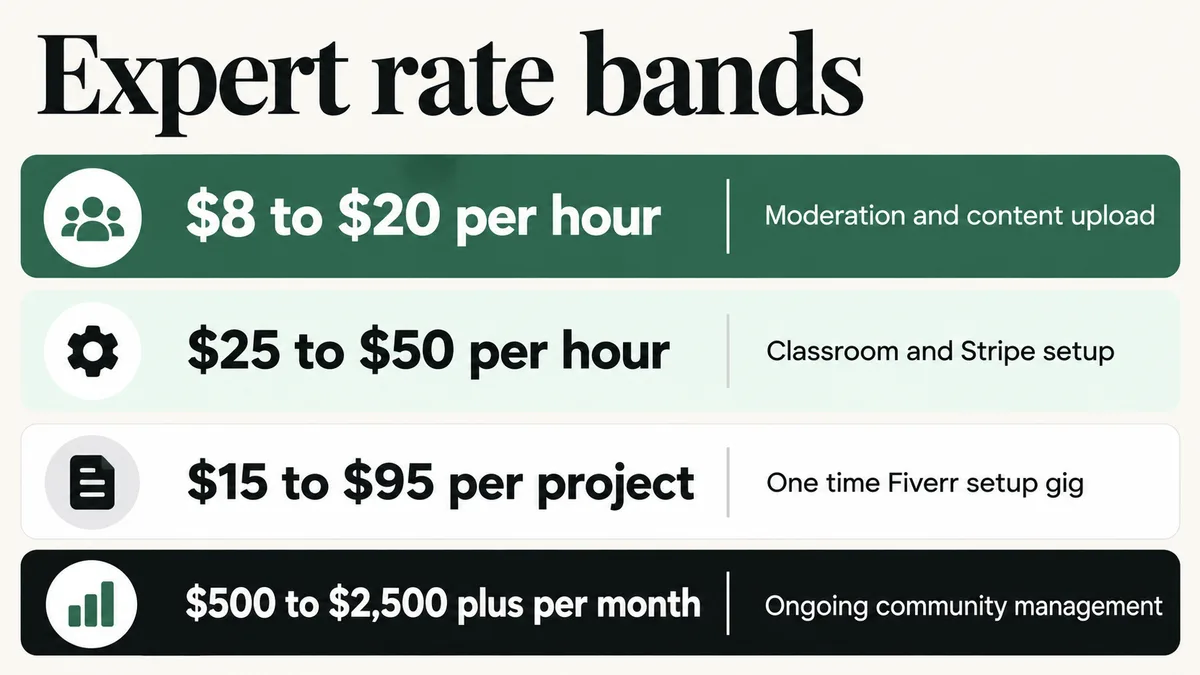
A Skool expert typically costs $8 to $20 an hour for basic moderation and content upload, $25 to $50 an hour for a generalist who can structure your Classroom and connect Stripe pricing, and $500 to $2,500 a month for ongoing community management. One-time setup gigs on Fiverr run $15 to $95, and full-service agency management runs $3,000 a month or more, sometimes structured as a revenue share instead of a flat fee. Before paying for “automation,” confirm the work is actually possible, since Skool has no public API and its Zapier integration covers only two triggers and two actions on the Pro plan.
📋 What’s Covered
02How Much Does a Skool Expert Cost in 2026?
03Step 1: Do You Need a Community Manager or a Setup Specialist?
04Step 2: Does Skool Even Have the Automation You’re Being Sold?
05Step 3: Have They Actually Migrated Members Into Skool Before?
06Step 4: Who Configures Your Points, Levels, and Leaderboard?
07Step 5: What Happens the Week After Launch?
08Step 6: Is the Scope and Payment Structure Written Down?
09What Are the Red Flags That Should End the Conversation?
10How Do You Screen a Skool Expert in an Afternoon?
11Where Should You Look to Hire a Skool Expert?
12How Do You Avoid Hiring the Wrong Person Twice?
13Frequently Asked Questions
What Does a Skool Expert Actually Do?
Skool was built so a single creator can launch a paid community without writing a line of code, and for a simple group with one price and one Classroom, that promise holds up well. The real hiring decisions start once the business gets more complicated: multiple pricing tiers, a migration carrying real members and payment history from Circle, Mighty Networks, Facebook Groups, or Mighty’s older competitors, a leaderboard and points system tuned to actually drive engagement instead of sitting at its defaults, or a DM and content workflow that needs to run the same way every single day without you doing it by hand.
Because Skool has no public API and no app marketplace, the word “developer” does not really apply here the way it does on LearnDash or Kajabi. There is nothing to code against. What people actually sell under the “Skool expert” label splits into three distinct jobs instead: a community manager who moderates posts, runs events, and keeps the Feed active day to day, a setup specialist who structures your Classroom modules, configures pricing tiers through Skool’s built-in Stripe connection, and tunes the leaderboard’s level thresholds, and a migration specialist who has actually moved paying members off another platform without losing their access or payment history.
Fiverr alone lists close to two thousand gigs under Skool-related search terms, and almost none of them separate which of these three jobs you are actually buying.
How Much Does a Skool Expert Cost in 2026?
Rates for Skool work are unusually spread out for how simple the platform looks from the outside, mostly because the market has not settled on separate pricing for the three jobs above.
$8 to $20 per hour: basic moderation and content upload. Real Upwork job posts for a “Skool Community Manager” commonly land in this range, with the broader community-management category on Upwork averaging close to $12 an hour. Fine for day to day engagement, not the person to configure a pricing tier or a migration.
$25 to $50 per hour: a generalist who can structure Classroom modules, connect your Stripe-linked pricing tier, and set sensible leaderboard thresholds. Real Upwork specialist profiles charging $15 to $25 an hour for combined Circle and Skool setup work fall in this band. Reasonable for a single-tier community with no migration involved.
$15 to $95 per project: one-time Fiverr setup gigs, the most common way Skool work is actually sold. These cover importing content, branding a Classroom, and basic configuration, typically delivered in three to ten business days depending on scope. The low price reflects a template-driven process, not a judgment on quality.
$500 to $2,500 per month, or $3,000 and up for a full team: ongoing community management. A single freelance manager handling moderation, events, and engagement typically falls in the lower part of this range. A full-service setup with separate people for moderation, content, and strategy, or an agency charging a 30 percent revenue share plus a flat setup fee in the $499 to $599 range, a real structure found on an active Skool management offer, pushes toward the top.
Budget the platform subscription on top of whatever you pay a person. Skool’s own pricing, confirmed directly against its current pricing page, runs two plans: Hobby at $9 a month with a 10 percent plus 30 cent transaction fee, and Pro at $99 a month with a 2.9 percent plus 30 cent fee that rises to 3.9 percent on any single payment of $900 or more. Annual billing drops those to roughly $7.50 and $82 a month. Every quote you receive should separate the person’s fee from this platform cost, since blending the two makes a cheap specialist look expensive and an expensive one look reasonable.
Step 1: Do You Need a Community Manager or a Setup Specialist?
Write down what you actually need before you talk to a single candidate, because “I need a Skool expert” covers at least two different hires with two different going rates. If the real need is welcoming new members, responding to posts, running weekly calls, and keeping the Feed active, that is a community manager, and the going rate sits toward the lower end of the bands above.
If the real need is structuring Classroom modules, connecting a pricing tier, migrating members from another platform, or tuning the leaderboard and level thresholds, that is a setup specialist, a one-time job rather than an ongoing role. Plenty of real projects need both, just not from the same person at the same rate. Paying a setup specialist’s hourly rate for daily moderation wastes money. Asking a community manager to configure a Stripe-linked pricing tier gets you a payment flow that works in testing and breaks the first time a real member tries to upgrade mid-cycle.
Do this: Split your brief into a build list (one-time structure, pricing, and migration work) and a run list (ongoing moderation and engagement). Hire against each list separately, even if it ends up being the same person.
Step 2: Does Skool Even Have the Automation You’re Being Sold?
This is the single most important question in this entire guide, and almost nobody selling Skool services volunteers the answer. Skool has no public API, no documented webhooks, and no app marketplace. Its only official third-party automation route is a Zapier integration available on the Pro plan, and that integration supports exactly two triggers, new member and new post, and two actions, create a post and send a direct message. There is no native trigger for a member canceling, no behavioral tagging, and no built-in way to detect an inactive member and act on it automatically.
That real limitation does not mean nothing can be done. Workflow tools outside Skool itself can watch for specific patterns and send scheduled DMs or posts on a timer, and a specialist who has actually built around these limits knows exactly which two triggers exist and sells you a workaround honestly labeled as a workaround. Someone who promises full automation, behavioral tagging, or “connect it to anything” without naming the Pro plan or the two-trigger limit either has not built on Skool recently or is describing a feature the platform does not have.
Do this: Ask exactly which Zapier triggers and actions the automation uses, by name. A real answer names “new member” or “new post” specifically. A vague answer about connecting “everything” is a sign the person has not actually checked Skool’s real limits.
Step 3: Have They Actually Migrated Members Into Skool Before?
Migrating an existing paid community into Skool is one of the most common reasons people hire outside help, and it is also where the platform’s real limits bite hardest. Skool’s own import tools work from a CSV file, and that import process does not let you assign imported members to a specific course, access level, or pricing tier as part of the upload. Whatever structure your members had on their old platform has to be rebuilt by hand on the Skool side after the import lands.
A specialist who has genuinely run one of these migrations names that gap unprompted, because they have hit it before. Someone who says your entire member base, tiers, and payment history will move over automatically either has not done a real Skool migration or is telling you what you want to hear. Payment history in particular does not move at all. Active subscriptions on your old platform have to be recreated through Skool’s own Stripe connection, which means a real gap in billing continuity unless it is planned for in advance.
Do this: If a migration is involved, ask specifically how imported members get assigned to the correct tier or course after the CSV upload, and what happens to active subscriptions during the switch. A specific answer beats a reassuring one.
Step 4: Who Configures Your Points, Levels, and Leaderboard?
Skool’s gamification system, points earned for posting and getting likes, a leaderboard ranking the most active members, and nine configurable levels, is one of the platform’s real differentiators, and it is also frequently left on its defaults by people who set up the Classroom and pricing but never touch it. A community that actually uses this system well has its point values and level thresholds tuned to reward the specific behavior that keeps members engaged, not whatever Skool ships with out of the box.
Access problems caused by a misconfigured tier, rather than the leaderboard itself, are common enough that they deserve their own fix rather than a full rebuild, something covered directly in a separate guide on a Skool course showing locked for members who should have access.
Ask directly whether leaderboard and level configuration is included in the quote or treated as a separate add-on. This is a small piece of work technically, usually under an hour once someone understands your goals, but it is exactly the kind of detail a rushed setup skips, and it is cheap to fix now compared to rebuilding engagement habits after members have already gotten used to a leaderboard that rewards the wrong thing.
Do this: Confirm leaderboard and level-threshold configuration is explicitly included in the setup quote, not assumed, and ask the specialist to explain what behavior your point values are actually meant to reward.
Step 5: What Happens the Week After Launch?
A Skool community almost always looks fine in a walkthrough and starts showing real problems once actual members join: someone upgrades mid-cycle and the access does not update cleanly, a DM automation sends the wrong message to the wrong segment, or a migrated member cannot find content that technically imported but landed in the wrong course.
Ask what support is included after handover, for how long, and what it costs beyond that window. “Everything is included forever” is either an answer from someone who has not thought it through or a specialist planning to disappear once paid. A clear answer sounds like two weeks of bug fixes included, then an hourly rate or a small monthly retainer for anything new. Get this in writing before the project starts, not after the first real member hits a problem.
Do this: Get the support window, what counts as a bug fix versus new work, and the post-launch rate written into the agreement before any payment moves.
Step 6: Is the Scope and Payment Structure Written Down?
Nearly every dispute between a community owner and a Skool specialist traces back to the same root cause: two different pictures of what “done” meant, and neither one written down anywhere. The document does not need to be long. It needs a list of deliverables, a definition of done for each one, who owns writing the first batch of posts and course content, and what a change request costs once work has started.
If the deal is structured as a revenue share rather than a flat fee, which is common for full-service management offers, get the exact percentage, the monthly minimum if one exists, and the length of the commitment in writing before anyone touches your Stripe connection. A deposit with staged payments tied to named deliverables protects both sides on a flat-fee project. Paying everything up front removes your own negotiating room entirely.
Do this: Require a written scope with deliverables, a named content owner, and either a milestone payment schedule or an exact revenue-share percentage and minimum, before any work begins.
What Are the Red Flags That Should End the Conversation?
Some signals are worth walking away from immediately rather than negotiating around:
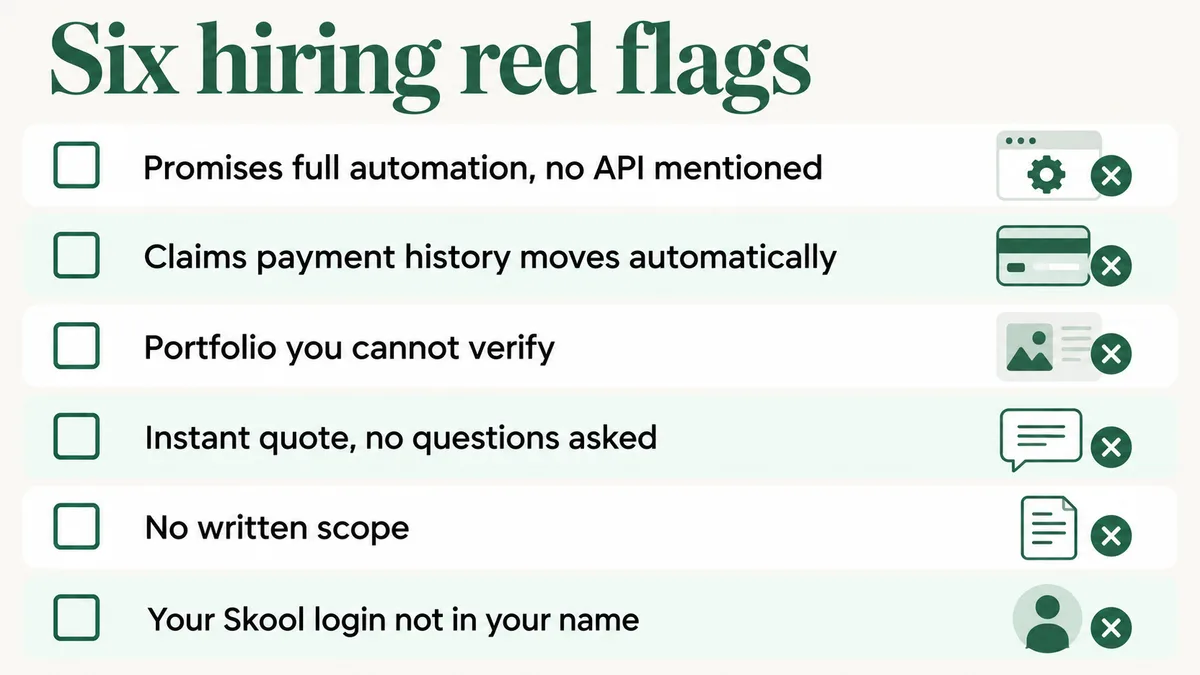
- A promise of full automation without ever mentioning Skool’s real two-trigger Zapier limit or the lack of a public API.
- A migration pitch claiming tiers and payment history move over automatically.
- Portfolio communities you cannot actually open or verify as real.
- A total price quoted within minutes, before any real questions about your member count, tiers, or migration needs.
- No written scope, only a chat thread and a number.
- Your own Skool group, custom URL, or Stripe account set up under the specialist’s login instead of yours.
The instant-quote flag deserves a second look specifically because it looks like good service. A specialist who prices a Skool project without asking about your member count, tier structure, or a migration is not being efficient. They are guessing, and that guess shows up later as a change order with a new price attached to it.
How Do You Screen a Skool Expert in an Afternoon?
If you want the compressed version of everything above, run it in this order. It moves faster than comparing three separate proposals side by side on your own.
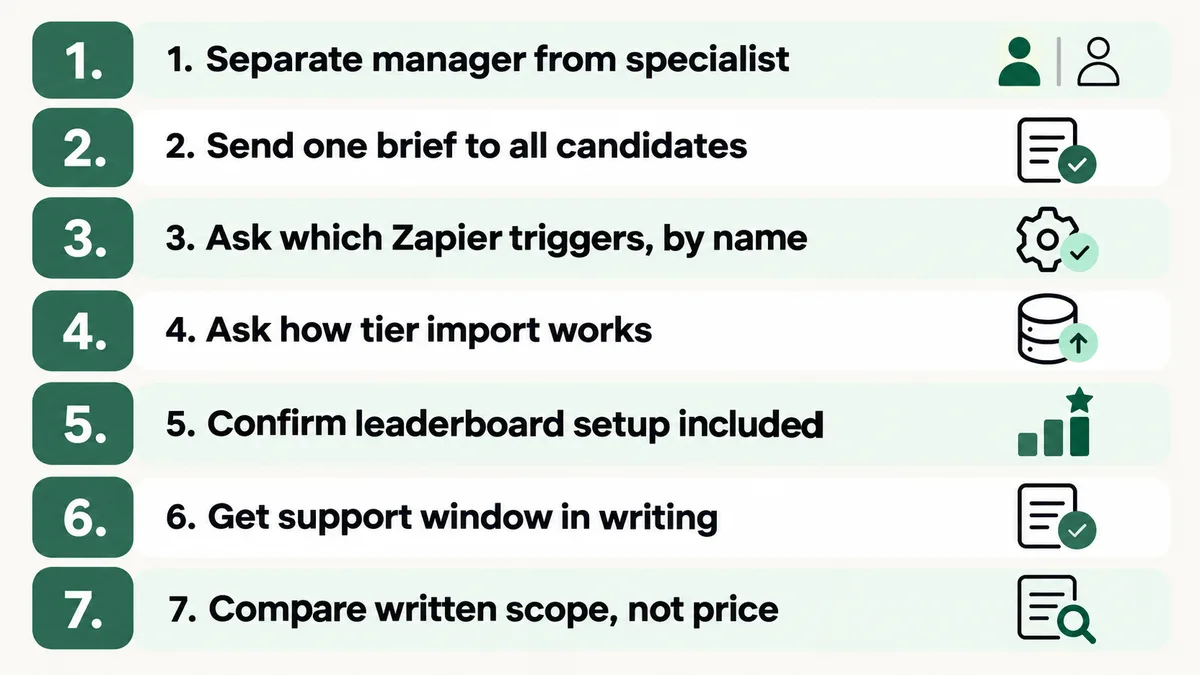
- Confirm whether you are hiring a community manager, a setup specialist, or a migration specialist, and write down which parts of the project are each.
- Send the identical one-page brief to every candidate you are considering.
- Ask exactly which Zapier triggers and actions any proposed automation uses, by name.
- If a migration is involved, ask how imported members get assigned to the correct tier after the CSV upload.
- Confirm leaderboard and level configuration is included in the quote, not a separate add-on.
- Get the post-launch support window and rate in writing.
- Compare only the candidates still standing, on written scope rather than the headline price.
Most candidate lists lose at least one person at step three. What remains afterward is a far more useful conversation, because by then you are no longer comparing marketing copy.
Where Should You Look to Hire a Skool Expert?
Here is a real structural gap worth knowing before you search: unlike Mighty Networks and Circle, Skool runs no official vetted Experts or Partner Directory. Skool does run its own in-house affiliate program, paying 40 percent recurring commission for life on referred subscriptions, but an affiliate relationship says nothing about someone’s setup or migration skill. There is no badge, no certification, and no official list to start from.
That makes general freelance marketplaces, mainly Fiverr for one-time setup and import work and Upwork for ongoing community management, the realistic starting point, alongside a handful of community-growth agencies that publish real case studies instead of generic service pages. Because none of these sources pre-vet anyone for Skool specifically, the screening steps in this guide matter more here than on a platform with an official directory doing some of that work for you.
Working out how to hire well on Skool is really a verification problem, not a sourcing problem, the same way it is when hiring for a comparable community platform like Circle or pricing out a Mighty Networks expert. The source changes how many people you are choosing from. It does not change how carefully you need to check each one, and on Skool, where the platform itself vets nobody for you, that checking matters more, not less.
How Do You Avoid Hiring the Wrong Person Twice?
The cheapest protection available is a small paid trial task before committing to a full engagement. Pay for something real and self-contained: set up one pricing tier end to end, or configure the leaderboard thresholds for a test group. Two to three hours is usually enough to learn what you need to know.
That trial reveals four things no interview can: how someone communicates under real conditions, whether their time estimate held up, whether the work is genuinely finished when they say it is, and whether they volunteer Skool’s real limits unprompted or only when pressed. Paying for a small test costs far less than discovering the answers halfway through a full migration.
Keep your own record of what got built and why: which pricing tiers, which automation workaround, which leaderboard thresholds, and the reasoning behind each one. Specialists move on to other clients, and a Skool group nobody can explain becomes expensive for whoever inherits it next. A shared document maintained during the setup costs nothing and saves real time later.
Frequently Asked Questions
Do I really need a Skool expert, or can I set it up myself?
For a single free or one-tier paid group with no migration involved, most creators can set it up themselves inside Skool’s own interface, since the platform is genuinely built for that. Once you need a migration, multiple pricing tiers, or a workaround for Skool’s limited automation, hire someone with real, specific experience on this exact platform. Those gaps fail quietly, and a generalist without Skool-specific experience often will not notice something is broken until a paying member reports it.
How long does a Skool setup or migration actually take?
A straightforward single-tier setup with content ready to upload usually takes a few days to a week. A migration carrying an existing member base and payment history commonly stretches to two or three weeks once you account for the manual tier and access reassignment Skool’s CSV import does not handle automatically. Content readiness, not the configuration itself, is almost always the real bottleneck.
Is a flat fee or a revenue share better for ongoing Skool management?
A flat monthly fee is easier to budget and keeps incentives neutral. A revenue share can work when a manager is also expected to help grow membership, since it ties their pay to your outcome, but get the exact percentage, any monthly minimum, and the commitment length in writing first. A revenue share with no minimum and no exit clause can quietly cost more than a flat fee once a community grows.
Can a Skool expert really automate DM sequences and follow-ups?
Only within real limits. Skool’s own Zapier integration covers two triggers and two actions on the Pro plan, which does not include a native “member inactive” or “subscription canceled” trigger. Third-party workflow tools can approximate scheduled DM sequences around these limits, but anyone promising unlimited behavioral automation on Skool is describing a feature the platform does not currently have.
Should I hire a freelancer or a full-service agency?
A freelancer usually costs less and gives you direct access to the person doing the work, which matters on a platform with no official vetting layer. A full-service agency costs more but offers more continuity if one person leaves and more capacity for a larger migration. For most single-brand communities, an experienced freelancer who passes the screening steps above wins on both price and communication.
What is the fastest way to spot someone who has not actually built on Skool?
Ask them to name Skool’s real Zapier triggers, and ask what the hardest part of a past migration was. Someone who has genuinely done this work answers both immediately and specifically, usually mentioning the two-trigger limit or the CSV import’s lack of tier assignment unprompted. Someone who has not stays vague on both, often with a confident tone doing the work the details should be doing instead.
Want a second opinion before you sign anything?
Send me the brief and the quotes. I will tell you honestly whether the scope is realistic and what is missing from it, whether or not you end up working with me.