
A member sends you a screenshot of a padlock. They paid, they are clearly inside your group, the course is sitting right there in the Classroom tab, and it will not open. You click it yourself and it opens instantly, which tells you nothing useful and makes the conversation harder. If you have been searching “Skool course locked for members“, you have probably already checked the one setting you know about and found it looked correct.
I build and repair membership and community platforms for coaches, course creators and training businesses, across Skool and half a dozen others, and a locked Skool course is almost never a fault. It is one of five permission modes doing exactly what somebody set it to do, sometimes stacked on top of a second gate nobody remembers adding. Skool does not explain the decision to you or to the member. The padlock just sits there. Below are the ten causes I work through, in the order that finds the answer fastest.
Quick Answer
When a Skool course is locked for members, the cause is almost always the course permission mode. Every course carries one of five settings, and four of them hold members out until a specific condition is met: a level reached, a payment made, a number of days elapsed, or an admin granting access by hand. Two other gates sit on top of that, a course left in draft and a page level drip timer. Check the permission first, then the publish state, then the individual member’s level and tier. Never test with your own account, because admins have access to every course and never see the locked view.
📋 What’s Covered
02Cause 1: Is the Classroom Tab Switched On for the Group?
03Cause 2: Is the Course Still Sitting in Draft?
04Cause 3: Are You Checking This From an Admin Account?
05Cause 4: Is the Course Level Gated and the Member’s Level Too Low?
06Cause 5: Is the Course Private With Access Never Granted?
07Cause 6: Is a Time Gate Still Counting Down?
08Cause 7: Is a Drip Holding Back the Individual Lesson?
09Cause 8: Is the Member on the Wrong Membership Tier?
10Cause 9: Is It a Paid Course They Never Actually Bought?
11Cause 10: Did an Automated Course Grant Quietly Fail?
12What If They Lost Access to the Whole Group Instead?
13Skool Course Locked for Members: How Do You Diagnose It in Order?
14Why Does Skool Gate Courses This Many Different Ways?
15How Do You Stop This Happening on the Next Course?
16Frequently Asked Questions
How Does Skool Decide Whether a Course Opens for a Member?
Before the causes, the model. Most confusion about a Skool course locked for members comes from treating the course permission as the whole decision. It is one check out of four, and the other three are the ones people forget they configured.
A member has to clear all of these before content appears:
- They are still in the group. Sounds obvious. A cancelled subscription or a failed card removes people quietly, and a removed member sees nothing at all.
- The Classroom tab is switched on. It is a group wide toggle, and switching it off hides the entire section from everybody.
- The course is published rather than drafted. A drafted course is invisible to members and looks completely normal to you.
- The course permission lets them in. This is the setting people think of first, and it has five possible values.
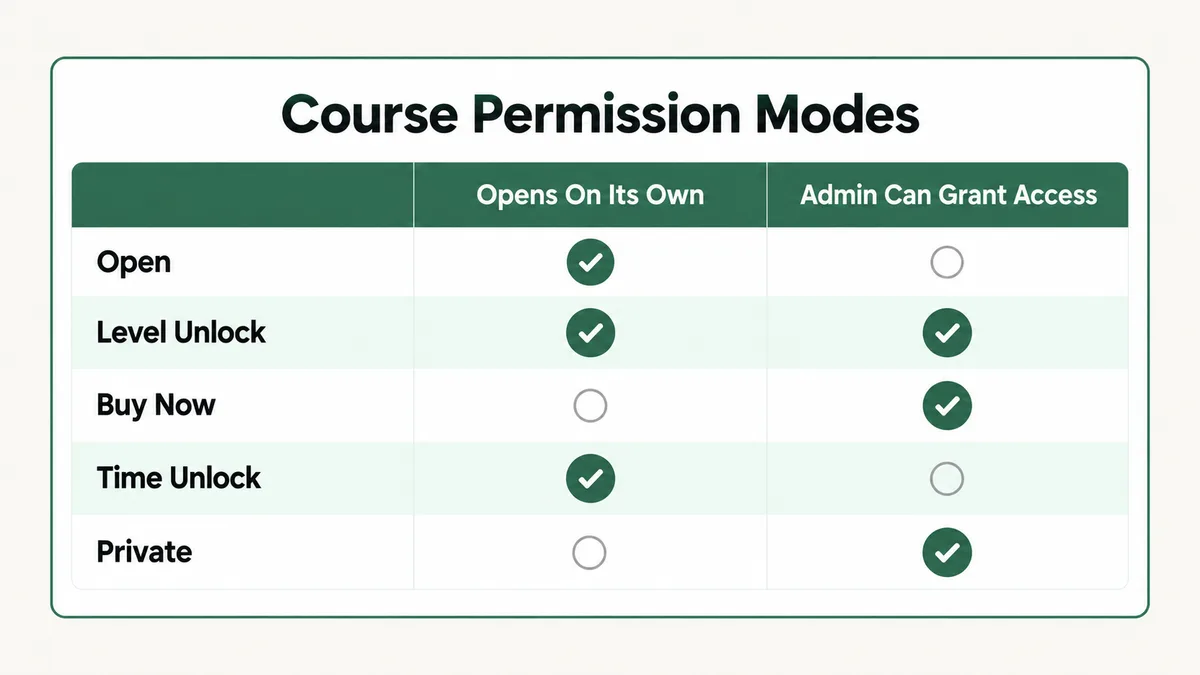
Those five values are worth learning by heart, because they explain most of what follows. Skool’s own permissions documentation defines them plainly: Open means “all members of the group have access”, Level unlock means “members unlock this course at a specific level”, Buy now means “members pay a 1-time price to unlock this course”, Time unlock means “members unlock this course after X days from joining the group”, and Private means “members you specify manually can access”.
Only the first of those five lets everyone straight in. The other four are gates, and each one fails silently. There is no message telling the member which condition they missed, and no report on your side listing who was refused.
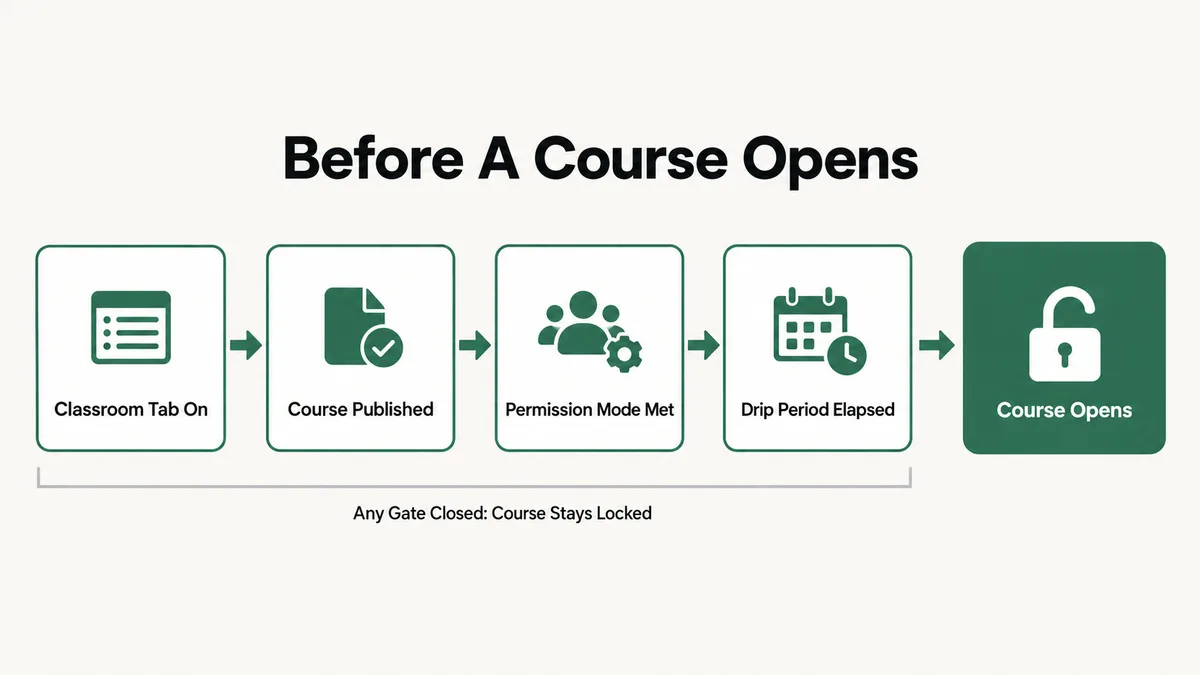
There is a fifth gate underneath all of this, applied per page rather than per course: the drip setting. A course can be fully open while an individual lesson inside it stays shut for another eleven days. That combination produces some of the strangest support messages you will get, because the member can see the course, enter it, and still find the thing they paid for missing.
Cause 1: Is the Classroom Tab Switched On for the Group?
Start here when more than one person reports the problem at the same time, because this is the only cause on the list that hits your whole community at once.
The Classroom is a tab, and tabs are toggled per group under Settings, then Community, then Tabs. Switch that toggle off and the section disappears for every member simultaneously. Your own view does not change in any way that draws attention, so nobody notices until the messages start arriving. It happens most often during a redesign, when somebody hides the tab to reorganise the content behind it and then gets pulled into something else.
Fix: Open Settings, then Community, then Tabs, and confirm Classroom is on. If several members reported this within the same hour, check this before anything else. One toggle explains all of them at once, and no amount of per member investigation will find it.
Cause 2: Is the Course Still Sitting in Draft?
The second group wide cause, and the one that catches people who built the course over several sessions.
Skool’s publishing documentation states that “all courses are published by default”, and that the green toggle is what reverts a course to draft status, “hiding this course from members”. So a drafted course is not a half finished course in a staging area. It is a live course that somebody deliberately hid, and the hiding is total.
The reason this survives a careful review is that the signal is subtle and admin only. Drafted courses show an icon in the upper left corner and reduced opacity in your classroom view. On a screen with eight courses on it, slightly faded is not something the eye catches, and members never see that view at all to tell you about it.
Fix: Look at your classroom grid and check the opacity of every card, not just the one being complained about. If the course is faded, open it and switch the green toggle to published. While you are there, check the courses either side of it, because a batch of courses built in one sitting tends to share the same mistake.
Cause 3: Are You Checking This From an Admin Account?
This one is not a cause of the lock. It is the reason you cannot find the cause, and it wastes more time than any genuine misconfiguration on this page.
Skool’s documentation on level gated courses is explicit that “admins have access to all courses” and that admins will not see the locked view a regular member sees. Your account bypasses every gate described in this article. Level, tier, purchase, drip, all of it. So when you click the course and it opens beautifully, you have learned precisely nothing about what your member is looking at.
Moderators are worth checking separately rather than assuming they behave the same way. Role permissions and course permissions are configured in different places, and the person testing on your behalf is often the one person in the group whose experience does not represent anybody else’s.
Fix: Keep one ordinary member account, on a separate email address, joined to your own group at the standard tier. Test every gate from that account before you change a setting. It takes five minutes to set up once and it turns this entire category of problem into something you can see rather than something you have to reason about.
Cause 4: Is the Course Level Gated and the Member’s Level Too Low?
Now we are into the per member causes, and this is the most common one in active communities that use gamification at all.
Level gating ties course access to community participation. Skool’s documentation on level gated courses explains that “members need to engage in the community to gain points” and that “they earn points when other members like their posts or comments (1 like = 1 point)”. Once a member reaches the required level, the course opens for them. Until then, they see it in the classroom list with a padlock on it.
The part that catches admins is the shape of the point thresholds. There are nine levels, and the gaps between them are not even close to linear.
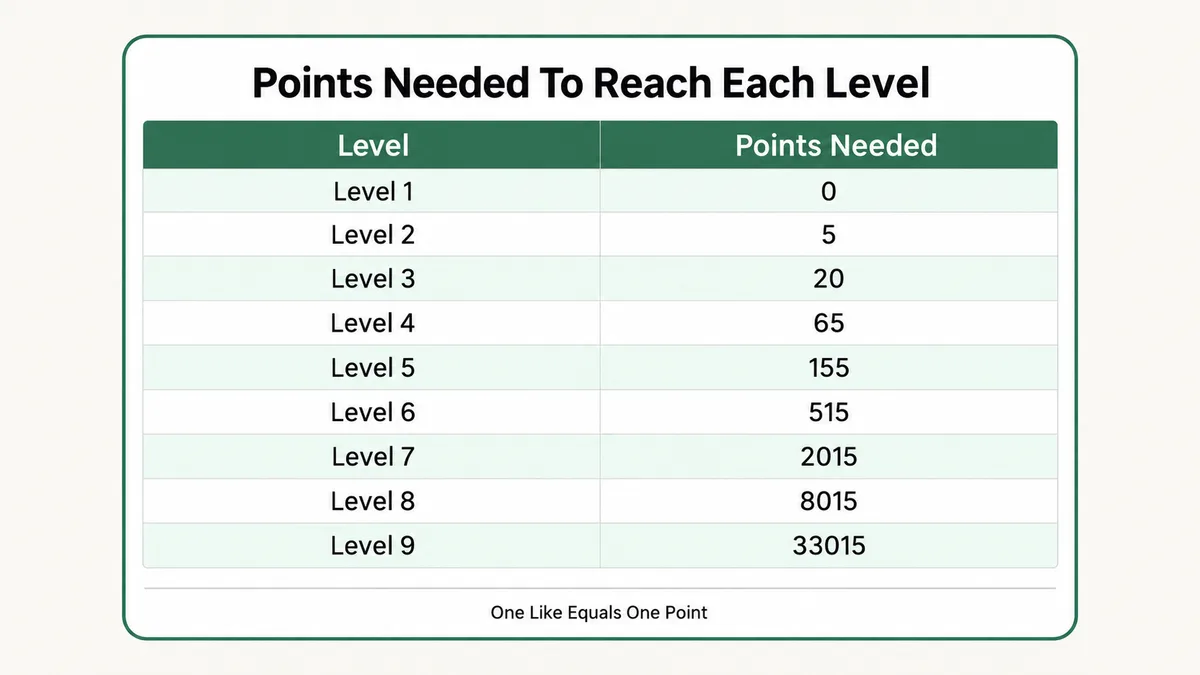
The points and levels documentation lists the thresholds: 5 points for level 2, 20 for level 3, 65 for level 4, 155 for level 5, 515 for level 6, 2,015 for level 7, 8,015 for level 8 and 33,015 for level 9. Gate a course at level 5 and you are asking for 155 likes from other people. In a group of forty members, that is not a participation target, that is a wall. Gate at level 3 and you are asking for 20, which a motivated member reaches in a fortnight.
One more detail that generates support messages on its own: levels are calculated per group and start again from level 1 when somebody joins a new one. A member who is level 6 in your free community arrives in your paid community at level 1, and every level gated course there is shut to them on day one.
Fix: Open the Members tab and read the member’s actual level off their profile, then compare it against the level the course requires. If the gap is large, you have a design problem rather than a support ticket, and the answer is to lower the gate. For the individual member in front of you, grant access by hand through Membership Settings so they are not waiting on the community to like their posts.
Cause 5: Is the Course Private With Access Never Granted?
Private is the mode that does exactly what it says and still surprises everyone, because a private course is invisible until you personally add each member to it.
Skool’s permissions page defines Private as “members you specify manually can access”. There is no automatic route in. Somebody paid, somebody joined, somebody completed the prerequisite, and none of that matters until an admin opens the Members tab and ticks the course for that person.
The mechanics are quick once you know where they live. Skool’s course access documentation describes it: open the Members tab, find the member, click Membership Settings next to them, and in the Courses tab select the course you want to give access to. Revoking uses the remove access option in the same place.
The same page states a limit worth memorising, because it stops you looking for a button that does not exist: “you can grant and revoke access to any member as long as the course is set to Level Unlock, Buy Now, or Private”. Open courses are available to everybody and cannot be granted or revoked, and time gated courses open automatically after the set number of days, with no manual override.
Fix: Grant the member access through Membership Settings, then decide whether Private is the right mode at all. If the course is meant for everyone who buys a particular thing, an automated grant or a tier is a better fit than a manual list you have to remember to maintain at three in the morning.
Cause 6: Is a Time Gate Still Counting Down?
Some courses are not locked. They are early, and the member is measuring from a different date than Skool is.
Time gating opens a course a set number of days after somebody joins the group, in Skool’s own words “after X days from joining the group”. The clock is per member, not per course, so no two people in your community are at the same point in it. Two members who bought on the same afternoon can still be a day apart if one of them joined the free group months earlier and upgraded later.
That is the detail that produces the argument. The member counts from the day they paid. Skool counts from the day they joined the group. When those two dates differ, and they often do in a freemium setup, the maths disagrees and both sides are certain they are right.
There is no manual override for this mode. Skool’s documentation is direct that time gated courses open automatically after the number of days set, which means you cannot grant early access to one person the way you can with Private or Level.
Fix: Check the member’s join date in the Members tab and count forward yourself, rather than trusting either of your memories. If you genuinely need to let one person in early, switch the course to Private and grant them access manually, since that is the only route that gives you control over an individual. Change it back afterwards.
Cause 7: Is a Drip Holding Back the Individual Lesson?
If the member can open the course but one lesson inside it will not open, stop looking at the course permission entirely. You are looking at the wrong setting on the wrong object.
Drip is configured per page, underneath the course level permission, and the two are completely independent. Skool’s drip documentation describes the feature as one that opens “pages for your members after a certain number of days after they join your community”, and notes that a new member “will see that they have to wait a certain period until the page is unlocked for them”.
At least the member gets a visible waiting message here, which makes this the friendliest failure on the whole list. What it does not tell them is whether that wait was intended. A course built in 2024 with a thirty day drip on module four will still be holding module four back today, for every new member, long after the launch it was designed for ended.
This pattern repeats across every membership platform, not just Skool. On a cooking education build I worked on, running on Kajabi with MemberPress handling the membership side, the same combination of subscription billing and dripped content produced exactly this shape of support question: people who had paid, could see the product, and could not open the part they wanted. You can see that project and others on my portfolio.
Fix: Open the individual page and check its drip setting rather than the course’s permission. If the schedule is stale, clear it. For one member who needs everything now, release all content to them through their membership settings, which overrides the drip for that person without changing the schedule for anybody else.
Cause 8: Is the Member on the Wrong Membership Tier?
Tiers are the newest way to gate a course and the one most likely to be misconfigured, because the setup has a prerequisite that is easy to miss.
Tiered access is not a sixth permission mode sitting alongside the other five. A course has to be set to Private before tier access becomes available on it, and the permissions can then be combined: level gating or tier, one time purchase or tier, time gating or tier. Set a course to Open and then go hunting for the tier selector, and you will not find it, because the mode you chose removed it.
Tiers inherit upward, which is the behaviour most people assume without checking. A member on the top tier gets everything assigned to the tiers below it. The failure runs the other way: assign a course to the premium tier and every standard member is shut out of it, including the ones who were reading it perfectly happily last week under a different setting.
That last detail matters when you introduce tiers to a community that already has members. Everyone lands on some tier when the change is made, and whichever tier they land on decides what disappears from their classroom that day.
Fix: Check the member’s current tier in the Members tab, then check which tier the course is assigned to, and confirm the course is set to Private, since tier access depends on it. Before rolling tiers out across an existing community, write down which courses each tier should see and test the list from a real member account on each tier.
Cause 9: Is It a Paid Course They Never Actually Bought?
The Buy now mode charges a separate one time price for a single course, on top of whatever the member already pays for the group. Skool defines it as members paying “a 1-time price to unlock this course”.
Two separate payments, two separate things bought. That distinction is obvious in your billing and invisible in the member’s memory. Somebody who pays you monthly, has been in the community for a year, and sees a padlock on a bonus course will read it as a bug rather than a price, and their message to you will say the course is broken rather than asking what it costs.
There is a second version of this that is genuinely your problem rather than theirs. If the member bought the course somewhere else, through a checkout page or an order bump outside Skool, then nothing inside Skool knows the purchase happened. The payment is real, the access was never granted, and they are right to be annoyed.
Fix: Check whether a payment for that specific course exists before you do anything else. If it does, grant access manually through Membership Settings, which works for Buy now courses. If it does not, tell them plainly that the course is a separate purchase and what it costs. For anything sold outside Skool, connect the checkout to an automated grant rather than relying on somebody spotting the order.
Cause 10: Did an Automated Course Grant Quietly Fail?
Once you are granting course access from a purchase, a form or a CRM, the lock moves out of Skool and into the automation, and it fails in ways the Skool interface cannot show you.
Skool’s Zapier integration handles this, and its documentation carries three constraints that account for most failures. The feature is “only available on the Pro plan, and not on the Hobby plan”, so an account on the lower plan will build the automation, see it run green, and grant nothing. Only private courses can be selected, because open courses are already available to every member. And the action takes roughly ten to fifteen minutes on a standard Zapier account, so a member who checks immediately after buying sees a padlock that is about to disappear on its own.
The fourth constraint is the one that quietly breaks bundles: “only one active course access email will be valid at a time and the latest email access sent will override any previous unused access emails”. Send somebody three course invitations in a row and two of them stop working. Skool’s own guidance is to bundle multiple courses into a single grant where you can, rather than firing them separately.
Before rebuilding any of this, confirm the automation ran at all. A Zap that never triggers produces an identical symptom to a Skool permission problem, and the two are diagnosed in completely different places.
Fix: Open the automation’s own run history and confirm a successful run exists for that member’s email address, spelled exactly as it is in Skool. Check your plan supports the action at all. Then wait the full fifteen minutes before declaring it broken, and bundle multi course grants into one action rather than a sequence.
What If They Lost Access to the Whole Group Instead?
A portion of the messages that arrive described as a locked course are not about a course at all. The member lost the group, and a locked course is simply what that looks like from the outside.
Cancellation is the common one, and the timing is specific. Skool’s documentation on cancelling a membership states that “you will be removed from the group at the end of your billing cycle”, so somebody who cancelled six weeks ago and forgot keeps full access until their renewal date, then loses everything on a day they were not thinking about it.
Admin side removals work in two different ways worth keeping straight. Removing a member from the group cancels their subscription and takes them out, though they can rejoin later. Cancelling their subscription instead ends the membership at the end of the billing cycle, with the removal happening after their billing date. The first is immediate, the second is scheduled, and choosing the wrong one by accident is how a paying member vanishes a month later.
Failed payments produce the slowest version of this. A declined card triggers automatic retries over several days, during which the member usually still has access and is receiving emails about it that they are not reading. Access ends quietly at the end of that process, which is why these arrive as confused messages rather than angry ones.
The distinguishing question takes ten seconds. Ask whether they can still see the community feed. If the whole group is gone, this is a billing conversation. If the feed is fine and one course has a padlock on it, go back to the ten causes above.
Skool Course Locked for Members: How Do You Diagnose It in Order?
Ten causes is a lot to hold in your head while somebody waits for a reply. This is the order I actually work in, and it finds the answer faster than reading the list from the top.
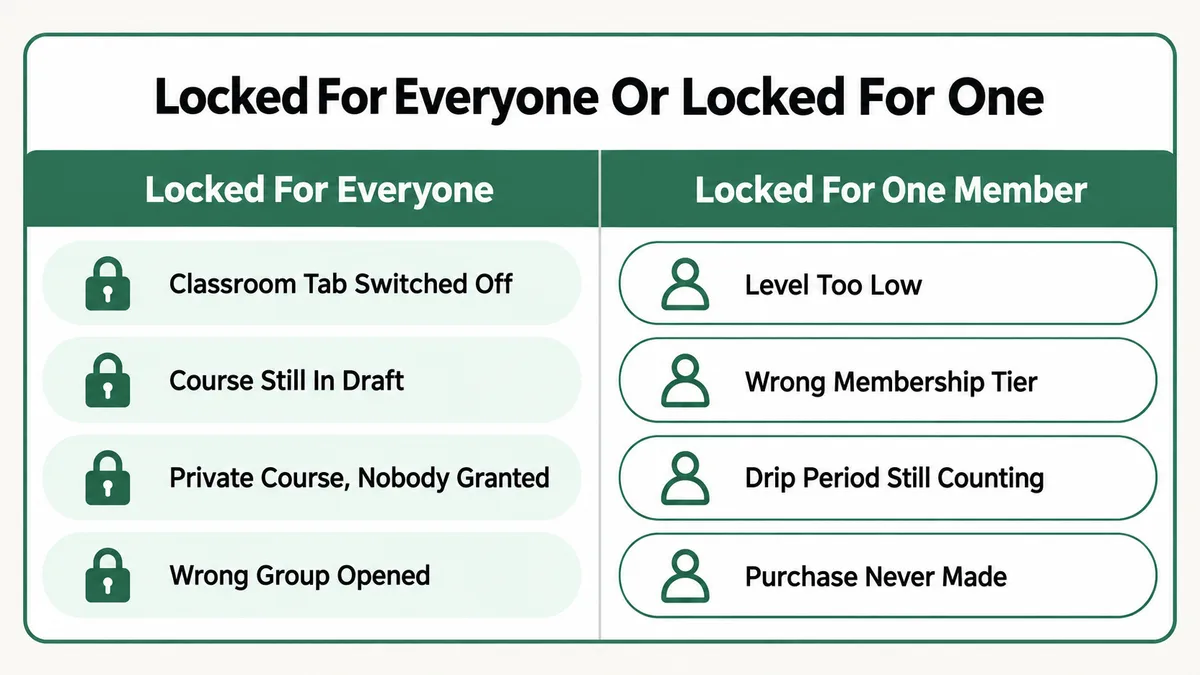
- Ask how many people it affects. One member points at level, tier, drip or a purchase. Everybody points at the tab, the draft state or the permission mode itself.
- Check the member still has the group. If the community feed is gone too, this is billing, not permissions.
- Read the course’s permission mode and write it down. Every remaining step depends on which of the five it is, and guessing wastes the next ten minutes.
- Confirm the course is published, not faded out in draft.
- Open your test member account and look at the classroom through it. Do not use your admin account for this, ever.
- Compare the member’s level and tier against what the course requires, reading both off the Members tab rather than from memory.
- Check their join date if any time gate or drip is involved, and do the arithmetic properly.
- Open the individual page if the course opens but one lesson does not. That is a drip setting, not a permission.
- Check the automation’s run history last, only if access was supposed to be granted by something outside Skool.
Why Does Skool Gate Courses This Many Different Ways?
It is worth understanding the design, because once you see it the behaviour stops feeling arbitrary and the ten causes stop needing to be memorised.
Each gate serves a different business goal, and they were added for different reasons. Level gating exists to drive participation, which is why the points come from other people liking your posts rather than from watching videos. Buy now and tiers exist to sell. Time gating and drip exist to hold people through a billing cycle instead of letting them consume everything in a weekend and cancel. Private exists for the hand sold, high value stuff.
Stack four business goals onto one padlock icon and you get a platform where the same symptom has ten causes. Skool has also chosen, consistently, to fail closed and stay quiet: when a check does not pass, the member sees a lock with no explanation, and you get no report of who was refused or why. That is defensible for a consumer product where an error message would leak how your pricing works, and it is exactly what makes this hard to debug.
None of this is unique to Skool. Every membership platform ends up with the same layered gating, which is why MemberPress rules that refuse to apply and Circle notifications that never arrive come down to the same short list of ideas: a condition nobody remembers setting, an admin account that sees everything, and a queue you cannot inspect. Learn the shape once and it transfers to whichever platform you end up on.
How Do You Stop This Happening on the Next Course?
Five habits remove most of these failures before a member ever meets one. None take long, and together they are the difference between a classroom you trust and one you check nervously every time somebody buys.
- Keep a real member account. Separate email, standard tier, joined like anybody else. Check every new course through it before you announce the course. This single habit catches more than the other four combined.
- Write the permission mode into the course name while you build. Something like “Advanced Module (private)” during setup makes a wrong mode visible at a glance in the classroom grid. Rename it before launch.
- Set level gates against your real leaderboard, not an ambition. Look at what level your most active members have actually reached, then gate below it. A gate nobody clears is a course nobody reads.
- Review drip schedules once a quarter. They are invisible from the classroom grid and they outlive the launch they were built for. A stale thirty day drip is still holding content back from members who joined last week.
- Test tiers from each tier before rolling them out. Assigning courses to tiers changes what existing members can see, and finding that out from a member is the expensive version.
If you are running a community alongside other tools, the same discipline applies at the connection layer. Access granted by an automation has to be verified in the automation, and the habit of checking a run history before touching platform settings will save you a rebuild you did not need. The same is true when you are choosing a platform in the first place: setting up a community as a solo creator is mostly a question of how many of these gates you are willing to maintain alone.
Frequently Asked Questions
Why is my Skool course locked for members who have already paid?
Paying for the group and having access to a specific course are two separate things in Skool. If the course is set to Buy now, it carries its own one time price on top of the membership. If it is set to Private, somebody has to grant that member access by hand. And if it is level or time gated, payment has no bearing on it at all, only their level or their join date does.
How do I give one member access to a locked Skool course?
Open the Members tab, find the member, click Membership Settings next to them, and select the course in the Courses tab. Skool’s documentation confirms this works as long as the course is set to Level Unlock, Buy Now or Private. Open courses cannot be granted because everyone already has them, and time gated courses open automatically with no manual override available.
Why can I open the course but my members cannot?
Because admins have access to all courses. Skool’s documentation states this directly, and it means your account bypasses every level, tier, purchase and drip gate in the group. Testing from an admin account proves nothing about what a member sees. Keep one ordinary member account on a separate email address and check through that instead.
How many points does a member need to reach each level in Skool?
Skool documents nine levels: 5 points for level 2, 20 for level 3, 65 for level 4, 155 for level 5, 515 for level 6, 2,015 for level 7, 8,015 for level 8 and 33,015 for level 9. Points come only from other members liking your posts and comments, at one point per like, and levels reset to 1 when somebody joins a different group.
My member can open the course but one lesson is still locked. Why?
That is a drip, set on the individual page rather than the course. Drip opens pages a certain number of days after a member joins the community, and Skool shows the member how long they have to wait. Check the page’s own settings, and if one person needs everything immediately, release all content to them through their membership settings.
Every course went locked at once. What happened?
A whole classroom going dark at the same time is a group level change, not ten individual ones. Check whether the Classroom tab was switched off under Settings, then Community, then Tabs. If the member cannot see the community feed either, they are out of the group entirely, which points at a cancelled subscription, a failed card or an admin removal rather than anything in the classroom.
Nearly every locked Skool course I have been asked to look at turned out to be a setting doing its job in a place nobody had checked. Start by asking whether it is one member or all of them, read the permission mode before you change anything, and test through a real member account rather than your own. If you want a related read, the walkthrough on BuddyBoss notifications that never arrive covers the same class of silent failure on a self hosted community, where the settings live in three places instead of one.
Still looking at a padlock you did not put there?
Tell me which permission mode the course is on, whether it affects one member or everybody, and what the member’s level and join date are. I will tell you which of these ten causes it is and what to change, whether or not you need anyone to build it.