
A student clicks Start Now on your course and lands on a page that says nothing was found. You open the same lesson from your dashboard and it loads perfectly. You re-save your permalinks, because that is what every forum reply says to do, and the student writes back an hour later to say it still does not work. If you are searching for a fix to a LearnPress 404 error, you have probably been through that loop at least once already.
I build and repair WordPress learning platforms, and a LearnPress 404 is rarely one problem. It is one symptom shared by about ten unrelated causes, spread across three different layers of the site: the web server, WordPress itself, and LearnPress’s own URL rules. Re-saving permalinks fixes exactly one of those causes. Below is every cause I check, in the order that finds the real one fastest, with what LearnPress’s own source code and documentation say about each.
Quick Answer
A LearnPress 404 error on a lesson, quiz or course almost always comes from one of three things: WordPress permalinks set to Plain, stale rewrite rules after an update or migration, or a lesson being opened by its direct URL instead of through its course. LearnPress lesson links only work inside the course path, like /courses/course-name/lessons/lesson-name/, and LearnPress deliberately returns a 404 on the bare /lessons/lesson-name/ address for anyone who is not an administrator or the lesson’s own instructor. Set permalinks to Post name, re-save LearnPress’s permalink settings, confirm the item is published, and test from a student account, never your admin one.
📋 What’s Covered
02Cause 1: Are Your WordPress Permalinks Set to Plain?
03Cause 2: Are the Rewrite Rules Stale After an Update or Migration?
04Cause 3: Is the Lesson, Quiz or Course Actually Published?
05Cause 4: Is Someone Opening the Lesson by Its Direct URL?
06Cause 5: Is Your Sitemap Sending Google to Dead Lesson Links?
07Cause 6: Did a Custom Course Permalink Structure Break the Rules?
08Cause 7: Is Another Page or Plugin Using the Same Slug?
09Cause 8: Is the Web Server Ignoring WordPress Rewrites?
10Cause 9: Is a Translation Plugin Rewriting Your Lesson Links?
11Cause 10: Is Your Theme Overriding LearnPress Templates?
12What If the 404 Is on the Profile or Checkout Page?
13LearnPress 404 Error: How Do You Diagnose It in Order?
14Why Does LearnPress Build Its URLs This Way?
15How Do You Stop LearnPress 404s Coming Back?
16Frequently Asked Questions
How Does LearnPress Turn a URL Into a Lesson?
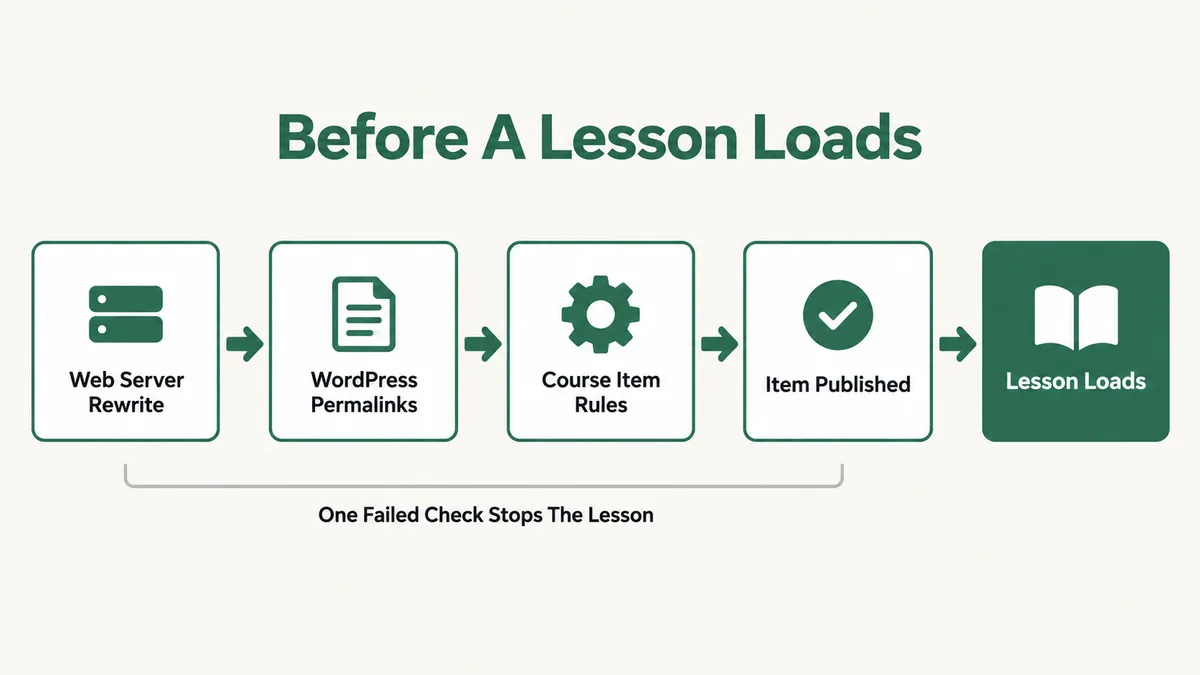
Before the causes, the model. Every fix on this page makes sense once you see that a lesson URL has to survive four separate checks before a student sees any content, and each check is owned by a different part of your stack.
- The web server passes the request to WordPress. On Apache that is the .htaccess file. On Nginx it is a line in the server configuration. If this step fails, WordPress never even sees the request.
- WordPress matches the URL against its rewrite rules. These rules are stored in the database and rebuilt only when something asks for a flush.
- LearnPress’s own rules map the course path to an item. LearnPress adds a rule that reads the course slug, the lesson or quiz base, and the item slug out of the address.
- LearnPress decides whether this visitor is allowed to load it. Publish status, the item type, and who is asking all matter here.
The address format itself is the part most people never look at closely. In the current release, LearnPress 4.4.8, the permalink settings describe the lesson format with the example /course/sample-course/lessons/sample-lesson/, and the quiz format the same way with quizzes in place of lessons. A lesson does not have a standalone public address the way a blog post does. It lives inside a course, and the course slug is part of its URL.
So when a 404 appears, the first useful question is not “is LearnPress broken” but “which of these four layers refused the request”. The ten causes below are grouped roughly by layer, starting with the ones that break every link at once and ending with the ones that only break it for certain people.
Cause 1: Are Your WordPress Permalinks Set to Plain?
This is the first thing to check on a new install, and the most common cause on a site where LearnPress has never worked at all.
WordPress ships with a Plain permalink option that builds URLs from query strings instead of readable paths. LearnPress’s course item rules depend on readable paths, because they pull the course slug and the item slug out of the URL itself. With Plain permalinks there is no path to read. LearnPress’s own settings documentation names this as the first of two common reasons for a lesson or quiz 404, and tells you to set permalinks to Post name under Settings, then Permalinks.
Some hosts and one click installers still default to Plain, and some staging tools switch it during a clone. It takes ten seconds to check and it rules out a whole category at once.
Fix: Open Settings, then Permalinks, choose Post name, and save. If the rest of your site was built on a different custom structure, pick any structure that is not Plain. The WordPress permalinks documentation explains each option if you need to keep an existing format.
Cause 2: Are the Rewrite Rules Stale After an Update or Migration?
This is the cause behind almost every “it worked yesterday” LearnPress 404 error, and it is the one the standard advice actually fixes.
WordPress does not recalculate URL rules on every page load. It stores them and rebuilds them only when something triggers a flush. LearnPress changed how it handles this in version 4.2.2: its changelog records that the rewrite rules method now runs only on the admin_init hook, and that it flushes rewrite rules only when settings are saved. That is sensible for performance. It also means that after a plugin update, a site migration, a domain change, or a restored backup, the stored rules can describe a site that no longer exists.
ThimPress’s own quick fix for a 404 after updating is exactly this: go to LearnPress, then Settings, then Permalinks, change the structure, save, change it back, and save again. The article makes a point that is easy to skim past. This is LearnPress’s permalink tab, not the main WordPress one, and saving only the WordPress screen does not always rebuild LearnPress’s course item rules.
Fix: Save Settings, then Permalinks in WordPress first. Then open LearnPress, then Settings, then the Permalinks tab, and save that too. Clear every cache layer afterwards, plugin, host and CDN. If the 404 survives all of that, stop re-saving. The rules are fine and the cause is somewhere further down this list.
Cause 3: Is the Lesson, Quiz or Course Actually Published?
The second reason LearnPress’s documentation gives for a lesson or quiz 404 is plain and easy to miss: the lesson, quiz or course was never published.
LearnPress stores courses, lessons and quizzes as separate WordPress posts, and each one has its own status. A published course can contain a draft lesson. A published lesson can sit inside a course that is still pending. Every combination except all three published produces a broken link for students, while you as the administrator can often still preview everything and see nothing wrong.
Multi instructor sites add a second trap. LearnPress has a setting under LearnPress, then Settings, then Course, called Review Course Before Publishing. With it switched on, a course an instructor submits goes to Pending status and waits for an administrator. The instructor believes it is live. The students get a 404. Nobody told the admin there was a queue.
Fix: Open the lesson list and the quiz list in the admin and filter by Draft and Pending, not just the course list. Publish anything that belongs in a live course. If you run multiple instructors, check the pending queue on a schedule, or switch the review setting off if nobody is actually reviewing.
Cause 4: Is Someone Opening the Lesson by Its Direct URL?
This is the cause that produces “it works for me but not for my students”, and it is not a bug. LearnPress does it on purpose.
Every lesson is a WordPress post, so WordPress also gives it a bare address like /lessons/lesson-name/, outside any course. LearnPress’s page controller contains a function written specifically to handle this, and its code comment reads “Handle 404 if user are viewing course item directly”. It applies to lessons, quizzes, questions and assignments. If the person visiting is an administrator, the page loads. If they are an instructor viewing an item they authored, the page loads. Everybody else, including enrolled students, gets a 404.
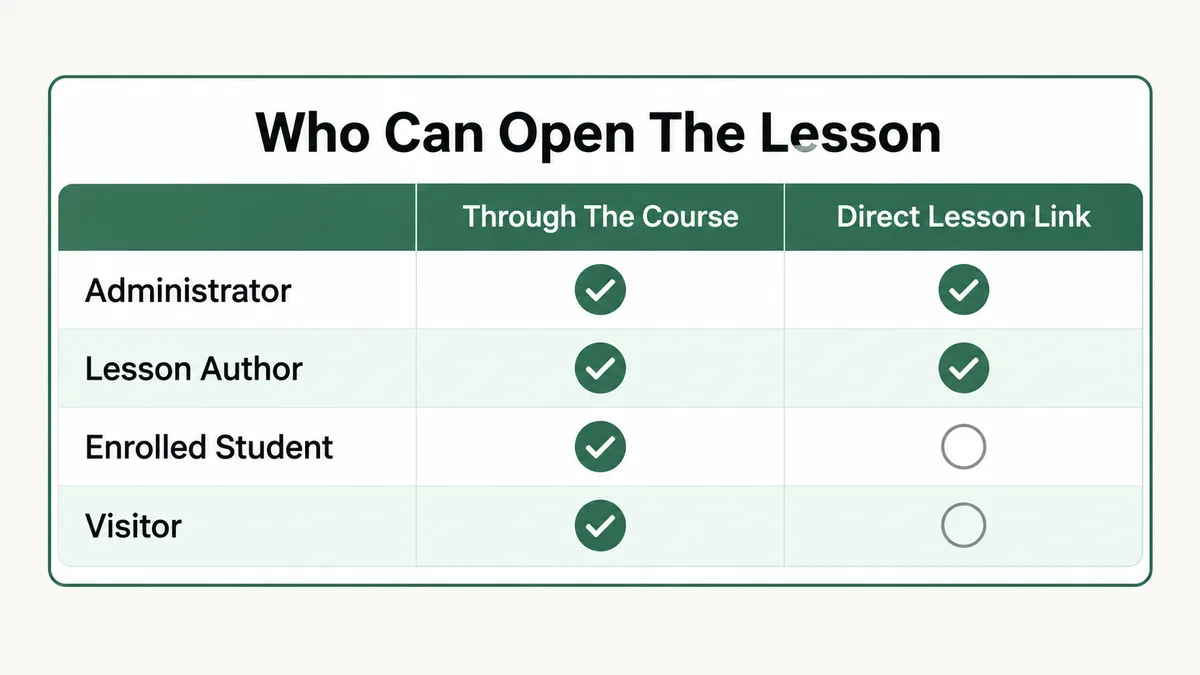
A ThimPress support reply on the WordPress.org forum spells out the consequence: a link in the form /lessons/lesson-name/ will be a 404, and the correct link is the course path, /courses/course-name/lessons/lesson-name/. These bare links get into circulation in predictable ways. Somebody copies the View Lesson link from the lesson editor, pastes it into a welcome email or a menu, tests it while logged in as admin, and it works. Then every student who clicks it hits a wall.
Fix: Look at the exact URL the student clicked. If it does not include the course slug, that is your answer. Replace every link to a lesson with the course path version, copied from the course curriculum while viewing the course, not from the lesson editor. Search your emails, menus and page content for “/lessons/” to find the rest.
Cause 5: Is Your Sitemap Sending Google to Dead Lesson Links?
Sometimes the 404s are not coming from students at all. They are coming from Google Search Console, in a report full of lesson URLs you never linked to anywhere.
This is Cause 4 again, reached by a crawler instead of a person. SEO plugins build sitemaps from public post types, and lessons and quizzes are public post types. So the sitemap lists every lesson at its bare address, Google requests it logged out, and LearnPress returns a 404 exactly as designed. A WordPress.org thread from 2023 documents this with the sitemap listing /lessons/sample-lessons and the working address being /courses/sample-course/lessons/sample-lessons.
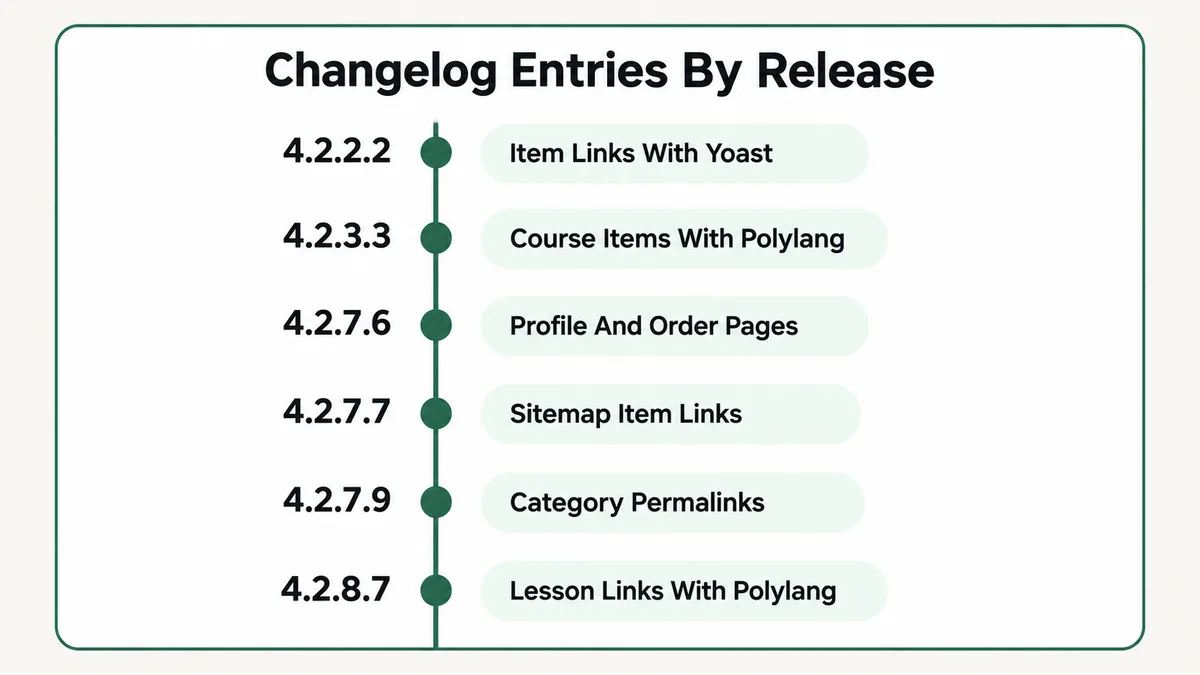
LearnPress has patched parts of this more than once. The public LearnPress changelog lists “Permalink item 404 when install YoastSeo plugin” fixed in 4.2.2.2, and “Sitemap 404 with items course” fixed in 4.2.7.7. An older install, or a different SEO plugin, can still produce the same report.
Fix: Update LearnPress, then exclude the Lessons and Quizzes post types from your sitemap in your SEO plugin’s sitemap settings. Keep courses in it, since the course page is the real landing page. Resubmit the sitemap in Search Console and mark the old lesson 404s as fixed. They are not pages that should rank anyway.
Cause 6: Did a Custom Course Permalink Structure Break the Rules?
LearnPress lets you change the course base, the lesson base and the quiz base under LearnPress, then Settings, then Permalinks. The defaults are courses, lessons and quizzes. Changing them is fine. Changing them to something clever is where the trouble starts.
The riskiest option is a custom course structure that includes the course category, using the %course_category% tag. LearnPress builds a completely separate set of rules for that case, matching both a category segment and a course segment before it gets to the lesson. The changelog records “Error 404 single course with struct permalink is %course_category%” as fixed in 4.2.7.9, which tells you it was broken for a real stretch of versions before that.
Custom slugs in non Latin scripts had their own history too. LearnPress’s source now runs lesson and quiz slugs through urldecode, with a comment explaining it fixes custom slugs in some languages. Sites that set those slugs on an older version and never re-saved can still be carrying the old, broken rules.
Fix: Temporarily set the course base back to its default and save. If the 404 disappears, your custom structure is the cause. Update LearnPress before reapplying it, keep the lesson and quiz bases to plain lowercase words, and save the LearnPress permalink tab again after every change.
Cause 7: Is Another Page or Plugin Using the Same Slug?
WordPress rewrite rules are matched in order, and the first rule that fits wins. If two things claim the same URL prefix, one of them loses, and the loser returns a 404.
This shows up most during a platform switch. Several WordPress LMS plugins use courses as their default course base. Run two of them at once while you move content across, which is a normal part of a migration, and they compete for the same addresses. The same thing happens with a custom post type from a page builder or a directory plugin that uses lessons, or a regular WordPress page whose slug matches your lesson or quiz base.
The telling detail is that the 404 appears or disappears when you activate or deactivate some unrelated plugin. That behaviour is not random. It is a rule order changing.
Fix: Search your pages, posts and custom post type settings for anything using courses, lessons or quizzes as a slug. Rename the conflicting page, or change LearnPress’s bases to something unique, then re-save both permalink screens. During a migration, give the incoming LMS a different base until the old one is switched off. If you are mid move, my guide on moving courses onto WordPress covers the order to do it in.
Cause 8: Is the Web Server Ignoring WordPress Rewrites?
If blog posts and regular pages 404 as well as lessons, stop looking at LearnPress. The request is failing before WordPress ever receives it.
On Apache, WordPress writes its rewrite block into the .htaccess file in the site root. If that file is missing, is not writable, or the server has AllowOverride switched off, pretty URLs fail across the whole site. On Nginx there is no .htaccess at all. The server configuration needs a try_files line that passes unknown paths to index.php, and the WordPress Nginx documentation shows the standard block. A migration to a new host, or a move from Apache to Nginx, is the usual moment this breaks.
A quick test separates this from everything else. Open any ordinary blog post by its pretty URL. If that also 404s, the problem is the server. If the blog post loads and only LearnPress items fail, the server is fine and you can skip this cause entirely.
Fix: On Apache, confirm .htaccess exists with the standard WordPress block and that the web server can write to it, then re-save permalinks. On Nginx, ask your host to confirm the try_files directive is present in the site’s server block. This is a hosting ticket, not a plugin setting.
Cause 9: Is a Translation Plugin Rewriting Your Lesson Links?
Multilingual sites add a language segment to every URL, and that segment has to be understood by LearnPress’s rules as well as WordPress’s. When the two disagree, lessons 404 in one language and load in another.
This one has a long paper trail in the changelog. “Lesson 404 with Polylang” was fixed back in the 3.x line. “Error 404 when view item’s course with Polylang” was fixed in 4.2.3.3. “Error 404 with link profile tab, link lesson with Polylang v3.7 and higher” was fixed in 4.2.8.7. There are separate WPML entries too, including one for 404s on paginated course listings. Each fix followed a change in the translation plugin, which is the pattern to remember: an update to Polylang or WPML can break LearnPress links that were fine the day before.
Fix: Update LearnPress and the translation plugin together, then re-save both permalink screens. Test a lesson in each language through its course path. If one language still fails, check whether the lesson and quiz slugs are set to be translated in the translation plugin, and that the translated course actually contains the translated lesson.
Cause 10: Is Your Theme Overriding LearnPress Templates?
Themes built for education sites often ship their own copies of LearnPress’s template files. When LearnPress updates and the theme does not, the theme is rendering course items with code written for an older plugin.
The WordPress.org support forum has a clear example. One site owner reported lesson content showing a 404 for every non admin user, with the Start Now and Continue buttons leading to an error page, while admins saw everything normally. Another user running an education theme reported courses failing after trying every standard fix, including deleting .htaccess and re-saving permalinks. ThimPress’s answer to the second was that the theme had overridden LearnPress’s templates, so only the theme’s author could fix it.
LearnPress gives you a direct way to check. Under LearnPress, then Tools, the Templates tab lists every template your theme overrides, with filters for Outdated and Unversioned files, and shows the theme’s version against the core version for each one.
Fix: Open LearnPress, then Tools, then Templates, and look at the Outdated count. If it is above zero, update the theme or remove the outdated overrides from your child theme. To confirm, switch to a default theme on a staging copy and load the same lesson as a student. If it works there, the theme owns the problem.
What If the 404 Is on the Profile or Checkout Page?
Not every LearnPress 404 involves a lesson. The profile page, its tabs, and the order received page after checkout all depend on LearnPress knowing which WordPress page plays which role.
Those assignments live under LearnPress, then Settings, then General, as a set of page dropdowns: courses page, profile page, checkout page and the rest. If a page was deleted, trashed, or recreated with a new ID during a migration, the dropdown points at nothing, and every URL built on it fails. The profile tabs are the most fragile, because LearnPress builds them as endpoints on top of the profile page, so a profile page at the wrong address takes every tab down with it.
Both of these also have version history. The changelog lists “Error 404-Page Order received after checkout” and “Error 404-Page Profile sub-page” as fixed in 4.2.7.6, and the current source still carries a line, labelled as temporary, that flushes rewrite rules on the checkout page to fix a 404 on the order received page.
The fix is short. Reassign each page in the General settings, confirm the profile page still contains the [learn_press_profile] shortcode that LearnPress’s documentation specifies, and re-save the LearnPress permalink tab, which holds the profile tab slugs. If you sell through WooCommerce instead of LearnPress’s own checkout, the payment side has its own failure modes, and my notes on slow WooCommerce membership sites cover the performance half of that.
LearnPress 404 Error: How Do You Diagnose It in Order?
Ten causes is a lot to hold in your head while a student waits. The fastest route is to find out who is affected first, because the three answers point at almost completely different causes.
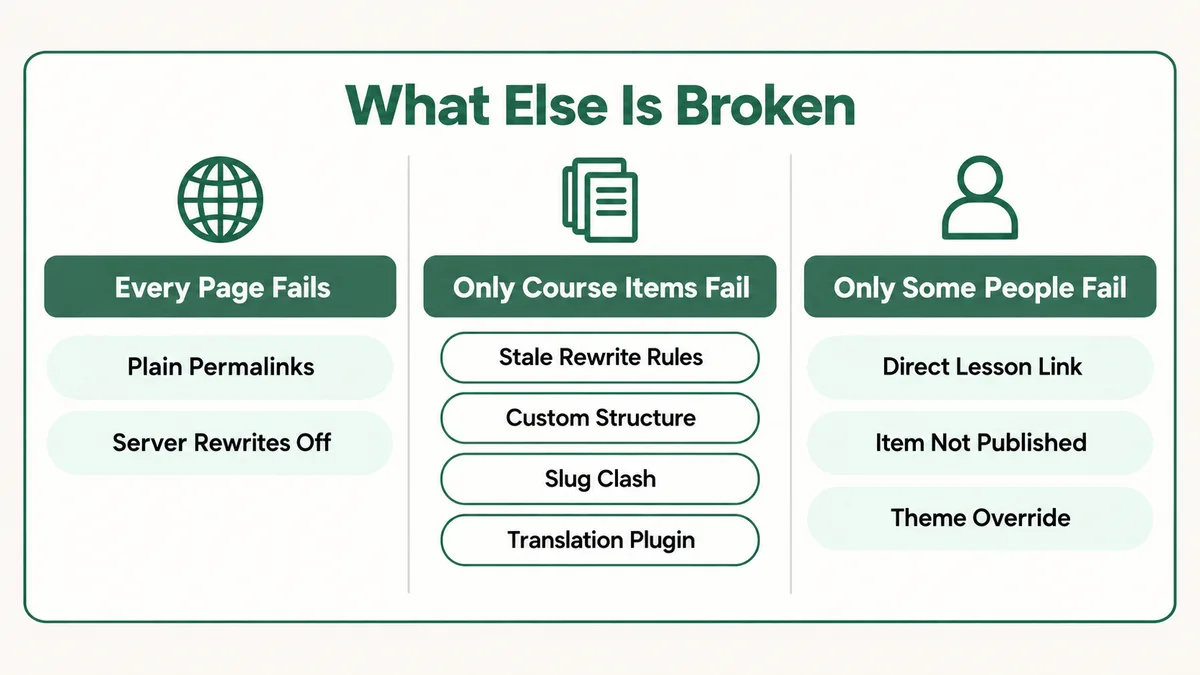
- Open an ordinary blog post by its pretty URL. If it also 404s, the problem is Plain permalinks or the web server. Check Causes 1 and 8 and nothing else.
- Copy the exact URL the student used. If it has no course slug in it, you have found Cause 4 and can stop.
- Open it logged out, in a private window. Never judge a 404 from your admin account, because admins bypass the direct URL rule entirely.
- Check the status of the course, the lesson and the quiz, all three separately, including any Pending instructor submissions.
- Re-save both permalink screens, WordPress first, then LearnPress, then clear every cache. Do this once. If it does not work, it will not work the second time either.
- Compare your LearnPress version against the fixes in the changelog if you use Polylang, WPML, a category based course structure, or an SEO plugin sitemap.
- Check LearnPress, then Tools, then Templates for outdated theme overrides.
- Deactivate plugins one at a time on a staging copy only after all of the above, looking for a slug clash.
That order is deliberate. The first three steps take under two minutes and rule out more than half the list. The plugin by plugin test comes last because it is slow and it disturbs a live site.
Why Does LearnPress Build Its URLs This Way?
It is worth understanding the design, because it stops the behaviour feeling arbitrary and it explains why the same symptom keeps returning after updates.
LearnPress wants a lesson to know which course it is being viewed in. That context drives everything else on the page: the curriculum sidebar, progress tracking, enrolment checks, and the Next and Previous buttons. A bare lesson address carries no course, so LearnPress has no way to decide whether this student is allowed to see it, or what progress to record. Returning a 404 for anyone but the author and administrators is the safe choice. It keeps paid lesson content from being reachable through a side door.
The cost of that choice is that LearnPress has to maintain its own layer of URL rules on top of WordPress’s, and every other plugin that touches URLs, translation, SEO, other LMS plugins, can collide with it. That is why the changelog has a steady run of 404 fixes rather than one. It is not sloppiness. It is the price of nesting content inside a structure WordPress was not originally built for.
Other WordPress LMS plugins make the same trade in different ways. The underlying tension between a lesson as a standalone post and a lesson as part of a course is behind a lot of the failures in LearnDash lessons that will not mark complete and the same problem in Sensei LMS. Once you see the pattern on one plugin, it reads the same on all of them.
How Do You Stop LearnPress 404s Coming Back?
Five habits remove most of these before a student ever meets one. None take long, and together they are the difference between a course site you trust and one you check nervously after every update.
- Keep a real student account. Separate email, enrolled in one course like anybody else. Click through every new lesson from it before you announce anything. This single habit catches more than the other four combined.
- Only ever copy lesson links from inside the course. Never from the lesson editor’s View link. Put that rule in whatever document your team uses for sending emails.
- Re-save both permalink screens after every LearnPress update, every migration and every restore. It costs thirty seconds and it removes the most common cause outright.
- Keep lessons and quizzes out of your sitemap from day one, so Search Console never fills with 404s you have to explain.
- Check the Templates tool after theme or plugin updates. An outdated override count above zero is a warning you get before students do.
Update LearnPress, your theme and any translation plugin on a staging copy first, and run your student account through a lesson before pushing to live. Most of the version specific causes on this page were introduced by an update to one component and not matched by the others, and a staging test catches exactly that mismatch.
Frequently Asked Questions
Why do LearnPress lessons work for me but show a 404 to students?
Because the link being used is almost certainly the bare lesson address rather than the course path. LearnPress deliberately returns a 404 on a direct lesson or quiz URL for anyone who is not an administrator or the item’s own instructor. Use the version that includes the course slug, like /courses/course-name/lessons/lesson-name/, and test logged out.
How do I fix a LearnPress 404 error after updating the plugin?
Save Settings, then Permalinks in WordPress, then save the Permalinks tab under LearnPress, then Settings. ThimPress recommends changing the structure, saving, changing it back and saving again, then clearing every cache. If that does not fix it, the rewrite rules were not the problem and one of the other causes in this guide is.
What permalink setting does LearnPress need?
Anything except Plain. LearnPress’s documentation recommends Post name under Settings, then Permalinks. Its lesson and quiz rules read the course slug and the item slug from the URL path, and Plain permalinks do not have a path to read.
Why is Google Search Console showing 404s for my LearnPress lessons?
Your sitemap is listing lessons at their bare addresses, and Google visits them logged out, which LearnPress answers with a 404 on purpose. Update LearnPress, exclude the Lessons and Quizzes post types from your sitemap, and resubmit it. Keep course pages in the sitemap, since those are the pages that should rank.
Can I change the lessons part of the LearnPress URL?
Yes. Under LearnPress, then Settings, then Permalinks, you can change the course base, the lesson base and the quiz base. Keep them to plain lowercase words that no page or other plugin uses, and save the tab after every change so the rewrite rules are rebuilt.
Every page on my site is a 404, not just LearnPress. What happened?
That is a server problem, not a LearnPress one. On Apache, the .htaccess file is missing or cannot be written. On Nginx, the try_files line that passes requests to WordPress is missing from the server configuration. It usually follows a host migration. Fix the server first, then re-save permalinks.
Almost every LearnPress 404 I have been asked to look at was a working rule applied to the wrong link, or a correct link hitting a rule that had gone stale. Start by asking what else is broken, look at the exact URL before you change a setting, and test through a student account rather than your own. If you are weighing up whether LearnPress is still the right platform for your courses, my comparison of LearnDash and Kajabi lays out how the hosted and self hosted options trade off, and the LearnDash development page covers the kind of builds I take on.
Still staring at a page that says nothing was found?
Send me the exact URL that fails, whether it fails for everyone or only for students, and which LearnPress version you run. I will tell you which of these ten causes it is and what to change, whether or not you need anyone to build it.