
You build the workflow, you check the trigger twice, you turn it on, and the enrollment count sits at zero. Or it enrolls nine contacts out of the four hundred that obviously qualify, and you cannot see what separates those nine from the rest. If you have been searching “HubSpot workflow not enrolling contacts“, you have probably already opened a contact record, confirmed the property value with your own eyes, and walked away wondering whether the platform is broken.
I build and repair marketing automation for coaches, training companies and agencies, across HubSpot and half a dozen other CRMs, and a HubSpot workflow that refuses to enroll is almost never a bug. It is a documented rule doing exactly what it says, inside a settings tab nobody opened. HubSpot checks far more than your trigger before it lets a contact through, and when one of those checks fails it does not raise an error or write a log line. The enrollment simply never happens. Below are the ten causes I work through, in the order that finds the problem fastest.
Quick Answer
When a HubSpot workflow is not enrolling contacts, the most common cause is that re-enrollment is switched off, which is the default. HubSpot’s documentation states that records are only enrolled the first time they meet the enrollment triggers, and never again unless you add re-enrollment triggers yourself. The next most common causes are existing contacts never being enrolled when the workflow was turned on, a suppression list silently blocking the contact, and a goal the contact already meets at the moment of enrollment. Open the workflow, click Help then Troubleshoot enrollment, and work down from there.
📋 What’s Covered
02Cause 1: Is the Workflow Actually Turned On?
03Cause 2: Does the Contact Really Meet Every Enrollment Trigger?
04Cause 3: Were Existing Contacts Ever Enrolled When You Turned It On?
05Cause 4: Is the Trigger a List the Contact Was Already On?
06Cause 5: Has This Contact Been Through the Workflow Before?
07Cause 6: Is the Re-Enrollment Trigger One HubSpot Does Not Support?
08Cause 7: Is the Contact Still Enrolled From Last Time?
09Cause 8: Is a Suppression List or a Goal Blocking Enrollment?
10Cause 9: Is the Workflow the Wrong Object Type for Your Filters?
11Cause 10: Is a Date Filter Waiting for the Start of the Day?
12What If the Contact Enrolled but the Email Never Sent?
13HubSpot Workflow Not Enrolling Contacts: How Do You Diagnose It in Order?
14Why Does HubSpot Make Enrollment This Complicated?
15How Do You Stop This Happening on the Next Workflow?
16Frequently Asked Questions
How Does HubSpot Decide Which Contacts Enroll in a Workflow?
Before the causes, the model. Most of the confusion around a HubSpot workflow not enrolling contacts comes from treating the enrollment trigger as the whole decision. It is one check out of several, and it is not even the one that blocks people most often.
There are three ways a contact gets into a workflow:
- The contact matches the enrollment triggers. This is the automatic route, and it fires at the moment the contact starts meeting the criteria, not on a schedule you control.
- You enroll them by hand. From Automation then Workflows, the Enroll button accepts custom filters, a list, or individual records. HubSpot is explicit that manually enrolled records do not have to meet the enrollment triggers at all.
- Another workflow pushes them in. An Enroll in another workflow action inside a different workflow hands the contact over.
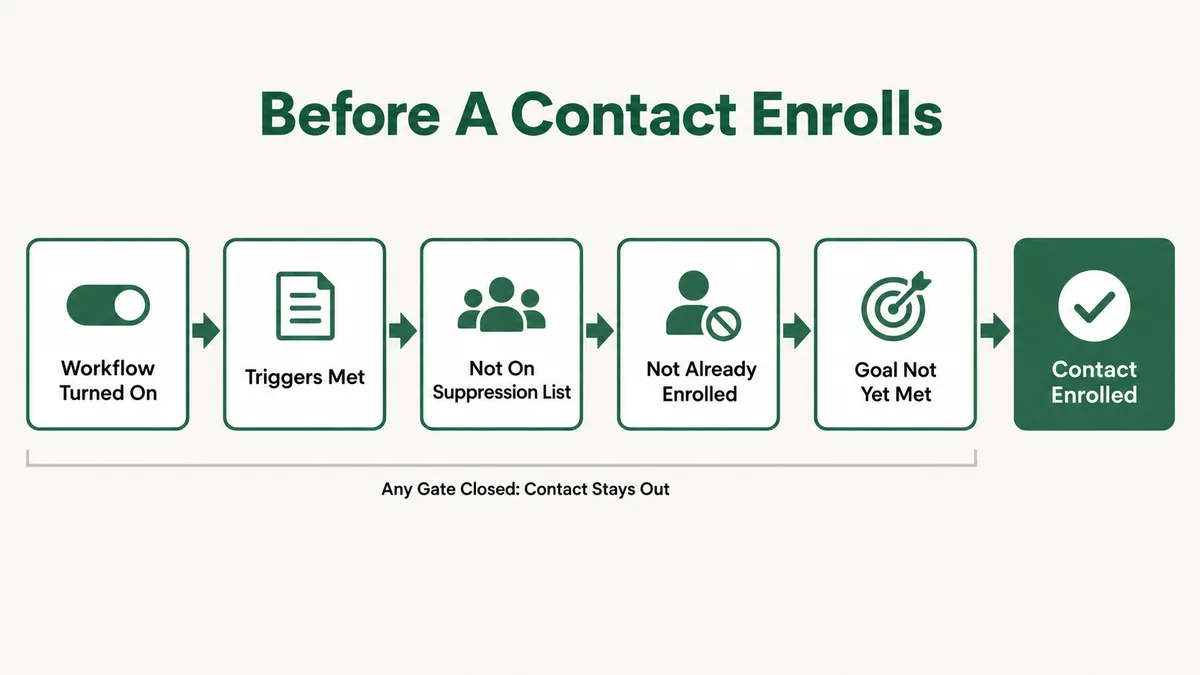
Sitting underneath all three are the gates that decide whether the enrollment survives. The workflow has to be on. The contact has to be either new to this workflow or eligible for re-enrollment. They cannot be sitting on the suppression list. They cannot already meet the goal or an unenrollment trigger. And they cannot still be enrolled from a previous run. Fail any one and there is no error message anywhere. The count just stays where it was.
HubSpot ships a tool for exactly this problem, and almost nobody uses it. Open the workflow, and in the upper left click Help then Troubleshoot enrollment. Pick the record from the dropdown, set the date and time range when you expected the enrollment, and HubSpot tells you what it saw. One caveat worth knowing before you trust it: the official troubleshooting documentation states that “only property, list, and form submission filters are supported in this tool”. If your trigger is an event or a behavioural filter, the tool will not explain it and you are back to working down this list.
Cause 1: Is the Workflow Actually Turned On?
Start here, always, and do not feel silly about it. HubSpot’s own list of enrollment failure reasons ends with exactly this, and I have found it on client accounts more than once after an hour of looking at filter logic.
A workflow that has never been published sits in draft. A workflow somebody paused during a campaign review stays paused until somebody turns it back on. The editor looks identical in both states, the triggers are all there, the actions are all there, and the only difference is a small status indicator most people scroll straight past. Cloned workflows are the worst offenders, because cloning gives you a complete, correct, switched off copy of something that was working.
Fix: Open the workflow and go to Review and publish, then Turn on. If it was already on, check the workflow’s history for a pause. While you are in there, confirm you are looking at the workflow you think you are: a clone named “Copy of Onboarding” that sits one row below the live one has cost me a real afternoon.
Cause 2: Does the Contact Really Meet Every Enrollment Trigger?
The contact looks like it qualifies. It probably does not, and the reason is usually filter group logic rather than a wrong value.
Inside a single filter group, every condition has to be true at once. Between groups, any one group being true is enough. People build a group with four conditions expecting it to behave as “any of these four” and get a workflow that only enrolls the rare contact matching all four. The fix is not a new trigger, it is splitting that one group into four groups.
There is a second distinction that catches people. HubSpot separates filter triggers from event triggers, and they behave differently. HubSpot’s enrollment trigger documentation puts it plainly: with filters, “objects will enroll when a criteria is true”, while with events “objects will enroll when an event has happened”. Filters give you access to cross-object data and let you write “has not” conditions. Events cannot do negative logic at all, because an event is something that happened.
Then there is timing. If the property that drives your trigger is written by an integration, a sync delay means HubSpot evaluates the contact before the value lands. The contact qualifies five minutes later, the trigger already ran, and nothing enrolls. Salesforce, custom API writes and third party enrichment tools all do this.
Fix: Rebuild the trigger as a saved active list first and see how many contacts land in it. A list gives you a real count you can eyeball, where a trigger gives you nothing until it fires. If the list count is right and the workflow count is not, the problem is further down this page. If the list count is also zero, your filter logic is the problem and you have just proved it in thirty seconds.
Cause 3: Were Existing Contacts Ever Enrolled When You Turned It On?
This is the one that produces the classic symptom: a brand new workflow, a database full of contacts that obviously qualify, and an enrollment count of zero that slowly creeps upward over the following week.
When you publish a workflow, HubSpot asks whether to enroll the records that already meet the trigger criteria. Click past that prompt and the workflow only ever looks forward. Every contact who qualified yesterday is permanently invisible to it. The documentation describes this as choosing to enroll only the records which meet the trigger criteria after turning the workflow on, and it notes that those existing records then have to be enrolled manually.
The reason this catches experienced people is that it is a one time decision presented once, during the single moment when you are most focused on something else. Nothing in the workflow editor afterwards tells you which way you answered.
Fix: Build an active list matching your trigger criteria, then use the Enroll button on the workflow and enroll that list. Manually enrolled records skip the trigger check entirely, so this works even when the trigger itself is the thing behaving oddly. Do it in one batch and expect it to take a while to process, which HubSpot warns about for large manual enrollments.
Cause 4: Is the Trigger a List the Contact Was Already On?
List membership is the most popular enrollment trigger in HubSpot and the most misunderstood, because “contact is a member of list X” does not mean what it reads like.
HubSpot’s troubleshooting documentation is direct about the behaviour: “records will only enroll when a record joins the list”. Membership is not a state the workflow keeps checking, it is an event the workflow waits for. Everyone already on that list at the moment you switched the workflow on is not going to enroll, because from the workflow’s point of view they never joined anything.
Static lists make this permanent. A static list is a frozen snapshot, so nobody ever joins it again unless you add them by hand, which means a static list used as an enrollment trigger will enroll nobody, forever, while looking perfectly configured. Active lists recalculate as contacts qualify, so they do generate real join events, which is why they are the only sensible choice here.
Fix: Confirm the list is active rather than static, then manually enroll the current members as a one off to clear the backlog. For anything ongoing, prefer a property based trigger over list membership where you can. It behaves as a condition rather than an event, which is what most people expected list membership to do in the first place.
Cause 5: Has This Contact Been Through the Workflow Before?
If the workflow enrolls new contacts fine but refuses to touch anyone who has been through it once, you have found the single most common cause on this whole page.
HubSpot’s default is one enrollment per record, for the life of the workflow. The documentation states that “records are only enrolled in workflows the first time they meet the workflow enrollment triggers”. A contact who qualified two years ago, completed the workflow, and qualifies again today is treated as already handled. Nothing marks them differently on the record, and the workflow does not report them as skipped.
This bites hardest on the workflows you most want repeating: a renewal reminder, a re-engagement series, a “deal stage changed back to demo booked” follow up. Every one of those assumes the same person comes round again, and every one of those is off by default.
One detail to plan around before you switch it on. HubSpot states that “Turning on re-enrollment will not retroactively enroll new records”, so enabling it today does nothing for the people who were skipped last month. You still have to enroll them yourself.
Fix: Open the workflow, click the enrollment trigger box, and switch to the Re-enrollment tab. Tick the specific triggers that should be allowed to bring a contact back in. Be deliberate about which ones: turning on everything is how people end up sending the same onboarding sequence to a customer four times. Then manually enroll the backlog separately.
Cause 6: Is the Re-Enrollment Trigger One HubSpot Does Not Support?
You turned re-enrollment on, and it still does nothing. This is where people conclude the feature is broken. It is not: your specific trigger is on a documented exclusion list, and the interface does not shout about it.
The clearest rule in HubSpot’s re-enrollment documentation is that “Activities and activity properties cannot be used for re-enrollment in any type of workflow”. That covers the triggers people reach for constantly: last activity date, last contacted, meeting booked, call logged, email replied. All of them work for a first enrollment. None of them work for a second.
The same page rules out calculation properties, privacy consent events, re-enrollment based on Last modified date is known, and any operator carrying several values at once, which takes out “is any of”, “is equal to any of” and “is equal to all of” when used for re-enrollment specifically.
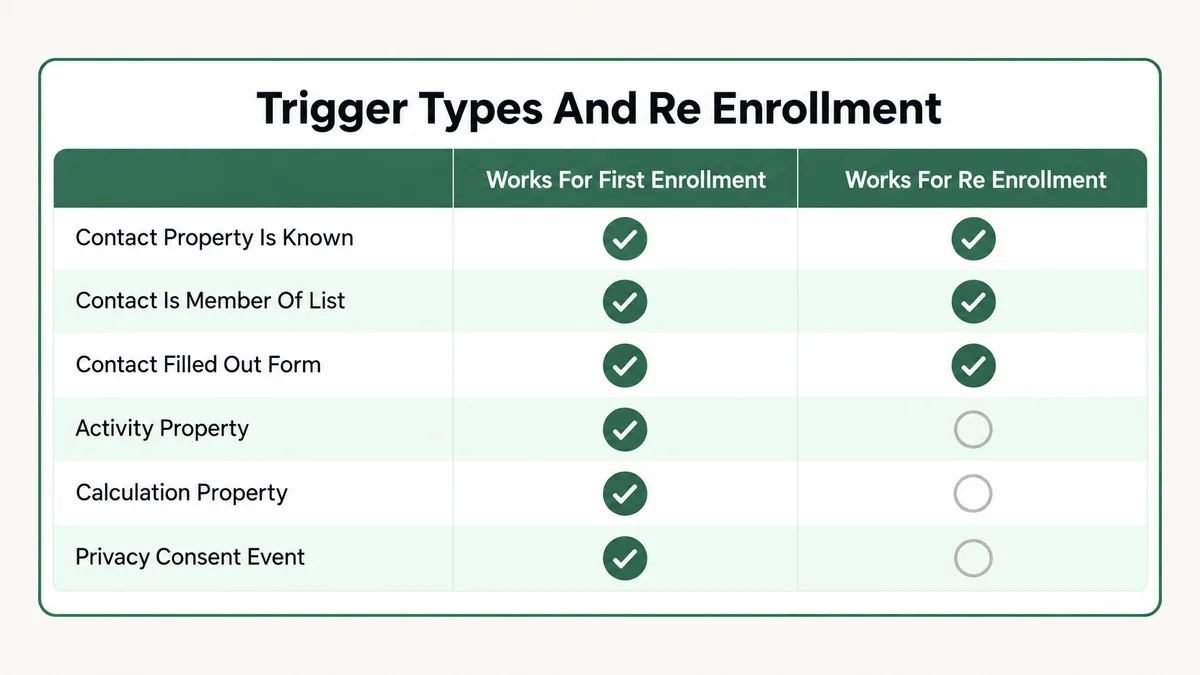
What does work for contact based workflows is a healthy list: contact properties with “is known”, text, number and date properties with “is equal to”, dropdown and radio select properties with “is any of”, contact is a member of a list, contact has filled out a form, page view and event completion triggers, and some integration triggers.
Fix: Translate the unsupported condition into a supported one. Build an active list whose criteria include the activity condition you wanted, then use “contact is a member of list” as the re-enrollment trigger. The list carries the logic HubSpot will not accept directly, and the workflow gets a trigger type it does accept. This one workaround solves most re-enrollment complaints I see.
Cause 7: Is the Contact Still Enrolled From Last Time?
Re-enrollment is on, the trigger type is supported, and the contact still will not come back in. Check whether they ever left.
HubSpot’s rule is one sentence long: “A record won’t re-enroll in a workflow while it’s already enrolled.” A contact sitting in a seven day delay, or parked on a branch waiting for a condition that never becomes true, is still enrolled. They are consuming their one slot. Nothing about their contact record looks unusual, and the workflow’s enrollment count does not distinguish between finished and stuck.
Long nurture sequences produce this constantly. A workflow with a thirty day delay in the middle has a permanent population of contacts who cannot re-enroll for a month, and nobody thinks of a delay step as a blocker.
Merged contacts deserve a mention in the same breath, because they create a near identical symptom. HubSpot excludes merged contacts from workflows by default unless the auto-enrollment setting is switched on, and after a merge the primary record stays enrolled where it was, which blocks a fresh enrollment until it finishes.
Fix: Open the workflow’s enrolled records view and look for your contact there before assuming they were rejected. If they are stuck, unenroll them manually, then either shorten the delay or add an unenrollment trigger so contacts leave cleanly when the sequence stops being relevant. For merged records, check the auto-enrollment setting in the workflow’s settings before you rebuild anything.
Cause 8: Is a Suppression List or a Goal Blocking Enrollment?
This is the quietest cause of the ten, because the contact genuinely qualifies, HubSpot genuinely evaluates them, and HubSpot genuinely decides against it without telling anyone.
Suppression lists are absolute. A contact on the workflow’s suppression list will not enroll even when they meet the triggers later, and cannot be manually enrolled either. The part that surprises people is what happens when you remove the suppression: those contacts do not flood in retroactively. They become eligible the next time they meet the enrollment or re-enrollment criteria, which for a one time trigger can mean never.
Goals work the same way from the other direction. In a contact based workflow, HubSpot checks the goal at the moment of enrollment, and a contact who already meets it is not enrolled at all. Set a goal of “lifecycle stage is Customer” on a nurture workflow, then wonder why none of your customers receive the nurture. That is the goal doing its job.
Unenrollment triggers behave as a third version of the same idea. HubSpot’s documentation notes that setting unenrollment criteria also prevents records from being enrolled into the workflow in the first place.
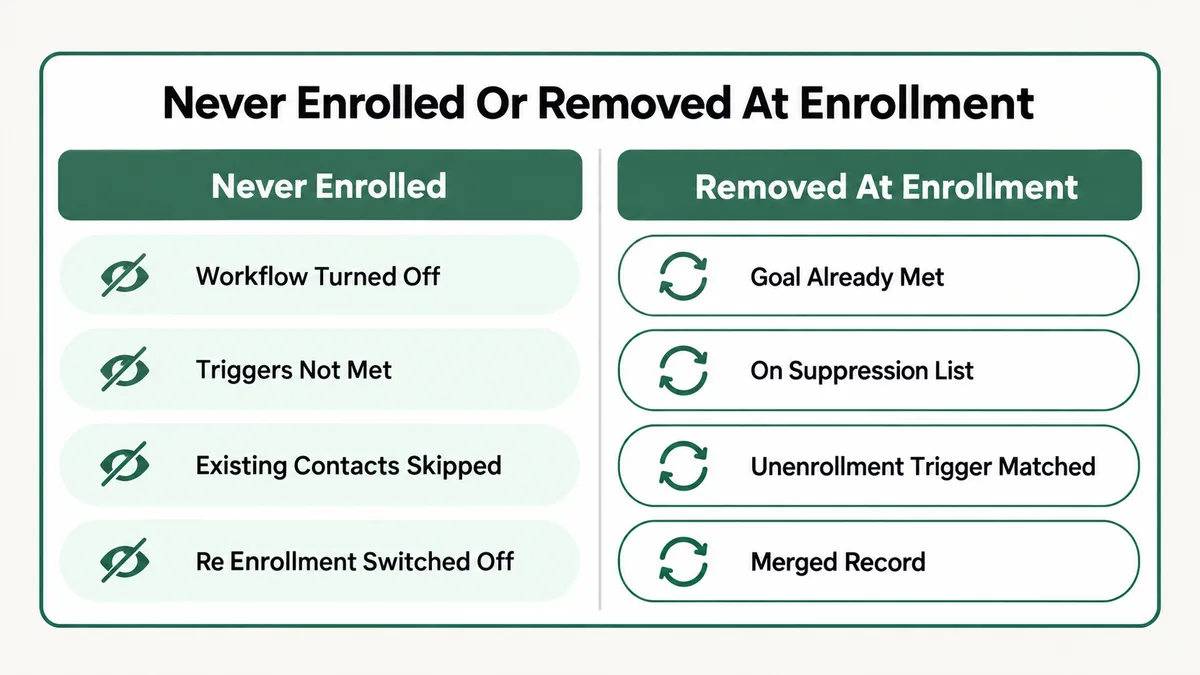
Fix: Open the workflow’s settings and read the suppression list, the goal and the unenrollment triggers as one set, out loud if it helps. Then test your contact against each of those three conditions the same way you tested them against the enrollment trigger. If you clear a suppression list, plan a manual enrollment straight afterwards, because nothing happens automatically.
Cause 9: Is the Workflow the Wrong Object Type for Your Filters?
A workflow has one object type, fixed when you create it, and it decides what can enroll. A company based workflow enrolls companies, not the contacts attached to them. A deal based workflow enrolls deals. If you want contacts to receive an email, the workflow has to be contact based, whatever the trigger data is about.
Cross-object filters blur this and cause the subtler version of the problem. HubSpot lets you filter on associated object properties, and explains it with a quote based example: quotes can be enrolled using deal, quote or subscription properties because quotes are associated with deals and subscriptions. The catch is the association itself. A contact based workflow filtering on a company property silently excludes every contact with no associated company, and in most real databases that is a large number of people.
I see this most often on account based sequences, where a filter like “company industry is Education” looks reasonable and quietly drops every self registered contact who never got matched to a company record.
Fix: Count how many contacts have the association your filter depends on before you blame the workflow. Build a list with the single filter “associated company is known” and compare that number with your total. If the gap is big, either fix the association data or rewrite the trigger against a contact level property you control.
Cause 10: Is a Date Filter Waiting for the Start of the Day?
Some enrollments are not missing. They are late, and you tested too early.
HubSpot documents this precisely for date property triggers. When you add a date property trigger using “is more than” or “is less than [x] days ago”, the trigger is checked at the start of the day, which produces an expected delay in enrollment. Build a renewal reminder on “renewal date is less than 30 days away”, test it at two in the afternoon, and nothing happens until tomorrow morning. The workflow is correct. Your test was impatient.
Volume produces a second, unrelated delay. HubSpot notes that when a large number of records enroll or execute an action at the same time, the workflow can be throttled. A bulk import of eight thousand contacts into a workflow does not enroll them in a minute, and watching the count for two minutes tells you nothing.
Fix: For date driven workflows, test across a full day boundary before declaring them broken. If the delay is a business problem rather than a testing problem, restructure the trigger around a property your own automation sets on a schedule you control, and let the workflow react to that property instead of doing the date arithmetic itself.
What If the Contact Enrolled but the Email Never Sent?
Half the tickets that arrive described as “HubSpot workflow not enrolling contacts” turn out to be a different problem wearing the same clothes. The enrollment worked. The email did not send, so nobody downstream saw any evidence that anything ran.
HubSpot logs a specific reason for each of these on the workflow’s action, and its documented list of workflow alerts is worth reading once in full. The ones that account for most real cases:
- The contact is set as non-marketing. HubSpot only sends marketing email to marketing contacts, and the alert says so directly.
- The contact has no email address. Common after an import that mapped the wrong column, and common on records created by a chat or a form that never captured one.
- They previously unsubscribed from that subscription type. Subscription types are per type, so a contact can be fully subscribed for one workflow and blocked for another.
- The address previously hard bounced. HubSpot blocks future sends to it, which is the correct behaviour and a genuinely invisible one.
- Graymail suppression removed them. If low engagement suppression is enabled, unengaged recipients are dropped before the send.
- The action landed outside your time window. HubSpot reschedules it rather than running it, and reports the new date and time.
Non-email actions fail in their own documented ways too. A property update targeting an associated record fails when no such record is associated, and a lifecycle stage update is refused when it would move the stage backwards. Both are silent from the contact’s point of view.
HubSpot Workflow Not Enrolling Contacts: How Do You Diagnose It in Order?
Ten causes is a lot to hold in your head. This is the order I actually work in, and it finds the answer faster than reading the list top to bottom.
- Confirm the workflow is on and that you have the right workflow open. Thirty seconds, rules out the most embarrassing answer.
- Run Help then Troubleshoot enrollment on one specific contact that should have enrolled. If your triggers are property, list or form based, this tool answers the question outright.
- Check whether that contact is currently enrolled. Stuck in a delay is a different problem from never accepted, and it changes everything you do next.
- Check the enrollment history on the contact record. If they went through once before, you are almost certainly looking at re-enrollment being off rather than a broken trigger.
- Read the suppression list, the goal and the unenrollment triggers. Treat those three as one block. Any of them can reject a perfectly qualified contact.
- Rebuild the trigger as an active list and compare the count against what you expected. This separates a logic problem from an enrollment problem in one step.
- Check for a merge on any contact behaving differently from its neighbours.
- Wait a full day before concluding anything about a date based trigger.
- Read the action level alerts to confirm the problem is enrollment at all, rather than a send that was blocked after a successful enrollment.
Why Does HubSpot Make Enrollment This Complicated?
It is worth understanding the design, because once you see it the behaviour stops feeling arbitrary and the causes above stop needing to be memorised.
Almost every one of these rules exists to prevent the same disaster: sending the same person the same thing repeatedly. One time enrollment by default, suppression lists that stay absolute, goals evaluated before the first action, a block on re-enrolling somebody still mid sequence. Each one is a guard rail against a marketer accidentally mailing their database four times in an afternoon. HubSpot has chosen, deliberately and consistently, to fail closed. When a check is ambiguous the contact stays out.
That choice is defensible and it has one real cost, which is exactly what brought you here. Failing closed silently gives you no signal. The count stays at zero whether your logic is wrong, your workflow is off, your contact is suppressed or everything is working and the trigger simply has not fired yet. Four completely different situations, one identical screen.
This pattern is not unique to HubSpot. The same structure shows up across every serious automation platform, which is why ActiveCampaign automations that do not trigger and Mailchimp automations that do not send come down to the same short list of ideas: a one time entry rule, an eligibility check nobody reads, and a queue you cannot see. Learn the shape once and it transfers.
How Do You Stop This Happening on the Next Workflow?
Five habits remove most of these failures before they happen. None of them take long, and they are the difference between a HubSpot account you trust and one you check nervously every Monday.
- Build the list before the workflow. Every trigger should exist as a saved active list first, so you have a real count to check against. This single habit catches filter logic mistakes before anybody is affected by them.
- Decide the re-enrollment question at build time. Ask whether this workflow should ever run twice for the same person, write the answer into the workflow description, and configure it immediately. Do not leave it to be discovered.
- Answer the existing records prompt on purpose. When you publish, read that screen instead of clicking through it. If you skip enrolling existing records, queue the manual enrollment as a task right then.
- Test with a real contact, not a test contact. Test records tend to have clean data, complete associations and no history, which is precisely why they enroll when your actual database does not.
- Document the suppression list in the workflow name. A workflow called “Q4 Nurture (suppresses Customers)” tells the next person why their contact was rejected, without them having to open three tabs to find out.
If you are running enrollment logic across several tools at once, the same discipline applies at the connection layer. A Zap that never triggers feeding HubSpot produces a workflow that looks broken while being entirely healthy, and the two problems get diagnosed in completely different places.
Frequently Asked Questions
Why is my HubSpot workflow not enrolling contacts who clearly meet the criteria?
In most cases those contacts met the criteria before, so their one allowed enrollment is already used. HubSpot enrolls a record the first time it meets the triggers and never again unless you add re-enrollment triggers. The other frequent answer is that existing contacts were never enrolled when the workflow was published, which leaves the workflow only looking forward from that moment.
How do I force a contact into a HubSpot workflow?
Go to Automation then Workflows, open the workflow, and use the Enroll button. You can enroll by custom filters, by list, or by individual record. HubSpot confirms that manually enrolled records do not have to meet the enrollment triggers, so this works even when the trigger itself is misbehaving. It will not work for a contact on the suppression list or one matching an unenrollment trigger.
Can a contact be in the same HubSpot workflow twice at once?
No. HubSpot states that a record will not re-enroll in a workflow while it is already enrolled. A contact parked in a long delay step still counts as enrolled, so a workflow with a thirty day wait in the middle will refuse re-enrollment for that whole period. Check the enrolled records view before assuming the trigger rejected them.
Why does re-enrollment not work with my last activity date trigger?
Because activities and activity properties cannot be used for re-enrollment in any type of workflow, which is stated directly in HubSpot’s re-enrollment documentation. Last activity date, last contacted and similar properties all fall under that rule. The workaround is to build an active list using that activity condition and re-enroll on list membership instead.
If I remove a suppression list, do those contacts enroll automatically?
No. Removing a suppression segment, or removing contacts from one, does not enroll them retroactively. They become eligible the next time they meet the enrollment or re-enrollment criteria. For a one time trigger they already passed, that moment never arrives, so plan a manual enrollment immediately after clearing the suppression.
My contacts enrolled but received nothing. Is that the same problem?
No, and it is worth separating the two before you rebuild anything. Enrollment succeeded and the send was blocked, for a documented reason such as the record being a non-marketing contact, having no email address, having unsubscribed from that subscription type, or a previous hard bounce. Open the workflow’s action level alerts and read the actual message rather than rebuilding the trigger.
Nearly every HubSpot workflow I have opened with an enrollment complaint attached turned out to be a documented rule doing its job in a place nobody had checked. Start with whether the workflow is on, run the Troubleshoot enrollment tool, then work through re-enrollment, suppression and goals before you touch the trigger logic. If you want a related read from further down the same pipe, the email deliverability setup guide covers what happens after the enrollment works and the send still does not reach anybody, and my portfolio shows the kind of automation builds this comes out of.
Still staring at a workflow with an enrollment count of zero?
Tell me what the trigger is, whether the contact has been through this workflow before, and what the Troubleshoot enrollment tool says. I will tell you which of these ten causes it is and what to change, whether or not you need anyone to build it.