
Somebody finally ran the WooCommerce High-Performance Order Storage migration they had been putting off for two years, watched the progress bar reach 100 percent, and moved on. Then a customer asked for a refund on an order from 2019 and the system could not say who issued the original refund or why. Or a support agent pulled up a customer’s order history and the name on file did not match the name on the order.
Nothing crashed. Nothing errored. The migration reported success, because by its own measure it was one. That is the real shape of WooCommerce HPOS migration data loss: not a failure you get warned about, but a quiet gap between what your store used to know and what it knows now.
I build and repair WordPress commerce and membership sites for a living, and HPOS migration has quietly become one of the riskier maintenance tasks a WooCommerce store can run, precisely because it looks so safe. Below are five real, independently documented bugs in that migration process, confirmed through WooCommerce’s own GitHub repository and merged fix history, what each one actually loses, and the order to check for them in if you have already migrated.
Quick Answer
Yes, WooCommerce HPOS migration data loss is real and documented, not a rumor. Five confirmed bugs in the migration tool can drop old order dates, strip the author and reason from pre-2017 refunds, silently truncate long transaction IDs and IP addresses, mismatch customer records, or freeze a batch on one bad value without telling you. None of this deletes your orders outright. It quietly loses specific fields inside them, and the only full recovery path once it happens is a pre-migration database backup, so check for it before you run the cleanup command that deletes the old data for good.
📋 What’s Covered
02Cause 1: Why Are Old Paid and Completed Dates Turning Up as NULL?
03Cause 2: Why Did My Oldest Refunds Lose Who Issued Them?
04Cause 3: Why Are My Transaction IDs and IP Addresses Getting Cut Short?
05Cause 4: Why Don’t My Customer Records Match Their Real Orders Anymore?
06Cause 5: Why Did My Migration Batch Just Stop Moving?
07WooCommerce HPOS Migration Data Loss: Which Check Comes First?
08Why Does HPOS Migration Keep Finding New Edge Cases?
09How Do You Prevent HPOS Data Loss Before You Migrate?
10Frequently Asked Questions
How Does WooCommerce HPOS Actually Store Your Orders?
Before HPOS, WooCommerce stored an order the same way WordPress stores a blog post: a row in wp_posts with post_type = shop_order, and every detail about that order, the billing address, the payment method, the transaction ID, the paid date, stuffed into wp_postmeta as loosely typed key and value pairs. It worked, but postmeta was never built for the volume or the queries a busy store needs, and stores with six figure order counts felt it directly in admin screen speed.
High-Performance Order Storage replaces that with purpose built tables: wc_orders, wc_order_operational_data, wc_order_addresses, and wc_orders_meta. According to WooCommerce’s own developer documentation, HPOS shipped as an opt-in feature in WooCommerce 7.1 in early 2023 and became the default data store for new installations in WooCommerce 8.2 that October. Existing stores are never switched over automatically. Migrating is a deliberate action, run by a background process called the DataSynchronizer, which reads every legacy order out of posts and postmeta and writes an equivalent row into the new tables.
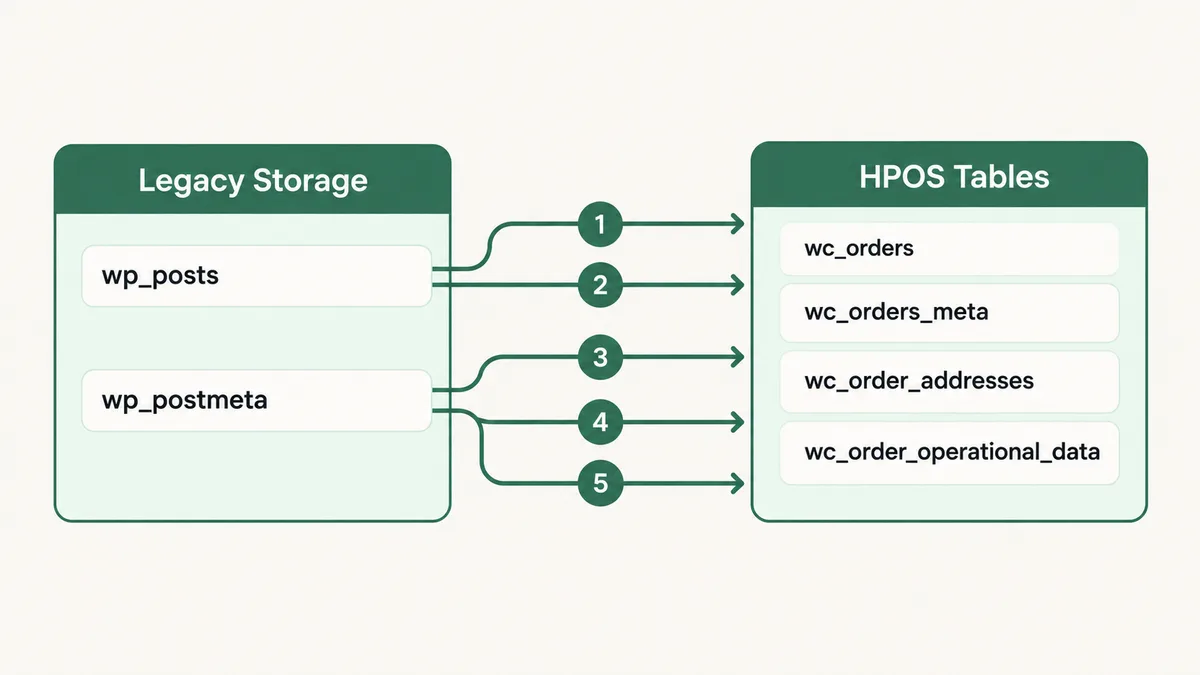
That mapping step is the entire risk. It is not a database copy. It is thousands of individual field-level translation rules, written against the shapes of data WooCommerce’s own test stores produce, applied to real stores that have been accumulating exceptions to those shapes since 2015 or earlier. The five causes below are specific, independently confirmed places where that translation drops or damages something on the way across.
Cause 1: Why Are Old Paid and Completed Dates Turning Up as NULL?
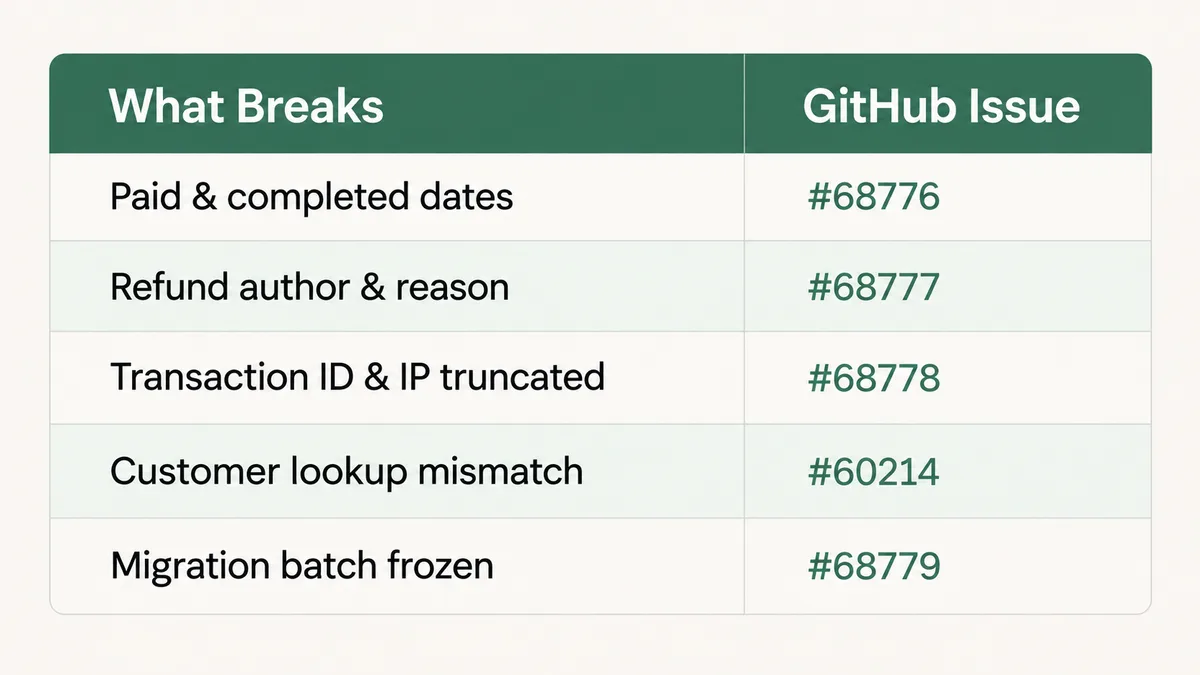
Modern WooCommerce stores an order’s paid and completed timestamps under the meta keys _date_paid and _date_completed. Orders created by WooCommerce 2.6 or earlier, and orders written by older third party importers, used a different pair of keys instead: _paid_date and _completed_date, stored as local time strings rather than GMT timestamps. The legacy posts data store had a quiet fallback that checked the old keys when the new ones were empty. The HPOS migrator’s field mapping did not carry that fallback across, so any order relying on it arrived in the new tables with date_paid_gmt and date_completed_gmt set to NULL.
This was confirmed directly against WooCommerce trunk and fixed in a real, merged pull request: Fix HPOS migration dropping legacy paid and completed dates, merged into the WooCommerce codebase on September 18, 2026. For any store older than WooCommerce’s 2017 era, or any store that imported historical orders through a plugin that wrote the old keys, those dates were genuinely at risk until that fix shipped. A missing paid date sounds cosmetic until a customer disputes a charge and your own records cannot say when it cleared.
Fix: Update WooCommerce to a release published after September 18, 2026 before you run the migration, since that is when the fix merged. If you migrated on an older version, do not assume it is too late. Back up your database, update WooCommerce, then re-run the sync from WooCommerce, then Status, then Tools, and spot check a sample of pre-2017 orders for a populated paid date afterward, before anything deletes the postmeta backing them up.
Cause 2: Why Did My Oldest Refunds Lose Who Issued Them?
Refunds created before WooCommerce 3.0, which shipped back in 2017, never recorded _refunded_by or _refund_reason meta in the first place, because those fields did not exist yet. The legacy data store simply had nothing to report for them, which is honest. Reports from testing against WooCommerce trunk found that after an HPOS migration, those same refunds come back reporting refunded_by = 0 and an empty reason string, a confident looking answer for data that was never actually captured.
The practical risk here is subtler than the other four causes. Nothing is being dropped that was previously accurate, because the information genuinely never existed. The danger is that a store owner auditing refund history years later sees a clean zero and a blank field and reasonably assumes that is a confirmed fact about the refund, rather than the honest absence it actually represents. On a store with a long operating history and a real dispute to resolve, that distinction matters.
Fix: Before migrating, identify refunds older than your store’s WooCommerce 3.0 upgrade date and treat any blank author or reason field on them as unknown, not as zero. If you need to resolve a real historical dispute, your original database backup from before the 3.0 upgrade, if you still have one, is the only source that could ever have had that data. Document the cutoff date internally so future staff reading refund reports do not mistake absence for a recorded fact.
Cause 3: Why Are My Transaction IDs and IP Addresses Getting Cut Short?
This is the bug that surprised me most. In the legacy store, wp_postmeta stores its value column as longtext, which accepts essentially unlimited length. Several of the matching HPOS columns do not: transaction ID, IP address, payment method, created-via, cart hash, order key, and address phone are defined as varchar(100), currency as varchar(10), and the WooCommerce version field as varchar(20).
Under WordPress’s default non-strict MySQL mode, inserting a value longer than a column’s width does not fail. It truncates silently and logs nothing a store owner would ever see. Verified testing against WooCommerce trunk found a 150-character transaction ID arriving as 100 characters, and a 166-character customer IP address, the kind you get from a forwarded-for header chain behind several proxies, also cut to 100. WooCommerce does ship a command, wp wc hpos verify_data, that can catch this mismatch. It only helps if somebody actually runs it before the next step destroys the evidence.
Fix: Before migrating, query postmeta for any transaction_id, ip_address, payment_method, cart_hash, order_key, or phone value longer than 100 characters, and any currency or version value running long. If you find them, decide whether the full value matters enough to store separately, since once the migration runs and wp wc hpos cleanup deletes the old postmeta, the untruncated original is gone for good. Run wp wc hpos verify_data after the migration and actually read its output rather than assuming a clean exit code means a clean result.
Cause 4: Why Don’t My Customer Records Match Their Real Orders Anymore?
HPOS keeps a dedicated summary table, wp_wc_customer_lookup, meant to make customer level reporting fast without joining through every order a person ever placed. A real, independently filed and confirmed GitHub issue, “Systematic Data Corruption in wp_wc_customer_lookup After HPOS Migration,” documents the migration script mis-mapping legacy WordPress user IDs, taken from the old _customer_user meta key, onto the wrong new HPOS customer_id values. The result is customer profiles in that lookup table whose email and name do not match the billing details on the orders actually linked to them.
What makes this one genuinely dangerous is how well it hides. Opening a single order in wp-admin shows the correct billing details, because that screen reads from the order’s own stored data, not from the corrupted lookup table. The mismatch only surfaces in customer level reports, segmented email lists, or any plugin that joins through wp_wc_customer_lookup directly, which is exactly the kind of tool a store owner trusts to be right precisely because the order screen next to it looks fine.
I see the same underlying fragility on membership and course sites that run WooCommerce as the checkout layer underneath a learning platform. On Certified Boater, a NASBLA-approved boater safety course I built on LearnDash, enrollment and certificate issuance both depend on a WooCommerce order resolving to the right customer record. A silent customer lookup mismatch on a site like that would not just confuse a sales report. It could point a renewal reminder or a certificate record at the wrong buyer entirely, and nobody would notice until someone asked why their records did not match.
Fix: Do not trust a clean looking order edit screen as proof the migration went well. After migrating, pull a sample of customer IDs from wp_wc_customer_lookup directly and compare the email and name against the billing fields on real orders tied to the same customer_id. If any plugin or report on your site joins through that table for segmentation or email targeting, treat its output as unverified until you have checked it, and rebuild the lookup table from order data if a mismatch turns up.
Cause 5: Why Did My Migration Batch Just Stop Moving?
The DataSynchronizer migrates orders in batches, and a documented bug found that one single unparsable meta value on one single order can block the entire batch containing it. Rather than skipping the bad order and logging it for review, the batch fails as a whole and Action Scheduler simply retries the same batch again, hits the same bad value, and fails again, indefinitely. From the store owner’s side, this looks exactly like orders going missing: the affected batch of orders never appears in the new Orders screen, the migration progress indicator stalls, and there is no obvious error pointing at the actual cause.
Nothing in this specific bug deletes data. The orders are still sitting in the legacy tables, untouched, waiting for a batch that cannot complete. The real cost is time and false alarm: a store owner who assumes “missing from Orders” means “deleted” can spend hours chasing a problem that a single corrupted meta value, fixed in minutes once found, would actually explain.
Fix: If a migration’s progress stalls, do not restart it blindly. Open WooCommerce, then Status, then Scheduled Actions and look for a DataSynchronizer batch sitting in a repeated failed or pending state rather than advancing. Cross reference the order IDs in that batch against your legacy postmeta table for an obviously malformed value, such as serialized data that was truncated or corrupted by an old export and reimport. Clear or correct that single value, then let the batch resume rather than restarting the whole migration from zero.
WooCommerce HPOS Migration Data Loss: Which Check Comes First?
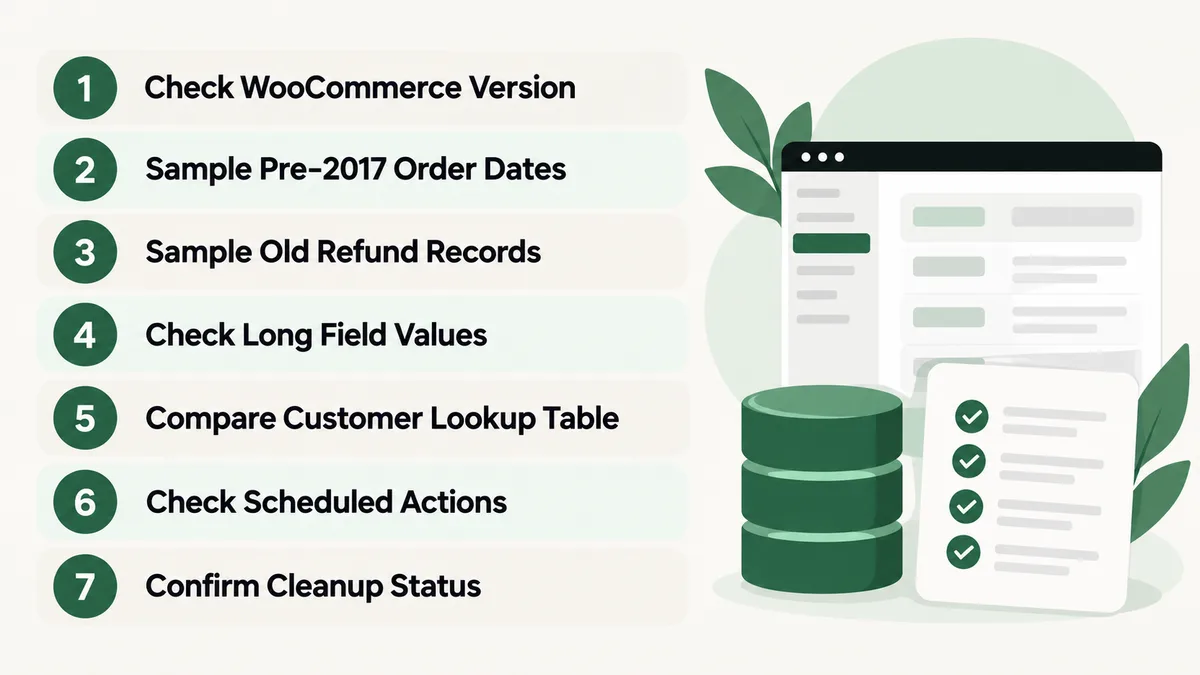
If you have already migrated and want to know whether any of the five causes above actually hit your store, run these checks in order. Each one takes a few minutes and either finds a real problem or rules out a whole category.
- Check your WooCommerce version history. If you migrated before a release published after September 18, 2026, the paid and completed date bug was live when you ran it.
- Sample pre-2017 orders for paid and completed dates. Open five to ten orders from before your store’s WooCommerce 3.0 upgrade and confirm those date fields are populated, not NULL.
- Sample refunds from the same era. Check refund author and reason fields on refunds issued before 2017 and treat a blank result as unknown, not confirmed.
- Look for long values that might have been cut. Spot check orders with unusually long transaction IDs or IPv6 addresses against your original postmeta, if it still exists.
- Compare the customer lookup table directly. Pull customer_id rows from
wp_wc_customer_lookupand check them against the billing details on linked orders, not just the order screen. - Open Scheduled Actions and look for stuck batches. A DataSynchronizer batch repeatedly failing rather than completing means a specific group of orders never finished migrating.
- Confirm whether cleanup has already run. If
wp wc hpos cleanupalready deleted your legacy postmeta, your only real recovery path for any of the above is a pre-migration database backup.
Why Does HPOS Migration Keep Finding New Edge Cases?
None of the five bugs above come from careless engineering. They come from the honest limits of testing a migration against a real store’s full history. Every field mapping the DataSynchronizer runs is effectively a hand written translation rule, built against the shapes of order data WooCommerce’s own test environments produce. A real store that has been running since 2015 or earlier has accumulated years of exceptions no single test environment can reproduce: orders written by a plugin that used slightly different meta keys, refunds issued under a version of WooCommerce that recorded less than today’s version does, transaction IDs from a payment gateway that did not exist when the original column widths were chosen.
That is why these fixes keep arriving one at a time, each patched only after a real store, or a developer testing against trunk, actually hit it. It is also why the risk is not limited to the moment you migrate. A separate, real, confirmed issue titled “WC 10.x DB upgrade re-triggers HPOS DataSynchronizer indefinitely on sites with refund history” documents sites that completed their HPOS migration years earlier, with sync disabled and everything working fine, suddenly suffering a server CPU spike after a routine core update.
The update’s own audit routine compared an HPOS order count that includes refund rows against a legacy count that excludes them, read the expected difference as a sync gap, and re-triggered the migration process on a store that had already finished migrating. No data was lost in that case, but it is proof that HPOS risk does not end the day your migration bar hits 100 percent.
How Do You Prevent HPOS Data Loss Before You Migrate?
The single most useful thing you can do is treat HPOS migration as a real database operation with a rollback plan, not a toggle in a settings screen.
- Update WooCommerce before you migrate, not after. Every fix described above only protects a store running a version released after that fix merged. Migrating on an old version re-exposes bugs that are already solved for everyone else.
- Take a full database backup first, including postmeta. Several of these bugs are specifically about information that lives in postmeta and does not survive the crossing. A backup taken before migration is the only guaranteed way back.
- Run in compatibility mode for days, not minutes. WooCommerce lets both data stores stay in sync for a period before you commit to HPOS as authoritative. Use that window to actually compare records, not just to confirm the toggle works.
- Never run cleanup until you have verified data on both sides. The
wp wc hpos cleanupcommand deletes the legacy postmeta permanently, which is exactly the data that would otherwise let you recover from the date and truncation bugs above. - Keep watching Scheduled Actions after migration, not just during. The infinite resync bug proves HPOS risk can resurface years later off the back of an unrelated core update, on a store that never touched HPOS settings again after migrating.
Frequently Asked Questions
Is WooCommerce HPOS migration actually safe to run?
For most stores, yes, especially on a current WooCommerce version. The five bugs in this article are real and documented, but they concentrate around specific conditions: orders older than 2017, unusually long field values, or very large stores with complex refund histories. A newer, smaller store migrating on a recent WooCommerce release faces a much narrower version of this risk than an older store does.
Does enabling HPOS delete my old orders?
Not by itself. Migrating copies orders into the new tables while leaving the legacy posts and postmeta rows in place, and both can stay in sync for as long as you choose. The legacy data is only removed if you separately run the cleanup command, which is the step that makes any undiscovered data loss from the bugs above permanent.
Can I roll back from HPOS to legacy order storage after migrating?
You can switch the authoritative data store back to legacy storage as long as the legacy posts and postmeta data has not been deleted, which is why skipping the cleanup step until you are confident in the migration matters. Once cleanup has run, there is nothing left in the legacy tables to switch back to, and your database backup becomes the only path back.
How do I know if I have already been affected by one of these bugs?
Run the seven checks in the diagnostic section above, starting with your WooCommerce version history at the time you migrated. Most of these bugs leave a specific, checkable signature, a NULL date, a truncated transaction ID, a mismatched customer lookup row, rather than an obvious error message, so you have to actually look for them.
Will updating WooCommerce now fix data that was already lost during migration?
An update stops the bug from happening again on a fresh migration or a new order going forward. It does not retroactively restore a date, a refund author, or a truncated value that was already dropped on your store, unless your legacy postmeta still has the original value and you re-run the sync against it. If cleanup already ran, an update cannot bring back what cleanup already deleted.
Should I wait before migrating to HPOS?
Waiting indefinitely is not the safer option, since new stores already default to HPOS and legacy storage is the path getting less testing and attention over time. The safer move is migrating deliberately: update WooCommerce first, back up your database, run the diagnostic checks above afterward, and hold off on cleanup until you have actually verified your own data rather than trusting the progress bar.
None of these five bugs are a reason to avoid HPOS. They are a reason to treat the migration like the real database operation it is rather than a settings toggle you flip once and forget. The pattern across all five is the same: nothing announces itself, the progress bar still reaches 100 percent, and the gap only shows up later when somebody needs a field that quietly did not make the trip.
I have seen the same category of risk play out on WooCommerce checkout flows sitting underneath course and membership platforms, where a payment issue stops looking like a data problem and starts looking like a subscription that will not renew or a membership site that has quietly slowed down. The fix is rarely dramatic once you know where to look. It is finding out where to look before the cleanup command removes the evidence.
Already migrated to HPOS and not sure what came across clean?
Tell me how old your store is and whether cleanup has run yet. I will tell you honestly which of these five risks actually applies to your data and what it takes to check it, whether or not you need anyone to do the work.