

Wanting to speed up a Kajabi site is one of the most common requests I get, right behind an automation that silently stopped firing. The pattern is almost always the same: someone runs their homepage through a speed test, sees a number that looks bad, and assumes the platform itself is the problem. It usually is not. Kajabi is a closed, hosted platform, so you cannot touch a server, install a caching plugin, or edit a .htaccess file the way you could on self-hosted WordPress. But that also means the list of things that can be slowing your site down is short and specific, and almost every real case I have seen traces back to one of six causes.
Below is that list, in the order worth checking them, with the exact fix for each one.
Quick Answer
A slow Kajabi site almost always comes down to six fixable things: uncompressed images, too many autoplaying Wistia videos on one page, tracking scripts sitting in Header Page Scripts (which load on every single page, not just the one you are testing), too many stacked page builder blocks, a busy community or membership area with heavy widgets, or a genuine mobile-specific rendering issue that desktop testing hides. Since you cannot change Kajabi’s server, caching, or CDN, every real fix lives in the content and code you control, not the infrastructure underneath it.
📋 What’s Covered
02Cause 1: Are Oversized Images the Real Reason Your Pages Load Slowly?
03Cause 2: Is Wistia Video Content Dragging Down Your Page Speed?
04Cause 3: Are Header Page Scripts Slowing Down Every Page on Your Site?
05Cause 4: Are Stacked Page Builder Blocks Adding Weight You Do Not Need?
06Cause 5: Is a Busy Community or Membership Area Making Pages Feel Slower?
07Cause 6: Is Your Site Actually Slower on Mobile Than It Looks on Desktop?
08How Do You Diagnose Which Cause Is Actually Slowing Your Site?
09Why Is Speeding Up a Hosted Kajabi Site Different From WordPress?
10How Do You Keep a Kajabi Site Fast Going Forward?
11Frequently Asked Questions
What Does It Actually Take to Speed Up a Kajabi Site?
Because a hosted platform moves the hard infrastructure problems off your plate and leaves you holding a shorter, more specific list of things that are actually yours to fix. On self-hosted WordPress, a slow site can be the server, the database, the hosting plan, a bad plugin conflict, or a theme doing something wasteful at the PHP level. On Kajabi, none of that is available to you. Kajabi runs its own infrastructure, its own content delivery network, and its own caching behind the scenes, and there is no settings page where you turn any of that up or down.
What is left is everything you put on top of that infrastructure: the images you upload, the videos you embed, the scripts you paste in, and the number of blocks you stack onto a single page. Kajabi’s own support documentation confirms this is exactly where it wants you looking, pointing site owners toward image compression, content review, and script cleanup rather than any server-side setting, because there is no server-side setting to point to.
That is good news, in a strange way. It means every real fix for a slow Kajabi site is something you can actually go do today, in the Kajabi dashboard, without waiting on a hosting upgrade or a developer touching infrastructure you will never have access to. The six causes below cover the real, specific places that weight accumulates.
Cause 1: Are Oversized Images the Real Reason Your Pages Load Slowly?
Start here, because it is the single most common answer on every hosted page builder, not just Kajabi. A photo straight off a phone or a stock library routinely runs 3 to 8 megabytes at full resolution, and a sales page with a hero image, a few testimonial headshots, and a product mockup can stack five or six of those before a single line of real content has rendered.
Kajabi’s own site speed guidance names this first for a reason: it is the one thing almost every slow page has in common, and it is also the easiest to fix without touching a single other setting. The image does not need to be smaller to look worse. A 4000-pixel-wide photo displayed in an 800-pixel-wide block is wasting four fifths of its own file size on detail nobody’s browser is even showing.
Fix: Run every image through a compressor before it goes anywhere near a Kajabi page. Kajabi’s own documentation recommends ImageOptim for Mac or TinyPNG for any platform. Resize the image to roughly the pixel width it will actually display at first, then compress it, rather than compressing a full-resolution original and calling it done. A hero image rarely needs to be wider than 1600 to 2000 pixels even on a large desktop monitor.
Cause 2: Is Wistia Video Content Dragging Down Your Page Speed?
Kajabi hosts the video content inside your pages and products through Wistia, at no extra cost, rather than making you bring your own video host. That is a real convenience, but it also means every video embed loads a player, a thumbnail, and in some cases a preloaded buffer of the first few seconds of footage, and that weight stacks the same way image weight does when a page carries more than one.
The common version of this mistake is a sales page with a hero video set to autoplay, followed by two or three testimonial clips further down the same page, all embedded the same way. Each one loads its own player instance the moment the page renders, whether or not the visitor ever scrolls far enough to see the testimonials at all.
Fix: Keep autoplay reserved for one video per page, at most, and let it be the one above the fold that is actually central to the page’s job. For testimonial clips or secondary videos further down, use a static thumbnail that loads the player only on click rather than a live embed that initializes the moment the page opens. If a page genuinely needs several videos, consider whether some of them belong on a separate page instead of stacked on one.
Cause 3: Are Header Page Scripts Slowing Down Every Page on Your Site?
This is the cause that gets missed longest, because it never shows up when you are only looking at images and video. Kajabi documents a Header Page Scripts field, found under Site settings, then Site details, and whatever you paste into it gets included in the <head> tag of every single page on your website, with the one exception of checkout and upsell pages.
That single detail is why this cause is so expensive compared to the others. A heavy script pasted into one specific page only slows that page down. A heavy script pasted into Header Page Scripts slows down every page on the entire site at once, including pages that have nothing to do with whatever that script is tracking. Analytics tags, chat widgets, retargeting pixels, and third-party trust badges are the usual culprits, and they tend to accumulate over time because adding one more feels harmless in isolation.
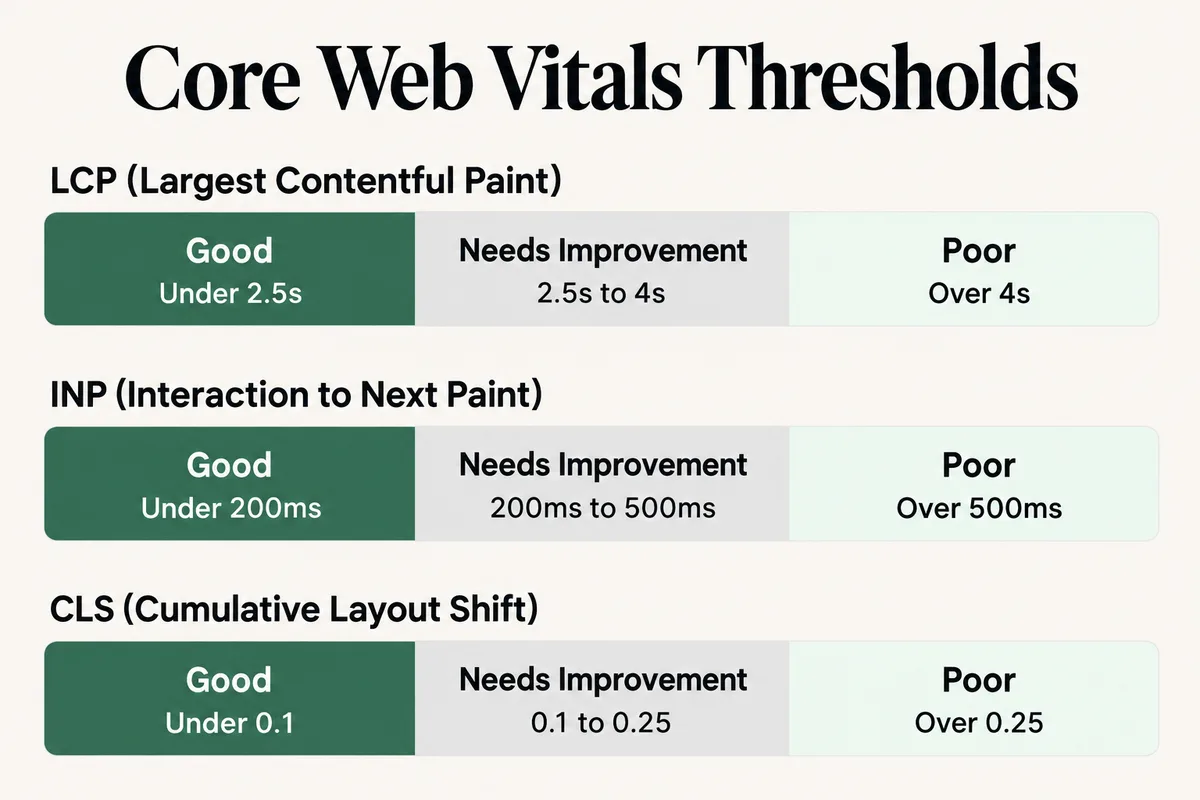
A script that blocks rendering while it loads pushes Largest Contentful Paint backward on every page it touches, which on Kajabi means your entire site rather than one offending page, and Largest Contentful Paint over 4 seconds is squarely in Google’s own “poor” band.
Fix: Open Site settings, then Site details, and read through everything sitting in Header Page Scripts line by line. For each script, confirm it is still genuinely needed, since tracking tags for a tool you stopped using months ago cost you performance for zero benefit. Kajabi’s own guidance is to load the scripts you keep asynchronously rather than as a blocking, render-stopping tag, which most analytics and pixel providers support through their own embed settings.
Cause 4: Are Stacked Page Builder Blocks Adding Weight You Do Not Need?
Kajabi’s page builder makes it genuinely easy to keep adding sections: another testimonial row, another FAQ block, another comparison table, another countdown timer. Each block is reasonable on its own. The problem is that nothing in the builder tells you when a page has crossed from thorough into bloated, and a long sales page built over several editing sessions tends to accumulate blocks the way a junk drawer accumulates everything that did not have an obvious home.
Custom code blocks are worth a specific mention here, since they behave like a miniature version of the Header Page Scripts problem but scoped to one page. A custom CSS or JavaScript block added for one specific visual effect, like a carousel or an animated counter, pulls in its own library and runs its own script, and a page with three or four of these stacked together is effectively loading several small, uncoordinated pieces of software just to render.
Fix: Go through your highest-traffic pages, usually the homepage and your main sales or opt-in page, and count the blocks. Ask honestly whether each one earns its place or is there because it seemed useful once. Pay particular attention to custom code blocks specifically, since those are the ones most likely to be pulling in an entire external library for one small visual flourish, and consolidate or remove the ones that are not doing real work.
Cause 5: Is a Busy Community or Membership Area Making Pages Feel Slower?
A quiet sales page and an active community feed are not the same kind of page, and treating them as if the same speed advice applies equally to both misses a real difference. A community or membership area with ongoing posts, comments, member avatars, and activity notifications is rendering more moving pieces per page load than a static page ever will, simply because there is genuinely more real content to display.
On a Kajabi build I did for Etrek, a spiritual growth community built around the Enneagram framework with more than 1,200 members, the community feed was exactly the page where speed habits mattered most, precisely because it was the page members actually opened daily rather than the page they visited once during checkout. Keeping member avatar images compressed at upload, rather than relying on members to do it themselves, and keeping the automated onboarding sequence free of any custom code blocks on the community pages it touched, made a real difference on the page that got the most real traffic.
Fix: If your community or membership area is the page members open most, treat it as the priority page for speed work, not an afterthought behind your sales page. Keep profile photo upload guidance in place for members where Kajabi allows it, and resist the urge to add extra custom code widgets to community pages specifically, since those pages already carry more rendering weight than a static page before anything custom is added on top.
Cause 6: Is Your Site Actually Slower on Mobile Than It Looks on Desktop?
A page that feels fine on a desktop browser over a fast office connection can be a genuinely different experience on a phone over a real mobile network, and testing only on desktop is one of the easiest ways to miss a mobile-specific problem entirely. Mobile devices generally have less processing power to decode a large image or run a heavy script, and mobile networks introduce latency a wired desktop connection never has to deal with.
Images sized for a wide desktop hero section are a frequent, specific offender here. A photo that looks appropriately sized on a 1600-pixel desktop layout is still being downloaded at that same file size on a phone screen that is only displaying it at a few hundred pixels wide, unless the page is specifically serving a smaller version to smaller screens.
Fix: Test every page you care about on an actual phone over a real mobile connection, not just a browser window resized to look narrow on your desktop. Kajabi’s own speed guidance specifically calls out testing mobile performance as its own separate step rather than assuming a desktop result carries over, because for image-heavy and video-heavy pages, it usually does not carry over cleanly at all.
How Do You Diagnose Which Cause Is Actually Slowing Your Site?
Guessing which of the six causes applies wastes time when what you actually want is to speed up a Kajabi site, because the fix for one looks nothing like the fix for another. This is the order I actually work through on a real Kajabi site, cheapest and most revealing checks first.
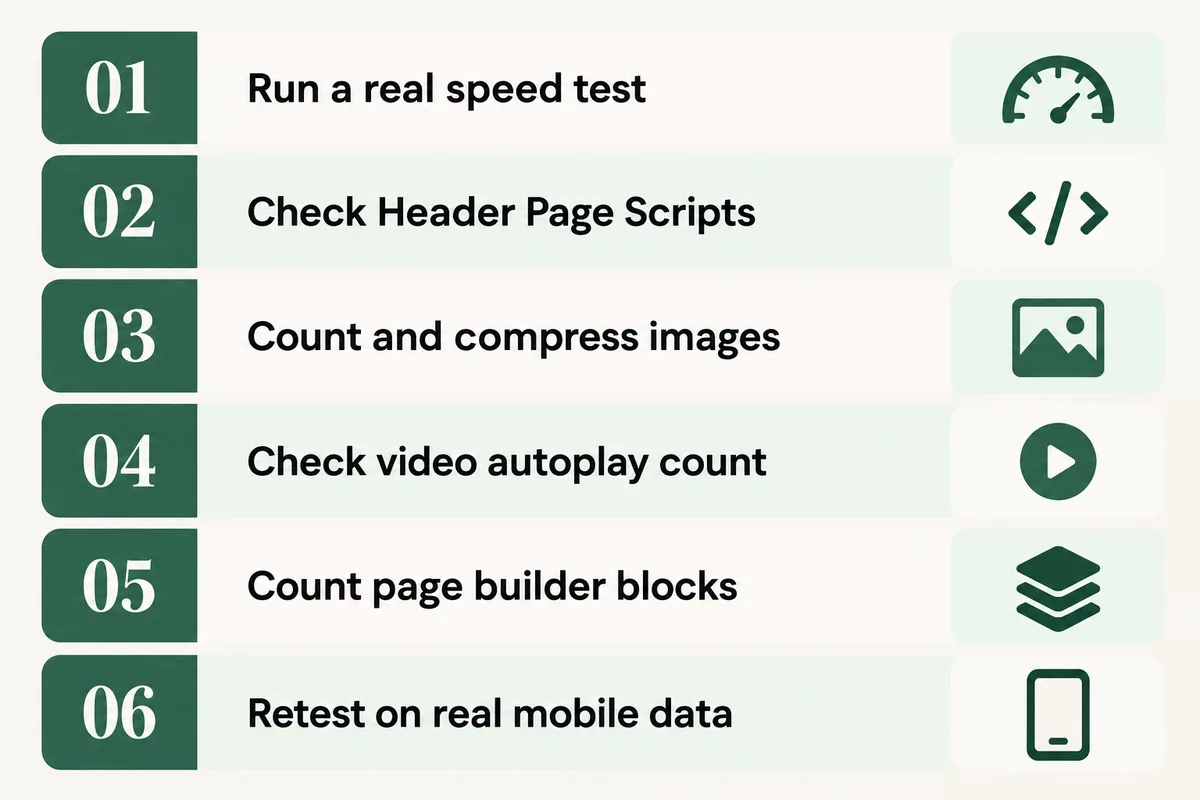
- Run a real speed test on the actual live page. Google PageSpeed Insights or GTmetrix, exactly as Kajabi’s own documentation recommends, tested against the live published URL rather than a preview link.
- Open Header Page Scripts under Site settings, then Site details. Read every script listed there, since this one field affects every page on the site at once and is the highest-impact single check on the list.
- Count the images on the slow page and check their real file size. Anything uploaded straight from a phone or stock library without compression is the most likely single offender.
- Count the video embeds and check autoplay settings. More than one autoplaying video on a single page is rarely necessary and always costs real load time.
- Count the page builder blocks, with particular attention to custom code blocks. A page that has grown over many editing sessions tends to have more blocks than its current job actually requires.
- Retest on a real phone over mobile data, not a resized desktop browser. A result that looks fine on desktop and poor on mobile points specifically at image sizing and script weight on smaller, slower devices.
Why Is Speeding Up a Hosted Kajabi Site Different From WordPress?
It helps to understand this distinction clearly, because it changes what advice is even worth reading. A huge amount of generic website speed advice online assumes you have access to a server: install a caching plugin, change your hosting plan, add a content delivery network, tune a database. None of that applies to Kajabi, because Kajabi already runs all of that infrastructure for you, as part of what you are paying for.
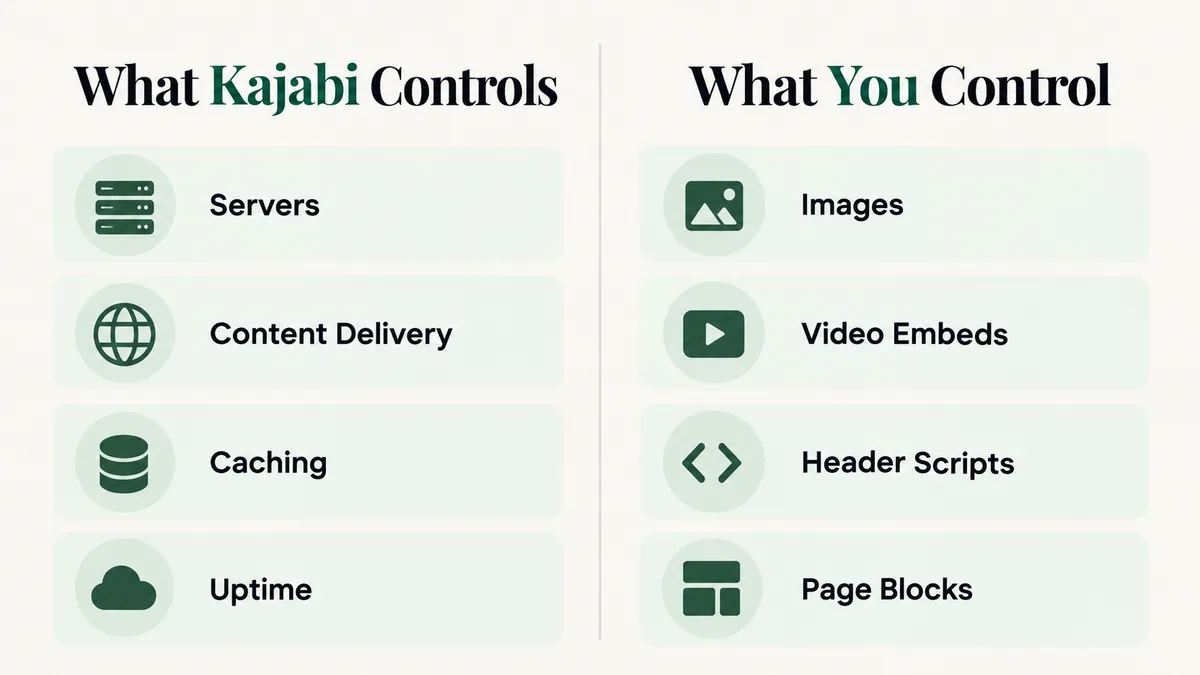
That trade-off is the whole point of a hosted platform. You give up the ability to tune the infrastructure yourself, and in exchange you never have to think about it at all, which is genuinely valuable for a course creator or coach whose actual job has nothing to do with server administration. The cost of that trade is that the remaining list of things you can control is shorter, which means each item on it, images, video, header scripts, and block count, carries more relative weight than it would on a self-hosted site where a dozen other levers exist to compensate.
This is also why a Kajabi site and a self-hosted WordPress and LearnDash build need genuinely different speed playbooks rather than the same checklist applied twice. A WordPress site’s speed problems are frequently a plugin conflict or a hosting tier mismatch that no amount of image compression will fix. A Kajabi site cannot have that specific problem, because the plugin layer and the hosting tier simply are not exposed to you in the first place.
How Do You Keep a Kajabi Site Fast Going Forward?
Four habits are what it actually takes to speed up a Kajabi site and keep it from drifting slow again once you have fixed it, and together they turn page speed from a periodic emergency into something that barely needs attention.
Compress before you upload, every time, with no exceptions. Make running a photo through TinyPNG or ImageOptim part of the upload habit itself, not a cleanup task you get to later. It takes under a minute per image and it is the single highest-impact habit on this entire list.
Treat Header Page Scripts as a field that needs quarterly review, not a one-time setup step. Every new tool you connect tends to ask you to paste something in there, and nothing ever prompts you to remove the old ones when you stop using them. Put a reminder on the calendar to actually look.
Set a soft block limit for your most important pages. Before adding one more section to a sales page or opt-in page, ask whether it is replacing something or just adding to the pile. Pages built in a single sitting rarely have this problem. Pages edited over many months almost always do.
Retest after every meaningful change, on both desktop and mobile. A speed test takes under a minute and catches a regression immediately, while waiting for a visitor to complain catches it only after it has already cost you conversions. This is the same discipline that matters on the automation side of a Kajabi build, where a silently broken workflow can sit unnoticed for weeks for exactly the same reason: nobody went back and checked.
Frequently Asked Questions
Does Kajabi use a content delivery network?
Yes, Kajabi runs its own infrastructure and content delivery behind the scenes as part of the hosted platform, which is why there is no CDN setting to configure yourself. That also means a slow page is never a CDN configuration problem on your end. It is almost always the content sitting on top of that infrastructure: images, video, scripts, and page builder blocks.
Can I install a caching plugin on Kajabi like I would on WordPress?
No. Kajabi is a closed, hosted platform with no plugin architecture and no server access, so caching plugins, CDN plugins, and similar WordPress-style performance tools simply do not apply. Kajabi already handles caching and delivery on its own infrastructure, which is part of what you are paying for by using a hosted platform instead of self-hosting.
Will switching Kajabi themes make my site faster?
Rarely on its own. The theme controls layout and styling, but the actual weight that slows a page down, oversized images, autoplaying videos, scripts in Header Page Scripts, and stacked custom code blocks, travels with the content you add to each page rather than living in the theme itself. Switching themes without addressing those causes usually reproduces the same slow result in a new layout.
Does Kajabi site speed actually affect search rankings?
Yes. Google measures page experience through Core Web Vitals, specifically Largest Contentful Paint, Interaction to Next Paint, and Cumulative Layout Shift, and uses them as part of how it evaluates a page. A page that loads slowly enough to land in Google’s “poor” band on any of those three metrics is working against itself in search, on top of the real cost of visitors leaving before the page finishes loading.
Should I host my videos somewhere other than Wistia to make Kajabi faster?
Not usually. Wistia is the video host built into Kajabi at no extra cost, and the player itself is not typically the bottleneck. The real cost comes from how many videos are embedded on one page and whether more than one is set to autoplay, not from Wistia as the hosting choice. Reducing autoplaying embeds per page fixes the actual problem without giving up the built-in hosting.
How fast should a good Kajabi page actually load?
Aim for your Largest Contentful Paint to land under Google’s 2.5 second “good” threshold, which is achievable on Kajabi once images are compressed, autoplaying video is limited to one per page, and Header Page Scripts is free of unnecessary tags. A page sitting between 2.5 and 4 seconds is in Google’s “needs improvement” band rather than a failure, but it is worth the same diagnostic pass described above to close the gap.
If you have worked through all six causes and a specific page is still slow, the honest next step is usually a line-by-line audit of that one page’s blocks and scripts rather than another general pass, since by that point the remaining weight is almost always something small and specific rather than one more obvious category.
Most of the Kajabi speed questions I get are the same shape: a page that used to feel fine and slowly picked up weight over months of normal editing. If you want to speed up a Kajabi site without overhauling the whole thing, compressing images, auditing Header Page Scripts, and keeping autoplay video to one per page fixes the overwhelming majority of cases without touching anything you do not actually control.
Still slow after checking all six causes?
Tell me which pages feel slow and what you have already tried. I will tell you honestly what is actually adding the weight on your Kajabi account and what it takes to fix it, whether or not you need anyone to do the fixing.