
A customer adds a product to their cart, clicks the checkout button, and then something breaks. Maybe the page never loads. Maybe the card gets declined for no visible reason. Maybe checkout says it “isn’t available” at all. If you are searching for why your Shopify checkout is not working, the first thing worth knowing is that this almost never means Shopify itself is down.
Shopify’s checkout is a hosted, PCI-compliant system that Shopify runs on its own servers, not a page your theme renders. That is good news and bad news at the same time. It means the checkout page itself is rarely the actual point of failure. It also means the real cause is almost always sitting one layer away from what you can see: your plan status, your payment provider setup, a fraud rule, a DNS record, or an app that touches checkout without you realizing it.
I build and maintain ecommerce and course sites for a living, and a broken checkout is the single highest-priority ticket I get, because every minute it stays broken is a lost sale. Below are the ten causes that account for almost every real “checkout not working” report, in the order I actually check them, cross-checked against Shopify’s own help documentation and its live community forum as of September 2026.
Quick Answer
When Shopify checkout is not working, the cause almost always sits in one of three places: your store’s plan or payment provider is not fully configured, a fraud filter or Shopify Flow automation is silently blocking real orders, or a legacy checkout customization is broken because Shopify deprecated checkout.liquid. Start with the fast, reversible checks: confirm your plan is active, confirm a payment provider shows “Active” in Settings, then test checkout in a private browser window before touching code or contacting your gateway.
📋 What’s Covered
02Cause 1: Is Your Store Still on a Free Trial With No Plan Selected?
03Cause 2: Is There No Active Payment Provider Configured?
04Cause 3: Did You Leave Test Mode Enabled on a Live Store?
05Cause 4: Does Your Account Have a Payout or Compliance Hold?
06Cause 5: Is an SSL or DNS Issue Blocking the Checkout Page?
07Cause 6: Are Products Missing From the Online Store Channel or a Shipping Rate?
08Cause 7: Are Fraud Filters or a Flow Automation Blocking Real Orders?
09Cause 8: Is a Legacy checkout.liquid Customization or App Conflict Breaking Checkout?
10Cause 9: Is Your Third-Party Gateway Down or Suspended?
11Cause 10: Is the Problem Sitting on the Customer’s Own Browser?
12Shopify Checkout Not Working: What Order Should You Check Things In?
13Why Does Shopify Checkout Break in So Many Different Ways?
14How Do You Stop Shopify Checkout Failures From Happening Again?
15Frequently Asked Questions
What Actually Has to Succeed for Shopify Checkout to Complete?
Unlike a page your theme renders, Shopify’s checkout runs on Shopify’s own infrastructure, separate from your store’s front end. That separation is what makes Shopify checkout PCI-compliant out of the box, but it also means a checkout failure can come from several genuinely different layers, and each layer fails silently in its own way.
- Your store account has to be eligible. A paid plan, a verified business, and no outstanding compliance flags all have to be in place before checkout activates at all.
- A payment provider has to be active and correctly configured. Shopify Payments or a third-party gateway has to accept the transaction, using live, valid credentials.
- Shopify’s risk and fraud analysis has to let the order through. Every order gets scored, and a high-risk score can trigger an automation that cancels a real, legitimate sale.
- The customer’s own browser has to complete the flow. Cache, extensions, and network conditions on their specific device can block a checkout that works perfectly for everyone else.
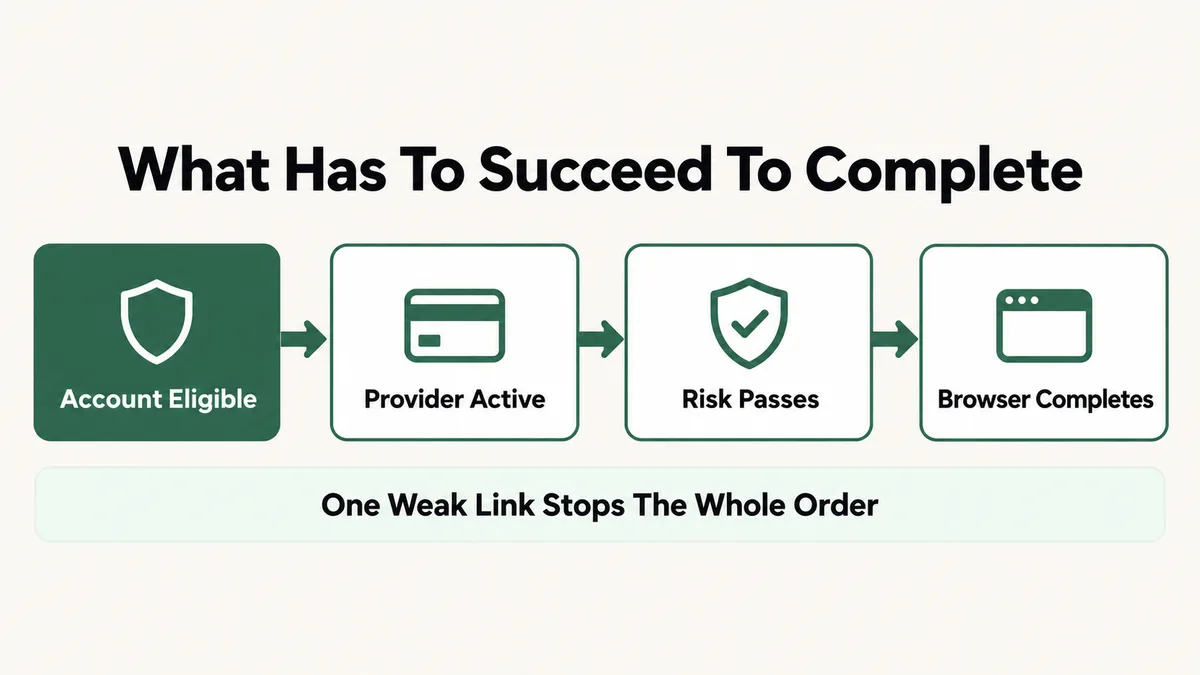
This is the reason the exact same phrase, “checkout not working,” can mean ten genuinely different things depending on the store. The causes below start with account-level and configuration causes, move through risk and customization issues, and end with the causes that sit entirely on the customer’s side.
Cause 1: Is Your Store Still on a Free Trial With No Plan Selected?
This is the single most common cause reported on Shopify’s own community forum, and it catches new store owners specifically because everything else in the admin looks fully functional. You can add products, build your theme, and preview your store, but the checkout step itself stays disabled until a paid plan is attached to the account.
The behavior is consistent across dozens of real threads on community.shopify.com: a trial store attempting checkout sees either a blank checkout screen or a direct message that checkout is not available, and choosing a plan, even before the trial ends, is what unlocks it. Billing does not start early just because you selected a plan during the trial period.
Fix: Go to Settings, then Plan, and choose a paid plan even while you are still inside your trial window. Confirm the plan shows as active, then test checkout again. If checkout still fails after this, the cause sits elsewhere on this list, most likely Cause 2 or Cause 6, since a missing payment provider or an unassigned sales channel can look identical to a trial restriction from the storefront side.
Cause 2: Is There No Active Payment Provider Configured?
If a plan is active and checkout still will not process, the next place to look is whether a payment provider is actually turned on. Without one, customers see a direct message that the store cannot accept payments, and there is no workaround from the storefront side at all.
Check Settings, then Payments. Your primary provider should show an “Active” status. If it reads “Inactive” or “Setup incomplete,” or the section is empty, that is the entire problem. For Shopify Payments, activation requires business details, banking information, and a tax ID, and first-time bank verification can take one to three business days. For a third-party gateway such as Stripe, PayPal, or Authorize.net, the store also needs valid, live API credentials entered under Settings, then Payments, then Third-party providers, not sandbox or test credentials left in the live fields.
Fix: Open Settings, then Payments, and confirm your primary provider shows “Active.” If it does not, complete Shopify Payments activation, or re-enter your gateway’s live API credentials directly from that provider’s own dashboard, watching for stray whitespace copied along with the key. Log in to the gateway’s dashboard separately afterward to confirm the account itself is in good standing, not just that Shopify accepted the credentials.
Cause 3: Did You Leave Test Mode Enabled on a Live Store?
This cause is easy to overlook because everything appears to work. Orders show up in the admin, confirmation emails go out, and nothing looks broken until you notice real money never actually moved. Shopify Payments and most third-party gateways include a test mode that simulates a full transaction without charging a real card, and if it stays on after launch, every real customer payment fails silently in the background.
The telltale signs: only specific test card numbers succeed (Stripe-based providers use 4242 4242 4242 4242 as the standard test number), real cards get declined with a vague error, and PayPal shows a sandbox redirect instead of the live PayPal flow.
Fix: Go to Settings, then Payments, then Manage next to your active provider, and scroll to the bottom of that settings page. Uncheck the Test Mode box if it is checked, then save. For a third-party gateway, check both Shopify’s own settings and the gateway’s dashboard separately, since some providers use entirely separate API keys for test and live modes. Process one small, real transaction afterward to confirm live payments are actually going through.
Cause 4: Does Your Account Have a Payout or Compliance Hold?
A store that has processed orders successfully for months can still hit a sudden checkout or payout block, and this is the cause owners recognize least, because nothing about the storefront changed. Shopify Payments applies real, ongoing account monitoring, and a spike in chargebacks, an unresolved verification request, or a flag from its own risk systems can put payouts, and in more serious cases checkout itself, on hold pending review.
This is distinct from Cause 7 below: a fraud hold on one order is a per-transaction risk score, while an account-level hold affects every order until the underlying compliance issue is resolved. Real reports on Shopify’s own community forum describe exactly this pattern: a store owner sees customers unable to check out at all, with no error explaining why, and the actual cause turns out to be a payout on hold tied to a chargeback ratio or an incomplete verification step.
Fix: Check Settings, then Payments, for any banner or notice about your account status, and check the email address on file for a message from Shopify Payments about verification or a compliance review. If you find one, respond with the requested documentation directly rather than reaching out through general support first, since account-specific holds are resolved by the risk team handling your case, not by a general troubleshooting pass.
Cause 5: Is an SSL or DNS Issue Blocking the Checkout Page?
Checkout requires a secure HTTPS connection, and if your store’s SSL certificate has an issue, browsers block the page outright or show a security warning that stops most customers before they even attempt to pay. Check Settings, then Domains, where each connected domain shows its own SSL status as Active, Pending, or Failed.
A “Pending” status can simply mean certificate provisioning is still in progress, which can take up to 48 hours after a domain change. A “Failed” status usually traces back to DNS misconfiguration. As PageFly’s SSL troubleshooting breakdown lays out, the most common blockers are an incorrect A record, a missing or wrong CNAME for the www subdomain, a wildcard DNS entry conflicting with certificate issuance, and a CAA record that restricts which certificate authorities are allowed to issue for your domain.
Fix: Confirm your domain’s A record points to Shopify’s IP and the www CNAME points to shops.myshopify.com. Remove any wildcard DNS entries and check for a CAA record; if one exists, make sure it explicitly allows Let’s Encrypt, the certificate authority Shopify uses. After correcting DNS, allow the full provisioning window before assuming the fix did not work, since certificate issuance is not instant.
Cause 6: Are Products Missing From the Online Store Channel or a Shipping Rate?
A product can exist, be in stock, and still be unbuyable if it was never actually published to your storefront’s sales channel. Shopify treats “Online Store” as one sales channel among several, and a product created through a bulk import or a migration tool sometimes lands unassigned, which makes it visible in the admin but invisible, or un-checkoutable, on the live site.
A missing shipping rate produces a related but distinct symptom: the customer can reach checkout and enter their address, but no shipping option appears, which blocks the final step of the flow without any explicit error naming the real cause.
Fix: Open the product in your admin and check the Sales Channels section in the sidebar; confirm “Online Store” is checked. Separately, go to Settings, then Shipping and Delivery, and confirm a shipping profile with an active rate covers the customer’s actual shipping zone, since a zone gap is one of the more common reasons checkout stalls at the shipping step specifically.
Cause 7: Are Fraud Filters or a Flow Automation Blocking Real Orders?
Shopify scores every order’s risk level as low, medium, or high, based on signals including AVS address matches, CVV verification, IP geolocation, and behavioral patterns. Shopify’s own fraud analysis documentation is explicit that a high-risk score alone does not cancel an order automatically, unless a store owner has configured an automation to do exactly that.
That automation is usually built in Shopify Flow, and it is the real, hidden cause behind a specific pattern: the payment appears to succeed, the order shows in the admin, and then it silently cancels moments later with no customer-facing explanation. Common false-decline triggers include a shipping and billing address mismatch (frequent on legitimate gift purchases), a customer on a VPN or traveling internationally, and a large first-time order from a brand-new email address, none of which are actually fraud.
Fix: Check your Shopify Flow workflows for any automation that cancels or holds high-risk orders automatically, and change “cancel” to “hold for review” so a real person confirms before an order is lost. If you run a third-party fraud app, check its threshold settings, since an overly aggressive default can flag legitimate customers at a much higher rate than actual fraud. Review Orders, then filter by “High risk,” to see whether real customer orders are being caught.
Cause 8: Is a Legacy checkout.liquid Customization or App Conflict Breaking Checkout?
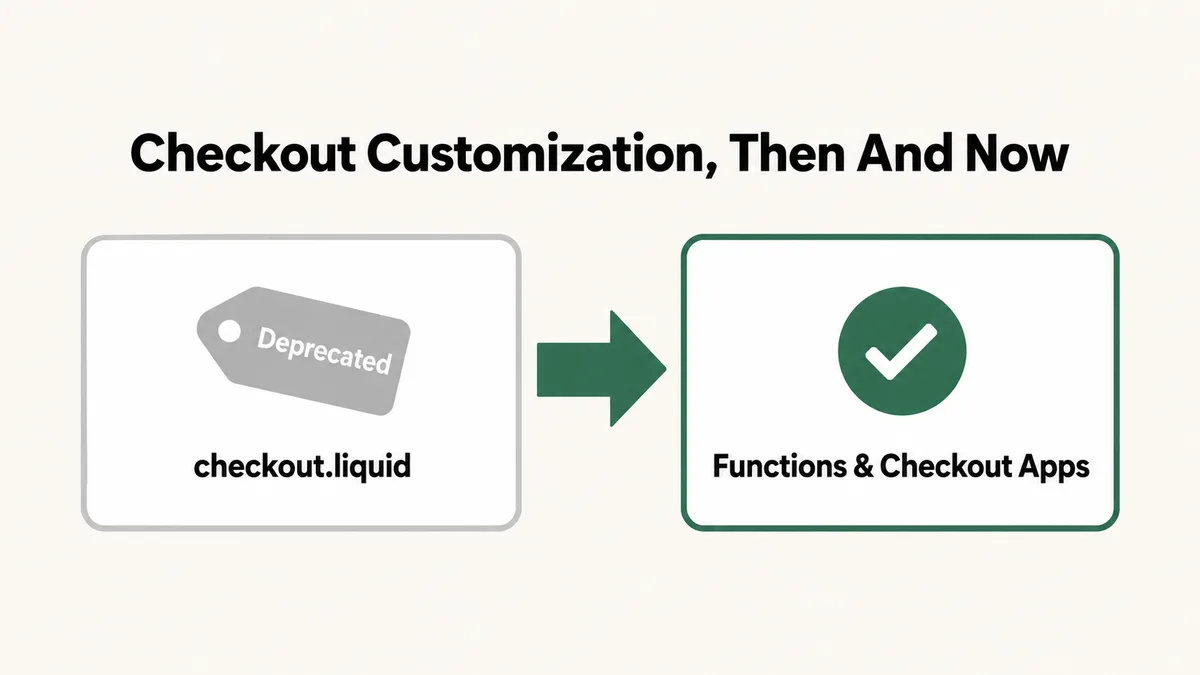
This is the cause most worth knowing about specifically in 2026, because it affects any store that had checkout customized the old way and has not touched it since. Shopify has been phasing out the checkout.liquid theme file entirely, replacing it with app blocks and Shopify Functions under its Checkout Extensibility system. Shopify’s own changelog announcement confirms that customizations built into checkout.liquid, along with Additional Scripts, stopped working on the information, shipping, and payment pages starting August 13, 2024. The same shutdown reached the Thank You and Order Status pages afterward, with non-Plus stores’ final deadline landing August 26, 2026, meaning any store that never migrated a legacy customization is now running with that code simply not executing at all.
A separate but related issue is app conflict on the newer, supported checkout: apps that inject custom fields, upsells, or redirects into checkout through Shopify’s supported extension points can still collide with each other, especially if two apps target the same checkout section.
Fix: If your store still relies on a custom Shopify Script or a checkout.liquid edit for discounts, shipping logic, or payment display, that logic needs to be rebuilt as a Shopify Function or a checkout app extension, since the deadlines above are firm rather than gradual. If the issue looks like an app conflict instead, disable checkout-related apps one at a time, testing after each, the same isolation method that works for any plugin conflict, and re-enable only the ones confirmed not to be the cause.
Cause 9: Is Your Third-Party Gateway Down or Suspended?
If you are using a payment provider other than Shopify Payments, your Shopify configuration can be entirely correct while payments still fail, because the actual point of failure sits on the gateway’s own infrastructure. An outage, an expired API credential, or a suspended merchant account on the gateway side produces the exact same symptom as a Shopify-side misconfiguration: checkout fails.
Every major provider publishes a real-time status page, and checking it takes under a minute: Stripe at status.stripe.com, PayPal at paypal-status.com, and Square at issquareup.com. Gateway accounts also get suspended for reasons that have nothing to do with your store’s setup, including incomplete identity verification, a chargeback ratio that crossed the provider’s own threshold, or a compliance flag on the account itself.
Fix: Check your gateway’s public status page first, since that rules out an outage in under a minute. If the status page shows no issue, log directly into the gateway’s own dashboard, separate from Shopify, and look for a compliance notice, a verification request, or an account alert. Consider enabling a second payment method, such as PayPal, as a fallback, so a single gateway outage never fully blocks your checkout again.
Cause 10: Is the Problem Sitting on the Customer’s Own Browser?
Sometimes checkout is not broken on your end at all. Stale browser cache, an ad blocker or privacy extension, an outdated browser version, or an active VPN connection each account for a real share of “checkout not working” reports, and none of them are fixable from your Shopify admin, because the problem never reaches your store’s configuration in the first place.
The clearest signal is inconsistency: the same checkout works fine for you, for a colleague, or for most customers, but fails for one specific person on one specific device. Ad blockers in particular can flag a payment script as tracking-related based on generic URL pattern matching, with no relationship to what the script actually does.
Fix: Ask the customer, or test yourself, in a private or incognito browser window first, since most extensions are disabled there by default. If checkout loads there, the cause is confirmed as browser-side: clear cache and cookies, try a different browser, disable extensions one at a time, or disconnect a VPN, then retry. This single test rules out or confirms this entire cause in under a minute.
Shopify Checkout Not Working: What Order Should You Check Things In?
Ten causes is too many to check by guessing under pressure while a customer is stuck mid-purchase. Use the exact symptom to skip straight to the right group, in the order I actually work through on a live client store.
- Confirm your plan and payment provider status. Two checks, under a minute combined, that rule out Causes 1 and 2 entirely.
- Test checkout in a private browser window. This isolates Cause 10 immediately and gives you a clean baseline to test everything else against.
- Check for a test mode toggle left on. A quick scroll to the bottom of your payment provider’s settings rules out Cause 3.
- Check Settings for any account notice or hold. This covers Cause 4, and it is worth checking even if nothing else on this list points there, since holds rarely produce an obvious storefront error.
- Check your domain’s SSL status. One glance at Settings, then Domains, confirms or rules out Cause 5.
- Confirm the specific product’s sales channel and shipping zone. This covers Cause 6, especially if the failure is isolated to one product rather than the whole store.
- Review Flow automations and fraud app thresholds. This directly confirms or rules out Cause 7.
- Check for legacy checkout.liquid code or a new checkout app. This covers Cause 8, and matters more the older your store is.
- Check your gateway’s public status page. A one-minute check that confirms or rules out Cause 9.
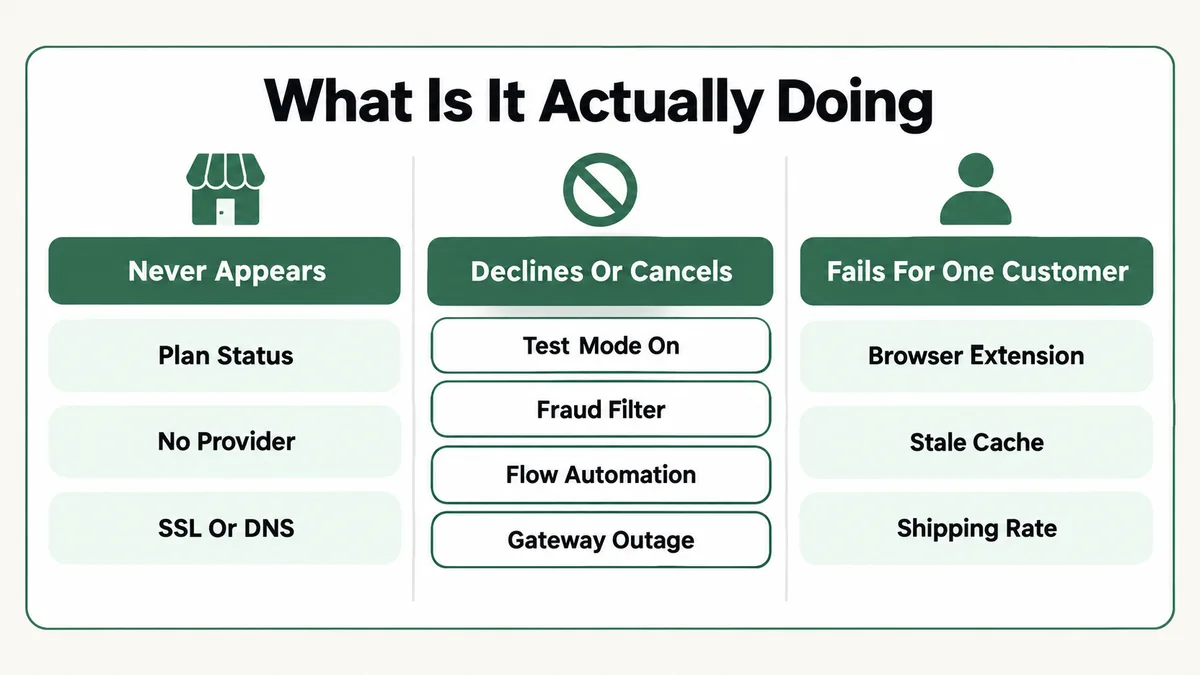
The symptom itself is the fastest filter. A checkout that never appears at all points toward Causes 1, 2, 4 and 5. A checkout that appears, then declines or silently cancels, points toward Causes 3, 7, 8 and 9. A checkout that fails for one customer or one product specifically points toward Causes 6 and 10. Match your exact symptom to a group before working through the full list top to bottom.
Why Does Shopify Checkout Break in So Many Different Ways?
Look back across the ten causes and a pattern shows up: Shopify’s checkout is not one system, it is several systems agreeing to let a transaction through. Your account has to be eligible. A payment provider has to accept the charge. A risk engine has to score the order as safe enough to keep. Your DNS has to resolve correctly. And the customer’s own browser has to render and submit the form without interference. Any single layer can fail while every other layer is working perfectly.
This is a deliberate trade-off, not a flaw. Shopify’s checkout being hosted and PCI-compliant by default is exactly why merchants do not have to build or secure their own payment form, the way an older, self-hosted ecommerce platform requires. The cost of that convenience is that a failure can originate from several places you do not directly control, rather than from a single template file you could just open and read. The checkout.liquid deprecation covered under Cause 8 is the clearest recent example: Shopify tightened control over checkout specifically to keep it secure and consistent, and any store that had customized the old, more open version now has to rebuild that logic through the newer, narrower extension system.
The same layered-failure pattern shows up on other platforms too, just with different specific causes. I walk through the same kind of order-form failure on a different platform in my guide to a ClickFunnels order form not submitting, where the split is between the classic and 2.0 editors rather than a checkout.liquid deprecation, but the underlying lesson, that a payment failure rarely has one single cause, holds just as true there.
How Do You Stop Shopify Checkout Failures From Happening Again?
Most of these ten causes are preventable with habits built into a regular routine, rather than something you only think about once a customer messages you about a failed order.
- Place one real, small test transaction weekly. Test mode and sandbox checks have real limits; a genuine transaction catches issues those cannot.
- Watch your checkout completion rate, not just total orders. Analytics, then Reports, then Checkout conversion, shows a drop before customers start reporting the problem themselves.
- Set Flow automations to “hold for review” instead of auto-cancel. A held order gets a second look from a real person before it is lost for good.
- Track the two checkout.liquid deadlines against your own store’s plan. Any Plus store not yet migrated, and any non-Plus store approaching August 26, 2026, needs that legacy customization rebuilt before the deadline, not after checkout breaks.
- Run a second payment method as a fallback. Shopify Payments alongside PayPal, or two independent gateways, means one provider’s outage never fully blocks a sale.
- Test after every app install or theme change, not just after payment changes. Any app that touches checkout is worth a real test transaction immediately after activation, not weeks later.
A store that has been live for years and never revisits these settings is exactly the profile most likely to be caught by Cause 4 or Cause 8, since both develop quietly over time rather than announcing themselves the day they start. The same discipline of testing after every change applies just as much to recurring billing as it does to a one-time checkout, which I cover in more depth in my guide to a WooCommerce subscription not renewing, since a missed renewal and a blocked checkout are really the same underlying failure mode, just at different points in the customer relationship.
Frequently Asked Questions
Why does my Shopify checkout say “This store can’t accept payments”?
This message means no active payment provider is configured at all. Go to Settings, then Payments, and either finish activating Shopify Payments or add valid, live credentials for a third-party gateway. There is no storefront-side workaround for this specific message.
Can Shopify decline or cancel an order without telling me why?
Yes, indirectly. Shopify’s own risk analysis flags an order as high-risk, but the order only cancels automatically if you have a Shopify Flow automation, or a third-party fraud app, configured to act on that flag. Check Orders, filtered to “High risk,” and review your Flow workflows to see whether real orders are being caught.
Is checkout.liquid really gone, or can I still edit it?
For most stores, it is functionally gone. Shopify’s own changelog confirms checkout.liquid customizations and Additional Scripts stopped affecting the information, shipping, and payment pages starting August 13, 2024, with the Thank You and Order Status pages following on a later deadline. Editing the file no longer changes what customers see; that logic now has to live in a Shopify Function or a checkout app extension.
Why does checkout work for me but not for my customer?
This points strongly toward a cause on the customer’s own device or connection rather than your store’s configuration: a browser extension, stale cache, or a VPN interfering with fraud checks are all far more likely than a store-wide issue, since a genuine account or gateway problem would affect every customer identically.
How do I know if the problem is Shopify or my payment gateway?
Check your gateway’s own public status page first, such as status.stripe.com for Stripe or paypal-status.com for PayPal. If the gateway reports no issue and your Shopify-side settings, plan, and SSL status all check out, log directly into the gateway’s own dashboard for an account-specific alert or compliance notice separate from Shopify entirely.
Will changing payment settings during business hours break in-progress checkouts?
It can. Changing gateway credentials or toggling settings while customers are actively mid-checkout risks interrupting a transaction already in progress. Make payment configuration changes during your lowest-traffic hours, and always follow any change with a single real test transaction to confirm nothing broke.
Shopify checkout not working is almost never Shopify itself failing. It is one specific layer, your plan, your payment provider, a fraud rule, your DNS, or the customer’s own browser, doing exactly what it was configured to do. Work through the ten causes in symptom order rather than guessing, and the real cause usually shows itself within the first two or three checks rather than the last. If a similar checkout or order-form failure is showing up on a different platform in your stack, my guide to a ClickFunnels order form not submitting works through the same kind of layered troubleshooting in more depth.
Checkout still down?
Tell me exactly what the customer sees, whether it happens for every order or just some, and how long it has been broken. I will tell you which of these ten causes it is and what to change, whether or not you need anyone to do the work.