
Search for a Mighty Networks expert and you will find the exact same title attached to two very different jobs. One person runs your community day to day: welcoming members, hosting events, writing weekly prompts. The other person builds the structure underneath that: membership tiers, Stripe-linked access, the automations and API work that only exist once you leave the entry plan. Hire the first for the second job and your paywall never gets wired up correctly. Hire the second for the first job and you are paying a builder’s rate for someone to post in the Community space twice a week.
Mighty Networks runs its own Certified Expert program, which helps, but the certification itself is weighted toward community strategy and course creation rather than guaranteeing deep technical skill. I have looked at enough real Mighty builds, some solid and some quietly broken behind a nice-looking front page, to know exactly which questions separate a real technical specialist from someone who is good at describing community vibes.
Quick Answer
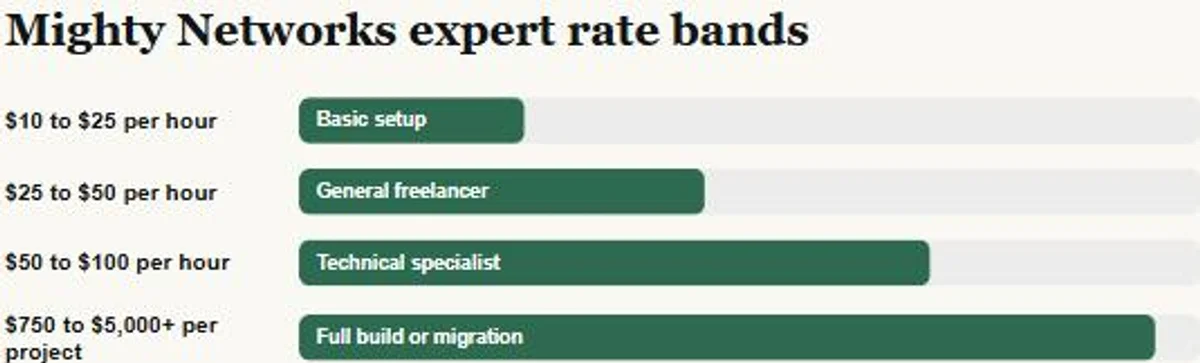
To hire a Mighty Networks expert well, first decide whether you need a community manager or a technical builder, since “expert” covers both. Then check what your current plan actually allows before anyone quotes you a price, because automations, the API, and third-party integrations only exist from the Scale plan up. Expect roughly $10 to $25 per hour for basic setup work, $25 to $50 per hour for a competent general freelancer, $50 to $100 per hour for a genuine technical specialist doing API or automation work, and roughly $750 to $5,000 or more for a full build or migration project depending on scope.
📋 What’s Covered
02How Much Does a Mighty Networks Expert Cost in 2026?
03Step 1: Do You Need a Community Manager or a Technical Builder?
04Step 2: Does “Mighty Certified Expert” Actually Prove Technical Skill?
05Step 3: Can They Explain Your Real Plan Limits?
06Step 4: Who Is Actually Doing the Technical Work?
07Step 5: What Happens the Week After Launch?
08Step 6: Do They Know What Mighty’s Own Migration Service Covers?
09Step 7: Is the Scope Written Down Before Money Moves?
10What Are the Red Flags That Should End the Conversation?
11How Do You Screen Candidates in an Afternoon?
12Where Should You Look to Hire a Mighty Networks Expert?
13How Do You Avoid Hiring the Wrong Person Twice?
14Frequently Asked Questions
What Does a Mighty Networks Expert Actually Do?
Mighty Networks is built to let a non-technical host launch a simple community alone, and for a single free Mighty Network with a few Spaces and no paywall, that promise mostly holds. The real work starts once the business side gets involved: paid membership tiers gating specific Spaces, a purchase on your own site that has to grant access automatically, a migration carrying real members and payment history from another platform, or any automation that has to behave the exact same way every single time a member joins, upgrades, or cancels.
A genuine technical build on Mighty touches several pieces at once: Space and Space Group architecture, membership tier and payment setup through Mighty’s own Stripe-based billing, the platform’s built-in automations for onboarding and course gamification, third-party integrations such as Zapier or Kit, and, on the higher plans, direct API and MCP access for anything connecting to an outside tool. Each of those pieces is gated to a different plan tier, which is exactly the detail a generalist rarely checks before naming a price.
This is also where the title gets blurred with a different job entirely. A community manager runs the people side: welcoming new members, moderating discussions, running events, keeping engagement up. A technical builder sets up the system that manager works inside: the Spaces, the tiers, the automations, the integrations. Mighty Networks’ own Experts Directory lists both kinds of specialist under the same seven service categories, from Community Strategy and Ongoing Community Management through to Technical Operations, which is honest about the range but does not sort candidates for you before you talk to them.
How Much Does a Mighty Networks Expert Cost in 2026?
Rates for Mighty Networks work vary widely for the same reason the job title does: the market prices community moderation and genuine technical building very differently, and most public listings do not separate the two.
$10 to $25 per hour: basic setup and content loading. Can follow a template to build out Spaces and load content. Not the person to design your tier structure or wire up a payment-triggered automation.
$25 to $50 per hour: a competent general freelancer who can structure Spaces, set up a basic course, and configure the built-in automations on the Scale plan. Reasonable for a single-tier community with no custom integration work.
$50 to $100 per hour: a genuine technical specialist with real API, Zapier, or payment-automation experience on Mighty. One real Upwork profile I found while researching this piece, a Top Rated specialist describing themselves as a Mighty Networks expert with over 260 completed jobs and more than $400,000 in total platform earnings, lists $95 an hour for exactly this kind of work. This is the band most paid-membership businesses doing anything beyond a basic setup should expect to hire in.
$750 to $5,000 or more per project: a fixed-price estimate, not a published figure. A straightforward single-tier build with standard Spaces usually runs 15 to 30 hours, which at the specialist rate above lands in the $750 to $3,000 range. A migration, multiple membership tiers, or custom automation work commonly pushes a build past 50 hours, which is where the estimate climbs past $5,000.
Budget the platform subscription separately from whatever you pay a builder. Mighty Networks’ current plans, confirmed directly against its own pricing page, run Launch at $79 a month, Scale at $179 a month, and Growth at $354 a month, each billed monthly, with a discount available on annual billing. Mighty Pro, aimed at larger brands wanting their own branded app, sits on custom pricing above that.
Mighty also takes a transaction fee on member payments that drops as you move up tiers: 2 percent on Launch, 1 percent on Scale, and 0.5 percent on Growth and Mighty Pro. Every figure above is confirmed directly against Mighty Networks’ own current pricing page. A quote that blends the builder’s rate with the platform subscription, without separating the two, is worth a direct question before you sign anything.
Step 1: Do You Need a Community Manager or a Technical Builder?
Write down what actually needs to happen before you talk to a single candidate, because “I need a Mighty Networks expert” describes at least two different hires. If the real need is welcoming new members, running events, writing weekly prompts, and keeping engagement up day to day, that is a community manager, and the going rate for that ongoing role sits closer to the lower end of the ranges above.
If the real need is building or fixing the structure underneath, membership tiers, a purchase that should automatically grant access, a migration, or an integration with your email tool or CRM, that is a technical builder, and it is priced and skilled differently from the community-management role above.
Plenty of real projects need both, just not from the same person at the same rate. Hiring a technical builder to run daily moderation wastes their rate on work priced far lower. Hiring a community manager to wire a membership tier to automatic access gets you a paywall that works in the demo and breaks the first time a real member upgrades mid-month. If the actual problem is a narrow, isolated issue rather than a full hiring decision, such as a specific setup mistake costing you weeks, that is usually worth fixing directly before opening a search at all.
Do this: Separate your brief into a build list (one-time structure, payment, and automation work) and a run list (ongoing moderation and engagement). Hire against each list separately, even if it ends up being the same person.
Step 2: Does “Mighty Certified Expert” Actually Prove Technical Skill?
Mighty Networks runs its own official Experts Directory, and every listed expert has gone through a live, in-person training with the Mighty team, which is a real and meaningful vetting step compared to an unverified freelance profile. Worth knowing before you treat that badge as a complete answer: the certification sorts experts into seven service categories, Community Strategy, Course Creation, Technical Operations, Marketing & Launch, Community Setup, Ongoing Community Management, and Growth & Retention, and most listed experts carry strategy and course-related tags rather than Technical Operations specifically.
That means certification tells you someone has been trained and vetted by Mighty itself, which is genuinely useful, but it does not by itself tell you they are the right person for a payment-triggered automation or an API integration. Ask directly which of the seven categories they are certified in, and treat Technical Operations as the one that actually matters for a build-heavy project. A certified expert whose real strength is Community Strategy is not a weaker hire, just the wrong one for this specific job.
Do this: Ask any Mighty Certified Expert which of the seven listed service categories their certification covers, and confirm Technical Operations is one of them before assuming the badge covers the build you actually need.
Step 3: Can They Explain Your Real Plan Limits?
This question separates someone who has actually shipped on Mighty Networks from someone guessing, and you do not need to be technical to ask it. Ask which Mighty plan your automation and integration needs actually require.
A real specialist answers with specifics. The entry Launch plan, at $79 a month, includes only basic automations and no third-party integrations or API access. Zapier, Kit, Google Analytics, and marketing pixel integrations, along with the real admin API, only appear starting on the Scale plan at $179 a month, which also includes 5,000 admin API requests a month. The Growth plan, at $354 a month, raises that to 50,000 requests a month and adds the deeper activity and content automations. If a candidate promises full automation without first asking which plan you are on, that promise is not realistic yet, because on the entry plan it is not technically possible.
This single question, asked directly, filters out more unqualified candidates in this market than anything else on this list, the same way it does when hiring for Mighty’s closest community-platform competitors.
Do this: Ask which Mighty plan your automation, API, or integration requirements actually need, and listen for a specific answer naming Scale or Growth by tier rather than a generic “I can automate anything.”
Step 4: Who Is Actually Doing the Technical Work?
A real and common pattern in this market: a community-growth consultancy or coaching brand sells the project, then quietly hands the technical build to a subcontractor the client never meets. You approve a confident proposal, and the actual API or automation work lands with someone who has never configured Mighty’s own integrations before.
You are allowed to ask who writes the automations and configures the integrations, whether that person works directly for the business you are hiring, and whether you can speak with them before signing. Someone who has genuinely done this work answers without hesitation, because the answer costs them nothing. Evasion on this specific question is one of the more reliable warning signs available to you in the whole process.
Time zone and response cadence belong in the same conversation. A multi-day gap on every clarifying question turns a two-week build into a two-month one, no matter how skilled the person is. Agree up front on how often you will hear from them and through which channel.
Do this: Get the name of the person actually building the automations and integrations, and talk to them once before signing. Agree on a communication cadence in that same conversation.
Step 5: What Happens the Week After Launch?
Mighty Networks communities tend to break in a specific, predictable way. They work perfectly in a walkthrough on a test account and start failing once real members arrive, because real members do things a test account never does: someone upgrades mid-cycle, a payment webhook fires out of order, or a Zapier automation hits an edge case nobody tested because nobody expected a real member to do that exact thing on day one.
This is why post-launch support belongs in the product, not as an upsell added after the fact. Ask what is covered after handover, for how long, and at what cost beyond that window. “Everything is included forever” is either an answer from someone who has not thought it through or a builder planning to disappear. A clear answer sounds like two weeks of bug fixes included, then an hourly rate or a small monthly retainer for anything new.
Ask directly what happens if an automation breaks a month later because Mighty itself shipped a platform update. Whether that is billable is worth clarifying in advance, and the specificity of the answer tells you how seriously the candidate takes their own work.
Do this: Get the support window, what counts as a bug fix versus new work, and the post-launch rate written into the agreement before the project starts, not after the first real member hits a problem.
Step 6: Do They Know What Mighty’s Own Migration Service Covers?
Mighty Networks is genuinely generous here compared to some competing platforms. It offers its own migration help, covering members, payments, and courses and content, for hosts on the Growth plan and above, confirmed directly on Mighty’s own pricing page. That is real, worth knowing, and a fair question to raise before paying a builder to manually rebuild something Mighty itself will move for you.
The part Mighty’s own migration help does not touch is anything built on top of the old platform: custom automations, Zapier zaps pointed at the old tool, CRM or email integrations keyed to the old member records, and any engagement history that lived entirely inside the previous platform’s own database. A builder who has actually run one of these migrations names those gaps unprompted. One who says “everything moves over automatically” either has not done this before or is telling you what you want to hear.
This matters even on a brand-new build with no migration involved, because the same person who undersells migration risk tends to undersell every other risk in the project too. How a candidate talks about what breaks is a better signal than how they talk about what works.
Do this: If a migration is involved, ask what Mighty’s own migration help covers on your plan tier, then ask specifically what still needs to be rebuilt by hand on top of it.
Step 7: Is the Scope Written Down Before Money Moves?
Nearly every dispute I have seen between a host and a Mighty Networks builder traces back to the same root cause: two different mental pictures of what “done” meant, and neither one written down anywhere.
The document does not need to be long. It needs a list of deliverables, a definition of done for each one, milestone dates, what you are responsible for supplying, and what a change request costs once work has started. Content is worth naming explicitly: writing Space descriptions, recording welcome videos, and populating the first batch of posts is real work, and if nobody owns it, it lands on your desk the week before launch.
On payment structure, milestones tied to named deliverables protect both sides. Paying everything up front removes your own negotiating room entirely, and paying only on full completion is a reasonable thing for a good builder to decline on a longer project. A deposit with staged releases against specific milestones is the normal, healthy arrangement experienced builders already expect.
One more clause worth insisting on in writing: your Mighty Network, domain, and Stripe account stay registered to you, not to the builder. This is not about distrust. It is about never being locked out of your own community if the relationship ends badly.
Do this: Require a written scope with deliverables, milestone payments, a named owner for content, and written confirmation that your Mighty Network and connected accounts stay registered in your own name.
What Are the Red Flags That Should End the Conversation?
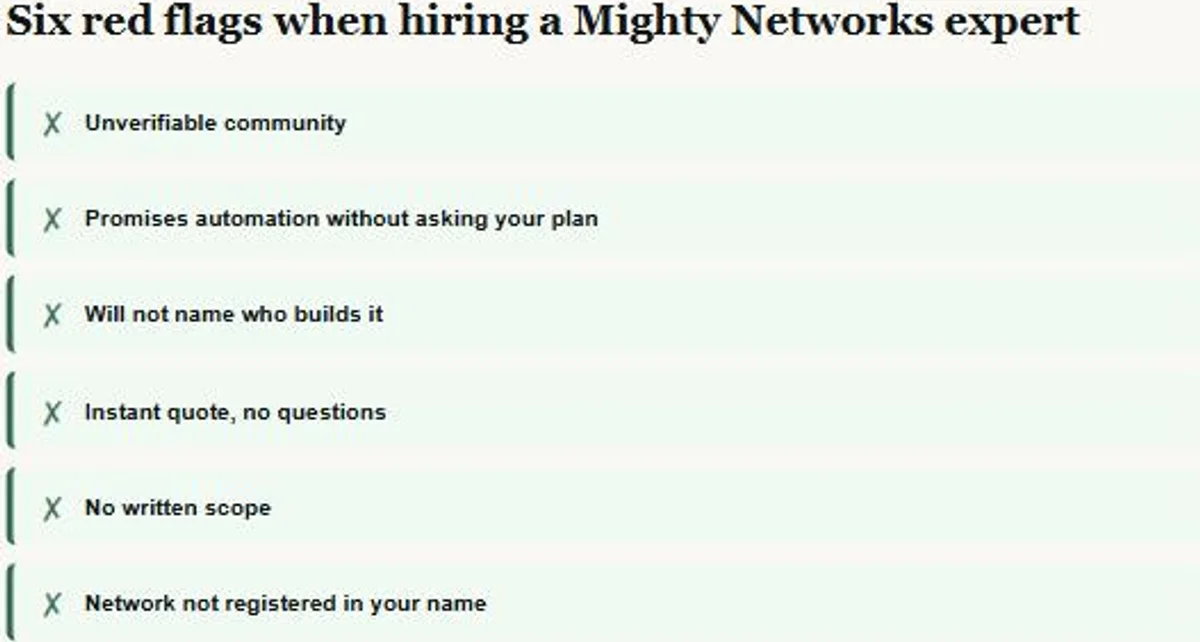
Some signals are worth walking away from immediately rather than negotiating around:
- Portfolio communities you cannot actually open or verify as real.
- A promise of full automation without ever asking which Mighty plan you are on.
- Refusal to name the person doing the technical build or to put them on a short call.
- A total price quoted within minutes, before any real questions about tiers, payments, or migration.
- No written scope, only a chat thread and a number.
- Your own Mighty Network, domain, or Stripe account set up under the builder’s credentials instead of yours.
The instant-quote flag deserves a second look specifically because it looks like good service. A builder who prices a Mighty Networks project without asking about your plan, your payment structure, or a migration is not being efficient. They are guessing, and that guess shows up later as a change order with a new price attached to it.
How Do You Screen Candidates in an Afternoon?
If you want the compressed version of everything above, run it in this order. It moves faster than comparing three separate proposals on your own, side by side.
- Confirm you are hiring a technical builder and not a community manager, or write down which parts of the project are each.
- Send the identical one-page brief to every candidate you are considering.
- If they are Mighty Certified, ask which of the seven service categories their certification actually covers.
- Ask which plan your automation and integration needs require, listening for Scale or Growth named specifically.
- Ask who writes the automations and request a short call with that person.
- Ask what Mighty’s own migration help covers on your plan, and what still has to be rebuilt by hand.
- Compare only the candidates still standing, on written scope rather than the headline price.
Most candidate lists lose at least one person at step three and another at step four. What remains afterward is a far more useful conversation, because by then you are no longer comparing marketing copy.
Where Should You Look to Hire a Mighty Networks Expert?
Mighty Networks runs its own Experts Directory, where every listed name has completed a live training with the Mighty team and is tagged by service category. That is a reasonable first stop precisely because Mighty itself does part of the vetting before you ever talk to anyone, though as covered above, the tags matter more than the badge alone.
Beyond Mighty’s own directory, the realistic sources are general freelance marketplaces such as Upwork, dedicated community-architecture agencies that publish real case studies instead of generic service pages, and Mighty’s own paying-customer community, open to any active account, where you can watch how someone answers a stranger’s technical question in public. That public behavior tells you more than a polished sales page ever will.
Worth knowing before you search: general marketplaces do not pre-vet anyone for Mighty Networks specifically, which is exactly why they list rates as low as thirteen dollars an hour on real job postings alongside genuine specialists charging well over seven times that for comparable technical work. The screening steps in this guide matter more on a general marketplace than anywhere else, because the marketplace itself is doing none of that screening for you.
Whichever source you choose, the standard you hold candidates to should not change. Working out how to hire a Mighty Networks expert is really a verification problem, not a sourcing problem, the same way it is when hiring for a comparable community platform like Circle. The source changes how many people you are choosing from, not how carefully you need to check each one.
How Do You Avoid Hiring the Wrong Person Twice?
The cheapest protection available is a small paid trial task before committing to the full build. Pay for something real and self-contained: configure one automation end to end, or fix one specific existing access issue. Two to three hours is usually enough to learn what you need to know.
That trial reveals four things no interview can. How someone communicates under real conditions, whether their time estimate held up, whether the work is genuinely finished when they say it is, and what their configuration looks like when nobody is reviewing it in real time. Paying for a small test costs far less than discovering the answers halfway through a full launch.
The second protection is keeping the first real engagement smaller than you eventually want it to be. Launch with fewer membership tiers or a simpler automation set than your long-term plan calls for. A two-tier launch that actually works beats a five-tier launch that half works, and it leaves you with a working relationship to expand rather than a large bet placed on a stranger.
Keep your own record of what got built and why: which automations, which integrations, which Spaces map to which membership tier. Builders move on to other clients, and a Mighty Network nobody can explain becomes expensive for whoever inherits it next. A shared document maintained during the build costs nothing and saves real time later.
Frequently Asked Questions
Do I really need a Mighty Networks expert, or can I set it up myself?
For a single free community with no paywall and no outside integrations, most hosts can set it up themselves inside Mighty’s own interface, with help from its built-in AI Cohost. Once you need paid membership tiers tied to automatic access, a migration, or anything connecting to an outside tool, hire someone with real plan-tier and automation experience. Those systems fail quietly, and a community manager without that background often will not know something is broken until a paying member reports it.
How long should a Mighty Networks build take?
A straightforward single-tier community with standard Spaces usually takes one to two weeks once content is ready. Migrations, custom automations, and multi-tier payment builds extend that meaningfully. Content and Space-structure decisions are almost always the real bottleneck, not the configuration time itself.
Is a fixed price or an hourly rate better for a Mighty Networks project?
Fixed price works when the scope is genuinely well defined, which is exactly why the written brief in Step 1 matters. Hourly suits ongoing changes, moderation, or a scope that is still being figured out. A common, sensible arrangement is a fixed price for the defined build plus an hourly rate for anything added afterward.
What if my current Mighty Network was already set up badly?
Get an audit before deciding anything. Plenty of communities that feel broken need a plan-tier fix or an automation correction rather than a full rebuild, and an audit tells you which situation you are actually in. Rebuild only when the underlying tier or Space structure is genuinely unworkable, since untangling existing member and payment data is the hardest part of any rescue project.
Should I hire a freelancer or a Mighty Certified Expert from the official directory?
A freelancer usually costs less and gives you direct access to the person doing the work. A Mighty Certified Expert from the official directory has completed a live training with Mighty’s own team, which adds real vetting, provided their listed category actually matches the job: Technical Operations for a build, not Community Strategy or Course Creation. For most single-brand membership communities, an experienced freelancer or a correctly matched certified expert wins on both price and fit.
What is the fastest way to spot a fake Mighty Networks specialist?
Two questions do most of the work. Ask which Mighty plan your automation requirements actually need, and ask what the hardest access or automation problem was on a specific past build. Someone who has genuinely done this work answers both immediately and specifically. Someone who has not stays vague on both, usually with a confident tone doing the work the details should be doing instead.
Want a second opinion before you sign anything?
Send me the brief and the quotes. I will tell you honestly whether the scope is realistic and what is missing from it, whether or not you end up working with me.
Related reading: How Much Does a Skool Expert Cost