
Ask three people what a LearnDash developer should cost and you will get three different numbers, because they are quietly pricing three different jobs. One quote assumes someone who installs the plugin and follows the documentation. Another assumes a real WordPress specialist untangling a broken quiz-completion rule or a caching conflict eating your enrollment emails. The third is LearnDash’s own packaged setup service wearing a developer’s price tag. All three numbers can be correct at once. They are just not the same work.
LearnDash is the plugin behind this site’s own main service line, and I build on it for a living, so I have watched real buyers overpay for basic setup and underpay for genuine custom development inside the same week. I have untangled enough course sites, some clean and some quietly broken behind a nice-looking dashboard, to know exactly where the real money should go.
Quick Answer
A real LearnDash developer cost runs roughly $15 to $25 per hour for basic WordPress-plus-LearnDash setup, $40 to $65 per hour for a dedicated LearnDash specialist, and $50 to $150 per hour for full custom build work or an agency. A fixed-price course site commonly runs $2,000 to $8,000 with a freelancer and $5,000 to $15,000 with an agency, and LearnDash’s own guided setup packages start at $2,000. Budget the LearnDash license, your WordPress hosting, and the developer’s time as three separate line items, because none of them include the others, and double-check LearnDash’s current license price directly before you quote it to anyone, since it has changed more than once in 2026.
📋 What’s Covered
02How Much Does a LearnDash Developer Cost in 2026?
03Why Is LearnDash’s Own License Price So Confusing Right Now?
04Step 1: Do You Need a Developer or a Course Builder?
05Step 2: Do They Actually Know WordPress, Not Just LearnDash?
06Step 3: Can They Explain Hooks, Not Just Settings Screens?
07Step 4: Who Is Actually Writing the Code?
08Step 5: What Happens After a Core Update?
09Step 6: Is LearnDash’s Own Setup Service a Better Deal?
10Step 7: Is the Scope Written Down Before Money Moves?
11What Are the Red Flags That Should End the Conversation?
12How Do You Screen Candidates in an Afternoon?
13How Do You Avoid Hiring the Wrong Person Twice?
14Frequently Asked Questions
What Does a LearnDash Developer Actually Do?
LearnDash markets itself as something a non-technical course creator can set up alone, and for a single simple course with linear lessons and a quiz at the end, that promise mostly holds. The real work starts once the business side gets involved: a course gated behind a WooCommerce purchase, a membership structure where access has to expire or renew automatically, a certificate that has to generate reliably for every student rather than most of them, or a migration pulling real enrollments and progress history in from Teachable or Kajabi.
Because LearnDash is a self-hosted WordPress plugin, not a closed SaaS dashboard, a real build touches pieces a hosted course platform never asks you to think about: the LearnDash plugin itself working cleanly alongside WooCommerce, MemberPress, or a CRM integration, server-level caching that can quietly serve a logged-in student a stale page, WordPress’s own mail system and whatever SMTP plugin sits on top of it, and the specific LearnDash add-ons, ProPanel, Gradebook, Groups, that your plan actually includes. Each of those pieces can break independently of the others, and I have watched a single caching rule take down certificate generation for an entire cohort without touching a single LearnDash setting.
This is also where the job title gets blurred with a different one. A course builder designs the curriculum: lesson structure, quiz questions, pacing, content. A LearnDash developer builds and maintains the system that curriculum runs on: the plugin configuration, the integrations, the hooks, the hosting environment underneath all of it. A portfolio full of well-designed courses tells you someone understands instructional design. It does not tell you they can diagnose why a quiz is silently failing to mark a lesson complete, and those are genuinely different skills.
How Much Does a LearnDash Developer Cost in 2026?
Rates for LearnDash work spread out for the same reason they do on BuddyBoss or any other self-hosted WordPress platform: the title covers both light setup and genuine plugin-level engineering, and most public listings never separate the two. LearnDash does run an official Experts directory, through a vetted marketplace like Codeable and its own Developers Club, but neither publishes a standard rate card, so the real number still comes down to what you ask and who you ask.
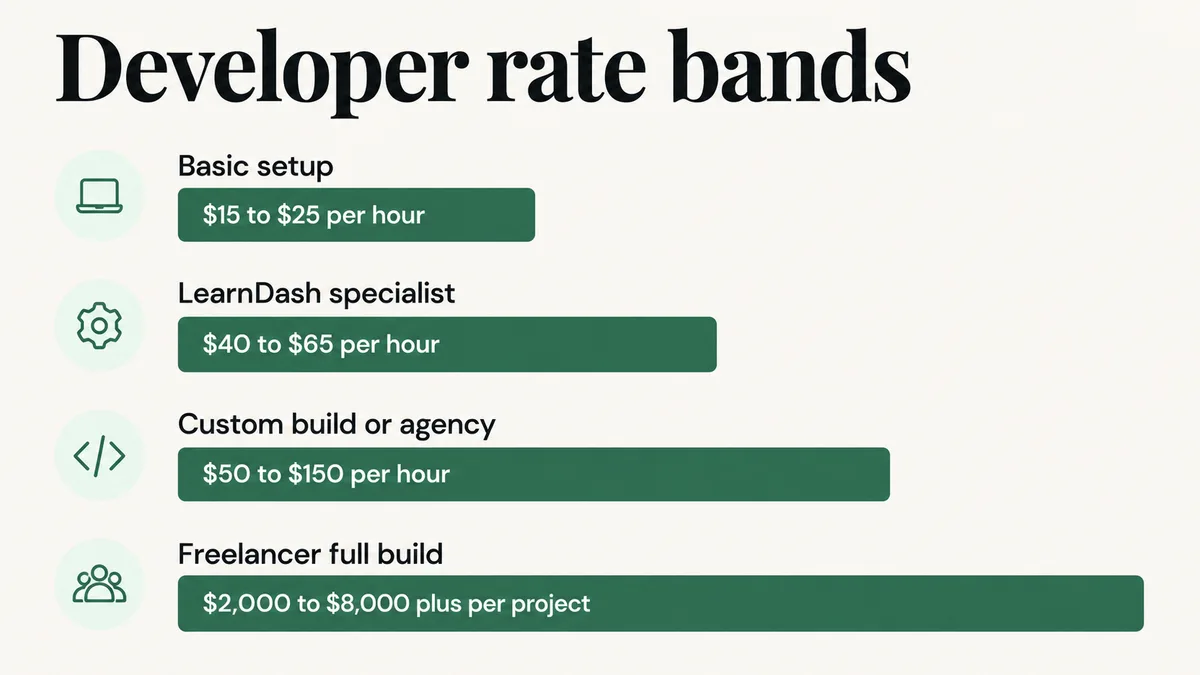
$15 to $25 per hour: basic WordPress skill with surface-level LearnDash knowledge, following the plugin’s own documentation to set up courses, lessons, and quizzes. Fine for a single straightforward course. Not the person to debug a plugin conflict or a broken completion rule.
$40 to $65 per hour: a dedicated LearnDash specialist with a real portfolio, coding ability, and years of hands-on experience with the plugin’s own hooks and data model. Reasonable for most course sites with one or two membership tiers and a standard WooCommerce or MemberPress integration.
$50 to $150 per hour: a developer who builds complete solutions from scratch, custom add-on development, theme customization, unusual integrations, or an agency with a LearnDash-specific track record. This is the band most paid course businesses with real customization needs should expect to hire in, and it overlaps with general custom WordPress plugin development rates because that is genuinely what this work is.
$2,000 to $8,000 per project with a freelancer, $5,000 to $15,000 with an agency: fixed-price estimates for a full build or migration, not published figures. A single-tier course with a standard WooCommerce checkout commonly runs 20 to 40 hours, which at the specialist rate above lands in the lower half of that range. Multi-tier memberships, custom reporting, or a migration carrying real student progress and certificates from another platform routinely push past it.
LearnDash also sells its own guided setup packages directly, priced at roughly $2,000 for a Starter build, $3,000 for a Plus build, and $3,500 for a Pro build, each with a defined scope and a two-week timeline. That is useful as a reference point for what basic guided setup costs before you move into deeply custom workflows, unusual integrations, or a substantial content migration, which is exactly the kind of work those fixed packages are not built to cover.
Why Is LearnDash’s Own License Price So Confusing Right Now?
Budget the LearnDash license, your WordPress hosting, and the developer’s time as three separate costs, because none of them include the others. The license itself is the one piece that has genuinely moved this year, and it is worth understanding why before you quote a number to anyone.
For most of 2026, independent trackers reported LearnDash selling three feature-based plans: Essentials, Pro, and Elite. Then, checked directly in mid-October, the Essentials plan at $259 a year disappeared from LearnDash’s own pricing page, leaving Pro at $399 a year and Elite at $599 a year as the only two tiers, with Pro adding the reporting dashboard and Elite adding group and multi-instructor tools on top of it.
That was not the end of it. Checking LearnDash’s own purchase page again while researching this guide, it no longer leads to a standalone LearnDash checkout at all. It now redirects to a Liquid Web page selling LearnDash bundled together with three other plugins, The Events Calendar, Give, and Kadence, priced by how many sites you need to cover: $350 a year for one site, scaling down per site to $599 for ten, $799 for 25, $899 for 50, and $999 for 100.
That is not a coincidence. Those four plugins are the exact same four that I covered in detail after Liquid Web dissolved the StellarWP brand earlier this year, the only four out of roughly ten StellarWP products the new owner committed to keep actively investing in, now apparently sold as a single bundle rather than as separate licenses.
The honest, practical takeaway is that LearnDash’s pricing has genuinely been in motion for months and is not guaranteed to have settled by the time you read this. Do not quote a license price to a client, a partner, or your own budget spreadsheet from a review article, including this one. Open LearnDash’s actual current purchase page yourself on the day you are budgeting, because the structure underneath that page has already changed twice in 2026 and nothing confirms it is finished changing.
Do this: Check LearnDash’s live purchase page yourself on the day you budget, rather than trusting any single article’s price, including this one, since the license structure has changed more than once this year.
Step 1: Do You Need a Developer or a Course Builder?
Write down what actually needs to happen before you talk to a single candidate, because “I need help with LearnDash” describes at least two different hires. If the real need is writing lessons, structuring modules, designing quiz questions, and pacing the curriculum, that is a course builder or instructional designer, and it is priced and skilled entirely differently from plugin-level work.
If the real need is building or fixing the structure underneath, a broken enrollment trigger, a certificate that will not generate, a custom reporting dashboard, or a migration, that is a developer. Plenty of real course creators need both, just not from the same person at the same rate. If the issue is a specific, already-diagnosed break rather than a reason to open a hiring search, such as a certificate not generating after course completion or a quiz retake not working, that is usually a configuration fix, not a full developer-search problem.
Do this: Separate your brief into a build list (setup, integration, and custom development) and a content list (curriculum, lessons, and quiz design). Hire against each list separately, even if it ends up being the same person.
Step 2: Do They Actually Know WordPress, Not Just LearnDash?
Because LearnDash runs on top of ordinary WordPress, most of what breaks on a real course site is not a LearnDash bug at all. It is a conflict between LearnDash and something else already running on the server: a caching plugin serving a stale lesson page to a logged-in student, an SMTP plugin that never actually intercepts LearnDash’s own notification emails because they route through a different code path than a contact form, or a page builder conflicting with the course content layout.
A candidate who only knows LearnDash’s own settings panels will solve the easy half of these problems and get stuck on the rest. Ask directly how many WordPress sites they have built that were not LearnDash, and ask for a specific plugin conflict or caching issue they diagnosed and fixed. A vague answer here is a more reliable warning sign than a thin LearnDash portfolio, because WordPress competence is the foundation everything else sits on.
Do this: Ask for a specific, real WordPress plugin conflict or caching issue they diagnosed on any project, LearnDash or not. A candidate with genuine WordPress depth answers immediately and specifically.
Step 3: Can They Explain Hooks, Not Just Settings Screens?
This question separates someone who has genuinely built custom LearnDash functionality from someone who has only clicked through its admin screens. LearnDash exposes its real power through a hooks and filters system, and almost every genuinely custom requirement, a non-standard completion rule, a custom progress report, a unique certificate trigger, gets built by hooking into that system rather than by finding a checkbox for it.
Ask a candidate to describe one real hook they have used and what it let them change. Someone who has actually done custom LearnDash development names a specific hook and a specific outcome without hesitation. Someone who has only configured the plugin through its settings screens will talk in generalities about “customizing the course flow” without ever naming anything concrete, and that gap matters most on exactly the kind of project where you are hiring a developer in the first place.
Do this: Ask for one real LearnDash hook or filter they have used and what specific behavior it changed. Listen for a concrete answer, not a general description of “customization.”
Step 4: Who Is Actually Writing the Code?
A real and common pattern in this market: a general web agency sells the project, then quietly hands the actual LearnDash configuration to a subcontractor the client never meets. You approve a confident proposal, and the real work lands with someone who has never touched LearnDash’s own hooks before.
You are allowed to ask who is actually building and configuring the site, whether that person works directly for the business you are hiring, and whether you can speak with them before signing. A developer who has genuinely done this work answers without hesitation, because the answer costs them nothing. Evasion on this specific question is one of the more reliable warning signs available to you in the whole process.
Do this: Get the name of the person actually building the site and talk to them once before signing. Agree on a communication cadence in that same conversation.
Step 5: What Happens After a Core Update?
LearnDash sites tend to break in a specific, predictable way. Custom code that worked perfectly for months can stop working the moment LearnDash ships a core update, because a hook signature changed or a function got deprecated, and that risk is real enough that it is a standard, named skill among developers who specialize in this plugin rather than general WordPress work.
This is why post-launch support belongs in the product, not as an upsell added after the fact. Ask what is covered after handover, for how long, and at what cost beyond that window. “Everything is included forever” is either an answer from someone who has not thought it through or a developer planning to disappear. A clear answer sounds like two weeks of bug fixes included, then an hourly rate or a small monthly retainer for anything new, including a LearnDash core update breaking something that previously worked.
Do this: Get the support window, what counts as a bug fix versus new work, and the post-launch rate written into the agreement before the project starts, including explicit coverage for a core LearnDash update breaking existing custom code.
Step 6: Is LearnDash’s Own Setup Service a Better Deal?
Before you commit to hiring independently, it is worth checking LearnDash’s own packaged alternative, because for a standard build it genuinely competes on price. LearnDash’s professional services packages run roughly $2,000, $3,000, and $3,500 for a Starter, Plus, and Pro site build respectively, each with a fixed, defined scope and a two-week timeline.
The genuine tradeoff is the same one you will find with most platform-owned setup services: it is a reasonable option for a standard build with a defined, repeatable scope, and it comes from the company that built the plugin. It is a weaker fit for custom hook-level development, an unusual integration, or ongoing iterative work, because a packaged service is built around a fixed deliverable list, not open-ended customization. A developer you hire directly costs more per hour in the higher bands above, but keeps working with you past a single defined handoff.
Do this: Request a written, itemized quote from LearnDash’s own setup service before comparing it to an independent developer’s bid, and confirm what is explicitly out of scope.
Step 7: Is the Scope Written Down Before Money Moves?
Nearly every dispute I have seen between a course creator and a LearnDash developer traces back to the same root cause: two different mental pictures of what “done” meant, and neither one written down anywhere.
The document does not need to be long. It needs a list of deliverables, a definition of done for each one, milestone dates, what you are responsible for supplying, and what a change request costs once work has started. Hosting is worth naming explicitly, since LearnDash includes none: confirm who is providing and paying for WordPress hosting, and whether the developer’s quote assumes a specific host’s capabilities. I built Certified Boater, a NASBLA-approved boater safety course on LearnDash with quizzes, certificates, and a WooCommerce checkout, and the clearest lesson from that build was that writing the certificate-generation and enrollment logic down in plain language before any code shipped saved far more time than it cost.
On payment structure, milestones tied to named deliverables protect both sides. Paying everything up front removes your own negotiating room entirely, and paying only on full completion is a reasonable thing for a good developer to decline on a longer build. One more clause worth insisting on in writing: your WordPress hosting account, domain, and LearnDash license stay registered to you, not to the developer, so you are never locked out of your own site if the relationship ends badly.
Do this: Require a written scope with deliverables, milestone payments, a named hosting owner, and written confirmation that your domain, hosting account, and LearnDash license stay registered in your own name.
What Are the Red Flags That Should End the Conversation?
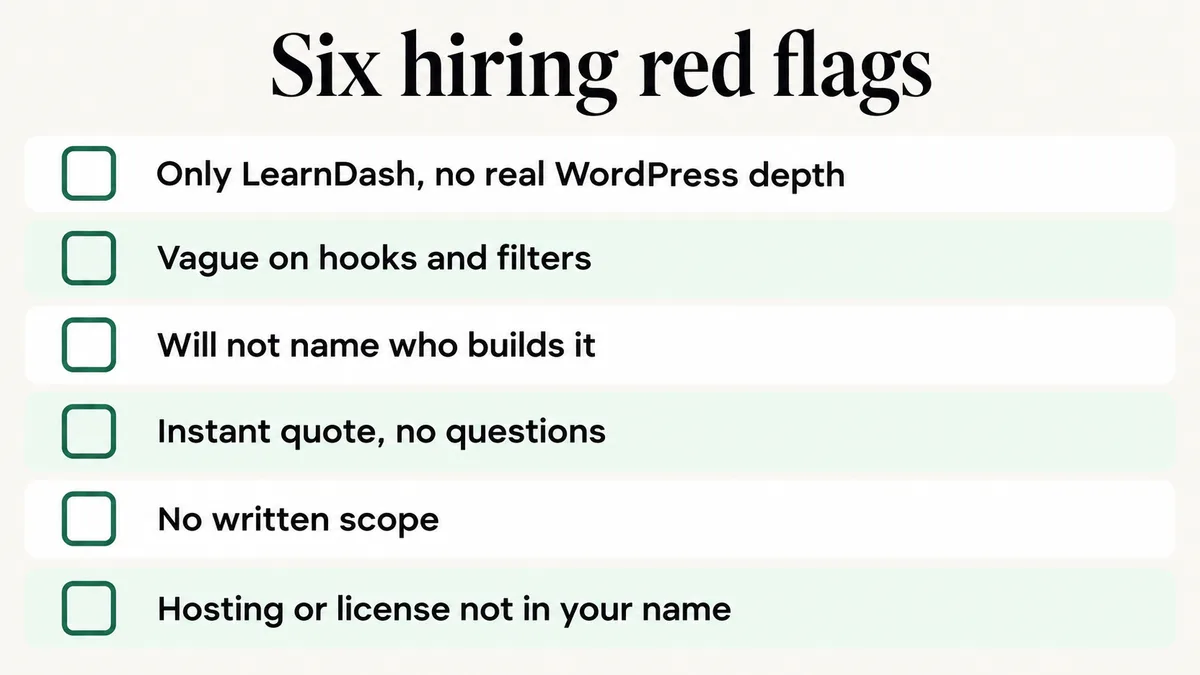
Some signals are worth walking away from immediately rather than negotiating around:
- A portfolio of only LearnDash sites, with no broader WordPress troubleshooting experience to point to.
- A vague, general answer about “customization” with no specific hook, filter, or real fix they can name.
- Refusal to name the person doing the technical build or to put them on a short call.
- A total price quoted within minutes, before any real questions about your existing stack, plan, or hosting.
- No written scope, only a chat thread and a number.
- Your own hosting account, domain, or LearnDash license set up under the developer’s credentials instead of yours.
The instant-quote flag deserves a second look specifically because it looks like good service. A developer who prices a LearnDash build without asking about your hosting environment, your existing plugins, or your enrollment logic is not being efficient. They are guessing, and that guess shows up later as a change order with a new price attached to it.
How Do You Screen Candidates in an Afternoon?
If you want the compressed version of everything above, run it in this order. It moves faster than comparing three separate proposals on your own, side by side.
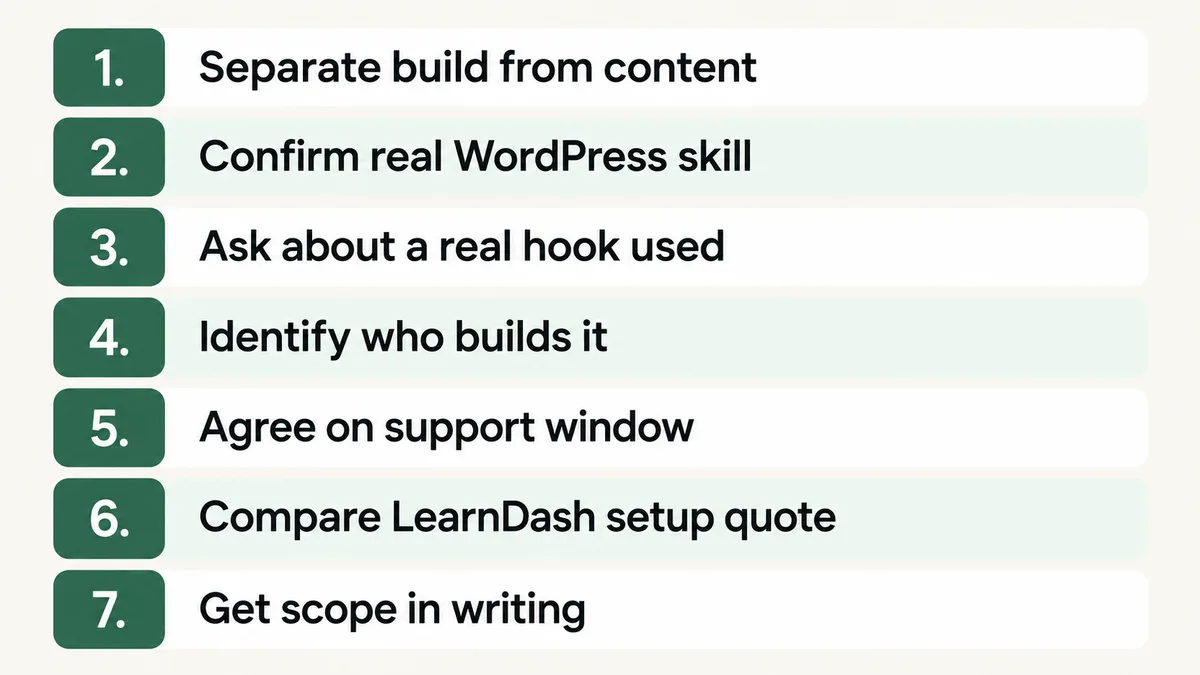
- Confirm you are hiring a developer and not a course builder, or write down which parts of the project are each.
- Send the identical one-page brief to every candidate you are considering.
- Ask for a real, non-LearnDash WordPress plugin conflict or caching issue they diagnosed and fixed.
- Ask for one specific LearnDash hook or filter they have used and what it changed.
- Ask who writes the configuration and request a short call with that person.
- Request a comparison quote from LearnDash’s own setup service if your scope is a standard build.
- Compare only the candidates still standing, on written scope rather than the headline price.
Most candidate lists lose at least one person at step three and another at step four. What remains afterward is a far more useful conversation, because by then you are no longer comparing marketing copy.
How Do You Avoid Hiring the Wrong Person Twice?
The cheapest protection available is a small paid trial task before committing to the full build. Pay for something real and self-contained: fix one specific, already-identified bug, such as a lesson not marking complete, or configure one WooCommerce integration end to end. Two to three hours is usually enough to learn what you need to know.
That trial reveals four things no interview can. How someone communicates under real conditions, whether their time estimate held up, whether the work is genuinely finished when they say it is, and what their configuration looks like when nobody is reviewing it in real time. Paying for a small test costs far less than discovering the answers halfway through a full launch.
The second protection is keeping the first real engagement smaller than you eventually want it to be. Launch with a simpler course structure and fewer customizations than your long-term plan calls for, then expand once the foundation is proven stable. A simple course that actually works beats an ambitious one that half works, and it leaves you with a working relationship to expand rather than a large bet placed on a stranger. If you are still deciding whether LearnDash itself is the right long-term platform given its ownership changes this year rather than just who builds on it, that is a separate, worthwhile question to answer first.
Keep your own record of what got built and why: which hooks, which theme customizations, which hosting settings were changed and for what reason. Developers move on to other clients, and a LearnDash site nobody can explain becomes expensive for whoever inherits it next. A shared document maintained during the build costs nothing and saves real time later.
Frequently Asked Questions
Do I really need a LearnDash developer, or can I set it up myself?
For a single straightforward course with linear lessons and a quiz, following LearnDash’s own documentation often gets a non-technical course creator a working site. Once you need a WooCommerce or MemberPress integration, automatic access rules, a reliable certificate system, or a migration, hire someone with real WordPress and LearnDash experience. Those systems fail quietly, and a course builder without that background often will not know something is broken until a paying student reports it.
How long should a LearnDash build take?
A straightforward single-course site with one standard integration usually takes one to three weeks once content and hosting are ready. Migrations, custom reporting, and multi-tier membership builds extend that meaningfully. Hosting setup and content readiness are almost always the real bottleneck, not the plugin configuration itself.
Is a fixed price or an hourly rate better for a LearnDash project?
Fixed price works when the scope is genuinely well defined, which is exactly why the written brief in Step 1 matters. Hourly suits ongoing changes, plugin-conflict debugging, or a scope that is still being figured out. A common, sensible arrangement is a fixed price for the defined build plus an hourly rate for anything added afterward.
What if my current LearnDash site was already set up badly?
Get an audit before deciding anything. Plenty of sites that feel broken need a plugin-conflict fix or a hosting adjustment rather than a full rebuild, and an audit tells you which situation you are actually in. Rebuild only when the underlying configuration is genuinely unworkable, since untangling existing student progress and certificate data is the hardest part of any rescue project.
What is the fastest way to spot a fake LearnDash specialist?
Two questions do most of the work. Ask for a real, non-LearnDash WordPress plugin conflict they diagnosed and fixed, and ask for one specific LearnDash hook or filter they have used and what it changed. Someone who has genuinely done this work answers both immediately and specifically. Someone who has not stays vague on both, usually with a confident tone doing the work the details should be doing instead.
Want a second opinion before you sign anything?
Send me the brief and the quotes. I will tell you honestly whether the scope is realistic and what is missing from it, whether or not you end up working with me.