
Three plugins on a course and community site each claim to support WooCommerce’s High-Performance Order Storage. LearnDash handles the courses, MemberPress handles the membership rules, BuddyBoss runs the community, and WooCommerce sits underneath all three processing the actual checkout. Every one of those plugins has, at some point, added a line of code declaring itself “HPOS compatible.” None of them were ever tested running together, on your exact combination of add-ons, against your exact order history.
That gap used to be quietly covered by a WooCommerce safety net most store owners never knew existed. In April 2026, WooCommerce turned that safety net off by default. I build and maintain WordPress sites that run exactly this kind of stack, and this is the real HPOS compatibility checklist I use to find out whether a LearnDash, MemberPress, or BuddyBoss site is actually safe on HPOS, or just hasn’t broken yet.
Quick Answer
A single plugin declaring “HPOS compatible” does not mean a LearnDash, MemberPress, and BuddyBoss stack running together is actually safe. Each plugin’s compatibility badge is self reported and tested in isolation, not against your specific combination. Worse, WooCommerce 10.7 (released April 14, 2026) disabled a background safety net called sync on read by default, which means any plugin or webhook still writing order data the old way can now drift out of sync with HPOS silently, with no error and no warning.
This HPOS compatibility checklist covers each plugin’s real declared version, compatibility mode’s actual settings, and how to test the combination directly before you trust the green checkmarks.
📋 What’s Covered
02Check 1: Has Your LearnDash WooCommerce Integration Actually Declared HPOS Compatibility?
03Check 2: Is MemberPress’s WooCommerce Sync Built the Way HPOS Expects?
04Check 3: Did Your BuddyBoss Purchase Activity Feed Just Lose Its HPOS Safety Net?
05Check 4: Did WooCommerce 10.7 Just Turn Off a Safety Net You Didn’t Know You Were Using?
06Check 5: Are Your Zapier, Make, or CRM Webhooks Still Seeing Every Order Update?
07What Order Should You Actually Run This HPOS Compatibility Checklist In?
08Why Does Stacking Three Plugins Multiply HPOS Risk Instead of Just Adding It?
09How Do You Keep a LearnDash, MemberPress and BuddyBoss Stack Safe Going Forward?
10Frequently Asked Questions
How Does WooCommerce HPOS Actually Work Underneath a LearnDash, MemberPress or BuddyBoss Stack?
On a plain WooCommerce store, HPOS is a two-way relationship: your orders live in dedicated database tables instead of the generic wp_posts table, and WooCommerce keeps a copy in the old posts table synced through what it calls compatibility mode. On a course, membership, and community stack, that two-way relationship stops being plain.
A WooCommerce order gets created at checkout, LearnDash reads that order to decide which course to grant access to, MemberPress reads the same order to decide which membership level applies, and BuddyBoss’s purchase integration reads it again to post an activity update or update a profile badge. Four separate codebases are all touching the same order, and only WooCommerce’s own code is guaranteed to touch it the way HPOS expects.
That is exactly why a single plugin’s compatibility badge is not enough, and why this HPOS compatibility checklist treats the stack as a whole rather than checking each plugin in isolation.
According to WooCommerce’s own HPOS documentation, the platform checks every active plugin’s declared compatibility before letting you flip the HPOS switch, and if a plugin reports itself as incompatible, or simply never declares a position at all, the switch to enable HPOS gets disabled in WooCommerce, then Settings, then Advanced, then Features until that’s resolved. That sounds like a solid gate. The real gap is what happens after a plugin does declare itself compatible, because WooCommerce has no way to independently verify that claim, and it has no way at all to test whether three separately-compatible plugins behave correctly running together on your specific site.
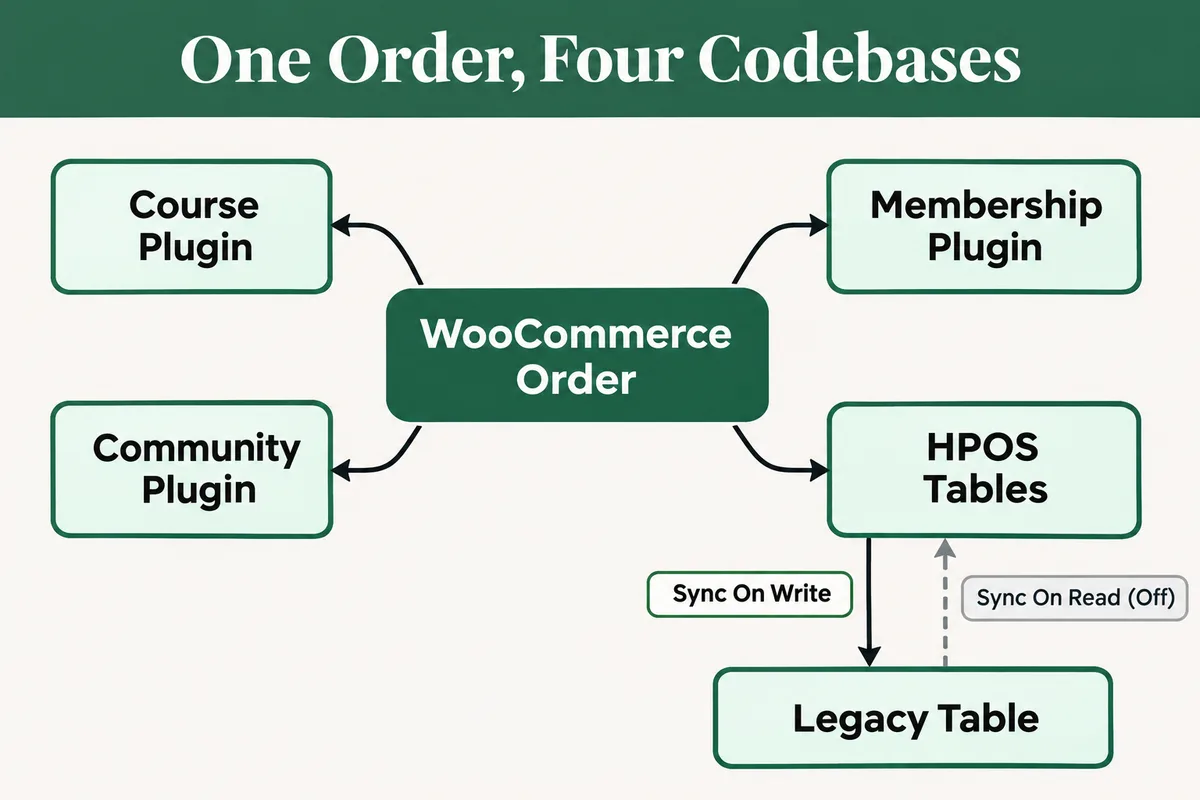
That is the real shape of the risk on a stack like this. Not a single bug, but a compounding one, where each plugin is individually fine and the combination is the untested part.
Check 1: Has Your LearnDash WooCommerce Integration Actually Declared HPOS Compatibility?
LearnDash does not talk to WooCommerce by default. The connection runs through LearnDash’s own official add-on, sold separately as “WooCommerce for LearnDash,” and that add-on is the piece that actually needs to understand HPOS, not LearnDash’s core plugin. The add-on’s own changelog documents a direct fix: version 1.9.7 lists “Fix: Compatibility with WooCommerce High Performance Order Storage,” alongside an unrelated fix to guest checkout password fields in that same release.
If your site installed that add-on years ago and auto-updates have been running quietly ever since, you are almost certainly past that version and fine. If auto-updates are disabled, if the add-on was installed from an old zip file during a migration, or if nobody has checked its version number since the site launched, there’s a real chance you’re running a version from before that fix shipped.
I have built and maintained courses on exactly this stack. Certified Boater, a NASBLA-approved boater safety course, runs LearnDash for course delivery and MemberPress for membership rules on top of WooCommerce checkout, and the first thing I check on any site with that shape is whether every plugin touching the order, not just the headline platform, has actually been updated past its HPOS fix.
Fix: Open Plugins in wp-admin and check the installed version number of “WooCommerce for LearnDash” against 1.9.7 or newer. If it’s older, update it before you trust anything else on this list, since every other check below assumes this baseline connection is already sound. If you cannot confirm the installed version against the changelog, check WooCommerce, then Settings, then Advanced, then Features, then “View and manage” next to HPOS, which lists any plugin WooCommerce has flagged as incompatible by name.
Check 2: Is MemberPress’s WooCommerce Sync Built the Way HPOS Expects?
MemberPress runs its own native checkout by default and does not need WooCommerce at all for most sites. A membership and course stack built on top of WooCommerce instead, usually to share one cart and one checkout across courses, products, and community access, needs a separate bridge: either MemberPress’s own WooCommerce integration add-on or the “MemberPress WooCommerce 2-Way Sync” product, which maps WooCommerce products to MemberPress membership levels and keeps purchases, cancellations, and subscription status matched in both directions.
That sync has to listen for WooCommerce order events, read the order’s status and product, and then create or cancel the matching MemberPress membership. Declaring HPOS compatibility means the add-on reads that order data through WooCommerce’s own WC_Order methods rather than a raw get_post_meta() call. A compatibility declaration is a one-line statement in the plugin’s own code. It is not independently tested by WooCommerce, and it says nothing about whether the sync was ever tested against a cart that also contains a LearnDash-linked product and a BuddyBoss community upgrade in the same checkout.
Fix: Place one real test order that mixes a MemberPress-mapped product with a LearnDash course product in the same cart, then confirm both the membership level and the course enrollment actually activate. Don’t trust a single clean test with one product type in the cart as proof the combination works, since that is the exact scenario a plugin’s own isolated compatibility testing is least likely to have covered.
Check 3: Did Your BuddyBoss Purchase Activity Feed Just Lose Its HPOS Safety Net?
BuddyBoss Platform itself does not process WooCommerce orders directly. Community sites that want a purchase to post an activity update, grant a profile badge, or trigger a notification usually run a separate bridge plugin, most commonly “BuddyPress Integration for WooCommerce,” known in its own codebase as wc4bp. That plugin’s premium tier only became recognized as HPOS compatible in version 3.6.3, released in October 2026, when its developers shipped a fix specifically described as declaring HPOS compatibility “from the running plugin file” rather than from an older file WooCommerce’s compatibility checker was no longer reading correctly.
That detail matters more than it looks. The plugin had almost certainly been functionally fine with HPOS for a while before that fix. The actual problem was that WooCommerce’s compatibility checker could not see the declaration at all, which means the site’s Advanced Features screen showed this plugin as untested or incompatible for a period even while it quietly worked, or showed it as compatible due to a stale cached read even after something changed.
Either direction is the same real lesson: the compatibility badge on a plugins screen is a snapshot, not a guarantee, and it can be wrong in either direction.
Fix: If your community site bridges WooCommerce purchases into BuddyBoss activity feeds or profile data, confirm the bridge plugin is on version 3.6.3 or newer if it is wc4bp, or check your specific bridge plugin’s own changelog for an HPOS entry if you’re running a different one. Then place one real test purchase and confirm the activity post or profile update actually appears, rather than trusting the plugins screen’s compatibility badge alone.
Check 4: Did WooCommerce 10.7 Just Turn Off a Safety Net You Didn’t Know You Were Using?
This is the real, current reason this checklist matters right now rather than being a generic “audit your plugins” reminder. HPOS compatibility mode has always run two separate sync directions. Sync on write copies new order data from HPOS into the legacy posts table, which is the direction most people picture. Sync on read runs the opposite way: if something writes order data directly into the old posts table instead of through WooCommerce’s own order object, sync on read would notice the mismatched timestamp and quietly pull that change back into HPOS the next time the order was read.
That second direction was always meant as a temporary safety net, not a permanent feature, and WooCommerce’s own developer blog confirmed that starting with WooCommerce 10.7, released April 14, 2026, sync on read is disabled by default. The stated reasoning is direct: sync on read “can cause unexpected behavior” by letting data modified outside WooCommerce’s normal workflow silently override HPOS’s own order record during a read operation, and with HPOS now the long-term default rather than an interim feature, that safety net was judged to cause more confusion than it prevented.
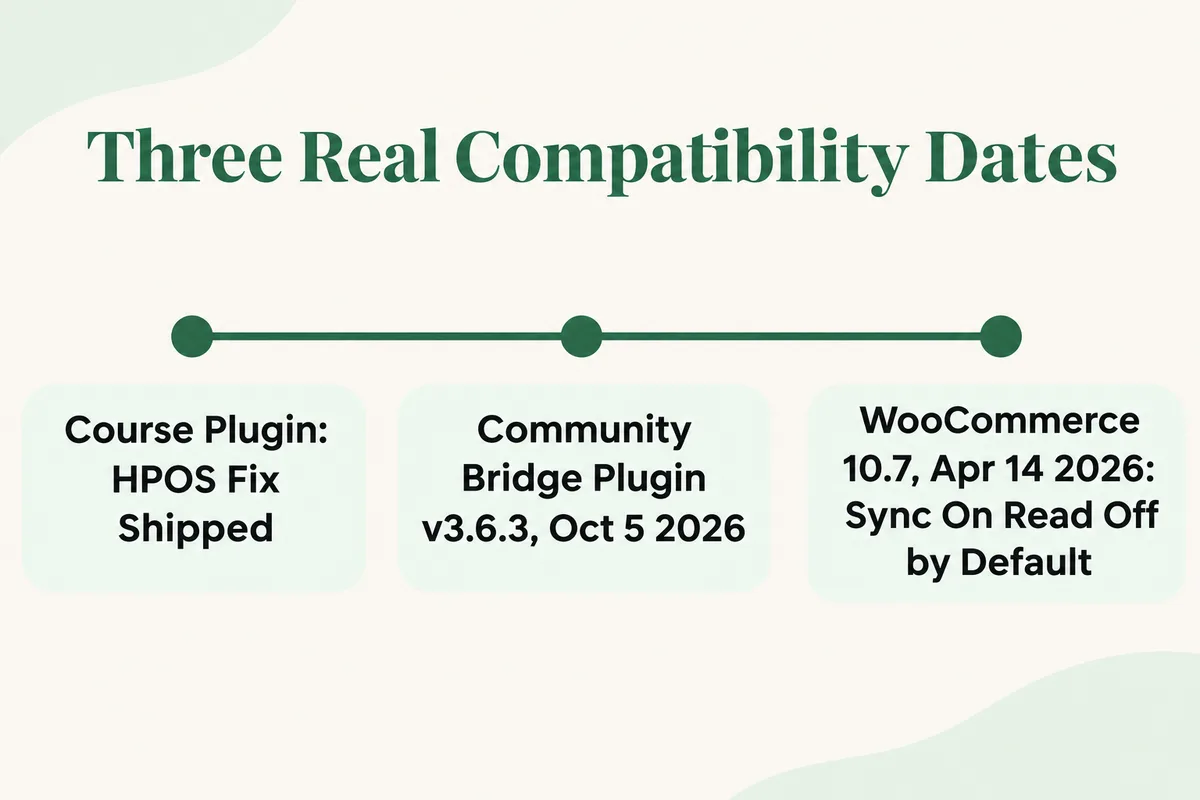
For most stores, this changes nothing, because nothing on the site was relying on sync on read in the first place. For a stack with an older bridge plugin, a custom reporting tool, or a direct database query that still writes order status straight into wp_postmeta instead of through WooCommerce’s order API, sync on read was the thing quietly fixing that mistake on every page load. With it off by default, that mistake now simply stays wrong until something else catches it, and nothing on the order screen will look different in the meantime.
Fix: If you’re already on WooCommerce 10.7 or newer and nothing has looked wrong, you likely never needed sync on read and can leave it off. If you suspect a plugin or custom code still writes order data the old way, you can temporarily restore the previous behavior with add_filter('woocommerce_hpos_enable_sync_on_read', '__return_true'); while you track down and fix the actual source, rather than leaving that filter in place permanently as the real solution.
Check 5: Are Your Zapier, Make, or CRM Webhooks Still Seeing Every Order Update?
A course and membership stack rarely stops at LearnDash, MemberPress, and BuddyBoss. Most real sites I work on also push order events out to an email platform, a CRM, or an automation tool like Zapier or Make, usually to tag a new student, start an onboarding sequence, or sync a customer record somewhere else entirely. Those webhooks and automations are the least likely piece of the stack to have ever been reviewed for HPOS at all, because nobody thinks of a Zapier connection as “a WooCommerce extension” that needs its own compatibility declaration.
If that automation was originally built against a WooCommerce action hook or a direct meta key read rather than the standard WC_Order object, it was previously protected by the same sync on read safety net covering everything else on this list. With that net removed by default in WooCommerce 10.7, the practical failure mode is exactly the kind described by WooCommerce’s own guidance on the change: a bulk status update or a webhook payload reads from the legacy table, finds data that no longer matches what HPOS considers current, and a downstream CRM record quietly stops reflecting reality.
Nothing on your WooCommerce dashboard shows an error, because from HPOS’s perspective, nothing is broken. The CRM is just wrong.
Fix: List every external automation that triggers off a WooCommerce order, email sequences, Zapier zaps, Make scenarios, CRM syncs, and for each one, place a real test order and confirm the automation actually fires with current, correct order data within a few minutes. Don’t assume an automation still works because it worked when it was first built. Treat each one as untested against HPOS until you’ve watched it succeed on a fresh order after the WooCommerce 10.7 change.
What Order Should You Actually Run This HPOS Compatibility Checklist In?
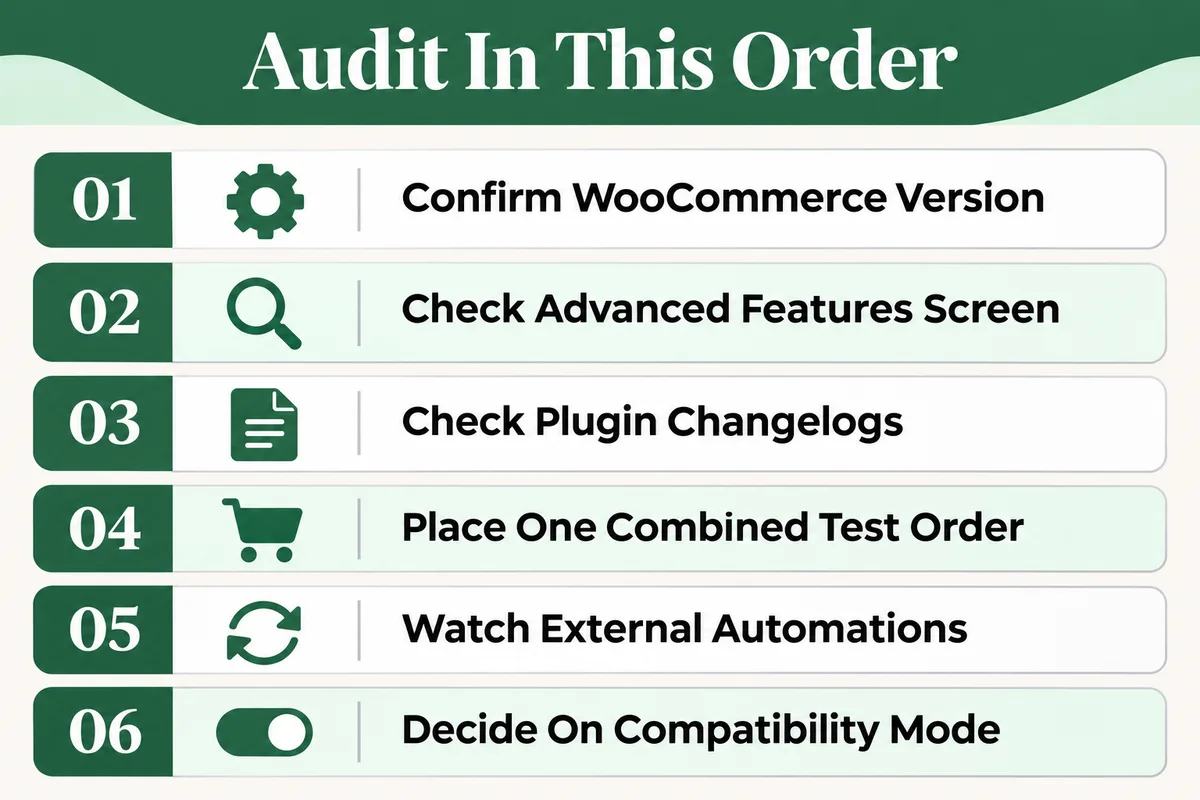
Run this HPOS compatibility checklist in this order. Each step either clears a whole category of risk or tells you exactly where to look next, instead of leaving you guessing which of five plugins caused a problem you noticed three weeks later.
- Confirm your WooCommerce version. Check WooCommerce, then Settings, then Help, then System status, and note whether you’re on 10.7 or newer, since that single number tells you whether sync on read is off by default on your store.
- Open the Advanced Features screen and read the incompatible list by name. WooCommerce, then Settings, then Advanced, then Features, then “View and manage” next to HPOS. Anything listed here is a confirmed, known problem, not a guess.
- Check the installed version of every plugin that touches an order, not just the three named in this article. Compare each against its own changelog for an HPOS entry, the way you would check “WooCommerce for LearnDash” against 1.9.7 or wc4bp against 3.6.3.
- Place one combined test order. One cart, one checkout, a LearnDash-linked product, a MemberPress-mapped product, and anything that touches BuddyBoss, all at once. This is the step that actually tests the combination rather than each plugin in isolation.
- Watch every external automation fire on that same test order. Confirm the CRM record, the email sequence, and any Zapier or Make scenario all reflect the order correctly within a few minutes, not just that they fire at all.
- Decide on compatibility mode deliberately, not by default. If every check above passes cleanly, you likely don’t need sync on read re-enabled. If anything failed, re-enable it temporarily with the filter above while you fix the actual source, then turn it back off once that fix is confirmed.
Why Does Stacking Three Plugins Multiply HPOS Risk Instead of Just Adding It?
A single WooCommerce extension declaring HPOS compatibility is tested, at best, against its own isolated use case: one product type, one checkout flow, one set of hooks. LearnDash’s own compatibility work was never responsible for testing MemberPress, and MemberPress’s own compatibility work was never responsible for testing BuddyBoss. Each developer did their own job correctly and still left the exact combination you’re running completely unverified, because no single plugin maker can reasonably test against every other plugin maker’s product.
That’s why the risk compounds rather than adds. Three independently-compatible plugins give you, at best, three independently-tested paths through the same order data, and zero tested paths through all three touching one order at once. The WooCommerce 10.7 change makes this sharper rather than causing it: removing the sync on read safety net doesn’t create new bugs in LearnDash, MemberPress, or BuddyBoss. It removes the thing that was quietly catching bugs that were already there, in whichever one of the three, or in whatever glue code connects them, never got fully tested against this specific combination in the first place.
I see the same underlying pattern on sites with a different three-plugin combination every time, not because any specific plugin is badly built, but because “compatible with HPOS” and “compatible with HPOS running alongside your other twenty plugins” are two different claims, and only the first one ever gets tested before release.
How Do You Keep a LearnDash, MemberPress and BuddyBoss Stack Safe Going Forward?
A one-time HPOS compatibility checklist answers today’s question. These are the habits that keep the answer from quietly going stale again.
- Re-run the combined test order after any major plugin update. A plugin update that touches checkout, orders, or membership logic deserves the same one-cart test described above, not just a changelog skim.
- Keep every order-touching plugin current, not just the big three. A forgotten reporting plugin or an old custom snippet is exactly the kind of thing sync on read used to quietly cover for.
- Watch the Advanced Features incompatible list after every plugin update, not just once. A plugin can move from compatible to incompatible, or the reverse, with a single release, the way wc4bp did with its own fix.
- Treat compatibility mode as a decision, not a default. Know whether sync on write and sync on read are on or off on your store right now, and know why, instead of leaving WooCommerce’s current default in place without checking whether it still matches what your stack actually needs.
- Follow WooCommerce’s own developer blog for HPOS changes, not just your plugin vendors’. The sync on read change came from WooCommerce core, not from LearnDash, MemberPress, or BuddyBoss, and none of those three vendors had a reason to warn you about it.
Frequently Asked Questions
Is it safe to run LearnDash, MemberPress, and BuddyBoss together on WooCommerce HPOS?
For most current, well-maintained installs, yes. All three ecosystems have real, documented HPOS compatibility work behind them. The actual risk concentrates in older plugin versions, custom code or webhooks that bypass WooCommerce’s order API, and the untested combination of all three running together, which is exactly what the checks above are built to find.
What does “HPOS compatible” on a plugin actually mean?
It means the plugin’s developer added a line of code telling WooCommerce the plugin reads and writes order data through WooCommerce’s own order object instead of raw database calls. It is a self reported declaration, not an independent test WooCommerce runs itself, and it says nothing about whether that plugin was tested running alongside your other specific plugins.
What is sync on read, and why did WooCommerce turn it off?
Sync on read was a background check that compared the HPOS order record against the older posts table record every time an order was read, and pulled in the newer version if something had written directly to the old table. WooCommerce disabled it by default in version 10.7, released April 14, 2026, because it could let data changed outside WooCommerce’s normal workflow silently override the HPOS record during a routine read, which the WooCommerce team judged to cause more confusion than it prevented now that HPOS is the long-term default.
How do I know if my site is affected by the WooCommerce 10.7 change?
Check your WooCommerce version under Settings, then Help, then System status. If you’re on 10.7 or newer and nothing has looked wrong, you likely never depended on sync on read. If you run older custom code, a legacy bridge plugin, or webhooks that write order status directly into postmeta, place a real test order and confirm every downstream system, your CRM, your email automation, your community feed, actually reflects it correctly.
Should I just leave compatibility mode and sync on read enabled permanently to be safe?
You can re-enable sync on read with a filter while you investigate, but WooCommerce’s own guidance treats that as a temporary measure, not a permanent fix, and leaving dual sync running indefinitely costs real performance on every order read and write. The safer long-term move is finding and fixing whatever still writes order data the old way, then running with compatibility mode off once you’ve confirmed nothing needs it.
Where do I check which plugins WooCommerce has flagged as HPOS incompatible on my own site?
Go to WooCommerce, then Settings, then Advanced, then Features, and click “View and manage” next to the High-Performance Order Storage option. That screen lists, by name, any active plugin WooCommerce currently sees as incompatible or undeclared, which is the fastest real starting point before you work through the rest of this checklist.
None of this is a reason to avoid HPOS, and it isn’t a reason to avoid running LearnDash, MemberPress, and BuddyBoss together either. All three are genuinely solid choices for a course, membership, and community stack, and the compatibility work behind each one is real. The actual lesson is narrower: a green checkmark on a plugins screen tells you what one developer tested in isolation, not what happens when four systems touch the same order at once, and the safety net that used to quietly cover that gap is now off by default.
I see the same underlying pattern show up as a specific symptom more often than as a clean “HPOS broke my site” report. It looks like a MemberPress rule that stops applying correctly, a BuddyBoss notification that quietly stops firing, or a Zapier automation that no longer triggers, each one looking like its own isolated bug rather than the shared order-data gap underneath. If your stack has never been tested as a combination, it’s worth finding out now, while you still get to choose when to look.
Not sure if your LearnDash, MemberPress, or BuddyBoss stack is actually HPOS safe?
Tell me which plugins touch your checkout and how old your install is. I will tell you honestly which of these checks actually applies to your stack and what it takes to verify it, whether or not you need anyone to do the work.