
Someone fills in your registration form, sees the message telling them to check their inbox, and then nothing arrives. They try again. They check spam. They email you to ask whether the site is broken, and you look at the dashboard and find them sitting in a list of pending accounts you did not know existed. If you are searching for a fix for a BuddyPress activation email not sending, you are losing members at the exact moment they were most interested in joining.
I build and repair WordPress membership and community sites, and this is one of the most common problems I get asked about on BuddyPress. The frustrating part is that most advice stops at “install an SMTP plugin”. That fixes one cause out of ten. BuddyPress has its own email system, its own signup table, and three different registration modes, and each of those can stop the email before your mail server ever sees it. Below is every cause I check, in the order that finds the real one fastest, verified against the BuddyPress 14.5.2 source code.
Quick Answer
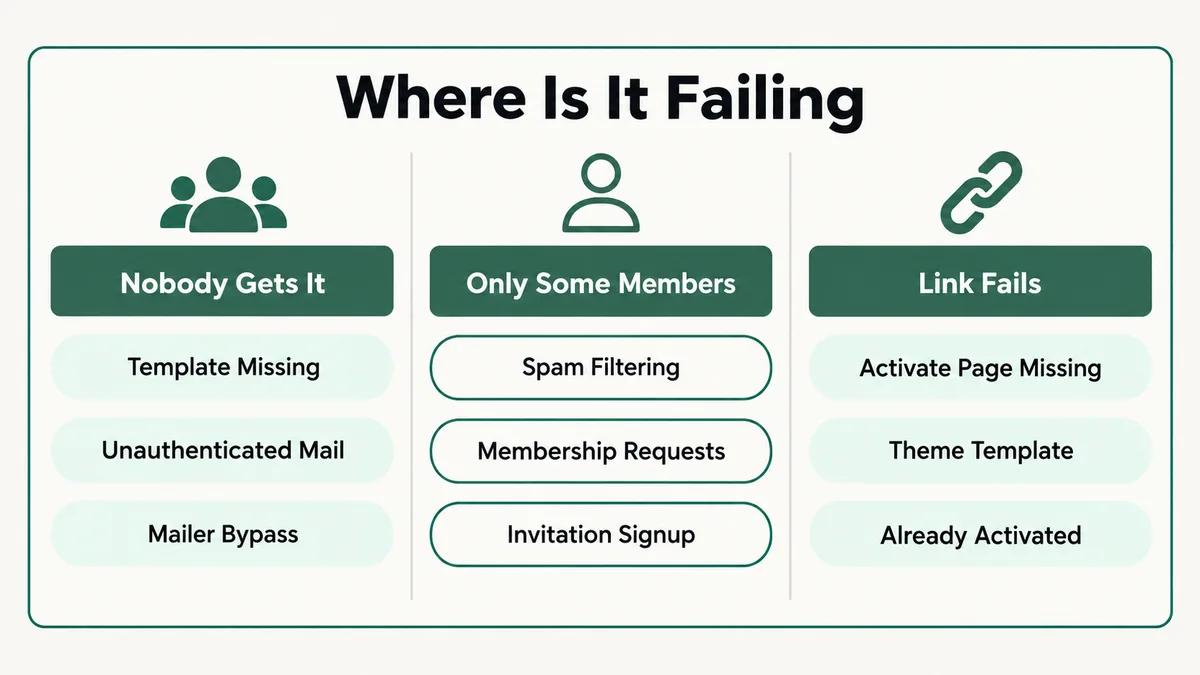
A BuddyPress activation email usually stops for one of three reasons: the activation email template is missing from BuddyPress’s Emails list, the site sends mail through an unauthenticated server that inboxes reject, or the registration mode is one that never sends an activation email at all, such as Membership Requests or invitations. Run Tools, then BuddyPress, then Reinstall emails, send mail through an authenticated SMTP service, and check Users, then Manage Signups to see what BuddyPress thinks happened. You can resend any activation email from that screen.
📋 What’s Covered
02Cause 1: Is the Activation Email Missing From the Emails List?
03Cause 2: Are Membership Requests Switched On?
04Cause 3: Did the Member Join Through an Invitation?
05Cause 4: Is a Plugin Cancelling the Email on Purpose?
06Cause 5: Is the Site Sending Mail With No Authentication?
07Cause 6: Is BuddyPress Going Around Your SMTP Plugin?
08Cause 7: Is the From Address a Domain You Cannot Send For?
09Cause 8: Is Another Plugin Replacing the BuddyPress Signup?
10Cause 9: Is the Emails Sent Counter Telling You the Truth?
11Cause 10: Does the Email Arrive but the Activate Link Fail?
12BuddyPress Activation Email Not Sending: How Do You Diagnose It in Order?
13Why Does BuddyPress Handle Email Differently From WordPress?
14How Do You Stop Activation Emails Failing Again?
15Frequently Asked Questions
How Does BuddyPress Send an Activation Email?
Before the causes, the model. The activation email is not one event. It is the end of a short chain, and every link in that chain is owned by a different part of your site. Knowing the chain turns a vague “emails are broken” into a question you can answer.
- The registration form creates a pending signup. BuddyPress does not create a normal WordPress user straight away. Since version 2.0 it stores new registrations in the signups table, and the person only becomes a real member after activating.
- BuddyPress decides whether to send an activation email at all. A filter called bp_core_signup_send_activation_key runs first. Membership Requests, invitations and some plugins use it to cancel the email.
- BuddyPress looks up the email template. It searches its Emails list for a published email assigned to the situation “Recipient has registered for an account”.
- A mailer delivers it. By default that is BuddyPress’s own mailer class, not the WordPress wp_mail() function most plugins expect.
- The member clicks through to the Activate page. The link includes a unique key, and the page asks them to press Activate.
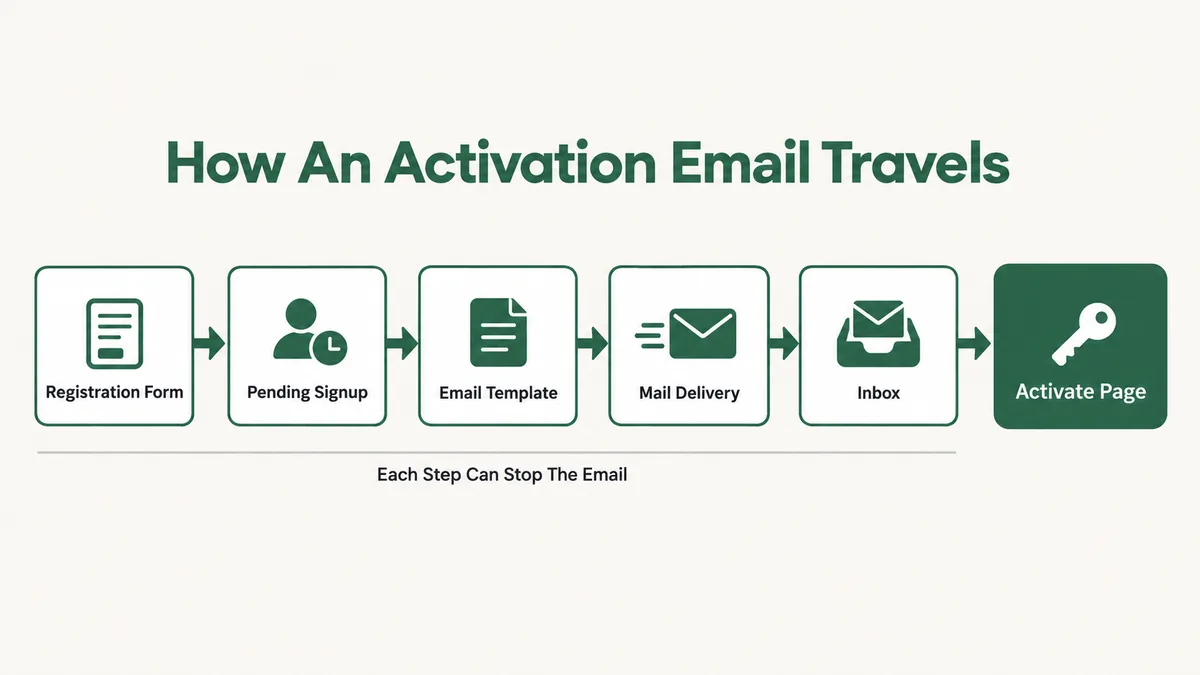
The member only ever sees the last step. You, as the admin, can see most of the others, which is why the fix almost always starts in the dashboard rather than the inbox. The ten causes below follow the chain from the top.
Cause 1: Is the Activation Email Missing From the Emails List?
This is the cause that produces total silence. No email to anyone, no error on screen, and nothing in any mail log, because BuddyPress never got as far as trying to send.
BuddyPress stores every email it sends as a post in its own Emails list, with each one tied to a situation. When a signup needs an activation email, BuddyPress searches for a published email assigned to the core user registration situation. In the source, if that search comes back empty, the send function returns an error called missing_email and stops. It does not fall back to a default message. It does not warn you.
Those email posts go missing more often than you would expect. A site migration that copies posts but not taxonomy terms breaks the link between the email and its situation. So does a database cleanup plugin, someone deleting what looked like clutter under Emails, or a content import that brought across posts without their terms. A BuddyPress.org support thread on activation emails not arriving was resolved exactly this way.
Fix: Open Emails in the dashboard and look for “Activate your account”. Open it and check the Situations box shows “Recipient has registered for an account”. If it is missing, trashed or has no situation, go to Tools, then BuddyPress, tick Reinstall emails, and run it. Be aware that this deletes and restores every BuddyPress email from defaults, so copy any customised wording out first.
Cause 2: Are Membership Requests Switched On?
This is not a fault. It is a setting working exactly as designed, and it catches site owners who turned it on months ago and forgot.
BuddyPress 10 added Membership Requests, an option under Settings, then BuddyPress, then Options. The BuddyPress Codex page on alternative registration workflows explains that it is only available with public registration switched off, and that the activation email is not sent automatically. Instead, administrators receive a notice and review each request under Users, then Manage Pending Memberships.
The source confirms it. BuddyPress hooks a function into the send filter that returns false when requests are required, which cancels the activation email outright. If the person then tries to log in, they see “Your membership request has not yet been approved” rather than the usual resend link. From their side, it looks exactly like an email that never came.
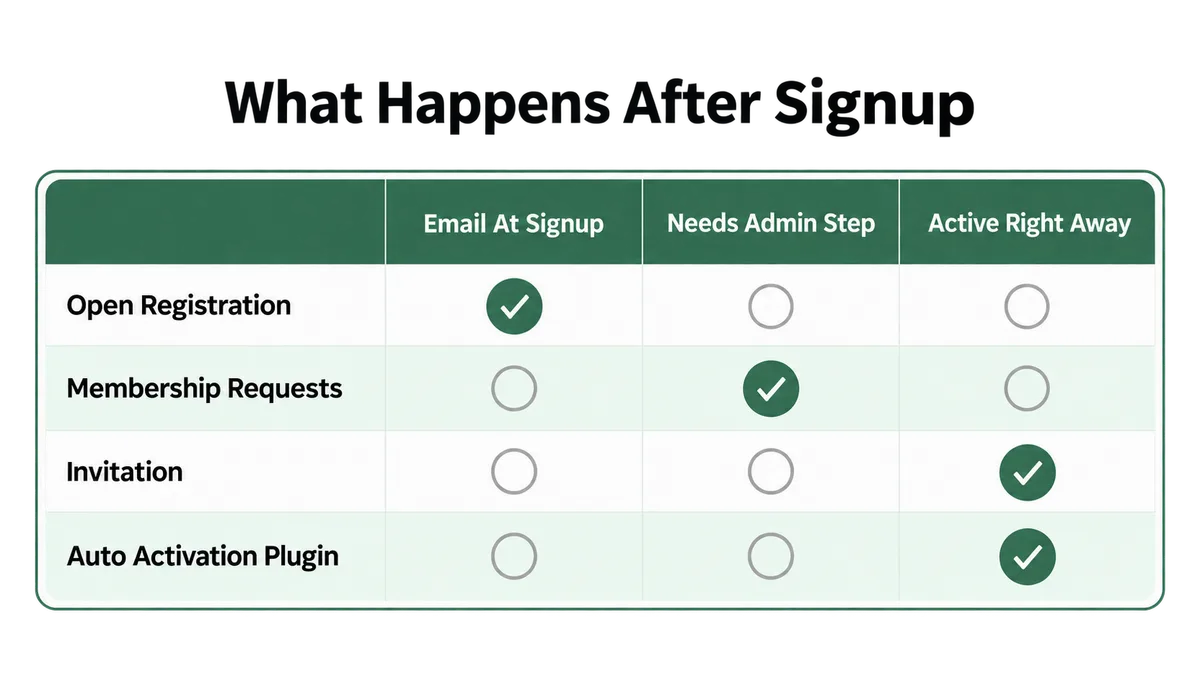
Fix: Check Settings, then BuddyPress, then Options. If Membership Requests is on and you want it, work the pending queue: Approve sends the activation email, while Activate skips the email and makes the account live immediately. If you did not mean to gate signups, switch it off and turn public registration back on under Settings, then General.
Cause 3: Did the Member Join Through an Invitation?
BuddyPress also lets existing members invite people by email. An invited person who registers through that invitation link never gets an activation email either, and again this is by design.
The logic is simple. The invitation already proved the address works, because the person clicked a link that was emailed to it. So BuddyPress cancels the activation email through the same filter, then activates the account as soon as registration completes. The Codex describes the account as active immediately, and the person can log in straight away.
Where this causes confusion is a site with mixed signups. The admin sees some members complaining about missing emails and others who never mention it, and assumes delivery is patchy. Often the members who “got through” are the invited ones, who never needed the email at all, and the problem is really affecting every open signup.
Fix: Before concluding that email works for some people, check how each of those people joined. Test with a brand new address through the public registration form, not through an invite. That is the only test that exercises the activation email.
Cause 4: Is a Plugin Cancelling the Email on Purpose?
The same filter that Membership Requests and invitations use is open to any plugin or code snippet. That is how auto activation works: a plugin returns false on bp_core_signup_send_activation_key, skips the email, and activates the account itself.
That is fine while it works. The failure mode is half of it working. An auto activation plugin that has been disabled, broken by an update, or only partly configured can still cancel the email while no longer activating anyone. New members then pile up in Manage Signups with no email and no activation. A snippet pasted into functions.php years ago by a previous developer does the same thing, and nobody remembers it is there.
Theme bundles are a common source. Community themes often ship their own registration tweaks, and some of them hook into this filter.
Fix: Search your active theme, child theme and plugins folder for bp_core_signup_send_activation_key. Anything that returns false there is choosing to skip the email. Either make sure it also activates the account, or remove it. On a staging copy, switch to a default theme and test a fresh signup to rule the theme in or out.
Cause 5: Is the Site Sending Mail With No Authentication?
If Causes 1 to 4 check out, the email is being handed to your server for delivery. Now the question is whether anyone accepts it.
Out of the box, WordPress and BuddyPress send mail through PHP’s mail function on the web server. That mail carries no authentication for your domain. Gmail and Yahoo tightened their sender rules in 2024 to require proper authentication, and Microsoft followed with its own requirements. Unauthenticated mail from a shared hosting server gets filtered, delayed or dropped silently. Some hosts block the mail function entirely to stop spam, and the send fails without any message reaching the site owner.
This is the cause every SMTP guide is written for, and it is real. It is just not the only one, which is why an SMTP plugin fixes the problem for some sites and does nothing for others.
Fix: Send through an authenticated service, a transactional provider or your own mail host over SMTP, using an SMTP plugin. Set up SPF, DKIM and DMARC records for your sending domain in DNS. Then send a test to a Gmail address and open the message headers to confirm SPF and DKIM both show a pass.
Cause 6: Is BuddyPress Going Around Your SMTP Plugin?
This is the cause behind the most frustrating version of the problem: WordPress password resets arrive, WooCommerce receipts arrive, the SMTP plugin’s test email arrives, and BuddyPress emails still do not.
BuddyPress does not send through wp_mail() by default. It uses its own mailer class, built on PHPMailer, so it can send HTML templates. The source shows two situations where it falls back to the standard wp_mail() function: when another plugin has replaced wp_mail() itself, or when something has set the site’s mail content type to HTML. Otherwise, BuddyPress keeps its own path.
BuddyPress’s mailer does fire the phpmailer_init hook, so SMTP plugins that configure the connection through that hook still apply. Plugins that work at the wp_mail() level, including some API based senders and many email log plugins, never see BuddyPress’s mail. That is why a BuddyDev forum thread from 2022 described WP Mail SMTP Pro sending every email except BuddyPress’s, and why the mail log can be empty while emails are in fact being attempted.
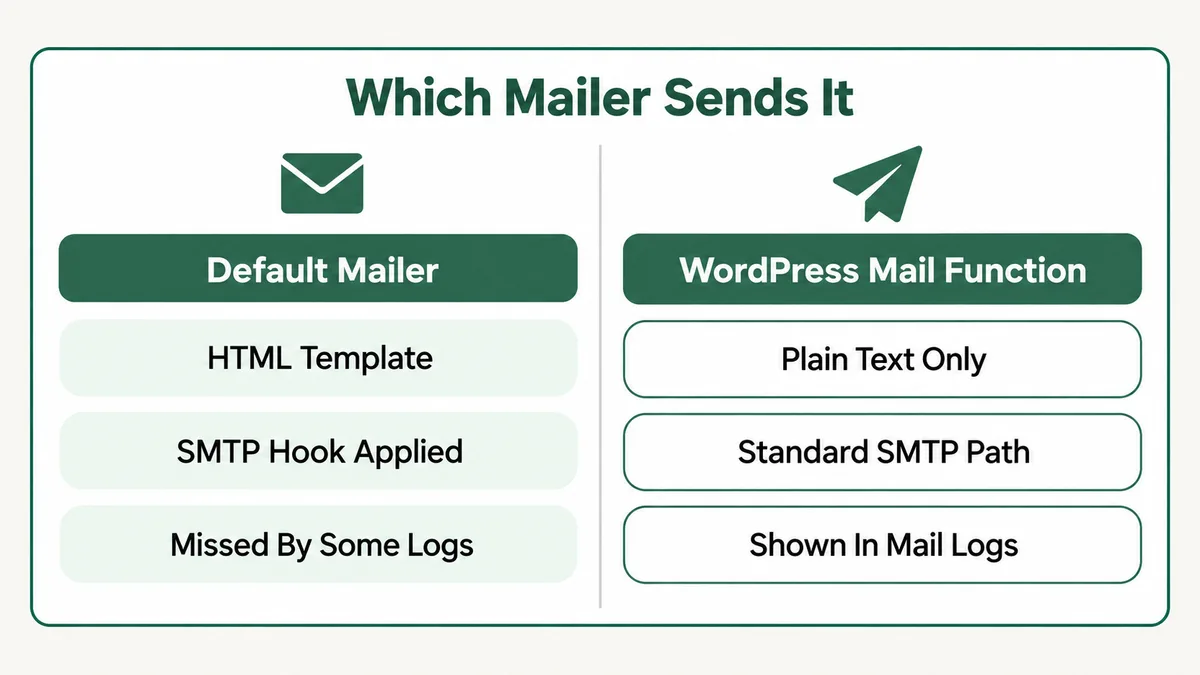
Fix: Add one line to a small custom plugin or your child theme: add_filter( ‘bp_email_use_wp_mail’, ‘__return_true’ ); This is a filter BuddyPress provides for exactly this case, and it sends every BuddyPress email through wp_mail(), where your SMTP and logging plugins can see it. The trade off is that emails go out as plain text, without the HTML template.
Cause 7: Is the From Address a Domain You Cannot Send For?
Authenticated delivery only helps if the address in the From line belongs to the domain you authenticated. When the two disagree, receiving servers treat the mail as a forgery.
This goes wrong in a few predictable ways. The From address is left as the default wordpress@ address on a domain with a strict DMARC policy. It is set to a free Gmail or Outlook address, which your server has no right to send for. Or the SMTP plugin forces one From address while BuddyPress’s email settings, set through the Customizer under Emails, show another, and different emails go out with different senders.
The symptom is usually partial. Some providers deliver the mail to spam, others reject it, and a few let it through. That inconsistency makes it look random when it is completely predictable from the headers.
Fix: Use a From address on your own domain, such as hello@ or community@, and make it the same domain your SPF and DKIM records cover. In your SMTP plugin, force that From address for every email so BuddyPress and WordPress cannot disagree.
Cause 8: Is Another Plugin Replacing the BuddyPress Signup?
BuddyPress only sends its activation email when a registration goes through BuddyPress’s own signup process. Plenty of sites do not register people that way.
Form builders with user registration add-ons, social login plugins, membership plugins and custom registration pages all create accounts through their own code. Some hand off to BuddyPress properly. Others create a normal WordPress user directly, which skips the signup table and the activation email entirely, or create a signup without triggering the email. A BuddyPress.org thread on activation emails not being sent traced one site’s problem to its social network login plugins interfering with the send.
The quick test is whether the person shows up under Users, then Manage Signups at all. If they registered and are not listed there, BuddyPress never handled the signup, so it was never going to send its email.
Fix: Register a test account through the exact form your members use, not the default BuddyPress page. If it does not appear in Manage Signups, check the form or login plugin’s settings for a BuddyPress integration or its own activation option, and use one activation system, not two.
Cause 9: Is the Emails Sent Counter Telling You the Truth?
The Manage Signups screen shows when the last activation email was sent and how many times. Most admins read that as proof of delivery. It is not.
In the BuddyPress source, the function that sends the activation email calls the send, then updates the signup’s sent date and count, without checking whether the send succeeded. So a signup can show one email sent while BuddyPress in fact hit a missing template, or its mailer failed. The counter records an attempt, not an arrival.
This matters because it sends people in the wrong direction. The admin sees “sent”, concludes BuddyPress did its job, and spends a day arguing with the mail host about a message that was never handed over.
Fix: Treat the counter as an attempt log only. To confirm delivery, route BuddyPress through wp_mail() as in Cause 6 so your mail log records it, or check the log in your transactional provider’s dashboard. Then use the resend option in Manage Signups, described in the Codex guide to managing signups, and watch the log as it goes out.
Cause 10: Does the Email Arrive but the Activate Link Fail?
Sometimes a member reports “no activation email” when what they mean is the email came, they clicked, and nothing worked. Ask which one it is before you touch mail settings.
The link in the email points at your Activate page. In BuddyPress 12 and later, that page is set under Settings, then BuddyPress, then URLs. The source only treats the site as having its own Activate page when there is an activation slug and the theme or BuddyPress template pack provides an activate template. When either is missing, the link falls back to WordPress’s wp-activate.php, which on a single site install does not know what to do with a BuddyPress key.
Two other versions of this come up. A page caching plugin serves a cached copy of the Activate page, so the form never processes the key. And a member who already clicked once, or whom you already activated by hand, sees an error the second time and assumes the process failed.
Fix: Open Settings, then BuddyPress, then URLs and confirm the Activate page has a title and slug, then save. Exclude the Register and Activate pages from every cache layer. Test the link from a fresh signup in a private window. If a member is stuck, activate them yourself from Manage Signups and tell them to log in.
BuddyPress Activation Email Not Sending: How Do You Diagnose It in Order?
Ten causes is a lot to work through while new members give up. This order is built so the checks that take seconds come first, and each one rules out a whole group.
- Ask the member exactly what happened. No email at all, or an email with a link that failed? The second is Cause 10 and has nothing to do with delivery.
- Look for them in Users, then Manage Signups. Not listed means another plugin handled the registration, Cause 8.
- Check Settings, then BuddyPress, then Options for Membership Requests, and ask whether they joined by invitation. Causes 2 and 3 are settings, not faults.
- Open Emails and find “Activate your account” with its situation set. Missing means Cause 1 and a Reinstall emails run.
- Send an SMTP test email to a Gmail address and read the headers for SPF and DKIM passes. Failures point at Causes 5 and 7.
- If the test arrives but BuddyPress emails do not, add the bp_email_use_wp_mail filter from Cause 6 and resend.
- Search the codebase for bp_core_signup_send_activation_key if signups are still stuck with no email, Cause 4.
- Resend from Manage Signups and watch a real log, never the Emails Sent counter alone, Cause 9.
Steps one to four take under five minutes and involve no code. On the sites I have looked at, the answer turns up in those four more often than in the mail settings everyone jumps to first.
Why Does BuddyPress Handle Email Differently From WordPress?
Understanding the design stops this feeling like a bug, and it explains why the same problem keeps appearing in forum threads year after year.
In version 2.5, BuddyPress replaced plain text notifications with a proper email system: editable templates stored as posts, situations that decide which template goes with which event, tokens for names and links, and an HTML design you can adjust in the Customizer. The BuddyPress Codex section on emails covers how those templates work. WordPress’s own wp_mail() sends plain text by default, so BuddyPress brought its own mailer to send the HTML versions.
That choice gave community sites much better looking email. It also created a second mail path on every BuddyPress site, and most of the WordPress email ecosystem, SMTP plugins, logging plugins, API senders, was built around the first one. BuddyPress bridges part of the gap by firing phpmailer_init and by falling back to wp_mail() when it detects a replacement, but anything that only listens at the wp_mail() level still misses it.
The signup table adds a second layer. Because pending people are not WordPress users yet, tools that look at the Users list do not see them. That is why a site can quietly collect hundreds of pending signups with nobody noticing. BuddyBoss, which is built on BuddyPress, carries the same structure, and my guide to BuddyBoss notifications not working covers the member notification side of the same email system.
How Do You Stop Activation Emails Failing Again?
Five habits remove most of these failures before a new member ever notices one. None of them take long.
- Register a test account after every update. Use a fresh address through your real signup form, and click the activation link through to the end. It is the only check that covers the whole chain.
- Check Manage Signups weekly. A growing pending list is the earliest warning you get, often weeks before anyone complains.
- Keep a copy of your customised email wording outside WordPress, so a Reinstall emails run never costs you your copy.
- Use one authenticated sending service with a single forced From address, and keep SPF, DKIM and DMARC current whenever you change mail providers.
- Write down every registration setting you change, including Membership Requests, invitations and any auto activation plugin, so the next person on the site knows which mode is live.
Migrations deserve special care. Moving a BuddyPress site means moving the signups table, the email posts and their situation terms together. Miss any of those three and you get Cause 1 or a pile of orphaned signups on day one of the new host. The same discipline applies to access rules on membership plugins, which I cover in MemberPress rules not working.
Frequently Asked Questions
How do I resend a BuddyPress activation email?
Go to Users, then Manage Signups, hover over the person’s row and choose Email, or tick several rows and use the bulk resend action. Members can also resend it themselves: if they try to log in before activating, BuddyPress shows a link to resend the activation email, unless Membership Requests is switched on.
Can I activate a BuddyPress account without the email?
Yes. In Users, then Manage Signups, the Activate action makes the account live immediately without the member confirming their address. Use it to unblock someone while you fix the underlying email problem, not as a permanent workflow.
Why do WordPress emails work but BuddyPress activation emails do not?
Because BuddyPress sends through its own mailer by default instead of wp_mail(). SMTP plugins that hook in at the wp_mail() level never see it. Adding the bp_email_use_wp_mail filter sends BuddyPress email through wp_mail(), at the cost of the HTML template.
Where are BuddyPress email templates stored?
As posts under Emails in the WordPress dashboard. Each one is assigned to a situation, and the activation email is the one tied to “Recipient has registered for an account”. If that email or its situation is missing, BuddyPress sends nothing. Tools, then BuddyPress, then Reinstall emails restores the defaults.
Is the BuddyPress activation link time limited?
The activation key stays attached to the pending signup until it is used or the signup is deleted, so a member can use an older email. If the link shows an error, the usual reasons are that the account is already active, or the Activate page is misconfigured or cached.
Does Membership Requests stop the activation email?
Yes. With Membership Requests on, BuddyPress holds every new signup for review and sends no activation email until an administrator approves the request under Users, then Manage Pending Memberships. Approving sends the email. Activating skips it.
Almost every case of a BuddyPress activation email not sending that I have been asked to fix was stopped before it reached a mail server, by a missing template, a registration setting, or a plugin making a decision nobody remembered. Start in Manage Signups, not the inbox, and let what you find there tell you which cause you are dealing with. If your community runs on a hosted platform instead, the same kind of silent failure shows up in Circle notifications not working, and the approach of tracing the chain step by step carries over directly. BuddyPress itself is free on the WordPress.org plugin directory, and keeping it current closes several of these gaps on its own.
New members still stuck waiting for an email?
Tell me what shows in Manage Signups, which SMTP plugin you use, and whether Membership Requests is on. I will tell you which of these ten causes it is and what to change, whether or not you need anyone to build it.