
Ask three agencies what a BuddyBoss developer should cost and you will get three different numbers, because they are quietly answering three different questions. One quote assumes you want someone to activate the plugin and follow the documentation. Another assumes a genuine WordPress specialist untangling a caching conflict or a broken membership paywall. The third is really BuddyBoss’s own packaged service wearing a developer’s price tag. None of those quotes are wrong. They are just not the same job.
BuddyBoss is not a hosted app you log into and configure. It is a WordPress theme and plugin suite you install on your own site, which means the person you hire needs real WordPress skill first and BuddyBoss-specific knowledge second. I have untangled enough of these builds, some solid and some quietly broken behind a nice-looking profile page, to know exactly where buyers overpay and where they underpay for the wrong reasons.
Quick Answer
A real BuddyBoss developer cost runs roughly $15 to $40 per hour for basic setup, $40 to $75 per hour for a competent WordPress generalist, and $75 to $125 or more per hour for a genuine BuddyPress specialist handling theme customization, plugin conflicts, or multisite work. A full build or migration project commonly lands between $1,500 and $6,000 depending on scope, and BuddyBoss’s own Done For You web service is a direct alternative starting at $2,499 one-time. Budget the BuddyBoss license, hosting, and the developer’s time as three separate line items, because none of them are included in the others.
📋 What’s Covered
02How Much Does a BuddyBoss Developer Cost in 2026?
03Step 1: Do You Need a Developer or a Community Manager?
04Step 2: Do They Actually Know WordPress, Not Just BuddyBoss?
05Step 3: Can They Explain Your Real Plan’s Limits?
06Step 4: Who Is Actually Doing the Technical Work?
07Step 5: What Happens the Week After Launch?
08Step 6: Is BuddyBoss’s Own Done For You Service a Better Deal?
09Step 7: Is the Scope Written Down Before Money Moves?
10What Are the Red Flags That Should End the Conversation?
11How Do You Screen Candidates in an Afternoon?
12Where Should You Look to Hire a BuddyBoss Developer?
13How Do You Avoid Hiring the Wrong Person Twice?
14Frequently Asked Questions
What Does a BuddyBoss Developer Actually Do?
BuddyBoss markets itself as a platform a non-technical founder can set up alone, and for a small free community running the default theme with no paywall, that promise mostly holds. The real work starts the moment the business side gets involved: membership tiers gating specific groups or courses, a purchase on your checkout page that has to grant access automatically, a migration pulling real members in from another platform, or an email or notification system that has to fire correctly every single time, not just in a demo.
Because BuddyBoss is a self-hosted WordPress product, not a closed SaaS dashboard, a real build touches pieces a hosted platform like Circle or Mighty Networks never asks you to think about: the BuddyBoss Platform plugin and BuddyBoss Theme working together without conflict, LMS integrations such as LearnDash, MemberPress, Tutor LMS, or LifterLMS, server-level caching and hosting configuration, WordPress’s own mail system and whatever SMTP plugin sits on top of it, and the mobile app layer if you have purchased one of BuddyBoss’s app plans. Each of those pieces can break independently of the others, and each one needs a slightly different kind of expertise to fix.
This is also where the job title gets blurred with a different one entirely. A community manager runs the people side: welcoming members, moderating discussions, running events. A BuddyBoss developer builds and maintains the system that manager works inside: the plugin configuration, the theme, the integrations, the hosting environment underneath all of it. A portfolio full of active, well-moderated communities tells you someone understands engagement. It does not tell you they can diagnose why BuddyPress’s own activation emails are silently being swallowed by an SMTP plugin, and those are genuinely different skills.
How Much Does a BuddyBoss Developer Cost in 2026?
Rates for BuddyBoss work vary for the same reason the Circle and Mighty Networks markets do: the title covers both light setup and genuine WordPress engineering, and most public listings never separate the two. Unlike those hosted platforms, there is no official BuddyBoss partner badge to anchor a number against, so the real market is closer to the broader WordPress development market than to a platform-specific niche.
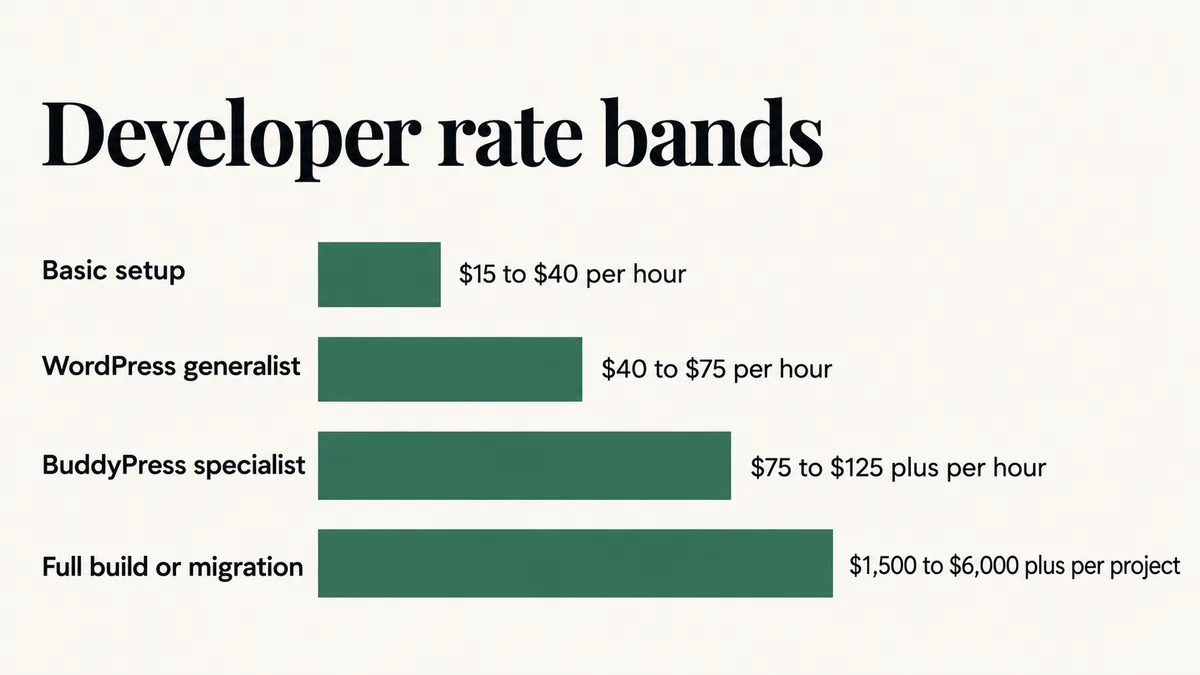
$15 to $40 per hour: basic installation and setup, following BuddyBoss’s own documentation to activate the theme and plugin. Fine for a single, simple community. Not the person to debug a caching conflict or a broken membership paywall.
$40 to $75 per hour: a competent WordPress developer with real BuddyPress experience, capable of theme customization, LMS plugin integration, and standard troubleshooting. Reasonable for most membership sites with one or two tiers and no custom automation.
$75 to $125 or more per hour: a genuine BuddyPress specialist handling custom component development, multisite configuration, or hosting-level debugging. A published 2025 cost guide from Flexiple’s own developer-cost breakdown puts BuddyPress developer rates at $50 to $125 or more per hour, rising by seniority from entry-level work in the $50 to $75 band through senior specialists above $100. This is the band most paid-membership sites with real customization needs should expect to hire in.
$1,500 to $6,000 or more per project: a fixed-price estimate for a full build or migration, not a published figure. A straightforward single-tier site with standard LMS integration commonly runs 20 to 40 hours, which at the specialist rate above lands in the $1,500 to $5,000 range. Custom components, multisite setups, or a migration carrying real member data from another platform routinely push past that.
Budget the BuddyBoss license, your WordPress hosting, and the developer’s time as three separate costs, because none of them include the others. BuddyBoss’s own web plans, confirmed directly against BuddyBoss’s current pricing page, run Start at $99 for the first year, Launch at $199, and Scale at $349, each covering one production site.
Here is the real hidden cost almost nobody mentions upfront: that is introductory pricing. BuddyBoss’s own page states renewals are “at full price,” which means Start jumps to $199 a year, Launch to $399, and Scale to $699 from the second year on, roughly double the price you were quoted when you signed up. Hosting is not included in any plan, and an additional site license costs $99 regardless of tier.
The mobile app layer, if your project needs one, is priced entirely separately and carries the same doubling pattern: Solo starts at $499 a year and renews at $999, while the combined iOS and Android Launch plan starts at $999 and renews at $1,999. You will also need your own Apple Developer account at $99 a year and a Google Play developer account at a $25 one-time fee, neither of which BuddyBoss’s plans cover.
Step 1: Do You Need a Developer or a Community Manager?
Write down what actually needs to happen before you talk to a single candidate, because “I need help with BuddyBoss” describes at least two different hires. If the real need is moderation, event programming, member onboarding messages, and keeping engagement up day to day, that is a community manager, and the going rate for that ongoing role sits closer to the lower end of a general freelance market, not the WordPress development rates above.
If the real need is building or fixing the structure underneath, a membership tier gated to a specific group, a broken integration with your LMS or email tool, a theme customization, or a migration, that is a developer, and it is priced and skilled differently from the community-management role above.
Plenty of real sites need both, just not from the same person at the same rate. Hiring a developer to run daily moderation wastes their rate on work priced far lower. Hiring a community manager to fix a broken activation email gets you a half-diagnosed problem. If the real issue is a specific, isolated break rather than a reason to open a full hiring search, such as notifications or emails not reaching members, that is usually a configuration fix, not a developer-search problem.
Do this: Separate your brief into a build list (one-time setup, integration, and customization work) and a run list (ongoing moderation and engagement). Hire against each list separately, even if it ends up being the same person.
Step 2: Do They Actually Know WordPress, Not Just BuddyBoss?
This is the question that matters most for BuddyBoss specifically, and it does not come up when hiring for a hosted platform like Circle or Mighty Networks. Because BuddyBoss runs on top of ordinary WordPress, most of what breaks on a real site is not a BuddyBoss bug at all. It is a conflict between BuddyBoss and something else already running on the server: a caching plugin serving a stale page to a logged-in member, an image-optimization tool interfering with profile photos, or an SMTP plugin that never actually intercepts BuddyPress’s own activation and notification emails because those emails route through a different code path than a contact form does.
A candidate who only knows BuddyBoss’s own settings panels will solve the easy half of these problems and get stuck on the rest. A genuine WordPress developer recognizes a hosting or plugin-conflict symptom immediately, because they have debugged the same underlying WordPress behavior on other projects that had nothing to do with community platforms at all. Ask directly: how many WordPress sites have they built that were not BuddyBoss, and can they describe a real plugin conflict they diagnosed and fixed. A vague answer here is a more reliable warning sign than a thin BuddyBoss portfolio, because WordPress competence is the foundation everything else sits on.
Do this: Ask for a specific, real WordPress plugin conflict or caching issue they diagnosed on any project, BuddyBoss or not. A candidate with genuine WordPress depth answers immediately and specifically.
Step 3: Can They Explain Your Real Plan’s Limits?
This question separates someone who has actually shipped a real BuddyBoss site from someone guessing, and you do not need to be technical to ask it. Ask which BuddyBoss plan your project’s features actually require.
A real specialist answers with specifics. The entry Start plan includes core community and social features along with native Memberships and Courses, but at a 2.9 percent transaction fee on those native sales and without the full BuddyBoss Theme or LMS integrations. Those LMS integrations, LearnDash, MemberPress, Tutor LMS, and LifterLMS among them, along with real-time messaging and web push notifications, only appear on the Launch plan and above, which also drops the transaction fee to zero.
Gamification, multilingual support, and media offload to a global CDN do not appear until the Scale plan. If a candidate promises a feature your current plan does not include, that promise is not realistic yet, and you are the one who will discover it after paying for the work.
Do this: Ask which BuddyBoss plan your specific features, LMS integration, gamification, or transaction-fee-free sales, actually require, and listen for a specific answer naming Start, Launch, or Scale rather than a generic “it will all work.”
Step 4: Who Is Actually Doing the Technical Work?
A real and common pattern in this market: a general web agency or a “community setup” service sells the project, then quietly hands the actual configuration to a subcontractor the client never meets. You approve a confident proposal, and the real work lands with someone who has never touched BuddyBoss’s own plugin settings before.
You are allowed to ask who is actually building and configuring the site, whether that person works directly for the business you are hiring, and whether you can speak with them before signing. A developer who has genuinely done this work answers without hesitation, because the answer costs them nothing. Evasion on this specific question is one of the more reliable warning signs available to you in the whole process.
Time zone and response cadence belong in the same conversation. A multi-day gap on every clarifying question turns a two-week build into a two-month one, no matter how skilled the person is. Agree up front on how often you will hear from them and through which channel.
Do this: Get the name of the person actually building the site and talk to them once before signing. Agree on a communication cadence in that same conversation.
Step 5: What Happens the Week After Launch?
BuddyBoss sites tend to break in a specific, predictable way. They work perfectly in a walkthrough on a staging environment and start failing once real members and real traffic arrive, because real usage does things a staging test never does: a caching layer serves a stale page to a logged-in member, a bulk import hits a timeout the test account never reached, or a hosting resource limit gets exposed the moment real concurrent users show up.
This is why post-launch support belongs in the product, not as an upsell added after the fact. Ask what is covered after handover, for how long, and at what cost beyond that window. “Everything is included forever” is either an answer from someone who has not thought it through or a developer planning to disappear. A clear answer sounds like two weeks of bug fixes included, then an hourly rate or a small monthly retainer for anything new.
Ask directly what happens if something breaks a month later because a WordPress core update or a third-party plugin update changed how it interacts with BuddyBoss. Whether that is billable is worth clarifying in advance, and the specificity of the answer tells you how seriously the candidate takes their own work.
Do this: Get the support window, what counts as a bug fix versus new work, and the post-launch rate written into the agreement before the project starts, not after the first real member hits a problem.
Step 6: Is BuddyBoss’s Own Done For You Service a Better Deal?
Before you commit to hiring independently, it is worth checking BuddyBoss’s own packaged alternative, because for some projects it genuinely competes on price. BuddyBoss’s dedicated Done For You page lists a one-time web service at $2,499 and a separate app service at $1,999.
Worth knowing before you quote either number to a client or a partner: BuddyBoss’s own pricing page describes a similar offering differently, as part of an all-in-one bundle “from $1,999 per year” that includes setup, rebranding, migration, roughly $1,200 of premium plugins, and a year of premium support. Those two BuddyBoss-owned pages do not agree with each other, which is itself a real reason to get a written, itemized quote directly from BuddyBoss before assuming either figure is final.
The genuine tradeoff is this: BuddyBoss’s own service is a reasonable option for a standard setup, a theme rebrand, or a straightforward migration, and it comes from the company that built the platform. It is a weaker fit for custom component development, an unusual integration, or ongoing iterative work, because a packaged service is built around a defined, repeatable scope, not open-ended customization. A developer you hire directly costs more per hour in the higher bands above, but can keep working with you past a single defined handoff.
Do this: Request a written, itemized quote from BuddyBoss’s own Done For You service before comparing it to an independent developer’s bid, since the company’s own pages currently disagree on price.
Step 7: Is the Scope Written Down Before Money Moves?
Nearly every dispute I have seen between a site owner and a BuddyBoss developer traces back to the same root cause: two different mental pictures of what “done” meant, and neither one written down anywhere.
The document does not need to be long. It needs a list of deliverables, a definition of done for each one, milestone dates, what you are responsible for supplying, and what a change request costs once work has started. Hosting is worth naming explicitly, since BuddyBoss includes none: confirm who is providing and paying for WordPress hosting, and whether the developer’s quote assumes a specific host’s capabilities.
On payment structure, milestones tied to named deliverables protect both sides. Paying everything up front removes your own negotiating room entirely, and paying only on full completion is a reasonable thing for a good developer to decline on a longer build. A deposit with staged releases against specific milestones is the normal, healthy arrangement experienced developers already expect.
One more clause worth insisting on in writing: your WordPress hosting account, domain, and BuddyBoss license stay registered to you, not to the developer. This is not about distrust. It is about never being locked out of your own site if the relationship ends badly.
Do this: Require a written scope with deliverables, milestone payments, a named hosting owner, and written confirmation that your domain, hosting account, and BuddyBoss license stay registered in your own name.
What Are the Red Flags That Should End the Conversation?
Some signals are worth walking away from immediately rather than negotiating around:
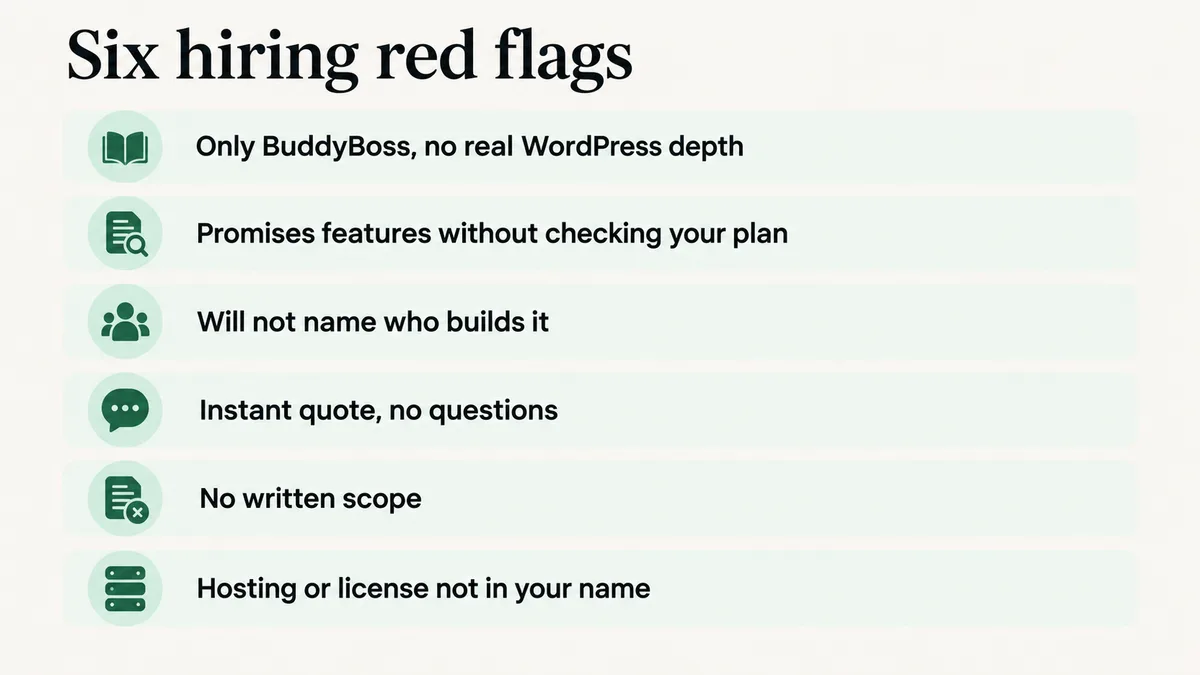
- A portfolio of only BuddyBoss sites, with no broader WordPress troubleshooting experience to point to.
- A promise of a feature your current BuddyBoss plan does not include, without checking the plan first.
- Refusal to name the person doing the technical build or to put them on a short call.
- A total price quoted within minutes, before any real questions about plan, hosting, or existing plugin conflicts.
- No written scope, only a chat thread and a number.
- Your own hosting account, domain, or BuddyBoss license set up under the developer’s credentials instead of yours.
The instant-quote flag deserves a second look specifically because it looks like good service. A developer who prices a BuddyBoss build without asking about your hosting environment, your existing plugins, or your plan tier is not being efficient. They are guessing, and that guess shows up later as a change order with a new price attached to it.
How Do You Screen Candidates in an Afternoon?
If you want the compressed version of everything above, run it in this order. It moves faster than comparing three separate proposals on your own, side by side.
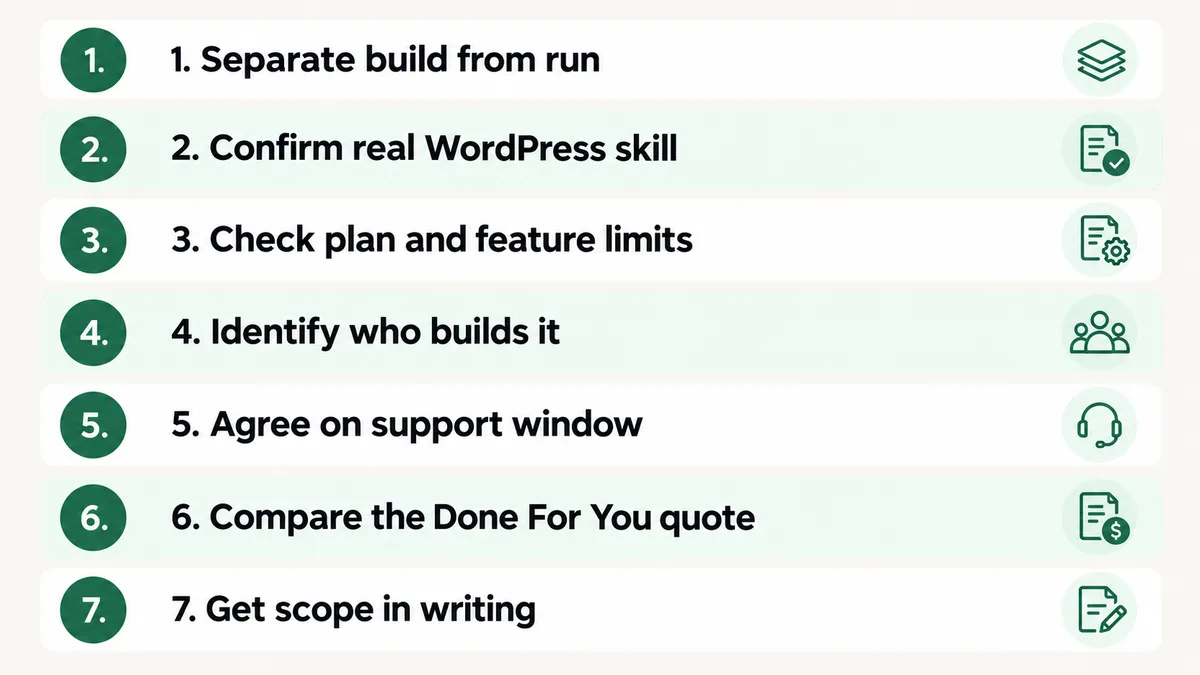
- Confirm you are hiring a developer and not a community manager, or write down which parts of the project are each.
- Send the identical one-page brief to every candidate you are considering.
- Ask for a real, non-BuddyBoss WordPress plugin conflict or caching issue they diagnosed and fixed.
- Ask which BuddyBoss plan your actual feature list requires, listening for Start, Launch, or Scale named specifically.
- Ask who writes the configuration and request a short call with that person.
- Request a comparison quote from BuddyBoss’s own Done For You service if your scope is a standard build.
- Compare only the candidates still standing, on written scope rather than the headline price.
Most candidate lists lose at least one person at step three and another at step four. What remains afterward is a far more useful conversation, because by then you are no longer comparing marketing copy.
Where Should You Look to Hire a BuddyBoss Developer?
Here is a real gap worth knowing before you search: unlike Circle, which runs its own Solution Partner Directory, or Mighty Networks, which runs its own Experts Directory with live-trained specialists, BuddyBoss does not publish an official vetted agency or partner directory. BuddyBoss’s own site, checked directly, offers the packaged Done For You service covered above, but no public list of independently vetted developers carrying a BuddyBoss-specific badge.
That means the realistic sources are general freelance marketplaces such as Upwork and Fiverr filtered by WordPress and BuddyPress skills, general WordPress development agencies that list real BuddyBoss projects in their own portfolios, and BuddyBoss’s own public support forums and Facebook community, where you can watch how someone answers a stranger’s technical question. That public behavior tells you more about real competence than a polished sales page ever will.
Worth knowing before you search further: because there is no platform-specific vetting badge here, the screening steps in this guide matter more for BuddyBoss than they do for a comparable hosted platform like Mighty Networks or for Circle, where the platform itself does part of the vetting before you ever talk to anyone. On a general marketplace, nobody is screening candidates for you, so the burden sits entirely on the questions above.
How Do You Avoid Hiring the Wrong Person Twice?
The cheapest protection available is a small paid trial task before committing to the full build. Pay for something real and self-contained: fix one specific, already-identified bug, such as a broken activation email, or configure one LMS integration end to end. Two to three hours is usually enough to learn what you need to know.
That trial reveals four things no interview can. How someone communicates under real conditions, whether their time estimate held up, whether the work is genuinely finished when they say it is, and what their configuration looks like when nobody is reviewing it in real time. Paying for a small test costs far less than discovering the answers halfway through a full launch.
The second protection is keeping the first real engagement smaller than you eventually want it to be. Launch with a simpler plan tier and fewer customizations than your long-term plan calls for, then upgrade once the foundation is proven stable. A simple site that actually works beats an ambitious one that half works, and it leaves you with a working relationship to expand rather than a large bet placed on a stranger.
Keep your own record of what got built and why: which plugins, which theme customizations, which hosting settings were changed and for what reason. Developers move on to other clients, and a BuddyBoss site nobody can explain becomes expensive for whoever inherits it next. A shared document maintained during the build costs nothing and saves real time later.
Frequently Asked Questions
Do I really need a BuddyBoss developer, or can I set it up myself?
For a single free community on the default theme with no paywall and no LMS integration, a non-technical founder can often follow BuddyBoss’s own documentation and get it running. Once you need membership tiers tied to automatic access, an LMS integration, a migration, or anything connecting to an outside tool, hire someone with real WordPress and BuddyPress experience. Those systems fail quietly, and a community manager without that background often will not know something is broken until a paying member reports it.
How long should a BuddyBoss build take?
A straightforward single-tier site with one LMS integration usually takes one to three weeks once content and hosting are ready. Migrations, custom theme work, and multi-tier membership builds extend that meaningfully. Hosting setup and content readiness are almost always the real bottleneck, not the plugin configuration itself.
Is a fixed price or an hourly rate better for a BuddyBoss project?
Fixed price works when the scope is genuinely well defined, which is exactly why the written brief in Step 1 matters. Hourly suits ongoing changes, plugin-conflict debugging, or a scope that is still being figured out. A common, sensible arrangement is a fixed price for the defined build plus an hourly rate for anything added afterward.
What if my current BuddyBoss site was already set up badly?
Get an audit before deciding anything. Plenty of sites that feel broken need a plugin-conflict fix or a hosting adjustment rather than a full rebuild, and an audit tells you which situation you are actually in. Rebuild only when the underlying theme or plugin setup is genuinely unworkable, since untangling existing member data is the hardest part of any rescue project.
Should I hire a freelancer or use BuddyBoss’s own Done For You service?
BuddyBoss’s own service suits a standard setup, rebrand, or straightforward migration, and it comes directly from the company that built the platform. A freelancer or agency usually costs more per hour but fits custom component work, unusual integrations, or an ongoing relationship past a single handoff better than a packaged service built around a fixed scope.
What is the fastest way to spot a fake BuddyBoss specialist?
Two questions do most of the work. Ask for a real, non-BuddyBoss WordPress plugin conflict they diagnosed and fixed, and ask which BuddyBoss plan your specific feature list actually requires. Someone who has genuinely done this work answers both immediately and specifically. Someone who has not stays vague on both, usually with a confident tone doing the work the details should be doing instead.
Want a second opinion before you sign anything?
Send me the brief and the quotes. I will tell you honestly whether the scope is realistic and what is missing from it, whether or not you end up working with me.