
A Kajabi automation not triggering almost never means Kajabi broke something. It means a contact failed a check you did not know was there, and Kajabi never tells you which one. The trigger looks right, the tag looks right, the offer looks right, and the automation still reports zero activity while you stare at a canvas that gives you no error at all.
I build and maintain Kajabi automations for course and coaching businesses, and a workflow that looks finished and does nothing is one of the most common things I get asked to look at. Nearly every time, the automation itself is fine. The real cause is sitting in a different tab, a different step, or a different plan tier than the one being stared at. Below are the ten real reasons a Kajabi automation does not fire, in the order worth checking them, with the exact fix for each one.
Quick Answer
A Kajabi automation not triggering is almost always one of three things: the automation itself is sitting in Draft or Paused rather than Published, the contact met the trigger condition before the automation went live (Kajabi triggers are not retroactive), or one specific step inside the automation, usually an email, is itself still a Draft even though the automation around it is Published. Check the automation’s own status first, then ask when the contact actually met the trigger, then open each individual step before assuming anything deeper is broken.
📋 What’s Covered
02Cause 1: Is the Automation Itself Still a Draft or Paused?
03Cause 2: Did the Contact Meet the Trigger Before the Automation Went Live?
04Cause 3: Did the Contact Already Have the Tag Before You Published It?
05Cause 4: Is a Send an Email Step Stuck on Draft Inside a Published Automation?
06Cause 5: Are You on the Basic Plan, Which Only Allows One When to One Then?
07Cause 6: Does Your Only If Filter Actually Match What You Think It Matches?
08Cause 7: Are Exit Conditions Pulling Contacts Out Before They Finish?
09Cause 8: Did You Mix Up Offer Is Granted With a Free Offer Purchase?
10Cause 9: Is a Third Party Form Creating the Contact Without a Kajabi Form Ever Being Submitted?
11Cause 10: Are You Trying to Catch an Abandoned Checkout Kajabi Cannot Trigger On?
12How Do You Work Out Which Cause It Is, in Order?
13Why Does Kajabi Automation Work This Way at All?
14How Do You Stop Kajabi Automations From Silently Failing Again?
15Frequently Asked Questions
Why Is Your Kajabi Automation Not Triggering in the First Place?
Because an automation only reflects what it was actually asked to do, and what it was asked to do is spread across several screens that never cross reference each other.
Kajabi documents its own building blocks plainly: an Automation is built from a When trigger and a Then action, with an optional Only if filter layered on top. That part is simple. What trips people up is everything sitting around those three pieces: the automation’s own status, the status of the individual step inside it, whether the event already happened before the automation existed, and whether the plan on the account even includes the piece being configured.
There is also a detail that catches experienced Kajabi users as often as new ones. Kajabi itself states that Automations are not retroactive: a trigger listens for an event as it happens, it does not go back and scan your contact list for everyone who already qualifies. That single design choice sits behind more than one of the ten causes below.
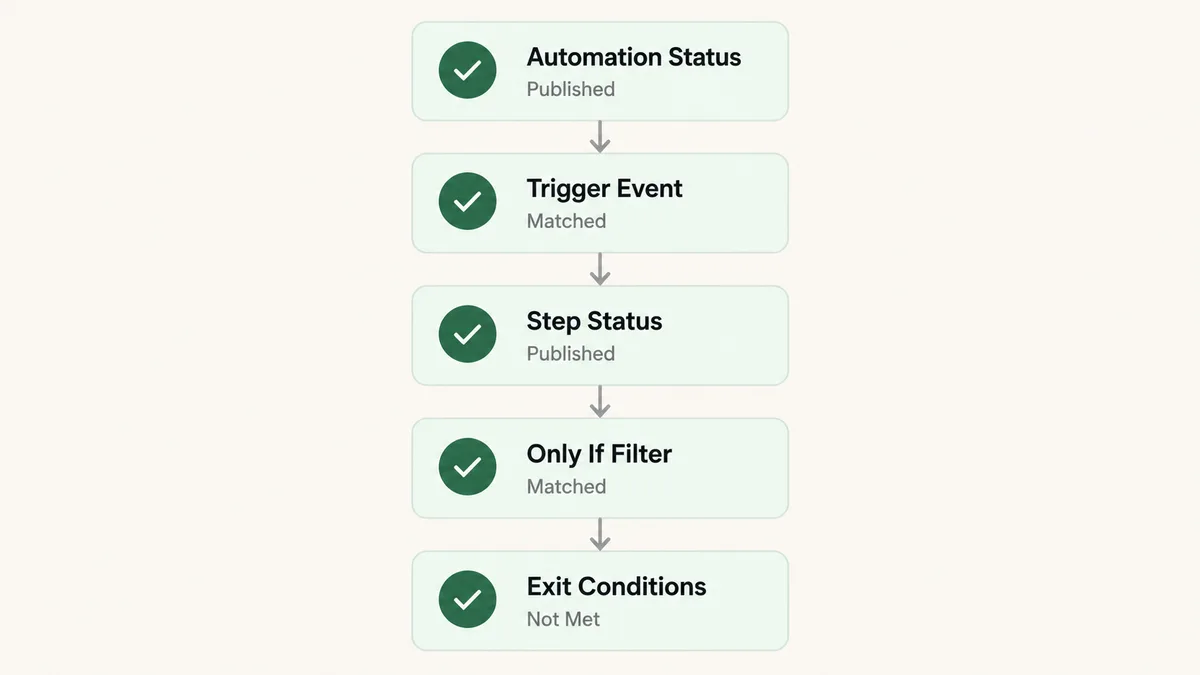
On a Kajabi build I did for Etrek, a spiritual growth community built around the Enneagram framework, the automated onboarding sequence was the single most fragile part of the build precisely because of this stack of silent checks. One tag applied a day too early by a separate automation would have quietly skipped a student past the welcome flow entirely, with nothing on screen to say so. The fix was not a cleverer automation. It was building the tagging order so each check could only ever pass once, in sequence, which is the same discipline the prevention section below gets into.
Cause 1: Is the Automation Itself Still a Draft or Paused?
Start here, because it costs ten seconds and it is genuinely the most common single answer. On Kajabi’s upgraded, visual Automations builder, every automation carries one of three statuses: Published, Draft, or Paused. Kajabi’s own documentation confirms you can filter your whole Automations list by exactly those three states, which only makes sense because accounts regularly have automations sitting in all three at once without anyone noticing.
An automation built, admired, and never explicitly published stays a Draft forever. One paused during a product launch, to stop emails going out while prices changed, stays Paused long after the launch ends if switching it back on was not written down anywhere.
Fix: Open Marketing, then Automations, click Status, and filter by Draft, then separately by Paused. Anything that shows up in either list and should be live gets published or resumed right there. Make checking this filter the last thing you do before closing out any session where you touched automations, not just the one you were editing.
Cause 2: Did the Contact Meet the Trigger Before the Automation Went Live?
This is the one that produces the most confused support tickets, and the behavior is deliberate rather than a bug. Kajabi states it directly: an automation only runs for contacts who trigger it after the automation is published. Contacts who already completed the event, already purchased the offer, already submitted the form, already earned the tag, are not enrolled retroactively, and the automation’s own enrollment count does not backfill that history.
Picture the sequence that catches almost everyone at least once. You import three hundred contacts from an old platform on Monday. On Tuesday you finish building a welcome sequence triggered by a tag those contacts already carry, and you publish it. Zero of those three hundred people enter, because the tag was applied the day before anything was listening for it. Only the next new contact who earns that tag gets in.
Fix: Kajabi documents the workaround directly: go to Contacts, then All Contacts, filter down to the specific group you mean to catch, select them, and use the bulk action menu to apply the tag, grant the offer, or subscribe them to the email sequence manually. That bulk action fires the same automation the individual event would have, just applied to everyone in the filtered list at once rather than one at a time.
Cause 3: Did the Contact Already Have the Tag Before You Published It?
This is a narrower, more specific version of cause two, and it is common enough to deserve its own entry. The Tag is added trigger is one of the most used triggers in Kajabi, and Kajabi’s documentation calls out exactly how it behaves: it only fires when a tag is actually added to a contact. If a contact already carries that tag at the moment the automation is published, the trigger does not fire for them retroactively, even though they technically have the exact condition the trigger is watching for.
The practical trap is testing with your own contact record. You tag yourself to confirm the automation works, it fires correctly, you leave the tag on, then you edit the automation later and test again with the same tag on the same contact. Nothing happens the second time, not because the fix broke anything, but because the add event already happened once and nothing added it again.
Fix: Kajabi’s documented workaround is exactly this: remove the tag from the contact, then re-add it after the automation is published, whether you do that by hand or through another automation. Re-adding fires the event fresh. For testing specifically, pick a tag you can freely strip and reapply on a throwaway contact rather than reusing your own primary account.
Cause 4: Is a Send an Email Step Stuck on Draft Inside a Published Automation?
This is the cause people miss longest, because the automation around it genuinely is Published, the trigger genuinely does fire, and the canvas still shows the contact moving through every step correctly. The piece that fails sits one level deeper. Kajabi documents that every Send an email step carries its own status, separate from whether the automation itself is Published, Draft, or Paused. A step left in Draft is marked with a Won’t send label directly on the canvas, and contacts who reach it simply skip the email and continue on to whatever comes next.
New email steps start as Drafts by default, specifically so a half finished email cannot accidentally go out the moment you save the automation. That safety behavior is exactly what causes the silent failure: build the step, get interrupted before clicking Publish on it, and the automation runs perfectly except for the one email nobody ever turned on.
Publishing a step is not retroactive either. Contacts who already moved past a Draft email step while it was still a Draft do not receive it afterward just because you publish the step later.
Fix: Open every email step individually, not just the automation as a whole, and look for the Won’t send heading. Click Publish on each one that should actually be sending. Treat a newly built email step as unfinished by default until you have personally confirmed its status reads Published, because that is exactly how Kajabi designed it to behave.
Cause 5: Are You on the Basic Plan, Which Only Allows One When to One Then?
If a trigger, filter, or feature you read about in a tutorial simply is not available when you try to build it, plan tier is the honest explanation most of the time. Kajabi splits Automations into two tiers by plan, and the gap between them is larger than most people expect.
Basic Automations, included on the Basic plan, support exactly one When trigger paired with one Then action. There is no conditional filter at all on this tier. Advanced Automations, included on Growth and Pro, add the Only if conditional filter, the full visual canvas with multiple triggers and branching flows, and per-step Draft and Published controls on individual actions like emails. Wait nodes, which pause an automation for a set time before the next step runs, are being rolled out to every plan regardless of tier, so a Wait step can still carry a Premium label on some accounts during that rollout.
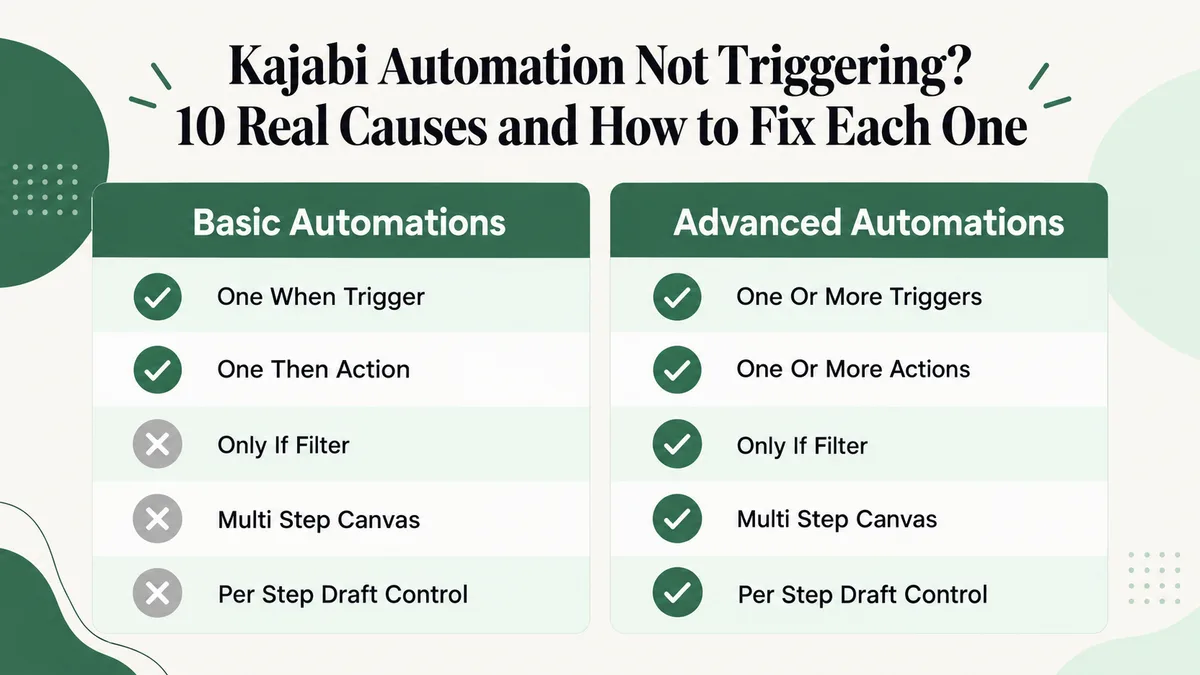
The practical failure mode is following a guide written against Advanced Automations while sitting on Basic. You add the When trigger, go looking for the Only if filter the guide shows, and it is not there. The automation you end up building fires correctly, just for every contact who matches the trigger rather than the narrower group you meant to filter down to.
Fix: Confirm your plan under Settings before spending time debugging a feature that is not included on it. If you genuinely need conditional filtering, multi-step flows, or per-step draft control, that requires a Growth or Pro plan rather than a cleverer workaround on Basic. Kajabi’s own comparison of the two tiers is the fastest way to see exactly what upgrading adds before you commit to it.
Cause 6: Does Your Only If Filter Actually Match What You Think It Matches?
If you do have Advanced Automations, the Only if filter introduces its own specific trap. Kajabi’s documentation is explicit about this: filters on custom fields and default fields like name, email, or address match based on contains, not an exact match.
That single word changes behavior in both directions. A filter built to catch contacts whose custom field equals “yes” will also catch a field that happens to contain “yes” as part of a longer answer, pulling in people you never meant to include. The opposite failure is just as real: a filter expecting an exact value can end up matching nobody at all if the stored data has extra whitespace, different capitalization, or a slightly different phrase than what you typed into the condition.
Tag, offer, and product filters behave more predictably, since those are matched against a fixed object rather than free text, but any filter built on a text field inherits this contains based logic.
Fix: For anything you need matched precisely, build the logic around a tag or a product filter instead of a text field, since those compare against a fixed value rather than scanning for a substring. If a text field filter is genuinely the only option, test it against a handful of real contact records first and confirm the group it returns is the group you actually meant.
Cause 7: Are Exit Conditions Pulling Contacts Out Before They Finish?
Exit conditions look like a small convenience feature and behave like a much bigger one. Kajabi documents them as applying to the whole automation rather than to a single step, which means a contact who buys on step two does not keep receiving steps three through six after a purchase exit condition is met.
The detail that catches people is this: exit conditions reach contacts who are already enrolled, not only new ones entering after you add the condition. Add an exit rule to an automation that already has people sitting inside it, and some of those people can leave immediately on save, before you ever meant for the rule to touch them.
Kajabi’s own interface tries to guard against the worst version of this. Before you save a new exit condition, the editor shows how many currently enrolled contacts would exit the moment you save, so the impact is visible before it happens rather than after. It also flags conditions that would exit every single contact, since an automation that exits everyone can never actually keep anyone inside it.
Fix: Open the automation settings gear icon, which shows a count whenever exit conditions already exist, and read every condition listed there before concluding a workflow is broken. If the preview shown before saving a new condition reports a large number of contacts exiting immediately, treat that as a warning rather than background noise, and confirm that is genuinely the group you meant to release early.
Cause 8: Did You Mix Up Offer Is Granted With a Free Offer Purchase?
This is a narrow cause, but it is confusing enough in practice that Kajabi calls it out directly in its own documentation rather than leaving it implied. Offer is granted and Offer is purchased on a Free Offer sound close enough to be the same event. They are not.
Granting an offer is something you or an automation does directly, bypassing checkout entirely. A Free Offer purchase requires the customer to actually go through the checkout process, even though no payment changes hands. If your automation is set to start after a Free Offer is purchased, manually granting that same offer to a contact does not fire it, because the checkout event the trigger is listening for never happened.
Fix: Decide which event you actually mean before you build the trigger. If contacts can legitimately reach the offer through either checkout or a manual grant, and you need the automation to run either way, build two triggers into the same automation, one on Offer is purchased and one on Offer is granted, both leading to the same Then action.
Cause 9: Is a Third Party Form Creating the Contact Without a Kajabi Form Ever Being Submitted?
Kajabi’s Form is submitted trigger listens for one specific event: a Kajabi Form, the object you build and select directly in the trigger, being submitted. A Typeform embed, a landing page built outside Kajabi, or a contact created through Zapier or a direct API call never produces that event, no matter how similar the end result looks in your contact list.
This is the kind of cause that hides well because the symptom looks like success. The contact shows up, their details are correct, everything seems to have worked, and the only thing missing is the automation that was supposed to follow. Nobody double-checks the trigger when the data itself arrived fine. This is exactly the scenario worth testing deliberately for anyone in the middle of moving a course business off Kajabi or onto it, since a rebuilt signup path is precisely the kind of change that gets tested for “did the contact appear” and never for “did the automation actually start.”
Fix: Have the third party tool apply a tag to the contact as part of whatever integration or automation creates them, then trigger your Kajabi automation on Tag is added instead of Form is submitted. A tag works as a universal signal regardless of which outside system produced the contact, and it keeps working even if you swap that outside tool out later.
Cause 10: Are You Trying to Catch an Abandoned Checkout Kajabi Cannot Trigger On?
This last cause is not a misconfiguration at all, and it is worth knowing before you spend an afternoon rebuilding a trigger that was never going to work. Kajabi states this limitation directly: there is no native When trigger for a customer who starts checkout but never finishes it. No combination of triggers and Only if filters recreates it, because the contact never completes the event any trigger is built to listen for in the first place.
If an abandoned checkout recovery sequence genuinely matters for your offer, Kajabi’s own documentation points to the real solution: connect the account to a third party tool such as Zapier and build the abandoned checkout logic there instead, since that logic simply does not exist as a native Kajabi capability to trigger against.
Fix: Stop looking for the trigger inside Kajabi, because it does not exist there. Route this specific workflow through Zapier or a comparable connector instead, and keep every other automation that Kajabi genuinely supports natively inside Kajabi rather than moving everything out just because one piece needed an outside tool.
How Do You Work Out Which Cause It Is, in Order?
Guessing is slow because these ten causes hide on different screens. When I am handed a Kajabi automation not triggering for someone, this is the order I actually work through, cheapest checks first, and it resolves most cases well before the last step.
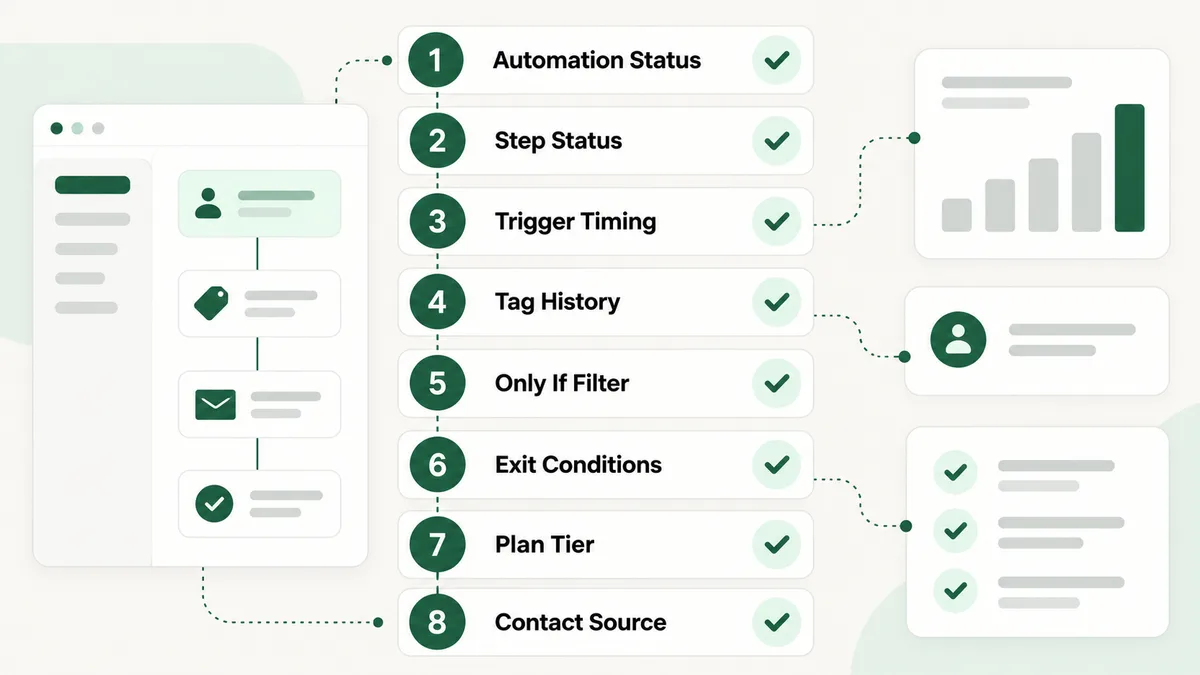
- Check the automation’s own status. Published, Draft, or Paused, visible from the Status filter on the Automations list. Ten seconds, and it is the most common answer.
- Open every individual step inside it. Look specifically for a Won’t send label on any Send an email step, since the automation status does not tell you anything about the step status.
- Ask when the contact actually met the trigger condition. If it happened before the automation was published, that is your answer, and the fix is a manual bulk action through Contacts.
- If the trigger is Tag is added, check the contact’s tag history. A tag applied before the automation went live will not fire it. Removing and re-adding the tag fires it fresh.
- Read every Only if filter attached to the trigger. Remember text field filters match on contains, not exact value, and confirm you have Advanced Automations at all before expecting one to be there.
- Open the automation settings gear and read the exit conditions. Confirm none of them are releasing the contact before they reach the step you are waiting on.
- Confirm your plan tier under Settings. It is rarely the cause, but it is the one no amount of rebuilding fixes on its own.
- Trace where the contact actually came from. A third party form, a Zapier connection, or an API call never fires a Form is submitted trigger, no matter how correct the contact record looks.
Why Does Kajabi Automation Work This Way at All?
It helps to know that none of this is accidental, because it changes how you build the next automation rather than just fixing this one.
Kajabi’s triggers are event driven. They subscribe to events as they occur rather than continuously scanning your entire contact list asking who qualifies right now. That is a sound engineering decision at scale: an account with tens of thousands of contacts and dozens of active automations would otherwise need to re-evaluate every combination constantly, which costs real server time for very little benefit. The tradeoff is pushed onto you as a sequencing rule instead, which is that the automation has to exist and be published before the event happens, not after.
The Draft defaults on new email steps and the warnings built into exit conditions exist for a related reason, protecting you from your own unfinished work. A half built email step that sent the moment you saved the canvas would be a far worse failure mode than one that silently waits for an explicit Publish click. An exit condition that could remove every enrolled contact without warning would be far more damaging than one that is merely confusing to read.
The genuine design gap behind a Kajabi automation not triggering is not the rules themselves. It is that most of them fail silently. A contact rejected at any one of these checks produces no record anywhere saying “this contact was rejected and here is which rule did it.” Until that changes, working through the causes above in order is the honest answer, and knowing why each rule exists tells you which one is likely before you start clicking through screens.
How Do You Stop Kajabi Automations From Silently Failing Again?
Five habits remove most of this permanently, and together they make a Kajabi automation not triggering a rare event instead of a monthly one.
Trigger on tags, not on sources. Whenever something outside Kajabi, or even a less common Kajabi event, starts a workflow, have it apply a tag first and trigger on Tag is added. One consistent pattern for every integration, and swapping the source system later never breaks the automation that depends on it.
Publish before you announce. Build the automation, publish every step inside it individually, test with a fresh contact, and only then point real traffic at it. The not retroactive rule stops costing you anything the moment the automation is live before the audience is.
Keep a disposable test tag. A tag you can strip and reapply freely sidesteps the entire tag history trap from cause three, and it works whether you are testing a brand new automation or one you have already touched a dozen times.
Check the step level, not just the automation level. An automation reading Published tells you almost nothing about whether every email inside it is actually set to send. Open each step the first time you review any automation you did not build yourself.
Audit quarterly. Open the Automations list, filter by Draft and by Paused, and look at anything that has enrolled nobody in ninety days. An automation with zero recent activity is either finished or quietly broken, and the difference genuinely matters. This is the same discipline that catches a connected platform that stopped sending events into Kajabi, which I have also seen cause a Kajabi build to look perfectly healthy while quietly doing nothing for weeks.
Frequently Asked Questions
Why is my Kajabi automation showing zero contacts?
A Kajabi automation not triggering for anyone at all is almost always because the automation itself is sitting in Draft or Paused, or because nobody has met the trigger since it was actually published. Check the status filter on the Automations list first. If the status genuinely reads Published, confirm the trigger event has happened for someone since that publish date, since Kajabi automations do not run for contacts who already met the condition beforehand.
Do Kajabi automations run retroactively?
No. Kajabi states directly that automations only run for contacts who trigger them after the automation is published, and contacts who already met the condition beforehand are not enrolled retroactively. The documented workaround is to filter the affected contacts under Contacts, then All Contacts, and apply the relevant tag, offer, or email sequence to them manually through the bulk action menu.
Why does my automation show Published but the email never sends?
Check the individual Send an email step, not just the automation as a whole. Every email step carries its own Draft or Published status, separate from the automation around it, and a Draft step is marked Won’t send directly on the canvas. New email steps start as Drafts by default, so a step that was built but never explicitly published will skip silently while the rest of the automation runs normally.
Why did my contact enter the automation once but not the second time?
This is usually the Tag is added trigger specifically. It fires only when a tag is actually added as an event, so a contact who already carries that tag from an earlier test will not trigger it again just because you edited and republished the automation. Kajabi’s documented fix is to remove the tag and re-add it after publishing, which fires the add event fresh.
Can I build an abandoned checkout automation in Kajabi?
Not natively. Kajabi has no When trigger for a customer who starts checkout but does not complete it, and no combination of triggers and Only if filters recreates one, because the event the trigger would need to listen for never actually occurs. Kajabi’s own documentation recommends connecting a third party tool such as Zapier and building that specific recovery logic there instead.
Why does a contact from my landing page or Zapier never trigger my Kajabi automation?
Because the Form is submitted trigger listens specifically for a Kajabi Form being submitted, and a contact created through an external landing page, a third party embed, or a Zapier connection never produces that exact event, regardless of how correct the resulting contact record looks. The fix is to have the outside tool apply a tag to the contact and trigger your automation on Tag is added instead, which works no matter which outside system created the contact.
If you have worked through all ten causes and the automation still is not firing, the problem has usually moved upstream of Kajabi entirely: whatever event you think is happening is not reaching Kajabi at all. That is an integration question rather than an automation question, and the contact’s own activity history is where you confirm it, since an event that never arrived leaves no trace there either.
Most of the automation work I do on Kajabi builds starts exactly here, with a workflow that looks correct on screen and does nothing in practice, and it is rarely the automation itself that needs rebuilding. It is the status, the step, or the source feeding it.
Still not firing after all ten checks?
Tell me what the trigger is, what it is supposed to do, and what you have already ruled out. I will tell you honestly where it is actually breaking on your Kajabi account and what it takes to fix it, whether or not you need anyone to do the fixing.