
Every Zapier vs Make comparison I read online is written for an anonymous “business,” as if a three-person marketing agency and a course creator running student onboarding have the same automation needs. They do not. I build on both tools inside course platforms, membership sites and funnels for a living, and the deciding factors look nothing like the generic “which has more integrations” roundups that dominate the search results.
So this is not another feature table. It is the real pricing at a volume that matters, what actually breaks on each one, and the specific question a course, membership or community business needs answered before picking either.
Quick Answer
Zapier is the faster, simpler tool: it connects to more apps and a non-technical person can build a working automation in fifteen minutes. Make is the cheaper, more capable tool once your workflows get complex or your volume grows past a few thousand actions a month, because it bills by module operation instead of by task and its visual canvas handles branching logic Zapier cannot. For a course, membership or funnel business specifically: pick Zapier for your first few simple two-app connections, and move to Make the moment an automation needs to branch, loop, or touch more than two platforms in one run.
📋 What’s Covered
02Difference 1: How Do Zapier and Make Actually Price Out at the Same Volume?
03Difference 2: Which One Connects to More of the Apps You Already Use?
04Difference 3: Which One Is Easier to Learn With No Technical Background?
05Difference 4: Which One Handles Branching and Complex Logic Better?
06Difference 5: What Do Real Users Actually Complain About on Each One?
07Difference 6: Which One Hides More Costs When You Go Over Your Plan?
08Difference 7: Which One Actually Fits a Course, Membership or Funnel Business?
09How Do You Decide Between Zapier and Make?
10Why Does “Tasks vs Operations” Confuse Almost Everyone?
11How Do You Avoid Picking the Wrong One and Overpaying?
12Frequently Asked Questions
What Is the Real Difference Between Zapier and Make?
Both tools do the same basic job: they watch for something to happen in one app and trigger an action in another, without anyone writing code. A new student enrolls in your course, and a Zap or a scenario tags them in your CRM, adds them to an email sequence, and posts a welcome message in your community. That part is identical.
Where they split is how you build the workflow and how you pay for it. Zapier’s editor reads like a sentence: when this happens, do that, then that. It is built for speed on simple, mostly linear workflows. Make’s editor is a visual canvas, a scenario drawn as a flowchart with branches, routers, filters and error handlers you can actually see and rearrange. It is built for workflows that are not a straight line.
The billing unit is where most people get surprised later, not sooner. Zapier counts a task every time a single action step runs, so a five-step Zap that fires counts as five tasks against your plan. Make counts an operation every time a module executes, and routers and error handlers do not consume operations at all. Same job, two different meters, and that difference is bigger than it sounds once your volume grows.

Difference 1: How Do Zapier and Make Actually Price Out at the Same Volume?
This is the number every comparison article hedges on, so here it is with the real figures attached.
Zapier’s own pricing page, checked live in October 2026, lists Professional at $19.99 a month on annual billing for 750 tasks, rising through its tiers to $129 a month for 10,000 tasks a month, still on annual billing. On monthly billing instead of annual, that same 10,000-task tier runs $193.50 a month. Free is capped at 100 tasks and two-step Zaps only.
Make does not publish a single static price table the way Zapier does, its pricing calculator adjusts live, but the Core plan has been consistently reported across multiple pricing trackers at roughly $9 to $11 a month for 10,000 operations, depending on monthly versus annual billing. That is the same rough order of magnitude Make itself advertises its entry tier at: a fraction of Zapier’s cost for a comparable unit count.
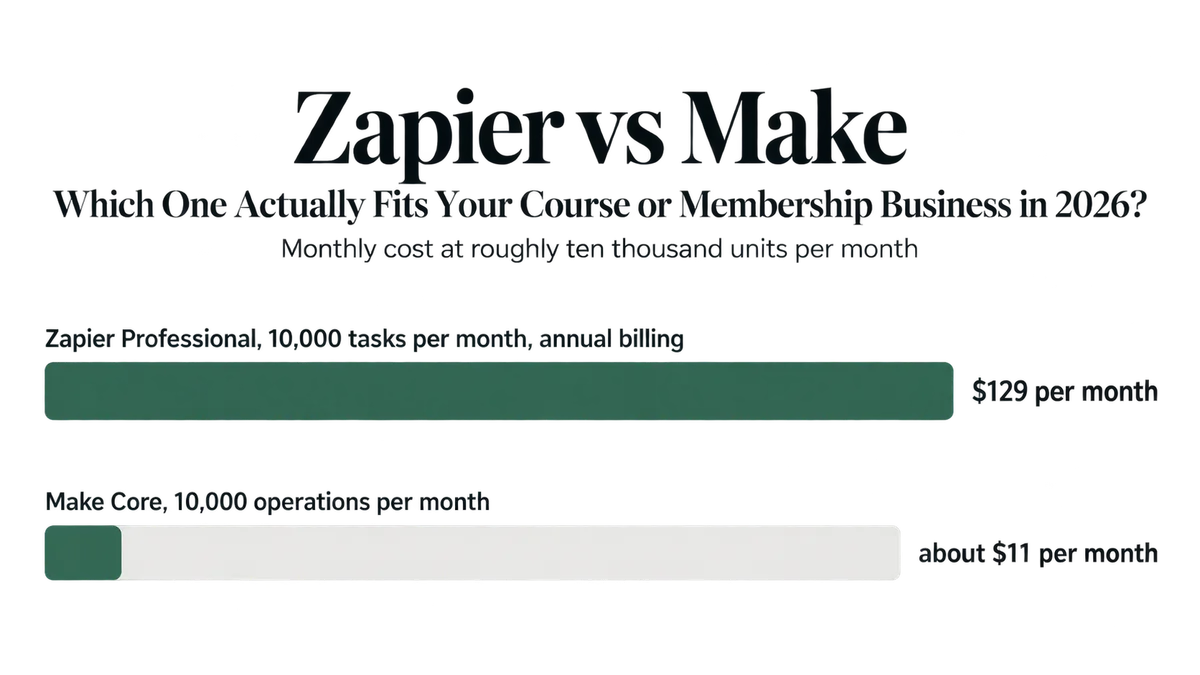
Bottom line: At a matched unit count, Make is dramatically cheaper, often by an order of magnitude. That gap is real, but it is not the whole story, because a “unit” is not the same thing on both platforms. Don’t decide on this chart alone, read the “tasks vs operations” section before you commit to either plan.
Difference 2: Which One Connects to More of the Apps You Already Use?
Zapier wins on raw count, and it is not close. Zapier’s own directory lists well over 7,000 connected apps. Make’s directory sits at roughly 2,000, still a large number, just a fraction of Zapier’s catalog.
For a course or membership business, the question that actually matters is narrower than the headline count: does each platform connect to your specific LMS, your email tool, your payment processor and your community platform. LearnDash, Kajabi, Teachable, Thinkific, Circle, Skool, ActiveCampaign, ConvertKit and every major CRM I have built with are on both. The gap shows up more with smaller or newer tools, a niche booking app, a regional payment gateway, an industry-specific CRM, where Zapier is more likely to already have a connector and Make may require a webhook workaround.
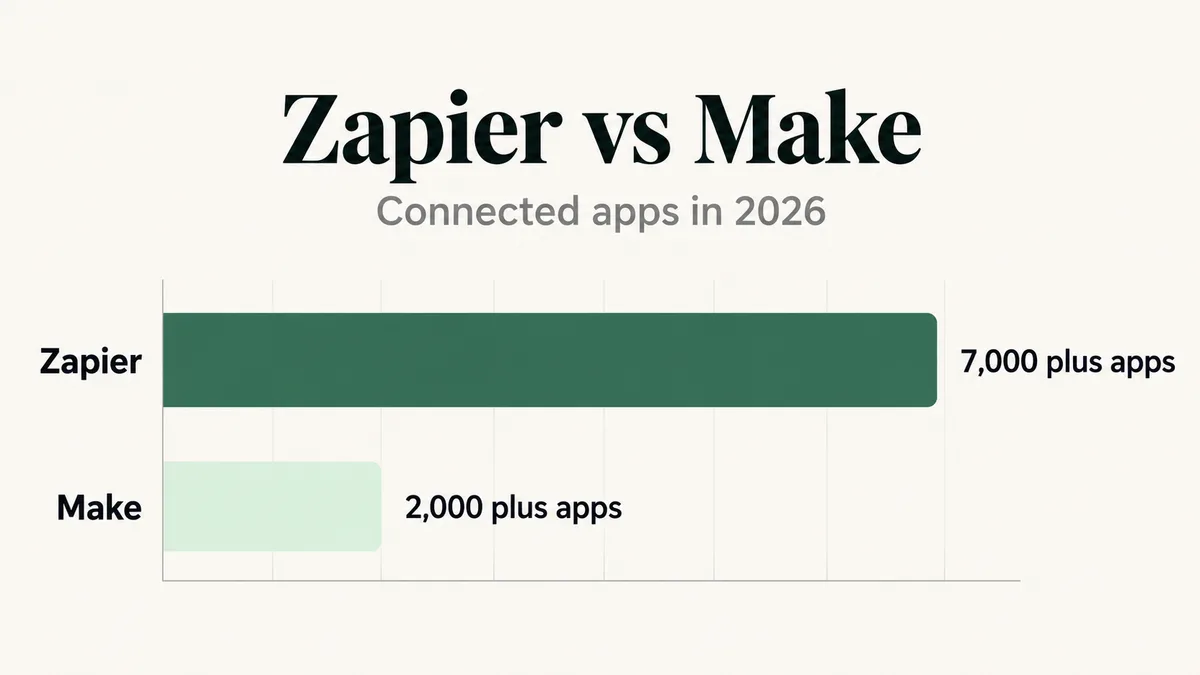
Bottom line: Before reading another word of this article, open both platforms’ app directories and search for the three or four tools your business actually runs on. If all of them exist on both, this difference does not decide anything for you. If one is missing from Make specifically, that single fact can outweigh every other point on this page.
Difference 3: Which One Is Easier to Learn With No Technical Background?
Zapier, clearly, for the first automation someone builds. The editor asks you one question at a time: pick a trigger app, pick a trigger event, pick an action app, pick an action event, map the fields. There is very little surface area to get confused on, which is exactly why it is the default recommendation for a solo creator or a small team with nobody dedicated to operations.
Make’s visual canvas is more powerful and genuinely harder to pick up. You are looking at a flowchart with modules, routes, filters and data mapping between them, and the mental model of “what data is available at this point in the scenario” takes longer to build than Zapier’s linear, one-step-at-a-time form. Real reviews back this up consistently: Make users describe a real learning curve even when they end up preferring the tool once they are past it.
Bottom line: If the person building and maintaining your automations has never touched either tool, Zapier gets a working result faster and with fewer support tickets. If that person already thinks in flowcharts, diagrams, or has built in n8n or similar tools before, the learning curve on Make is shorter than the reviews suggest and the payoff arrives sooner.
Difference 4: Which One Handles Branching and Complex Logic Better?
Make, and this is the difference I actually weigh most heavily when a client asks which one to use. A course business’s real automations are rarely two steps. A new enrollment needs to check which product the student bought, branch into a different email sequence depending on the answer, wait for a payment confirmation webhook, then update three different systems only if that confirmation lands within a set window. That is a scenario with branches, a filter, a delay and multiple parallel paths, and it is exactly what Make’s router and iterator modules are built for.
Zapier can do versions of this with Paths (its own branching feature) and multi-step Zaps, but the linear, top-to-bottom editor fights you as the logic gets more conditional. I have built Zaps with six nested Paths that became genuinely difficult for anyone but the original builder to troubleshoot six months later. The same logic in Make, laid out as a visual graph, stays legible because you can see the whole shape of it at once.
Bottom line: Count the branches in your most complicated real automation. One or two conditional splits, Zapier handles it fine. Three or more, or any step that depends on the outcome of an earlier step rather than just the original trigger, build it in Make instead and save yourself a rebuild later.
Difference 5: What Do Real Users Actually Complain About on Each One?
On Zapier, the two recurring complaints in support forums and review sites are support quality and cost at scale. A real thread on Zapier’s own community forum describes support tickets going unanswered on a real error, with the poster saying they were moving work to Make and n8n instead. On cost, the complaint is consistent across review platforms: Zapier’s per-task billing is manageable at a small scale and genuinely painful once a business is running thousands of multi-step Zaps a month, which is exactly the volume a growing membership site reaches faster than people expect.
On Make, the recurring complaints are the learning curve already covered above, and connection friction, reviewers on Trustpilot describe having to repeatedly re-authorize app connections, with support taking longer than expected to resolve it. Reviews on support quality are genuinely mixed: some reviewers rate Make’s support ahead of Zapier’s, others report the opposite, which tells you both companies have good and bad support experiences depending on who you get, not a consistent gap either way.
I see the real-world version of both failure modes from the troubleshooting side. If your Zaps have stopped firing, the common real causes (a disconnected trigger app, a changed field name, a paused Zap nobody noticed) are covered in my Zapier zap not triggering guide. If a Make scenario has stopped running, the equivalent real causes, often a scheduling setting or an error handler silently catching a failure, are in my Make scenario not running guide.
Bottom line: Neither platform has a clean support record, and both fail in ways that are usually fixable once you know the specific real cause. Budget time for troubleshooting on either tool, not just for building the automation the first time.
Difference 6: Which One Hides More Costs When You Go Over Your Plan?
Zapier’s own pricing page spells out a real, specific overage structure: if pay-per-task billing is enabled on your account, going over your plan’s task limit costs 2.5 times the base rate on a monthly plan, or 1.25 times the base rate on an annual plan, and usage pauses entirely once you hit 3 times your subscribed limit. That is a published number, not a guess, and it means a single busy month, a product launch, a webinar push, can cost meaningfully more than your subscription price if you are not watching your task count.
Make’s model is different: you buy a credit allowance for the month, and Core, Pro and Teams plans can enable auto-purchase of additional 10,000-credit blocks at a fixed, pre-set price when you run out, rather than a surge multiplier on each individual operation. It is a more predictable cost shape, you know the price per extra block in advance, but it means you need to actually set that auto-purchase limit, or a scenario can simply stop running mid-month when credits run dry.
Bottom line: On Zapier, turn off pay-per-task billing unless you specifically want it, and set a usage alert instead, so a launch month doesn’t silently bill you 2.5 times the base rate. On Make, set your auto-purchase credit limit deliberately rather than leaving it at the default, so an automation doesn’t go quiet during your biggest week because credits ran out.
Difference 7: Which One Actually Fits a Course, Membership or Funnel Business?
This is the question none of the generic comparisons answer, because they are written for “any business” rather than yours specifically.
A course or membership business’s automation load has a particular shape: it is spiky, not steady. Most months you run a modest, predictable volume of enrollments and routine tagging. Launch weeks and cohort starts spike volume five to ten times over, all at once, often with multi-step logic (enrollment, tagging, email sequence start, community invite, payment confirmation) all tied to the same event. That spike pattern is exactly where Zapier’s per-task overage multiplier gets expensive and where Make’s flatter, credit-block model tends to cost less over a full year.
The logic itself also tends toward complex rather than simple once a business has more than one product. “If they bought Course A, send sequence A. If they bought Course A and Course B, send the bundle sequence instead, and skip the one they’ve already seen.” That is a branching rule, not a straight line, and it is the kind of automation I most often end up rebuilding in Make after a client first tried it in a Zapier Path and hit a wall around step eight.
Bottom line: If you are a solo creator with one product and two or three simple connections, Zapier’s simplicity and speed to launch beats Make’s power you will not use yet. The moment you add a second product, a cohort launch, or any rule that starts with “if this, but only when that,” the spiky volume and branching logic of a real course business starts to favor Make, both on cost and on how maintainable the automation stays a year later.
How Do You Decide Between Zapier and Make?
Work down this list in order. Most businesses land on an answer within the first three rows, and the rest of this article is there to confirm the decision rather than override it.
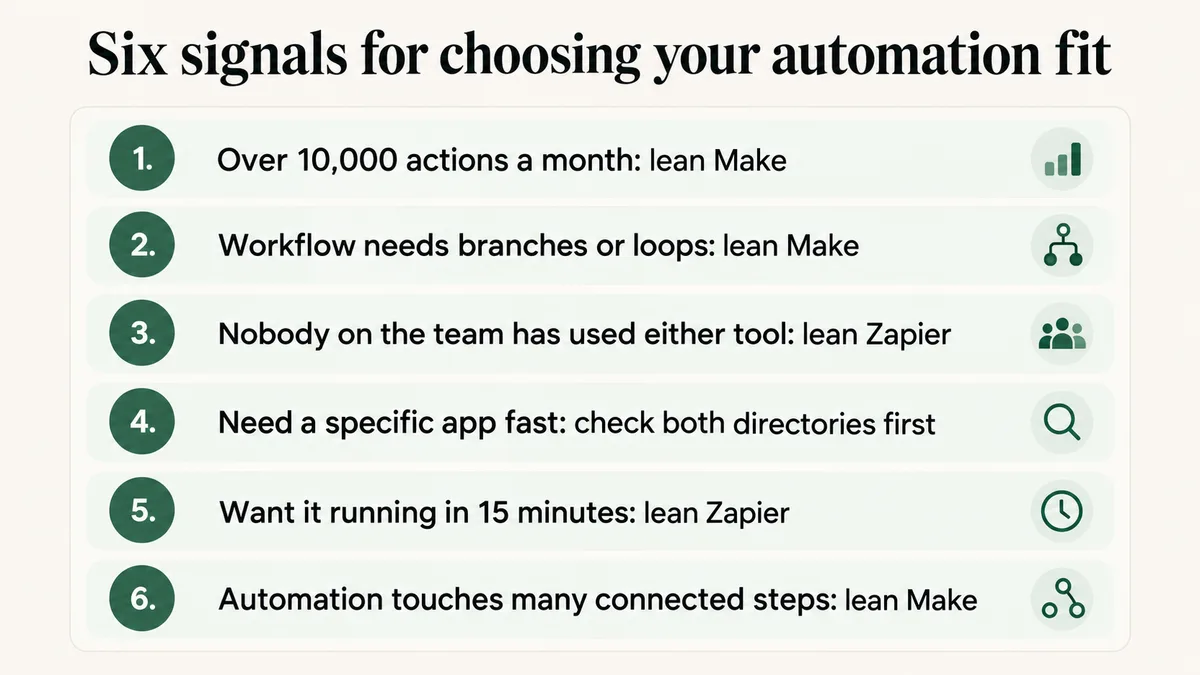
1. Count your real monthly actions, not a guess. Add up roughly how many trigger events fire across all your automations in a normal month, then multiply by the average number of steps each one runs. Past 10,000, Make’s pricing advantage from the first section starts to matter in real dollars, not just on a chart.
2. Count the real branches in your most complex workflow. One or two conditional splits, either tool works. Three or more, or logic that depends on an earlier step’s outcome, build it in Make.
3. Name who is building and maintaining it. Nobody with prior experience on either tool, start on Zapier for the learning curve alone, and migrate specific complex automations to Make later if volume or logic demands it.
4. Search both app directories for your actual stack. Your LMS, your email tool, your payment processor, your community platform. If one is missing from Make, that single gap can decide it regardless of every other factor on this page.
5. Check whether your volume is steady or spiky. A launch-driven business with cohort starts and spike weeks tends to do better on Make’s flatter cost model than on Zapier’s per-task overage multiplier.
6. Build one real automation on each, with your own data. Not a tutorial example, the actual enrollment or tagging workflow you need. An hour spent building the real thing on both tools tells you more than any comparison article, this one included.
Why Does “Tasks vs Operations” Confuse Almost Everyone?
Because the two words sound interchangeable and the vendors’ own marketing treats them that way, when the actual counting rules are genuinely different underneath.
A Zapier task is consumed by every action step that successfully runs. A five-step Zap that fires successfully uses five tasks, even though it was triggered by a single event. A Make operation is consumed by every module that executes, but routers, filters and error handlers, the exact modules that make Make’s branching logic possible, do not consume operations at all. That means a complex Make scenario with several branches can genuinely use fewer billed operations than the equivalent linear Zap uses tasks, because the branching itself is free while Zapier bills every step of every path.
This is exactly why the pricing chart earlier in this article has to be read as a rough, same-order-of-magnitude comparison rather than an exact one. A simple two-step Zap and a simple two-module Make scenario cost roughly comparable amounts per run. A complex, branching, multi-path workflow costs far more on Zapier’s per-step meter than on Make’s per-module-with-free-routing meter, which is the real mechanism behind the gap in the pricing chart, not just a cheaper sticker price.
The practical effect: don’t compare the two platforms’ prices using a simple workflow as your mental model if your real workflows are complex. Price out your actual most complicated automation on both, counting real steps and real branches, before trusting either platform’s advertised entry price as representative of what you’ll actually pay.
How Do You Avoid Picking the Wrong One and Overpaying?
Turn off Zapier’s pay-per-task billing unless you have a specific reason to want it, and set a task-count usage alert instead. The default behavior on some plans is to let you run over and bill the overage multiplier automatically, which is the single most common way a launch week turns into a surprise invoice.
On Make, set your credit auto-purchase ceiling deliberately rather than leaving the default in place, and check it again before any launch or cohort start where your volume will spike. A scenario that silently stops because credits ran out is harder to notice in the moment than a Zapier overage charge, because nothing bills you, something just quietly stops firing.
Re-count your real monthly volume and branch complexity every six months rather than once at setup. A business that started on Zapier with two simple Zaps and grew to fifteen connected, branching workflows across three products is very often still paying Zapier prices for what has become a Make-shaped problem, simply because nobody revisited the original decision.
Last, don’t migrate a working automation just because this article, or any article, says the other tool is theoretically better for your use case. A Zap that has run reliably for two years without an error is not costing you anything in frustration, and a migration carries real risk of breaking something that was quietly working. Reserve a platform switch for workflows that are genuinely expensive, genuinely broken, or genuinely blocked by a missing branch, not as a blanket rebuild.
Frequently Asked Questions
Is Make really cheaper than Zapier?
At a matched roughly 10,000-unit-per-month tier, yes, often by a wide margin: Zapier Professional runs $129 a month on annual billing for 10,000 tasks, against roughly $9 to $11 a month for Make’s Core plan at 10,000 operations. The gap narrows for very simple, low-volume workflows and widens further for complex, branching automations, because Make does not bill for router and filter modules the way Zapier bills every action step. Always price your own real, most complex automation on both before deciding on the headline numbers alone.
Can Zapier handle branching logic like Make can?
To a point, through a feature called Paths. It works for one or two conditional splits. Past that, Zapier’s linear, top-to-bottom editor becomes genuinely harder to build and troubleshoot than Make’s visual canvas, where the whole branching structure is visible as a flowchart. If your most complex automation has three or more real branches, Make is the better fit on readability alone, separate from the cost difference.
Which one is better for a course creator or membership site owner specifically?
Zapier for a solo creator with one product and two or three simple connections, because the setup speed and learning curve matter more than the eventual cost at that scale. Make once you add a second product, a cohort launch, or any rule that branches based on what a student bought, because course businesses tend to have spiky, launch-driven volume and genuinely conditional logic, both of which play to Make’s strengths.
What happens if I go over my plan’s limit on either platform?
On Zapier, if pay-per-task billing is enabled, overage tasks cost 2.5 times the base rate on a monthly plan or 1.25 times on an annual plan, and usage pauses entirely at 3 times your subscribed limit, all figures published on Zapier’s own pricing page. On Make, Core, Pro and Teams plans can enable auto-purchase of additional 10,000-credit blocks at a fixed price when you run low, a flatter cost shape, but a scenario can simply stop running if that auto-purchase limit isn’t set and credits run out.
Does Zapier really have more integrations than Make?
Yes, by a wide margin on raw count: Zapier’s directory lists well over 7,000 connected apps against roughly 2,000 for Make. In practice the gap matters less for mainstream course, membership and CRM platforms, which both tools support, and more for niche or newer tools, where Zapier is more likely to already have a ready-made connector. Check both platforms’ own app directories for your specific stack before assuming either way.
Can I use both Zapier and Make in the same business?
Yes, and I often set clients up this way deliberately. A common split: Zapier for the quick, simple, two-app connections that need to exist today, and Make for the handful of genuinely complex, branching, high-volume workflows where its canvas and operation-based billing earn their keep. There’s no rule against running both, and the cost of maintaining two tools is usually smaller than the cost of forcing a complex workflow into the wrong one.
Not sure which one fits what you’re automating?
Tell me what your course or membership business actually runs on and how complex your real workflows are. I’ll tell you honestly which tool I’d build it in and why, including when the answer is both.
Or have the automation built properly
Zapier and Make builds for course, membership and funnel businesses, scoped and priced before anything is touched, with the maintenance that keeps an automation running after launch week.