
Most people figure out how to hire a Kajabi developer the expensive way: they pay a deposit, wait three weeks, and end up with a site that looks fine in a screenshot and falls apart the first time a real customer tries to check out or a real automation tries to fire. I have taken over more of those builds than I have started clean, and the pattern repeats almost every time. The person could use Kajabi’s page builder. They had never actually touched its API, its automations, or its checkout settings under real load.
Kajabi is marketed as a no-code platform, which is exactly why this hiring decision gets treated too casually. A platform that hides its own complexity behind drag-and-drop blocks still has real complexity underneath: webhooks, pipelines, payment gateways, and a migration path that loses data if nobody checks it first. This guide is the screening process I would run myself, written from the side of the table that has cleaned up what a rushed hire leaves behind.
Quick Answer
To hire a Kajabi developer well, screen on seven things: a clear written brief before you talk to anyone, real live Kajabi sites you can open and verify yourself, proof they understand Kajabi’s actual limits (the Code Editor is Pro-plan only, the API costs extra on Growth), a named person doing the work, a written post-launch support window, honesty about what does not survive a migration, and a signed scope before money moves. Expect $35 to $80 per hour for a genuine specialist and $60 to $100 or more through vetted marketplaces such as Arc.
📋 What’s Covered
02How Much Does a Kajabi Developer Cost in 2026?
03Step 1: Do You Know What You Are Actually Hiring For?
04Step 2: Have They Built Real Kajabi Sites You Can Open?
05Step 3: Do They Understand Kajabi’s Real Limits?
06Step 4: Who Is Actually Doing the Work?
07Step 5: What Happens the Week After Launch?
08Step 6: Do They Know What Doesn’t Survive a Migration?
09Step 7: Is the Scope Written Down Before Money Moves?
10What Are the Red Flags That Should End the Conversation?
11How Do You Screen Three Candidates in an Afternoon?
12Where Should You Look When Deciding How to Hire a Kajabi Developer?
13How Do You Avoid Hiring the Wrong Person Twice?
14Frequently Asked Questions
What Does a Kajabi Developer Actually Do?
Kajabi sells itself as the platform where you do not need a developer. Pages, emails, checkout, and community all live inside one drag-and-drop builder, and for a single simple offer that promise mostly holds. The job starts the moment your business stops being simple: multiple products with different access rules, a migration from another platform, an automation that has to fire the right email at the right moment every single time, or a custom design the template blocks cannot produce on their own.
A real Kajabi build involves pipeline and funnel logic, offer and bundle structure, payment gateway configuration, automation rules tied to tags and triggers, the Custom Code Editor for anything the Page Builder cannot do natively, and a public API that is gated behind the Pro plan or a paid add-on. Each of those pieces has its own settings, its own failure mode, and its own documentation page that a general designer rarely reads past the first paragraph.
This is why a portfolio full of pretty Kajabi pages tells you less than it looks like it should. A landing page has no state. A real Kajabi business is full of state: who paid for what, which automation already ran on them, which offer grants which product, and what happens if a card gets declined mid-subscription. A developer without real Kajabi experience can make all of that look correct in a demo and still get the underlying logic wrong in a way nobody notices until a paying customer hits it.
How Much Does a Kajabi Developer Cost in 2026?
I covered the full cost breakdown with fixed-price project ranges in a dedicated guide, so here is the short version you need before you start screening anyone.
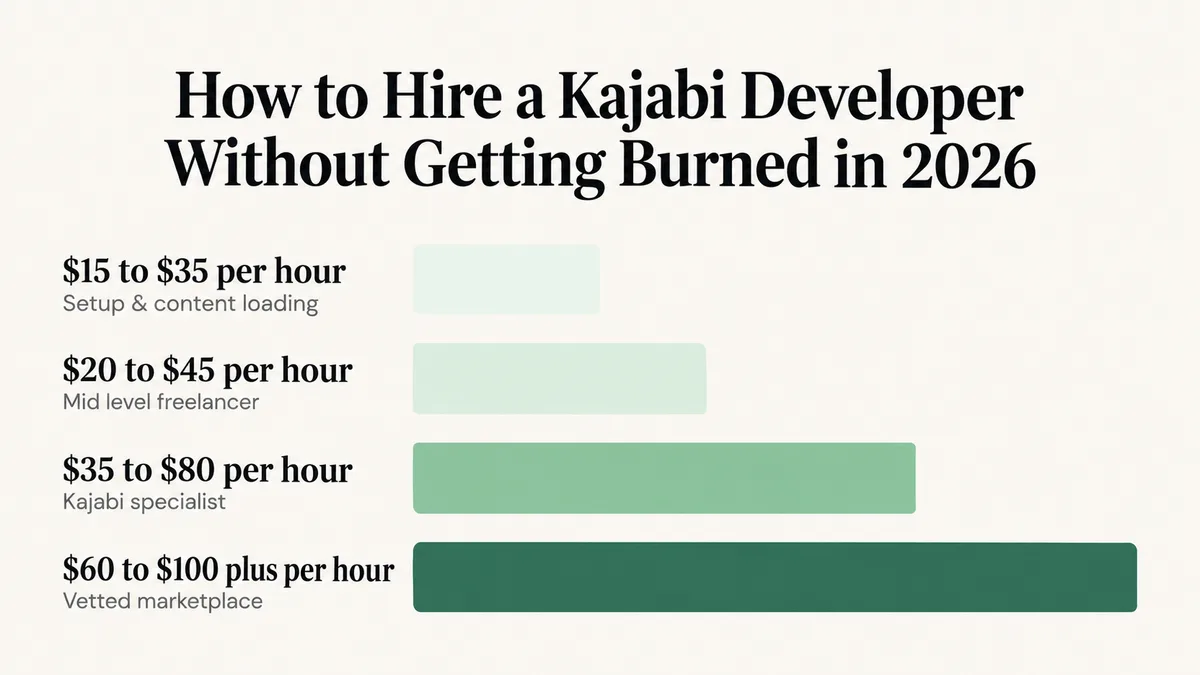
$15 to $35 per hour: setup, content loading, and basic template tweaks. Fine for getting an already-planned offer live. Not the person to design your pipeline logic or your checkout flow.
$35 to $80 per hour: an experienced Kajabi specialist with a real portfolio and real custom-code ability. This is the band most course and membership businesses should be hiring in.
$60 to $100 or more per hour: vetted marketplace talent. Arc’s own hiring page states its freelance Kajabi developers charge between $60 and $100 or more per hour, while general marketplaces list people as low as $10, according to Arc’s Kajabi developer page.
Budget for the platform separately from the developer’s quote. Kajabi’s current plans run Basic at $179 per month, Growth at $249, and Pro at $499, each cheaper when billed annually, confirmed directly against Kajabi’s own pricing page. The developer’s hourly rate and the platform subscription are two separate lines, and a quote that bundles them without saying so is worth questioning.
Step 1: Do You Know What You Are Actually Hiring For?
A large share of bad Kajabi hires were decided before anyone was contacted, because the brief was “build my Kajabi site.” That sentence covers at least four different projects with very different price tags and very different required skills.
Write down the answers to these before you talk to anyone: how many products and offers at launch, whether you are selling one-time purchases or recurring subscriptions, whether you need a community or membership space, which automations have to fire and on what trigger, which payment processor you already use, and whether you are migrating existing customers and their purchase history from another platform. That last question changes the entire scope of the quote.
Do this: Write a one-page brief answering those six questions and send the identical page to every candidate. The way someone responds to a real brief tells you more than any sales call, and identical inputs are the only way the quotes you get back are actually comparable.
Step 2: Have They Built Real Kajabi Sites You Can Open?
Ask for live URLs, not screenshots, then spend the two minutes it takes to verify each one. Kajabi sites load fonts and checkout scripts from kajabi-cdn.com and app.kajabi.com, visible in the page source or the browser’s network tab. If neither shows up on a site claimed as a portfolio piece, that site was not built on Kajabi.
Then ask a harder question about one of those sites: what was the hardest problem on that build, and how was it solved. Someone who actually did the work answers with something specific and a little mundane, like a webhook that fired twice on a failed payment retry or an offer that was granting the wrong bundle. Someone who did not answers in adjectives.
For a sense of what a complete answer sounds like, one of the Kajabi builds in my own portfolio is Etrek, a spiritual-growth community built on Kajabi around the Enneagram framework that runs a full community space with automated onboarding and has grown past 1,200 members. The hard part on that build was not the page design. It was making the onboarding automation behave identically for every new member regardless of which offer they entered through, which is exactly the kind of detail worth asking a candidate about directly.
Do this: Request three live Kajabi URLs, confirm each one actually runs on Kajabi, and ask for the hardest problem solved on one of them. A vague answer to that question is the fastest real warning sign you will get.
Step 3: Do They Understand Kajabi’s Real Limits?
This question separates someone who has actually shipped on Kajabi from someone guessing, and you do not need to be technical to ask it. Ask what plan you need to be on for the custom work you want done.
A real specialist knows the specifics. Kajabi’s full Code Editor, the one that edits the underlying template code behind pages, is Pro-plan only. Growth and Basic can still add custom HTML and CSS through specific fields in the Page Builder, which covers plenty of design requests, but not a full template rebuild. The public API ships included with Pro and as a $25-per-month add-on otherwise, and only account owners and subowners can issue the keys for it, confirmed directly on Kajabi’s own public API documentation. Webhooks, separately, are only available on Growth and Pro.
If a candidate promises deep custom functionality without first asking which plan you are on, that promise is not realistic yet. Kajabi’s own support team is explicit that it will not help troubleshoot custom code, stating plainly that anyone needing help implementing or debugging custom code with the API should look to an outside expert or developer. That single sentence is a real, useful admission: Kajabi knows this work needs a specialist, which is exactly why you are reading this guide.
Do this: Ask which plan tier your custom requirements actually need, and listen for a specific answer about the Code Editor, the API, or webhooks rather than a generic “I can build anything.”
Step 4: Who Is Actually Doing the Work?
A real and common problem in this market: agencies that sell Kajabi work and quietly hand it to a subcontractor they barely know. You approve a proposal written by a confident salesperson, and the actual build lands with someone who has never configured a Kajabi automation before.
You are allowed to ask who writes the code, whether that person works in-house, and whether you can speak with them before you sign anything. A developer who has genuinely done this work answers that question without hesitation, because it costs them nothing. Evasion on this specific question is one of the more reliable signals you will get in the whole process.
Time zone and response cadence belong in the same conversation. A two-day round trip on every question turns a two-week build into a two-month one, regardless of how skilled the developer is. Agree up front on how often you will hear from them and through what channel.
Do this: Get the name of the person actually building the site and talk to them once before signing. Agree on a communication cadence in that same conversation.
Step 5: What Happens the Week After Launch?
Kajabi sites break in a specific, predictable pattern. They work perfectly in a walkthrough and start failing once real paying customers arrive, because real customers do things a test account never does: they buy on a phone with a weak connection, they use a card that gets declined and retried, or they reply to an automated email in a way that trips a tag nobody planned for.
This is why post-launch support is part of the product, not an upsell tacked on afterward. Ask what is covered after handover, for how long, and at what cost beyond that window. “Everything is included forever” is either an answer from someone not thinking it through or a developer planning to disappear. A clear answer sounds like thirty days of bug fixes included, then an hourly rate or a small monthly retainer for anything new.
Ask directly what happens if a bug surfaces three months later that traces back to the original build. Whether that is billable is a fair thing to clarify in advance, and how a candidate answers tells you a lot about how seriously they take their own work.
Do this: Get the support window, what counts as a bug versus new work, and the post-launch rate written into the agreement before the project starts, not after the first real customer hits a problem.
Step 6: Do They Know What Doesn’t Survive a Migration?
If any part of this hire involves moving off another platform onto Kajabi, or off Kajabi onto something else, ask the candidate directly what does not transfer. A specialist who has actually run a migration answers this without being prompted twice.
I wrote a full breakdown of exactly this in the Kajabi migration guide: student progress and active subscription states are the two things that routinely get left behind, because they live in the old platform’s own database and most migration tools only move static content like lessons and media. A developer who answers “everything moves over cleanly” to a migration question, without naming progress and subscription state as the real risk, has either not done this before or is telling you what you want to hear.
This matters even for a brand-new build with no migration involved, because the same person who undersells migration risk tends to undersell every other risk in the build too. How a candidate talks about what breaks is a better signal than how they talk about what works.
Do this: If a migration is involved anywhere in the project, ask specifically what will not transfer, and treat a reassuring answer with no caveats as a reason to ask follow-up questions, not a reason to relax.
Step 7: Is the Scope Written Down Before Money Moves?
Nearly every dispute I have watched between a creator and a Kajabi developer traces back to the same root cause: two different mental pictures of what “done” meant, and neither one written down anywhere.
The document does not need to be long. It needs a list of deliverables, a definition of done for each one, milestone dates, what you are responsible for supplying, and what a change request costs once work has started. Content is worth naming explicitly: writing offer copy, recording videos, and setting up email sequences is real work, and if nobody was assigned it, it lands on your desk the week before launch.
On payment structure, milestones tied to real deliverables protect both sides. Paying everything up front removes your own leverage entirely, and paying only on completion is a reasonable thing for a good developer to decline. A deposit with staged releases against named milestones is the normal, healthy arrangement most experienced developers already expect.
One more clause worth insisting on in writing: your Kajabi account, domain, and payment gateway stay registered to you, not to the developer. This is not about distrust. It is about never being locked out of your own business if the relationship ends on bad terms.
Do this: Require a written scope with deliverables, milestone payments, a named owner for content production, and written confirmation that the Kajabi account and all connected accounts stay registered in your name.
What Are the Red Flags That Should End the Conversation?
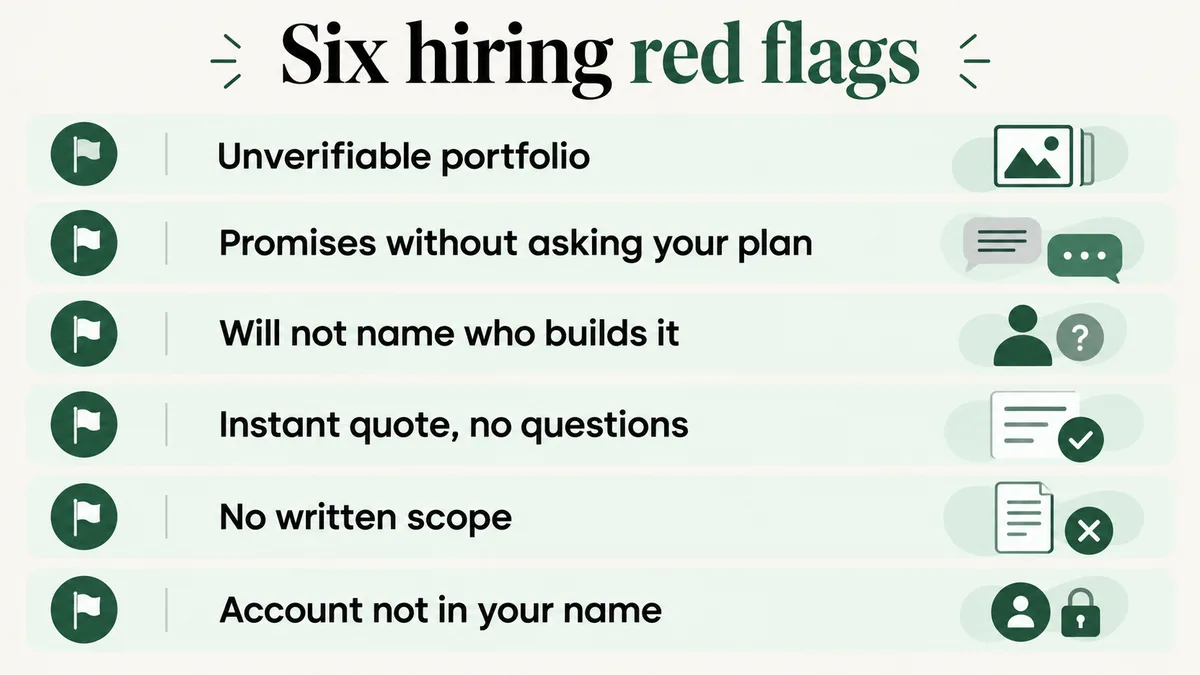
Some signals are worth walking away from immediately rather than negotiating around:
- Portfolio links to sites that show no sign of actually running on Kajabi when you check.
- A promise of full custom functionality without ever asking which Kajabi plan you are on.
- Refusal to name the person doing the work or to put them on a short call.
- A total price quoted within minutes, before any real questions about offers, automations, or migration.
- No written scope, only a chat thread and a number.
- Your own Kajabi account, domain, or payment gateway set up under the developer’s credentials instead of yours.
The instant-quote flag is worth a second look specifically because it looks like good service. A developer who prices a Kajabi build without asking about offer structure, automations, or migration is not being efficient. They are guessing, and that guess shows up later as a change order with a new price attached.
How Do You Screen Three Candidates in an Afternoon?
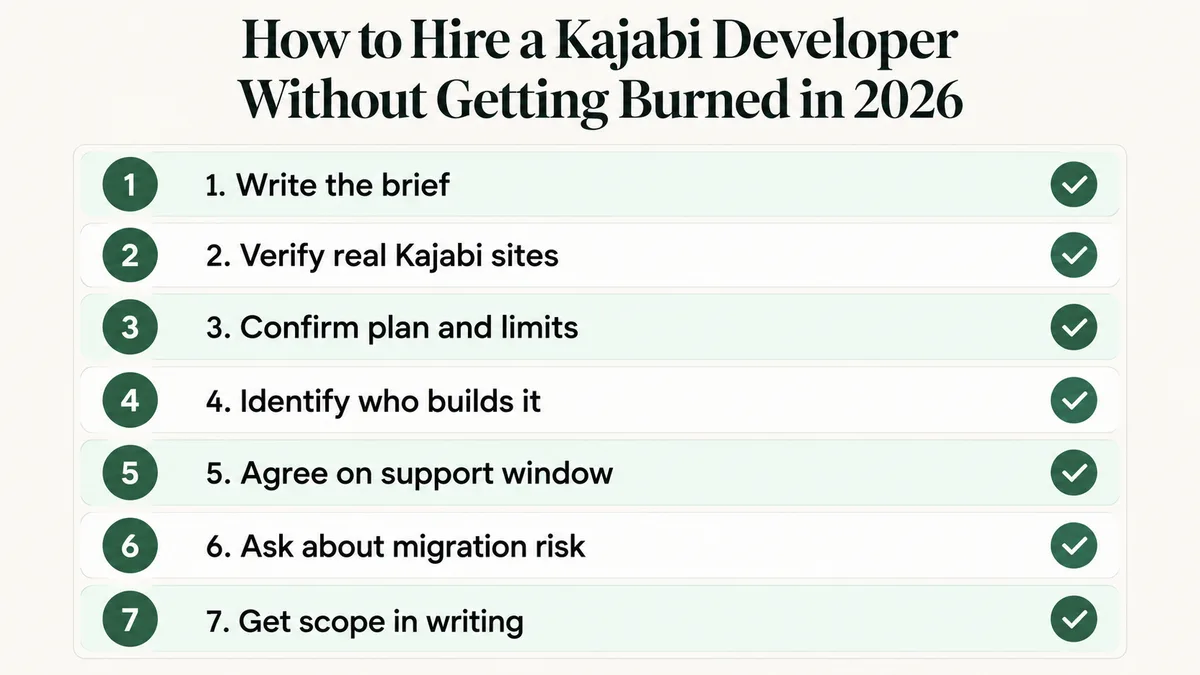
If you want the compressed version of everything above, run it in this order. It moves faster than comparing three separate proposals side by side on your own.
- Send the identical one-page brief to all three candidates.
- Ask for three live Kajabi URLs and verify each one actually runs on Kajabi yourself.
- Ask what the hardest problem on one of those builds was, and listen for real specifics.
- Ask which plan your custom requirements need, listening for the Code Editor, API, or webhooks by name.
- Ask who writes the code and request a short call with that person.
- Ask what post-launch support includes, for how long, and what it costs afterward.
- Compare only the candidates still standing, on written scope rather than the headline price.
Most candidate lists lose at least one person at step two and another at step four. What remains afterward is a far more useful conversation, because by then you are no longer comparing marketing copy.
Where Should You Look When Deciding How to Hire a Kajabi Developer?
Kajabi runs its own vetted Expert Directory at experts.kajabi.com, where you can browse profiles and hire directly, or submit a project brief to get matched with vetted experts. That is a reasonable first stop precisely because the vetting happens before you ever talk to anyone.
Beyond Kajabi’s own directory, the realistic sources are general freelance marketplaces (Upwork, Fiverr, Freelancer), vetted talent networks such as Arc that charge more but screen harder, and dedicated Kajabi development agencies that publish real case studies rather than generic service pages. Community forums and Kajabi’s own Facebook groups are worth a look too: watching how someone answers a stranger’s automation question in public is better evidence than anything on a sales page.
Worth knowing before you search: general marketplaces do not pre-vet anyone, which is exactly why they list rates as low as $10 per hour alongside genuine specialists charging ten times that for the same job title. The screening steps in this guide matter more on a general marketplace than anywhere else, because the marketplace itself is doing none of that work for you.
Whichever source you choose, the standard you hold candidates to should not change. Working out how to hire a Kajabi developer is really a verification problem, not a sourcing problem. The source changes how many people you are choosing from, not how carefully you need to check each one.
How Do You Avoid Hiring the Wrong Person Twice?
The cheapest protection available is a small paid trial task before committing to the full build. Pay for something real and self-contained: configure one automation end to end, or fix one specific existing problem. Two to three hours is usually enough to learn what you need.
That trial reveals four things no interview can. How someone communicates under real conditions, whether their time estimate held up, whether the work is genuinely finished when they say it is, and what their configuration looks like when nobody is reviewing it in real time. Paying for a small test costs far less than discovering the answers halfway through a full launch.
The second protection is keeping the first real engagement smaller than you eventually want it to be. Launch with fewer offers or a simpler automation set than your long-term plan calls for. A two-offer launch that actually works beats a ten-offer launch that half works, and it leaves you with a working relationship to expand rather than a large bet placed on a stranger.
Keep your own record of what got built and why: which automations, which integrations, which custom code and where it lives inside the account. Developers move on to other clients, and a Kajabi account nobody can explain becomes expensive for whoever inherits it next. A shared document maintained during the build costs nothing and saves real time later.
Frequently Asked Questions
Do I really need a Kajabi developer, or can I build it myself?
For a single simple offer with standard templates, most people can build it themselves inside Kajabi’s own builder. Once you need custom code, multiple interdependent automations, a migration, or integrations outside Kajabi’s native connections, hire someone with real Kajabi experience. Those systems fail quietly, and a general designer often will not know something is wrong until a paying customer reports it.
How long should a Kajabi build take?
A straightforward single-offer site with standard checkout usually takes one to three weeks once content is ready. Migrations, custom code work, and multi-offer automation builds extend that meaningfully. Content readiness is almost always the real bottleneck, not the development time itself.
Is a fixed price or an hourly rate better for a Kajabi project?
Fixed price works when the scope is genuinely well defined, which is exactly why the written brief in Step 1 matters. Hourly suits ongoing changes, maintenance, or a scope that is still being figured out. A common, sensible arrangement is a fixed price for the defined build plus an hourly rate for anything added afterward.
What if my current Kajabi site was already built badly?
Get an audit before deciding anything. Plenty of sites that feel broken need configuration fixes rather than a full rebuild, and an audit tells you which situation you are actually in. Rebuild only when the underlying offer or automation structure is genuinely unworkable, since untangling existing customer data is the hardest part of any rescue project.
Should I hire a freelancer or a Kajabi agency?
A freelancer usually costs less and gives you direct access to the person doing the work. An agency offers more continuity if one person leaves and more capacity for a larger project. For most single-brand course or membership businesses, an experienced freelancer or a small specialist team wins on both price and communication.
What is the fastest way to spot a fake Kajabi specialist?
Two questions do most of the work. Ask which Kajabi plan your custom requirements actually need, and ask what the hardest problem was on a specific past build. Someone who has genuinely done this work answers both immediately and specifically. Someone who has not stays vague on both, usually with a confident tone that is doing the work the details should be doing.
Want a second opinion before you sign anything?
Send me the brief and the quotes. I will tell you honestly whether the scope is realistic and what is missing from it, whether or not you end up working with me.
Or skip the search entirely
Offers, automations, checkout, and migrations built correctly the first time, by someone who has spent years doing only this.